Cycling through all six. Tap any point to stop.
Measured on six things
200+ free online tools for images, PDFs, SEO, and more, a...
Security
52HTTPS enforced, SPF/DMARC set, but no HSTS, CSP, or frame protection. 4/12 checklist. Client-side processing is a genuine privacy plus, but no SOC 2 or security page found.
Screenshots
1 / 1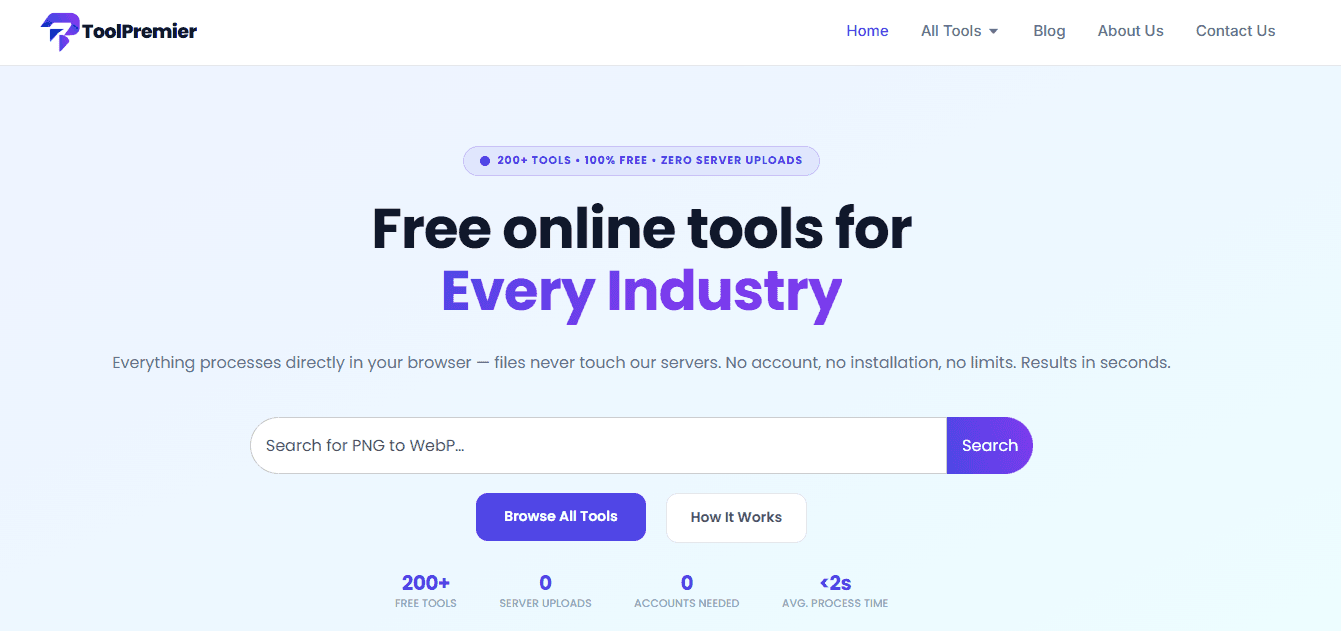
About this app
ToolPremier is a one-stop shop for a massive collection of free online tools. From compressing images and merging PDFs to generating QR codes and checking keyword density, this platform covers it all. What makes ToolPremier stand out is its commitment to privacy: all files are processed directly in your browser, never uploaded to a server, so your data stays 100% private. No signups, no watermarks, no daily limits — just open a tool, get the job done in seconds, and download the result. The interface is clean and intuitive, making it easy to jump between categories like image tools, PDF utilities, SEO resources, developer tools, and even health and finance calculators. I’ve used many free tool sites that bombard you with ads or constantly push premium upgrades, but ToolPremier feels refreshingly straightforward. Whether you’re a designer optimizing images for a website, a marketer analyzing content, or a developer formatting code, this platform has you covered with fast, secure, and...
Key features
- 1200+ free online tools across 8 categories (image, PDF, AI, SEO, developer, security, text, color)
- 2100% client-side processing — files never uploaded to servers, ensuring privacy
- 3No signup, no watermarks, no daily limits; up to 50 MB per file and 15 files at once
Target customer profile
Drawn from the product itself, not from a survey.
Demographic
Freelance designers and photographers
Pain points
Need to quickly optimize images without expensive software, fear of uploading client work to unknown servers, and dislike watermarks on free tools.
Primary needs
Fast, high-quality image compression and conversion that is private and respects client confidentiality.
Demographic
Small business owners and office staff
Pain points
Struggle with document management like merging PDFs or converting formats, limited IT budget, and wasting time on slow, ad-filled tools.
Primary needs
Reliable, straightforward PDF tools that are free, quick, and don't require account creation.
Demographic
Digital marketers and content creators
Pain points
Need to generate SEO metadata, schema markup, and optimize content for search engines but lack technical skills or want to avoid complex SEO software.
Primary needs
Easy-to-use SEO tools that provide immediate results and help improve website visibility without a steep learning curve.
Demographic
Web developers and IT professionals
Pain points
Often need to format JSON, test regex, generate UUIDs, or check hashes, but prefer tools that don't send sensitive code to external servers.
Primary needs
Client-side processing for data privacy, with a variety of developer utilities accessible in one place.
Demographic
Students and educators
Pain points
May need to convert file formats, calculate BMI or due dates, or generate citations without access to premium software.
Primary needs
A free, no-hassle collection of educational and practical tools to support academic work and personal projects.
Scout Review
Written by AI from measured evidence, scored out of 100.
ToolPremier is a competent, well-organized aggregator of 200+ free, client-side tools. Its core promise — no uploads, no signup, no watermarks — is genuinely appealing in a market where competitors like iLoveIMG and Convertio rely on server processing. The design is clean and modern, with good category navigation and a clear value proposition. However, polish issues (placeholder stats, a 'Lorem Ipsum' tool card, overcrowded grids) and a lack of documentation hold it back. Performance is mid-tier on mobile, and security headers are bare-minimum despite the privacy focus. Accessibility has real, fixable gaps. Growth potential is real but unproven, hinging on whether the client-side differentiator can overcome the marketing muscle of established players. It's a solid, useful tool that's one QA pass and a security header update away from being genuinely great.
Measure by measure
Usability
68Category cards and filter tabs make 200+ tools scannable; no signup and clear three-step process lower friction. Search is prominent. But no docs/help center and tool discovery could overwhelm new users.
Design
70Clean, modern UI with consistent card styling and purple accents. Hero and category grid are well-executed, but placeholder '0' stats, overcrowded popular grid, and a literal 'Lorem Ipsum' card drag it down.
Speed
58Lighthouse mobile 73/100 (LCP 3.2s, FCP 3.0s) is mid-pack; desktop 84 is better. CLS 0 is excellent. Client-side processing should feel snappy, but initial load is heavy.
Security
52HTTPS enforced, SPF/DMARC set, but no HSTS, CSP, or frame protection. 4/12 checklist. Client-side processing is a genuine privacy plus, but no SOC 2 or security page found.
Accessibility
58Lighthouse 87/100 but with real fails: aria mismatches, contrast issues, heading order, non-focusable skip links, no main landmark. No a11y statement or multi-language support. Keyboard nav not documented.
Growth
62Real problem (privacy, no signup) with clear wedge vs. cloud-based alternatives. Broad category coverage, but no network effects or data moat. Headroom exists but competition is fierce.
Improvement areas
- Fix placeholder '0' stats and the 'Lorem Ipsum Generator' card that appear unfinished
- Add security headers (HSTS, CSP, frame protection) to back the privacy-first claim
- Improve accessibility: fix aria mismatches, contrast, heading order, and skip links
Design & Usability
ToolPremier nails the basics: a clean, modern interface with consistent card styling, purple accents, and a hero that clearly communicates its value prop. Category cards and filter tabs make 200+ tools scannable, and the three-step 'How it Works' section lowers friction. But the polish wears thin — placeholder '0' stats, a literal 'Lorem Ipsum' tool card, and an overcrowded popular grid with repetitive 'HOT' tags suggest QA was rushed. Usability is solid for a tool aggregator: no signup, prominent search, and clear grouping. However, the lack of any documentation or help center means users are left to figure out edge cases alone. For a site claiming 200+ tools, the absence of a 'getting started' guide or tool-specific tips is a missed opportunity. Overall, it's a functional, above-average experience that would benefit from decluttering and finishing touches.
Speed & Security
Performance is a mixed bag. Mobile Lighthouse scores 73/100 with LCP at 3.2s — acceptable but not snappy, especially for a site that's mostly links. Desktop is better at 84. The zero CLS is a win, showing good layout stability. Client-side processing should make individual tools fast, but the initial page load carries the weight of 200+ tool cards. Security is where ToolPremier's privacy pitch meets reality. HTTPS is enforced and SPF/DMARC are set, but the absence of HSTS, CSP, and frame protection headers is concerning for a site handling file uploads — even if they're processed locally. The 4/12 security checklist score reflects a bare-minimum approach. The 'zero server uploads' claim is a genuine differentiator, but without a security page or third-party audits, users must take it on faith. For a privacy-focused tool, stronger security headers would be a cheap, high-impact improvement.
Accessibility & Growth
Accessibility is a work in progress. The 87/100 Lighthouse score masks real issues: aria-* attributes that don't match roles, insufficient color contrast, non-sequential headings, non-focusable skip links, and a missing main landmark. These are fixable but indicate a lack of a11y-first thinking. No WCAG statement or multi-language support further limits reach. Growth potential is moderate. The problem — needing free, private, no-signup tools — is real, and ToolPremier's client-side processing is a clear wedge against cloud-based competitors like Convertio and iLoveIMG. The target audience is broad (designers, marketers, developers, students), which helps volume but dilutes focus. The category has headroom, but without network effects or a data moat, growth depends on SEO and word-of-mouth. The claimed 500K monthly users and 12,400 reviews are unverified and should be treated skeptically. The idea is sound; execution and differentiation will determine if it scales.
Conclusion
ToolPremier is a solid choice for anyone who values privacy and simplicity in online tools. It's not perfect — the polish issues and missing security headers are noticeable — but the core experience is genuinely useful. If you're tired of upload-based tools and premium popups, give it a shot. Just don't expect it to replace your entire toolkit overnight. With a bit more attention to detail, this could be a go-to resource. For now, it's a reliable, no-nonsense option that respects your data and your time. Worth a bookmark, especially if you're a designer, marketer, or developer who works with sensitive files.
Suggestions for improvement
- Fix placeholder '0' stats and the 'Lorem Ipsum Generator' card — they undermine trust in a tools site.
- Add HSTS, CSP, and frame protection headers to back up the privacy-first claim.
- Create a help center or tool-specific guides to support users beyond the basics.
- Declutter the popular tools grid — 36 items with repetitive badges is overwhelming; curate to top 12.
Alternatives comparison
Named competitors, point by point. Nobody paid to appear here or to be left out.
 ToolPremier ToolPremier |  Convertio Convertio |  iLoveIMG iLoveIMG |  iLovePDF iLovePDF |  Remove.bg Remove.bg | |
|---|---|---|---|---|---|
| Processing location | 100% client-side, zero server uploads | Cloud-based processing | Server uploads required | Server uploads required | Cloud-based, not local |
| Pricing model | 100% free, no signup, no watermarks | Freemium with paid plans | Freemium with premium upgrades | Freemium with premium upgrades | Not free for high-res images |
| Tool variety | 200+ tools across 8 categories | File format conversion focus | Image compression/conversion only | PDF tools only | Background removal only |
| Privacy focus | Files never leave device (client-side) | Files uploaded to cloud servers | Files uploaded to servers | Files uploaded to servers | Files uploaded to cloud |
| Signup requirement | No account needed | Optional account for some features | No signup for basic tools | No signup for basic tools | No signup for basic, but limited |
Convertio
Converting between file formats (images, documents) with a focus on cloud processing, but doesn't offer as many local-processing options.
iLoveIMG
A popular image compression and conversion tool, but it often requires file uploads to their server, raising privacy concerns.
iLovePDF
Known for PDF merging and converting, but like iLoveIMG, it typically involves server uploads.
Remove.bg
Specializes in background removal, but it's not free for high-res images and processes via cloud, not locally.
Comparing options? See ToolPremier alternatives, scored side by side
More Productivity apps
View all Productivity
Qamarero
92An all-in-one hospitality software for restaurants and ba...

The Stack Newsletter
92A weekly newsletter delivering curated tech jobs, intervi...

EmbedMyReviews
92White-label reputation management software for agencies s...

StoryPad
92Privacy-first open source journal app with a continuous t...

Puzzly – B2B Lead Generation & Sales Intelligence Platform
92Puzzly is an all-in-one B2B lead generation platform that...

Notion
92All-in-one AI workspace for docs, projects, and knowledge...

Vibe Coding Agent Skills
92A free, open-source platform offering 110 AI agent skills...

CC Switch
91Open-source desktop app for switching AI coding providers...

username.md
90One verified handle for your online identity, readable by...

What the GIF
89Frame-perfect video-to-GIF maker that runs entirely in yo...

AuditCloser
89White-label website audits that close deals for digital a...

NudgeWin
89Automated quote follow-up for trades and service businesses.


A platform dedicated to providing unbiased reviews of newly launched applications, analyzing everything from their features to their full potential.
info@scoutforge.net© 2026 Scoutforge. All rights reserved.
