Cycling through all six. Tap any point to stop.
Measured on six things
Turn your MacBook notch into a Dynamic Island-style panel...
Growth
58A real problem with a specific wedge: a paid, privacy-first multi-widget notch panel versus free notch-hiders. The niche is narrow and Apple could absorb the idea, but the positioning is clear.
Screenshots
1 / 1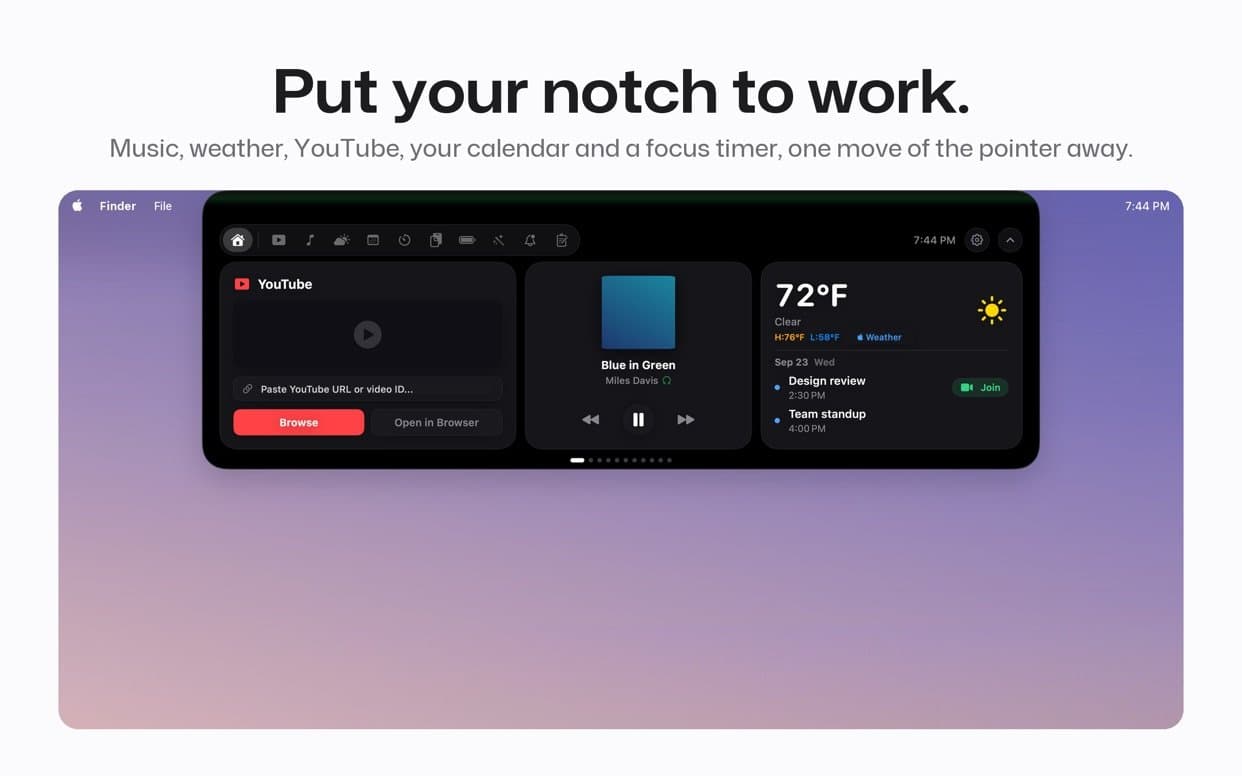
About this app
Top Notch is a paid Mac App Store app that transforms the black cutout at the top of your MacBook screen into a Dynamic Island-style panel. It lets you control music from Apple Music and Spotify, play YouTube videos in a floating window, check the weather, use a focus timer, and access clipboard history, calendar events, and quick notes. Priced at $9.99 one-time with no subscription or account, it runs on macOS 14 Sonoma or later. Features include synced lyrics, seven-day forecast, and optional AI summaries via your own Gemini API key. All data stays on your Mac, with no analytics. It works on notched and non-notched Macs, including Intel models. The app requires permissions for Music/Spotify control and calendar access but never asks for Accessibility, Screen Recording, camera, or microphone. It's a handy utility for multitaskers who want quick access to information without leaving their workflow.
Key features
- 1Dynamic Island-style notch panel with Apple Music/Spotify controls and synced lyrics.
- 2YouTube floating player, seven-day weather forecast, and a focus timer with presets.
- 3Clipboard history, calendar events, quick notes, and battery status — all local, no account.
Target customer profile
Drawn from the product itself, not from a survey.
Demographic
Remote workers and digital nomads
Pain points
Frequent context switching disrupts focus; need quick access to music and timer.
Primary needs
Seamless music control and focus timer visible at a glance without opening apps.
Demographic
Students and researchers
Pain points
Managing study time and keeping track of clipboard snippets and notes.
Primary needs
Integrated timer, clipboard history, and quick notes to streamline study sessions.
Demographic
Creative professionals (designers, writers)
Pain points
Interruptions from checking weather or controlling music break creative flow.
Primary needs
At-a-glance weather and music controls that minimize disruption.
Scout Review
Written by AI from measured evidence, scored out of 100.
Top Notch is a polished, privacy-conscious Mac utility that turns the notch into a widget hub for music, weather, YouTube, timer, clipboard, calendar, and notes. At $9.99 one-time with no account, no analytics, and narrow permissions, it's a fair deal for notch-owning multitaskers. The weaknesses are a slow mobile landing page, missing CSP headers, no free trial, and a narrow market squeezed between free notch-hiders and Apple's own roadmap.
Measure by measure
Usability
68The core interaction is obvious from the screenshots, there's no account to create, and permissions are refreshingly narrow. But the notch panel packs many widgets into a small strip, and there's no free trial to test before paying $9.99.
Design
71Judging the app UI from store screenshots: a cohesive dark notch panel with clean widget layouts and legible small text. The marketing site is polished but repeats one gradient treatment and uses faint gray body copy.
Speed
68Desktop Lighthouse hits 99/100, but mobile lands at 78 with a 5.3s LCP — well past the 2.5s good threshold. CLS 0 and 10ms TBT show the layout is stable and the main thread is idle; the hero imagery is the bottleneck.
Security
76Strong privacy posture: sandboxed Mac App Store app, Keychain-stored API key, no analytics, no account, and a detailed data-flow disclosure. HTTPS with HSTS, SPF, and DMARC are set, though CSP and frame protection headers are missing.
Accessibility
80Lighthouse accessibility scores a perfect 100/100, and the app ships in 30 languages. No public WCAG statement, but the automated audit and localization coverage put it well above typical indie Mac utilities.
Growth
58A real problem with a specific wedge: a paid, privacy-first multi-widget notch panel versus free notch-hiders. The niche is narrow and Apple could absorb the idea, but the positioning is clear.
Improvement areas
- No free trial; buyers must pay $9.99 before testing the notch interaction.
- Mobile Lighthouse LCP of 5.3s misses the 2.5s good threshold.
- Missing CSP and frame-protection headers; no published WCAG statement.
Design & Usability
The app UI, judged from store screenshots, is cohesive: a dark notch panel with music, weather, YouTube, timer, clipboard, calendar, and notes organized into distinct widgets with legible text. The marketing site is clean but leans on one gradient and faint gray body copy. Usability is strong on paper — no account, narrow permissions, obvious click-the-notch interaction — but the lack of a free trial means buyers commit $9.99 sight unseen, and cramming seven widgets into a notch strip risks density.
Speed & Security
Speed is split: desktop Lighthouse 99/100, mobile 78/100 with a 5.3s LCP that misses Google's good threshold, though CLS 0 and 10ms TBT show a stable, idle main thread. Security is a genuine strength for an indie Mac app: sandboxed distribution, Keychain-stored Gemini key, no analytics, no account, and a data-flow disclosure naming every outbound request. HTTPS, HSTS, SPF, and DMARC are configured; CSP and frame protection are the gaps.
Accessibility & Growth
Accessibility scores 100/100 on Lighthouse with 30-language localization — well above typical indie Mac utilities, though no WCAG statement is published. Growth is the harder call: the problem (context switching) is real and the target segments are named, but the wedge is a paid multi-widget panel competing against free notch-hiders like TopNotch and Notchmeister. The privacy-first, no-subscription angle is a legitimate differentiator; the ceiling is a narrow niche that Apple itself could absorb in a macOS update.
Conclusion
If you own a notched MacBook, switch context constantly, and resent subscription fatigue, Top Notch is a reasonable $9.99 bet — the privacy posture alone is worth supporting. If you're on a non-notched Mac or just want the notch gone, the free alternatives do that job. Try to see it in action before buying, since there's no trial.
Suggestions for improvement
- Add a free trial or a limited free tier so buyers can test the notch interaction before paying $9.99.
- Compress hero imagery to bring mobile LCP under 2.5s; desktop is already at 99/100.
- Add Content-Security-Policy and frame-protection headers to close the remaining security gaps.
- Publish a short WCAG/accessibility statement and show collapsed/hover notch states in screenshots.
Alternatives comparison
Named competitors, point by point. Nobody paid to appear here or to be left out.
 Top Notch Top Notch | TopNotch | Notchmeister | |
|---|---|---|---|
| Price | $9.99 one-time | Free | Free |
| Primary purpose | Widget panel in the notch | Hides the notch | Visual effects around the notch |
| Music control | Apple Music & Spotify with lyrics | No | No |
| Weather forecast | Seven-day, city-based | No | No |
| Focus timer | 25/45/60-min presets | No | No |
| Clipboard history | Last 20 text items | No | No |
| Account required | No | No | No |
TopNotch
A free app by a different team that hides the MacBook notch by turning the menu bar black.
Notchmeister
A free utility that adds visual effects around the notch, such as a glowing border or mouse tracking.
Comparing options? See Top Notch alternatives, scored side by side
More Productivity apps
View all Productivity
Qamarero
92An all-in-one hospitality software for restaurants and ba...

The Stack Newsletter
92A weekly newsletter delivering curated tech jobs, intervi...

EmbedMyReviews
92White-label reputation management software for agencies s...

StoryPad
92Privacy-first open source journal app with a continuous t...

Puzzly – B2B Lead Generation & Sales Intelligence Platform
92Puzzly is an all-in-one B2B lead generation platform that...

Notion
92All-in-one AI workspace for docs, projects, and knowledge...

Vibe Coding Agent Skills
92A free, open-source platform offering 110 AI agent skills...

CC Switch
91Open-source desktop app for switching AI coding providers...

username.md
90One verified handle for your online identity, readable by...

What the GIF
89Frame-perfect video-to-GIF maker that runs entirely in yo...

AuditCloser
89White-label website audits that close deals for digital a...

NudgeWin
89Automated quote follow-up for trades and service businesses.


A platform dedicated to providing unbiased reviews of newly launched applications, analyzing everything from their features to their full potential.
info@scoutforge.net© 2026 Scoutforge. All rights reserved.
