Cycling through all six. Tap any point to stop.
Measured on six things
A simple, free vacation calendar for teams to see who is away
Security
52HTTPS and HSTS are in place, but the header probe found no CSP, no frame protection, no secure cookies, no DMARC — 5/13 checklist points. No SOC 2, pen-test or bug bounty signals.
Screenshots
1 / 1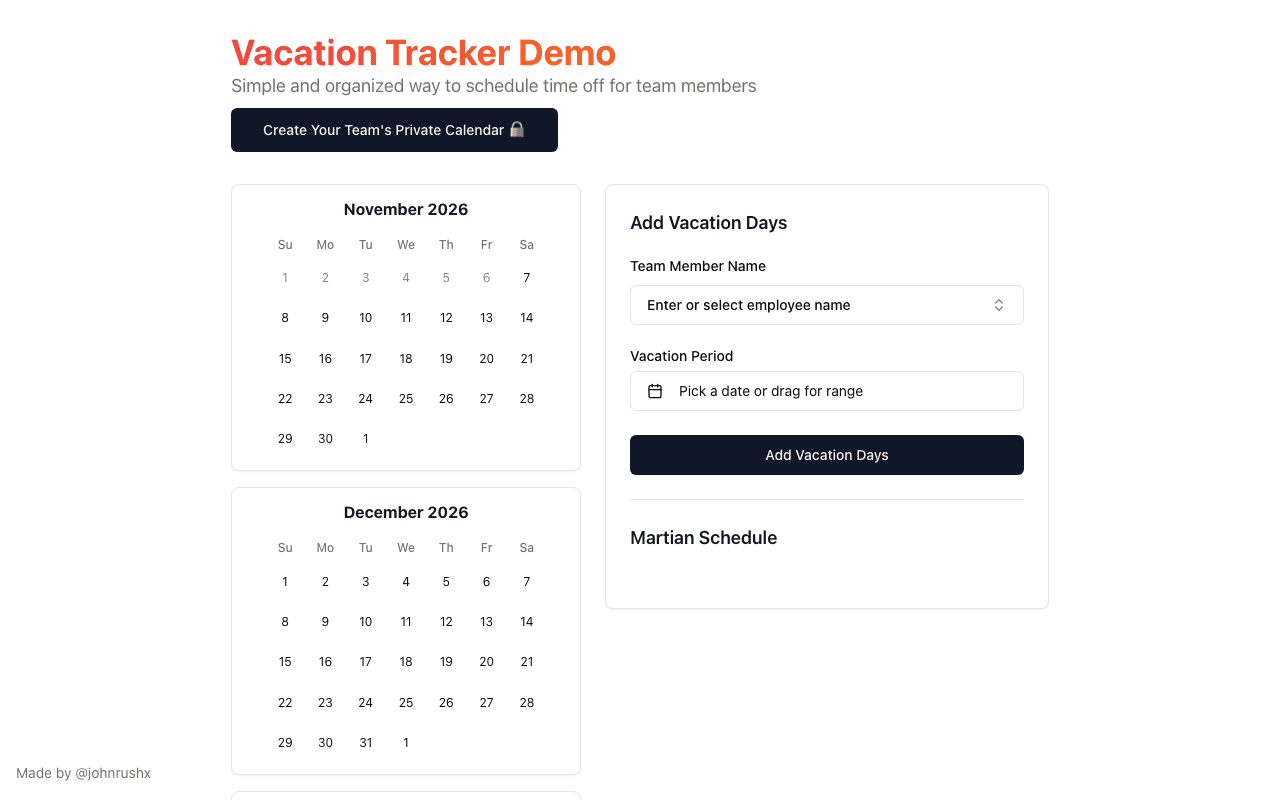
About this app
Track Vacations is a free shared vacation calendar for small teams, startups, agencies and remote teams. Create a private team calendar and share it with a secret link. Team members can add days off by choosing a date or dragging across a range, and everyone can see who is away across the months ahead. Slack and Discord notifications are available when someone schedules time off. There is no account to create and nothing to install.
Key features
- 1Free shared vacation calendar with a private secret link — no account, nothing to install.
- 2Add days off by picking a date or dragging across a range; view upcoming absences across months.
- 3Optional Slack and Discord notifications when someone schedules time off.
Target customer profile
Drawn from the product itself, not from a survey.
Demographic
Small teams, startups, agencies and remote teams
Pain points
Teams need a quick shared way to see planned time off without maintaining an outdated spreadsheet
Primary needs
A private calendar link, simple date entry, a view of upcoming absences, and optional Slack or Discord notifications
Demographic
Team managers coordinating schedules and coverage
Pain points
Unclear who will be away when planning work and coverage
Primary needs
A shared calendar showing upcoming days off across the team
Demographic
Remote and distributed teams
Pain points
Vacation dates are scattered across chats or spreadsheets
Primary needs
One private calendar link everyone can use to view and add time off
Scout Review
Written by AI from measured evidence, scored out of 100.
Track Vacations is a focused, low-friction shared vacation calendar that solves a real coordination problem for small teams. The no-account, secret-link model is genuinely pleasant, and the add-days form is clean. The weaknesses are visible: the month-grid view needs scrolling to be useful, the demo state looks unfinished, mobile performance lags desktop, and security headers are thin. It's a competent early-stage tool with a clear use case and a thin moat.
Measure by measure
Usability
61Onboarding is genuinely frictionless — no account, secret link, simple date-range form. But the create-calendar CTA and add-days form compete, and the empty employee dropdown leaves the roster flow unclear.
Design
58Restrained, clean layout with a clear dark CTA and tidy form, but six stacked month cards force heavy scrolling and the empty 'Martian Schedule' section reads as unfinished placeholder.
Speed
68Desktop Lighthouse 99/100 and CLS 0 are excellent; mobile 78/100 with a 3.8s LCP drags it down. Fast on a laptop, noticeably slower on a phone.
Security
52HTTPS and HSTS are in place, but the header probe found no CSP, no frame protection, no secure cookies, no DMARC — 5/13 checklist points. No SOC 2, pen-test or bug bounty signals.
Accessibility
57Lighthouse a11y 87/100, but buttons lack accessible names, the document has no <title>, and there's no main landmark. No a11y statement or multi-language support found.
Growth
60Real, recurring pain (who's away when) with a specific wedge: free, no-account, secret-link calendar plus Slack/Discord pings. Beats a spreadsheet, but the moat is thin.
Improvement areas
- Month-grid view requires heavy scrolling; no at-a-glance 'who's away' summary.
- Thin security headers (no CSP, frame protection, secure cookies, DMARC) and no compliance signals.
- Accessibility fails: unnamed buttons, missing page title and main landmark.
Design & Usability
The homepage is restrained and legible: generous margins, consistent card borders, and a single dark CTA that makes the primary action obvious. The add-days form is well-spaced with clear labels and one submit button. The problem is the core view — six month grids stacked in one column mean seeing who's away requires scrolling, and the empty 'Martian Schedule' section plus 'Demo' title make it look unfinished. Usability is the stronger half: no account, a secret link, and a simple date-range form is genuinely low-friction. But the create-calendar CTA and the add-days form compete for attention, and the employee dropdown gives no hint how the roster gets populated.
Speed & Security
Speed is split: desktop Lighthouse hits 99/100 with CLS 0, but mobile lands at 78/100 with a 3.8s LCP — fine on a laptop, sluggish on the phone where most people would actually check. Security is the weak spot. HTTPS and HSTS are enforced, but the header probe found no CSP, no frame protection, no secure cookies, no DMARC, and no X-Content-Type-Options — 5 of 13 checklist points. There's no SOC 2, pen-test or bug bounty signal in the collected evidence. For a tool holding team absence data behind a secret link, the link is doing most of the security work.
Accessibility & Growth
Accessibility scores 87/100 on Lighthouse but the failing audits are telling: buttons without accessible names, no document <title>, no main landmark. Those are cheap fixes with outsized impact for screen reader users. No a11y statement or multi-language support was found. Growth is the more interesting question. The problem — scattered vacation dates across chats and spreadsheets — is real and recurring, and the wedge is specific: free, no account, one secret link, optional Slack/Discord notifications. Against the listed alternative (a spreadsheet), it's a clear upgrade. The limit is defensibility: a secret link and a webhook are easy to replicate, so the idea can grow but the moat is shallow.
Conclusion
If you run a small team and your time-off tracking lives in a spreadsheet nobody updates, this is a reasonable upgrade — the friction of trying it is near zero. Just don't expect enterprise-grade security posture or a polished dashboard yet. It does one job simply, and for a free tool with no signup, that's a fair trade.
Suggestions for improvement
- Add a compact 'who's away this week' summary above the month grids so the core job is visible without scrolling.
- Fix the accessibility fails: give buttons accessible names, add a document <title>, and wrap content in a main landmark.
- Harden security headers — add CSP, frame protection, secure cookies and DMARC — cheap wins for a link-shared tool.
- Clarify the create-calendar vs. add-days flow and show the team roster in the employee dropdown.
Alternatives comparison
Named competitors, point by point. Nobody paid to appear here or to be left out.
 Track Vacations |  Spreadsheets |  | |
|---|---|---|---|
| Shared team view of upcoming time off | Dedicated calendar with month grids and a secret link | Manual spreadsheet rows; no calendar view | No data provided |
| Account required | No account — secret link only | Depends on spreadsheet platform (often account-based) | No data provided |
| Slack / Discord notifications | Built-in optional Slack and Discord notifications | None native; manual or via automation | No data provided |
| Pricing | Free | Free to paid depending on spreadsheet tool | No data provided |
Comparing options? See Track Vacations alternatives, scored side by side
More Productivity apps
View all Productivity
Puzzly – B2B Lead Generation & Sales Intelligence Platform
92Puzzly is an all-in-one B2B lead generation platform that...

Qamarero
92An all-in-one hospitality software for restaurants and ba...

EmbedMyReviews
92White-label reputation management software for agencies s...

StoryPad
92Privacy-first open source journal app with a continuous t...

Notion
92All-in-one AI workspace for docs, projects, and knowledge...

The Stack Newsletter
92A weekly newsletter delivering curated tech jobs, intervi...

Vibe Coding Agent Skills
92A free, open-source platform offering 110 AI agent skills...

QRBliss
91Branded QR codes with AI Brand Sync, 15 free dynamic code...

Gerty
91Private, local AI assistant for Mac that runs offline

Strukchad Property Management
91Property management for Kenyan letting agents: rent invoices raised every month, M-Pesa rent prompts to tenants, arrears tracking and landlord statements.

CC Switch
91Open-source desktop app for switching AI coding providers...

PitchWhip
90AI cold call scripts & direct dials from LinkedIn


A platform dedicated to providing unbiased reviews of newly launched applications, analyzing everything from their features to their full potential.
info@scoutforge.net© 2026 Scoutforge. All rights reserved.
