Cycling through all six. Tap any point to stop.
Measured on six things
O tradutor de mangá com IA traduz capítulos em lote, personaliza textos e oferece edição visual para estúdios.
Growth
62Targets a real pain point (manga translation) with a specific wedge: layout-preserving AI and a Photoshop-like editor. Competes against general tools like Google Lens and DeepL that don't handle manga formatting. Early-stage domain (2024) but the idea has room.
Screenshots
1 / 1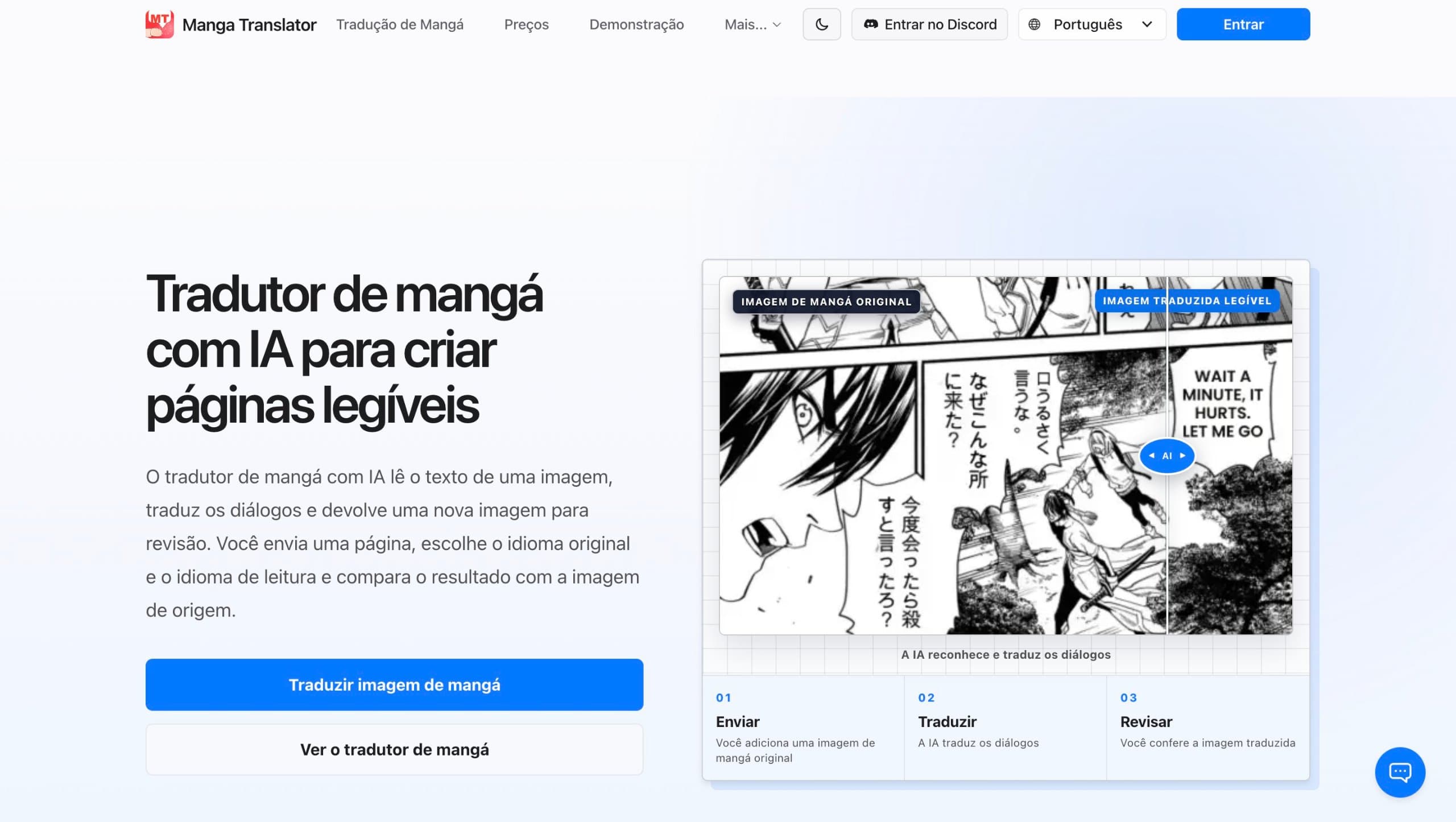
About this app
O tradutor de mangá com IA da Ficory LLC reúne leitura e tradução de quadrinhos em uma plataforma empresarial. Leitores individuais traduzem capítulos em lote e personalizam o texto de cada obra. Estúdios ajustam balões, letras e imagens em um editor online completo, semelhante ao Photoshop. A API conecta os recursos de tradução aos fluxos de trabalho pessoais. A plataforma suporta todos os idiomas de tradução.
Key features
- 1AI-powered manga translation that preserves original layout and speech bubbles.
- 2Online editor for adjusting text, fonts, and images, similar to Photoshop.
- 3API access for integrating translation into personal or studio workflows.
Target customer profile
Drawn from the product itself, not from a survey.
Demographic
Leitores de mangá
Pain points
A tradução manual de muitas páginas consome tempo.
Primary needs
Leitores traduzem capítulos em lote e personalizam resultados.
Demographic
Estúdios de localização
Pain points
A revisão de textos e imagens em ferramentas separadas atrasa a produção.
Primary needs
Estúdios editam páginas num editor online completo, semelhante ao Photoshop.
Demographic
Equipes empresariais
Pain points
Fluxos de produção exigem integração e escala para muitos idiomas.
Primary needs
A API integra a tradução aos fluxos pessoais e a plataforma suporta todos os idiomas.
Scout Review
Written by AI from measured evidence, scored out of 100.
tradutor de mangá com IA is a promising early-stage tool that does one thing well: translate manga while preserving layout. The site is fast, clean, and localized, with transparent pricing and a free trial. Security is solid but lacks enterprise certifications, and accessibility is good but not perfect. The real strength is the product's focus on manga-specific formatting, which general translation tools ignore. For individual readers and small localization teams, it's a compelling option. For large studios, the missing compliance badges might be a hurdle.
Measure by measure
Usability
68Three-step upload-translate-review flow is clearly explained, and free daily credits let you test before paying. Credit costs per model are transparent, though no full editor demo is shown on the homepage.
Design
72Clean, modern SaaS landing page with a clear before/after demo and consistent pricing cards. Fully localized in Portuguese. Not groundbreaking, but polished and professional for an early-stage tool.
Speed
88Lighthouse mobile 98/100 (LCP 1.9s, CLS 0, TBT 94ms) and desktop 100/100. The site is genuinely fast, with no user complaints about lag found in the collected evidence.
Security
74HTTPS enforced with CSP, frame protection, secure cookies, SPF and DMARC. Missing HSTS and Permissions-Policy headers, and no public SOC 2 or ISO certification found. Solid for an early-stage tool.
Accessibility
80Lighthouse accessibility 96/100, with multi-language support and responsive layout. Failing audits for color contrast and accessible names on visible text labels keep it from the top of the band.
Growth
62Targets a real pain point (manga translation) with a specific wedge: layout-preserving AI and a Photoshop-like editor. Competes against general tools like Google Lens and DeepL that don't handle manga formatting. Early-stage domain (2024) but the idea has room.
Improvement areas
- Missing HSTS and Permissions-Policy headers; no public SOC 2 or ISO certification.
- Accessibility issues: insufficient color contrast and missing accessible names on some buttons.
- Homepage lacks a full editor demo; free trial is limited to daily check-in credits.
Design & Usability
The design is clean and modern, with a clear before/after demo that actually shows the product working. The three-step flow (upload, translate, review) is well-explained, and the free daily credits let you test before committing. Pricing is transparent with per-model credit costs. However, the homepage doesn't show the full editor in action, and the free trial is just daily check-in credits, which feels more like a mobile game than a professional tool. For an early-stage product, the UX is solid but not exceptional.
Speed & Security
Speed is a genuine strength: Lighthouse mobile 98/100 and desktop 100/100, with LCP 1.9s and zero layout shift. The site loads fast and feels snappy. Security is decent for an early-stage tool: HTTPS enforced, CSP, frame protection, secure cookies, SPF and DMARC all present. But HSTS and Permissions-Policy headers are missing, and there's no public SOC 2 or ISO certification. Enterprise studios might hesitate without those compliance badges, but for individual readers and small teams, the security posture is acceptable.
Accessibility & Growth
Accessibility scores 96/100 on Lighthouse, with multi-language support and a responsive layout. However, failing audits for color contrast and accessible names on visible text labels show there's still work to do. Growth potential is solid: the product targets a real pain point (manga translation) with a specific wedge—layout-preserving AI and a Photoshop-like editor—that general tools like Google Lens and DeepL don't address. The API for studios is a smart play. The domain is only 1.7 years old, so it's early, but the idea has room to grow in a niche market.
Conclusion
If you're tired of Google Lens turning your manga into a text-soup disaster, this tool is worth a look. The free daily credits let you test it without commitment, and the pricing is fair for what you get. It's not perfect—the editor isn't fully demoed on the homepage, and enterprise-grade security certifications are absent—but for a 1.7-year-old product, it's impressively focused. Give it a shot on your next chapter and see if the layout preservation lives up to the demo.
Suggestions for improvement
- Add a full editor demo or interactive walkthrough on the homepage so users can see the Photoshop-like editing in action before signing up.
- Publish a security page with SOC 2 or ISO certification roadmap to reassure enterprise studios and localization teams.
- Fix the color contrast and accessible name issues flagged by Lighthouse to push accessibility closer to 100.
- Consider offering a one-time free trial with a set number of pages instead of daily check-in credits, which feels gamified.
Alternatives comparison
Named competitors, point by point. Nobody paid to appear here or to be left out.
 tradutor de mangá com IA |  Google Lens |  Papago |  DeepL | |
|---|---|---|---|---|
| Manga-specific layout preservation | Yes, preserves speech bubbles and page layout | No, overlays translated text without layout preservation | No, not optimized for manga formatting | No, text-only translation, no image support |
| Built-in editor for adjusting text and images | Yes, full online editor similar to Photoshop | No | No | No |
| API for workflow integration | Yes, API available | No public API for manga translation | Limited API, not manga-specific | Yes, text translation API only |
| Free trial available | Yes, daily check-in credits | Yes, free | Yes, free | Yes, free tier with limits |
Google Lens
Uses OCR to translate text in real-time via camera, but lacks manga-specific layout preservation.
Papago
Naver's translation app with image translation, but not optimized for manga formatting.
DeepL
High-quality text translation but doesn't support image translation directly.
Comparing options? See tradutor de mangá com IA alternatives, scored side by side
More Productivity apps
View all Productivity
Puzzly – B2B Lead Generation & Sales Intelligence Platform
92Puzzly is an all-in-one B2B lead generation platform that...

Qamarero
92An all-in-one hospitality software for restaurants and ba...

EmbedMyReviews
92White-label reputation management software for agencies s...

StoryPad
92Privacy-first open source journal app with a continuous t...

Notion
92All-in-one AI workspace for docs, projects, and knowledge...

The Stack Newsletter
92A weekly newsletter delivering curated tech jobs, intervi...

Vibe Coding Agent Skills
92A free, open-source platform offering 110 AI agent skills...

QRBliss
91Branded QR codes with AI Brand Sync, 15 free dynamic code...

Gerty
91Private, local AI assistant for Mac that runs offline

Strukchad Property Management
91Property management for Kenyan letting agents: rent invoices raised every month, M-Pesa rent prompts to tenants, arrears tracking and landlord statements.

CC Switch
91Open-source desktop app for switching AI coding providers...

PitchWhip
90AI cold call scripts & direct dials from LinkedIn


A platform dedicated to providing unbiased reviews of newly launched applications, analyzing everything from their features to their full potential.
info@scoutforge.net© 2026 Scoutforge. All rights reserved.
