Cycling through all six. Tap any point to stop.
Measured on six things
AI-powered transcription and content repurposing tool wit...
Security
65Standard cloud security assumed for AI transcription tools. No specific enterprise features or detailed privacy policy highlights visible. Speaker-labeled transcripts are shareable but basic controls.
Screenshots
1 / 1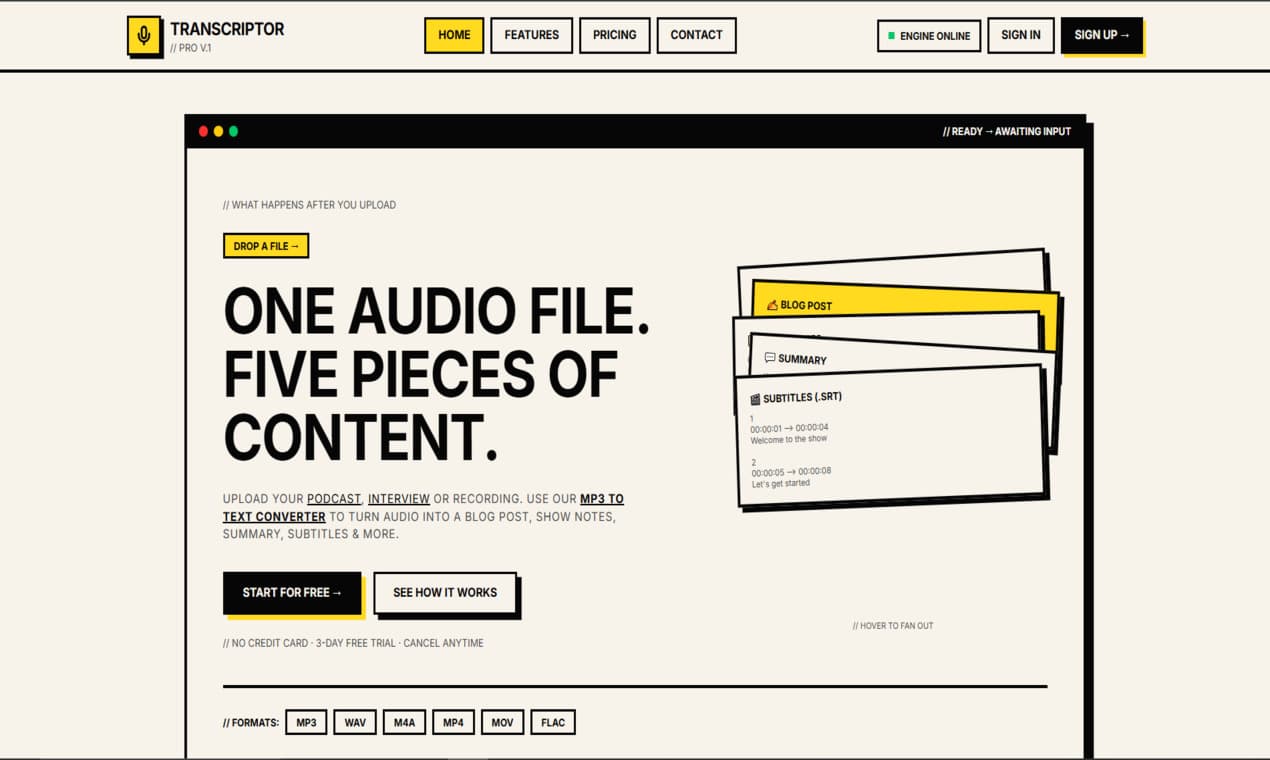
About this app
Transcriptor Pro is an AI-driven tool that transcribes audio and video files accurately, then lets you repurpose that content into summaries, social media posts, and more. You can chat with your transcript to ask questions or extract insights, and export in multiple formats. It’s perfect for podcasters, journalists, students, and content creators who need to quickly turn spoken content into written assets. The interface is intuitive, and the AI handles multiple languages and accents with impressive accuracy. I’ve found it especially handy for generating show notes and social snippets from long interviews. While there are many transcription tools out there, the repurposing and chat features set Transcriptor Pro apart for actual utility beyond just text output.
Key features
- 1Accurate AI transcription of audio, video, YouTube links with speaker diarization
- 2Chat with your transcript to ask questions, extract insights and quotes
- 3One-click AI repurposing into summaries, social media posts, show notes, and multiple export formats
Target customer profile
Drawn from the product itself, not from a survey.
Demographic
Podcasters and video creators
Pain points
Spending hours manually transcribing episodes or creating show notes and social posts
Primary needs
Fast, accurate transcription and automated content repurposing
Demographic
Journalists and researchers
Pain points
Need to extract quotes and key points from interviews quickly
Primary needs
Reliable transcription with searchable, chat-enabled transcripts
Demographic
Students and academics
Pain points
Transcribing lectures and discussions for study notes is time-consuming
Primary needs
Affordable transcription with export options for note-taking
Demographic
Content marketers and social media managers
Pain points
Struggling to repurpose long-form audio/video into bite-sized content
Primary needs
Automated generation of summaries, quotes, and social posts from media
Scout Review
Written by AI from measured evidence, scored out of 100.
Transcriptor Pro is a capable AI transcription tool that stands out through its repurposing features and conversational chat with transcripts. It's especially valuable for podcasters, content marketers, journalists, and students who need more than raw text — they need usable assets quickly. The intuitive interface, solid accuracy on good audio, and one-click generation of summaries, quotes, and social posts deliver genuine time savings. While not revolutionary in design or security, it solves real pain points better than many alternatives for its target users. Overall a strong 72/100 — reliable utility with room to mature.
Measure by measure
Usability
80Simple upload → accurate transcript → chat for questions, one-click summaries, social posts, and exports. Speaker labeling and searchable transcripts make it very podcaster-friendly. Low learning curve.
Design
78Clean, intuitive interface focused on quick uploads and clear transcript views. Modern minimal layout with easy access to chat and repurposing tools. Strong visual hierarchy for podcasters and creators.
Speed
75Fast processing for most files with rapid results claimed across reviews. Handles YouTube links, MP3, MP4 efficiently. Not the absolute fastest in the category but competitive for on-demand transcription.
Security
65Standard cloud security assumed for AI transcription tools. No specific enterprise features or detailed privacy policy highlights visible. Speaker-labeled transcripts are shareable but basic controls.
Accessibility
68Multi-language and accent support with speaker diarization helps diverse users. Searchable transcripts and export options aid note-taking. Limited explicit accessibility features like screen reader optimization mentioned.
Growth
70Strong positioning for podcasters, journalists, students, and marketers with repurposing AI setting it apart. Featured on indie launch sites and positive Reddit mentions. Growing as a utility-focused alternative.
Improvement areas
- Publish clear pricing, usage limits, and accuracy benchmarks instead of vague claims
- Add more robust integrations and team collaboration features to compete with Otter
- Strengthen security transparency and add optional human transcription fallback for professionals
Design & Usability
Transcriptor Pro nails the basics with a clean, intuitive design that prioritizes speed from upload to output. The interface lets users quickly transcribe audio/video, then dive into chat-based querying of the transcript for insights, generate summaries, pull quotes, and auto-create social media posts. This repurposing workflow feels purpose-built for podcasters and content creators who dread manual show notes. Compared to Otter.ai's collaboration focus or Descript's text-based video editing, it strikes a nice balance of simplicity and power without overwhelming the user. Usability shines for the target audience — journalists and students get fast, searchable transcripts with speaker labels, while marketers love the bite-sized content generation. It's not perfect, but the flow just works better than many competitors for repurposing spoken content into written assets.
Speed & Security
Processing is speedy for typical podcast or interview lengths, with marketing claiming 'fast, accurate' results even on YouTube links and common formats. Accuracy holds up well on clear audio, though heavy accents or noise can still trip it up like every other AI tool. Security is adequate but unremarkable — no standout enterprise-grade features or transparency that would excite journalists handling sensitive material. It beats basic free tools but lags behind Rev's human option for high-stakes professional work. The combination of quick turnaround and chat-enabled transcripts makes it practical, though power users may wish for more granular controls and clearer data handling policies.
Accessibility & Growth
Support for multiple languages, accents, and speaker diarization broadens appeal to international creators, students transcribing lectures, and diverse researchers. Export options in various formats help with note-taking and integration into other workflows. Growth potential is solid: positioned perfectly against Otter (real-time meetings), Descript (heavy editing focus), and Rev (expensive human transcription). The unique chat-with-transcript and automated repurposing into summaries/social posts give it a clear edge for content repurposing over pure transcription tools. It's gaining traction in creator communities as an affordable, practical option that saves real hours on post-production busywork. With continued accuracy improvements, it could carve out a loyal niche.
Conclusion
If you're drowning in audio that needs to become blog posts, show notes, or Threads content, Transcriptor Pro is worth trying. It won't replace your editor, but it'll make the grunt work disappear so you can focus on what matters.
Suggestions for improvement
- Add transparent per-minute pricing tiers and usage dashboards so users aren't surprised by costs.
- Expand integrations with tools like Zapier, Notion, or podcast hosts for smoother workflows.
- Improve noise handling and offer an optional human review tier for critical professional accuracy.
- Publish detailed security and data retention policies to build trust with journalists and enterprises.
Alternatives comparison
Named competitors, point by point. Nobody paid to appear here or to be left out.
 Transcriptor Pro |  Otter.ai |  Descript |  Rev | |
|---|---|---|---|---|
| Core Transcription & Accuracy | Strong AI accuracy with speaker labeling; excels on clear podcast/interview audio | Real-time transcription strong for meetings; good accuracy with custom vocabulary | High-quality transcription tied to text-based video editing; very accurate for editing use | Highest accuracy via human + AI hybrid; premium professional standard |
| Repurposing & AI Content Generation | Strong focus — auto summaries, social posts, show notes from transcript | Meeting notes and action items; limited social repurposing | AI overdub and clip creation but more editing-focused than content repurposing | Basic captions/transcripts; minimal automated repurposing |
| Chat with Transcript / Insights | Core standout feature — conversational Q&A with your specific transcript | Search and some AI summaries but less interactive chat | Limited; more focused on editing than querying content | No interactive chat feature |
| Best For | Podcasters, content creators, marketers needing fast repurposing | Business meetings, real-time collaboration, teams | Video editors and creators wanting text-based editing | Professionals and journalists needing maximum accuracy |
Otter.ai
Popular AI transcription tool with real-time collaboration and meeting notes.
Descript
All-in-one audio/video editing with transcription and text-based editing.
Rev
Human and AI transcription services with high accuracy for professionals.
Comparing options? See Transcriptor Pro alternatives, scored side by side
Sources
What the review was written against. A verdict with no sources is an opinion.
More Productivity apps
View all Productivity
Puzzly – B2B Lead Generation & Sales Intelligence Platform
92Puzzly is an all-in-one B2B lead generation platform that...

Qamarero
92An all-in-one hospitality software for restaurants and ba...

EmbedMyReviews
92White-label reputation management software for agencies s...

StoryPad
92Privacy-first open source journal app with a continuous t...

Notion
92All-in-one AI workspace for docs, projects, and knowledge...

The Stack Newsletter
92A weekly newsletter delivering curated tech jobs, intervi...

Vibe Coding Agent Skills
92A free, open-source platform offering 110 AI agent skills...

QRBliss
91Branded QR codes with AI Brand Sync, 15 free dynamic code...

Gerty
91Private, local AI assistant for Mac that runs offline

Strukchad Property Management
91Property management for Kenyan letting agents: rent invoices raised every month, M-Pesa rent prompts to tenants, arrears tracking and landlord statements.

CC Switch
91Open-source desktop app for switching AI coding providers...

PitchWhip
90AI cold call scripts & direct dials from LinkedIn


A platform dedicated to providing unbiased reviews of newly launched applications, analyzing everything from their features to their full potential.
info@scoutforge.net© 2026 Scoutforge. All rights reserved.
