Is this your app?
Claim Trick to manage its page, add your badge and see your traffic — free, and it stays free.
Cycling through all six. Tap any point to stop.
Measured on six things
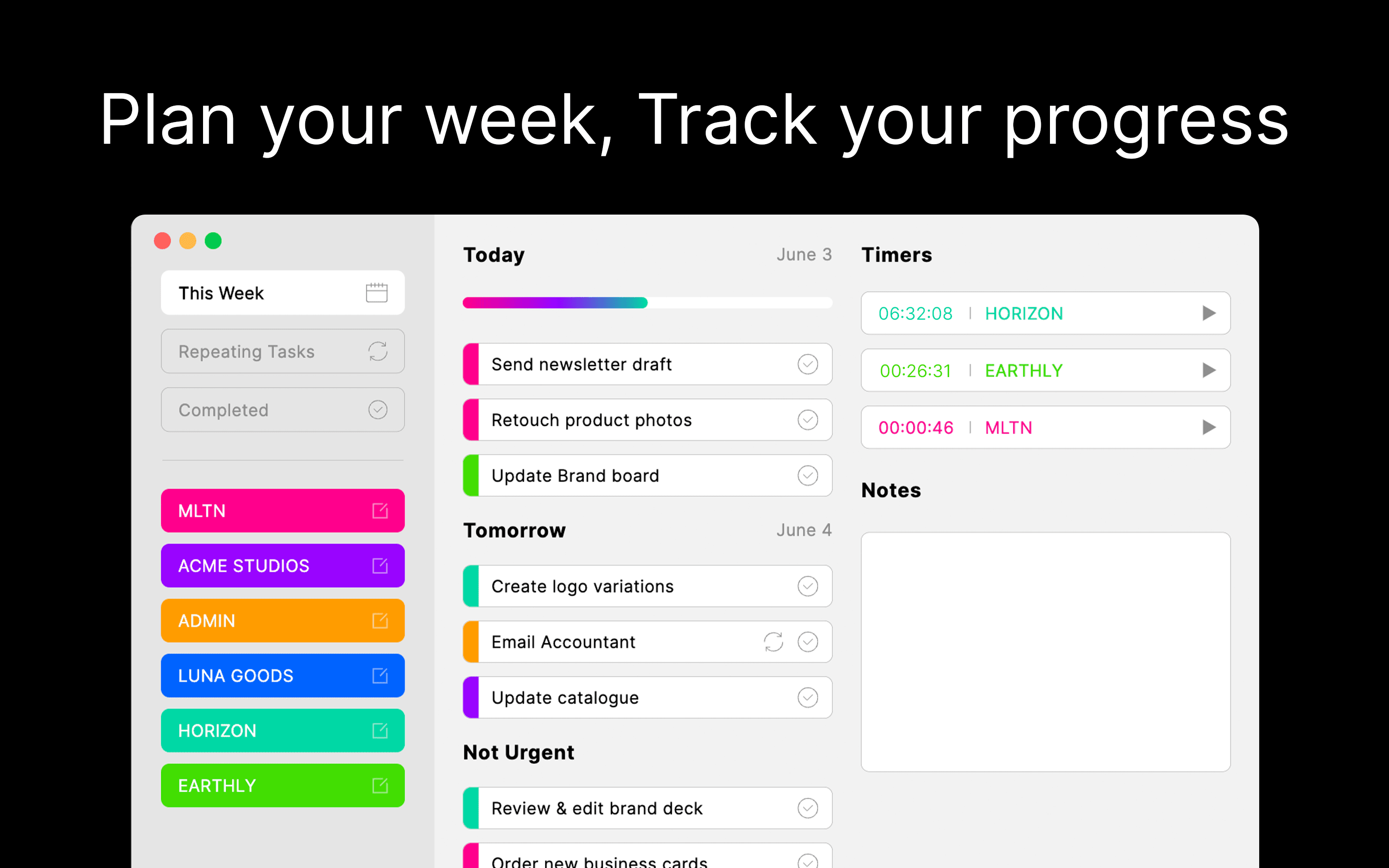
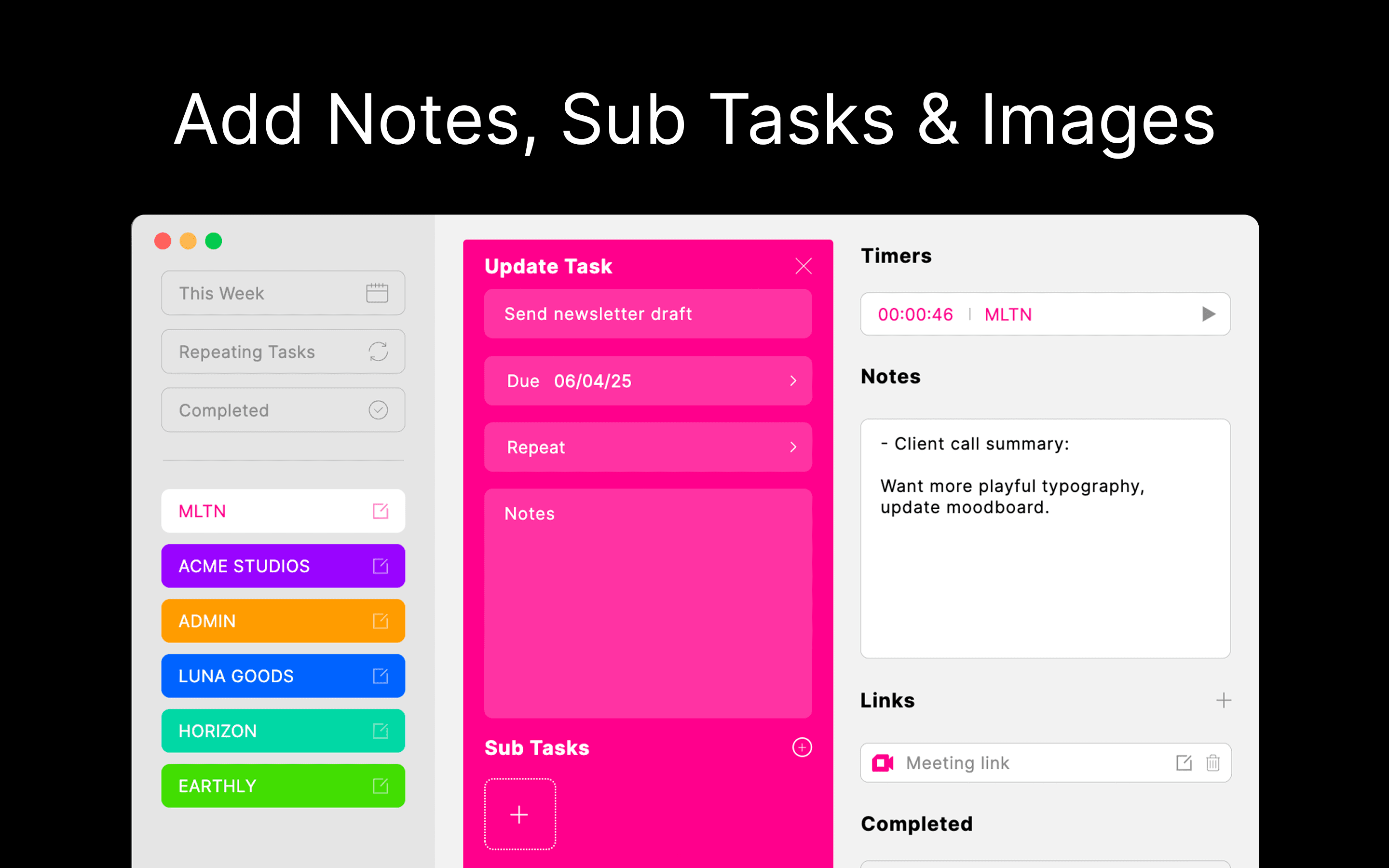
A holistic productivity app for Mac that integrates task lists, timers, notes, and bookmarks into one streamlined interface.
Accessibility
40Severely limited accessibility features with no mentioned screen reader support, high contrast modes, or cross-platform availability.
Screenshots
1 / 3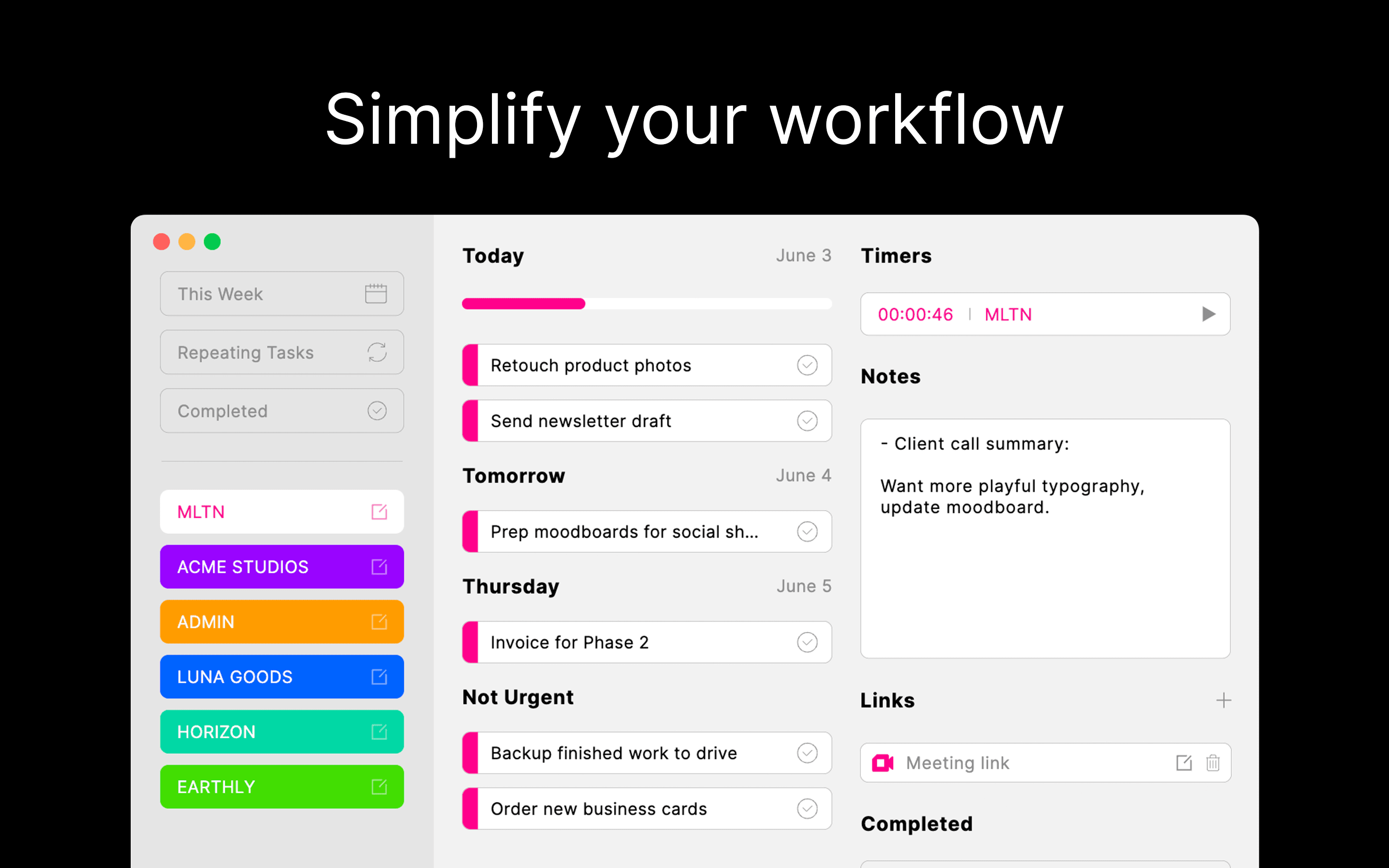
About this app
Trick is a dedicated productivity application exclusively for Mac users, designed to centralize daily planning tools like task management, time tracking, note-taking, and link storage into a single, intuitive interface. It targets professionals, freelancers, and students who struggle with app-switching and disorganization, offering a color-coded system for visual clarity and seamless workflow integration. While the free version provides a taste with limited categories, the Pro plan unlocks full customization and unlimited use. Key strengths include its clean, minimalist design and efficient usability, though it's limited to macOS with no current iOS or iPadOS support, and accessibility features are underdeveloped. It serves as a solid alternative to apps like Todoist, Toggl Track, and Notion for those seeking simplicity and integration over complexity.
Key features
- 1Integrated task management, time tracking, notes, and bookmark storage in single interface
- 2Color-coded visual organization system for reduced cognitive load and quick categorization
- 3Seamless Apple ecosystem integration with Sign in with Apple authentication
- 4Clean minimalist design optimized specifically for macOS user experience
Target customer profile
Drawn from the product itself, not from a survey.
Demographic
Mac-based professionals or freelancers
Pain points
Juggling separate apps for tasks, time tracking, and notes; lack of a unified system for daily planning
Primary needs
Consolidated tool for productivity, visual organization, progress monitoring
Demographic
Students or academics using Macs
Pain points
Disorganized study schedules, difficulty tracking time spent on projects
Primary needs
Simple task and timer integration, easy note access for research
Demographic
Creative individuals or small business owners on Mac
Pain points
Scattered workflows across multiple tools, inefficiency in managing daily tasks and ideas
Primary needs
All-in-one solution for planning, time management, and idea storage
Scout Review
Written by AI from measured evidence, scored out of 100.
Trick successfully delivers on its promise of being a holistic productivity solution for Mac users who want to consolidate their workflow without the complexity of managing multiple apps. The integration of tasks, timers, notes, and bookmarks creates a genuinely efficient system that reduces digital clutter and mental overhead. The color-coded visual organization is both practical and psychologically effective for maintaining focus and clarity throughout the workday.
Measure by measure
Usability
90Seamless integration of multiple tools eliminates app-switching, creating an intuitive workflow that actually makes sense for daily use.
Design
80Clean, minimalist interface with effective color-coded system that reduces visual clutter while maintaining organizational clarity.
Speed
80Responsive performance on Mac with quick task and timer operations, though internet dependency for syncing creates occasional bottlenecks.
Security
80Mandatory 'Sign in with Apple' provides solid authentication, though lack of detailed privacy policy transparency raises minor concerns.
Accessibility
40Severely limited accessibility features with no mentioned screen reader support, high contrast modes, or cross-platform availability.
Growth
60Strong core concept with high market demand, but platform exclusivity and underdeveloped accessibility features limit broader adoption potential.
Improvement areas
- Cross-platform availability beyond macOS ecosystem
- Comprehensive accessibility feature implementation
- Offline functionality for core productivity features
- Enhanced privacy policy transparency and data handling details
Design & Usability
Trick's design philosophy embraces the 'less is more' approach with a clean, minimalist interface that immediately feels familiar to Mac users. The color-coded categorization system isn't just decorative - it serves as a visual organization method that reduces cognitive load while making different task types instantly recognizable. Navigation follows Apple's human interface guidelines with intuitive placement of timers, notes, and task lists within the same window. The seamless integration means you're not constantly switching between apps, which dramatically improves workflow efficiency. While the free version gives you a taste, the Pro customization options let you tailor the experience to your specific productivity style, though the category limitations in the free tier might frustrate power users who need more organizational depth.
Speed & Security
Performance-wise, Trick delivers the snappy responsiveness Mac users expect, with quick-loading task lists and smooth timer functionality that doesn't lag or stutter. The mandatory 'Sign in with Apple' requirement provides enterprise-grade authentication security, leveraging Apple's robust ecosystem for encrypted data sync. However, the app's dependency on internet connectivity for synchronization creates a potential weak point - if you're offline, you lose the seamless cross-device functionality that makes modern productivity tools so valuable. While Apple's security infrastructure is solid, the lack of explicit details about local data encryption or comprehensive privacy policies leaves some questions unanswered for security-conscious users who want full transparency about their data handling practices.
Accessibility & Growth
Accessibility is clearly Trick's Achilles' heel. With no mentioned support for screen readers, high contrast modes, or enhanced keyboard navigation, it excludes users with visual or motor impairments. The macOS exclusivity further limits its reach, creating a significant barrier for anyone in mixed-device environments. Despite these limitations, Trick's core concept has substantial growth potential in the crowded productivity market. The demand for integrated tools that reduce app-switching fatigue is real, and Trick's focused approach could appeal to users overwhelmed by complex alternatives like Notion. However, to truly compete, expansion to iOS/iPadOS and robust accessibility features are non-negotiable for future development if they want to capture the broader productivity market beyond dedicated Mac users.
Conclusion
If you're a Mac user tired of juggling Todoist for tasks, Toggl for time tracking, and separate apps for notes and bookmarks, Trick offers the integrated solution you've been seeking. It's particularly well-suited for professionals, freelancers, and students who value visual organization and want to streamline their daily routine without the learning curve of more complex platforms. The free version provides enough functionality to determine if Trick fits your workflow, making it a low-risk trial for anyone seeking productivity consolidation. Give it a try if you're ready to declutter your digital workspace and embrace a more organized approach to daily planning.
Suggestions for improvement
- Develop iOS and iPadOS versions to enable true cross-device functionality and capture mobile users
- Implement comprehensive accessibility features including VoiceOver support and high contrast modes
- Add offline functionality for core tasks to reduce dependency on internet connectivity
- Provide detailed privacy policy transparency regarding data encryption and handling practices
Alternatives comparison
Named competitors, point by point. Nobody paid to appear here or to be left out.
 Trick Trick |  Todoist Todoist |  Toggl Track Toggl Track |  Notion Notion | |
|---|---|---|---|---|
| Platform Availability | macOS only | Cross-platform (Web, iOS, Android, Mac, Windows) | Cross-platform (Web, iOS, Android, Mac, Windows) | Cross-platform (Web, iOS, Android, Mac, Windows) |
| Feature Integration | Tasks, timers, notes, bookmarks in one interface | Task management focused, lacks built-in timers | Time tracking focused, no task/note integration | All-in-one but can be overwhelming |
| Learning Curve | Low - intuitive integrated design | Low - straightforward task management | Low - simple time tracking interface | High - extensive customization options |
| Visual Organization | Color-coded system with minimalist design | Project-based with priority color coding | Time-based reporting with charts | Fully customizable database views |
Todoist
A popular task manager with cross-platform support, but lacks built-in timers and deep note integration.
Toggl Track
Focuses on time tracking with robust reporting, but doesn’t combine tasks or notes in one interface.
Notion
Offers all-in-one workspace flexibility, but can be overwhelming for users seeking simplicity.
Comparing options? See Trick alternatives, scored side by side
More Productivity apps
View all Productivity
Notion
92All-in-one AI workspace for docs, projects, and knowledge...

Qamarero
92An all-in-one hospitality software for restaurants and ba...

EmbedMyReviews
92White-label reputation management software for agencies s...

StoryPad
92Privacy-first open source journal app with a continuous t...

Puzzly – B2B Lead Generation & Sales Intelligence Platform
92Puzzly is an all-in-one B2B lead generation platform that...

The Stack Newsletter
92A weekly newsletter delivering curated tech jobs, intervi...

Vibe Coding Agent Skills
92A free, open-source platform offering 110 AI agent skills...

QRBliss
91Branded QR codes with AI Brand Sync, 15 free dynamic code...

Gerty
91Private, local AI assistant for Mac that runs offline

CC Switch
91Open-source desktop app for switching AI coding providers...

username.md
90One verified handle for your online identity, readable by...

PitchWhip
90AI cold call scripts & direct dials from LinkedIn


A platform dedicated to providing unbiased reviews of newly launched applications, analyzing everything from their features to their full potential.
info@scoutforge.net© 2026 Scoutforge. All rights reserved.
