Cycling through all six. Tap any point to stop.
Measured on six things
AI-powered people search, reverse image, and price compar...
Growth
42Three unrelated jobs in one app — people search, reverse image search, price comparison — against PimEyes, Google Lens and Spokeo, each a focused leader. No wedge named for any of them. 50+ downloads is context, not the score.
Screenshots
1 / 1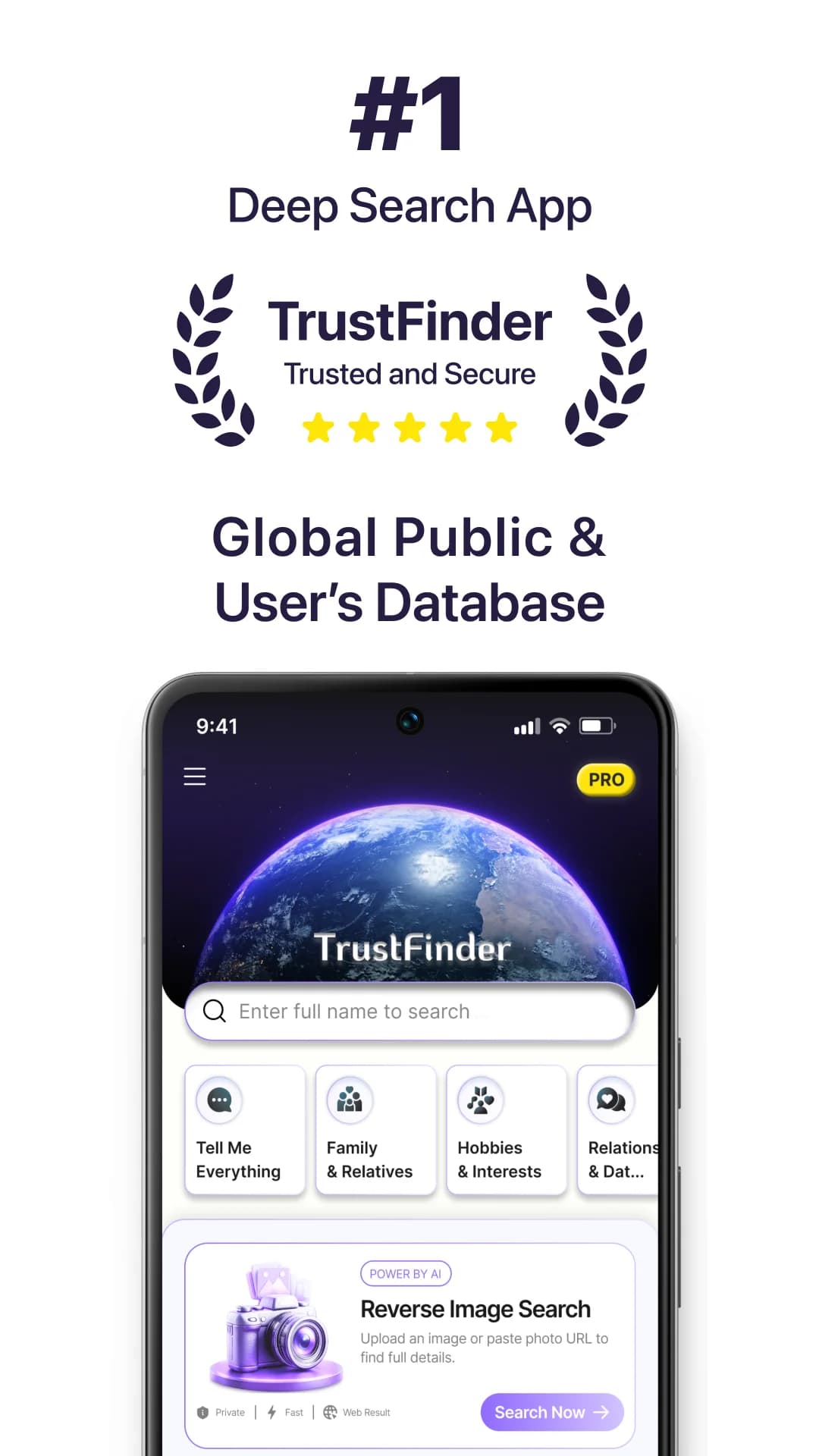
About this app
TrustFinder: Deep Search AI is an all-in-one search assistant that helps you find people by name, trace images, and compare product prices. It leverages AI to pull results from multiple public sources, presenting them in a clean, organized format. The app is designed for everyday users, researchers, journalists, and shoppers who want a comprehensive search tool without switching between apps. Key features include people search by name or username, reverse image search via upload, camera, or URL, and product price comparison across major retailers. TrustFinder emphasizes privacy, using only publicly available data. The app offers a freemium model with optional Premium access for unlimited searches and faster processing. With a user-friendly interface and versatile functionality, TrustFinder aims to simplify online research and smart shopping.
Key features
- 1People search by name or username, aggregating public profiles, posts and mentions from multiple sources in one view
- 2Reverse image search via upload, camera capture, or pasted URL to trace image origins and find visually similar content
- 3Product price comparison across major retailers, returning prices and availability without visiting multiple sites
Target customer profile
Drawn from the product itself, not from a survey.
Demographic
Everyday users reconnecting with old friends or checking new acquaintances
Pain points
Difficulty finding accurate public information across multiple platforms
Primary needs
Simple, quick people search with consolidated results
Demographic
Researchers and journalists gathering public data
Pain points
Time-consuming manual searches across various sources
Primary needs
Efficient deep search tool for comprehensive public records
Demographic
Online shoppers looking for best deals
Pain points
Comparing prices across multiple retailers is tedious
Primary needs
Instant price comparison from major retailers in one place
Scout Review
Written by AI from measured evidence, scored out of 100.
TrustFinder: Deep Search AI is a Google Play app that bundles people search, reverse image search, and product price comparison into one 'deep search' assistant. The pitch is convenience — one app instead of three. The execution is early: 50+ downloads, a single-developer listing, no help center, and a 5.8-second mobile LCP that undercuts the speed premise. The UI is consistent but generic, the store screenshots are low-contrast, and the security posture has real gaps (no enforced HTTPS, no DMARC, no secure cookies). Accessibility is the standout at 99/100 automated, though manual gaps remain. The core problem is positioning: it competes with PimEyes, Google Lens, and Spokeo simultaneously without a clear wedge in any of them.
Measure by measure
Usability
54Three flows (people, image, price) are described clearly and the search bar is front and center, but support is one Gmail address, there's no help center or FAQ, and no trial or demo beyond the freemium cap.
Design
55Judging the app UI from store screenshots: consistent purple accent and a clear search bar, but screenshots are low-contrast, generic, and one tile truncates to 'Relations & Dat...'. Stock Earth imagery reads template, not brand.
Speed
46Lighthouse mobile performance 54/100 with a 5.8s LCP and 819ms TBT; desktop 67/100. The listing page itself is heavy, and a search app that makes users wait 5.8s to load is fighting its own premise.
Security
62Probe shows HSTS, CSP, frame protection and Permissions-Policy in place, but HTTPS is not enforced, Referrer-Policy and DMARC are missing, and secure cookies aren't set (8/13). Store declares in-transit encryption and no third-party sharing.
Accessibility
78Lighthouse accessibility 99/100, but two real failures: no main landmark and visible text labels without matching accessible names. No WCAG statement or multi-language support found. Automated score is strong; manual gaps remain.
Growth
42Three unrelated jobs in one app — people search, reverse image search, price comparison — against PimEyes, Google Lens and Spokeo, each a focused leader. No wedge named for any of them. 50+ downloads is context, not the score.
Improvement areas
- Positioning: three unrelated jobs (people, image, price) with no wedge against PimEyes, Google Lens, or Spokeo
- Performance: 5.8s mobile LCP and 819ms TBT undercut the 'faster than switching apps' premise
- Security gaps: HTTPS not enforced, no DMARC, no Referrer-Policy, secure cookies unset (8/13 checklist)
- Support and docs: single Gmail address, no help center, FAQ, or demo; store screenshots low-contrast with truncated text
Design & Usability
Judging the app itself from its Google Play listing: the UI has a consistent purple accent, a prominent search bar, and clearly separated flows for people search, reverse image search, and price comparison. The quick-action tiles give obvious entry points. But the store screenshots are low-contrast and generic, one tile truncates to 'Relations & Dat...', and the Earth-from-space imagery reads as a template rather than a brand. Usability is described well in copy — three flows, freemium with a Premium upsell — but there's no help center, no FAQ, no demo, and support is a single Gmail address. For a tool that touches people's identities and photos, that's thin. The onboarding story is 'install and figure it out.'
Speed & Security
Speed is the weak spot. Lighthouse mobile performance lands at 54/100 with a 5.8-second LCP and 819ms total blocking time; desktop is 67/100. For an app whose entire value proposition is 'faster than switching between apps,' a 5.8s load is self-defeating. Security is middling: the probe found HSTS, CSP, frame protection and Permissions-Policy, but HTTPS is not enforced, Referrer-Policy and DMARC are absent, and secure cookies aren't set — 8 of 13 checklist points. The store declares in-transit encryption and no third-party data sharing, which is the right posture, but the missing DMARC and unenforced HTTPS are real gaps for a product handling search queries about real people.
Accessibility & Growth
Accessibility scores 99/100 on Lighthouse's automated audit, which is genuinely strong, but two failures remain: no main landmark and visible text labels without matching accessible names. There's no WCAG statement and no multi-language support. Automated checks cover only part of WCAG, so treat 99 as a ceiling, not a floor. Growth is the harder question. TrustFinder bundles three unrelated jobs — people search, reverse image search, and price comparison — and names no segment it serves better than the alternatives. PimEyes owns faces, Google Lens owns images, Spokeo owns people. The store shows 50+ downloads. The idea isn't dead, but it's spread across three fights it can't win at once.
Conclusion
If you're a casual user who wants one app for occasional people-lookups, image traces, and price checks, TrustFinder is a reasonable free starting point — just don't expect it to beat the specialists. If you're a researcher, journalist, or anyone doing serious work, the missing docs, thin support, and unenforced HTTPS should give you pause. The app needs to pick a lane. Right now it's three half-products in a trench coat, and the trench coat is a stock Earth photo.
Suggestions for improvement
- Pick one core job — people search, image search, or price comparison — and make it genuinely best-in-class before bundling the others.
- Enforce HTTPS, add Referrer-Policy, set secure cookies, and publish a DMARC record; these are cheap fixes with real security payoff.
- Build a real help center or FAQ and replace the single Gmail support address with a proper contact channel.
- Fix the truncated 'Relations & Dat...' tile and redo store screenshots with higher contrast and readable text at listing size.
Alternatives comparison
Named competitors, point by point. Nobody paid to appear here or to be left out.
 TrustFinder: Deep Search AI TrustFinder: Deep Search AI |  PimEyes PimEyes |  Google Lens Google Lens | Spokeo | |
|---|---|---|---|---|
| People search by name or username | Yes — aggregates public profiles, posts and mentions across multiple sources | No — face-based search only, not name or username lookup | No — visual/image search only | Yes — core feature, aggregates public records and social media |
| Reverse image search | Yes — upload, camera, or URL; traces image origins and similar content | Partial — face-focused, finds where a face appears, not general image tracing | Yes — core feature, best-in-class visual discovery and object recognition | No — people/records search only |
| Product price comparison | Yes — checks prices across major retailers in one view | No | Partial — can identify products visually but not a dedicated price comparison tool | No |
| Free tier / pricing model | Freemium with Premium for unlimited searches and faster processing; contains ads | Limited free searches; paid subscription for full results | Free | Freemium; paid subscription for full reports |
| Platform availability | Android (Google Play); 50+ downloads | Web-based | Web, iOS, Android (via Google app) | Web and mobile apps |
| Privacy / data handling stance | Claims public data only; encrypted in transit; collects app activity and device IDs | Face search with opt-out requests; GDPR-oriented privacy controls | Governed by Google's privacy policy and data controls | Public records aggregation with opt-out and privacy policy |
PimEyes
Facial recognition search engine to find where your photos appear online.
Google Lens
Reverse image search and visual discovery tool by Google.
Spokeo
People search engine that aggregates public records and social media.
Comparing options? See TrustFinder: Deep Search AI alternatives, scored side by side
More Productivity apps
View all Productivity
Qamarero
92An all-in-one hospitality software for restaurants and ba...

The Stack Newsletter
92A weekly newsletter delivering curated tech jobs, intervi...

EmbedMyReviews
92White-label reputation management software for agencies s...

StoryPad
92Privacy-first open source journal app with a continuous t...

Puzzly – B2B Lead Generation & Sales Intelligence Platform
92Puzzly is an all-in-one B2B lead generation platform that...

Notion
92All-in-one AI workspace for docs, projects, and knowledge...

Vibe Coding Agent Skills
92A free, open-source platform offering 110 AI agent skills...

CC Switch
91Open-source desktop app for switching AI coding providers...

username.md
90One verified handle for your online identity, readable by...

What the GIF
89Frame-perfect video-to-GIF maker that runs entirely in yo...

AuditCloser
89White-label website audits that close deals for digital a...

NudgeWin
89Automated quote follow-up for trades and service businesses.


A platform dedicated to providing unbiased reviews of newly launched applications, analyzing everything from their features to their full potential.
info@scoutforge.net© 2026 Scoutforge. All rights reserved.
