Cycling through all six. Tap any point to stop.
Measured on six things
Convert EML files to PST quickly and accurately.
Design
44Dated Windows-era app screenshots and a cookie modal that covers the hero. Feature grids are organized but dense, with small text and repeated sections that blur together.
Screenshots
1 / 4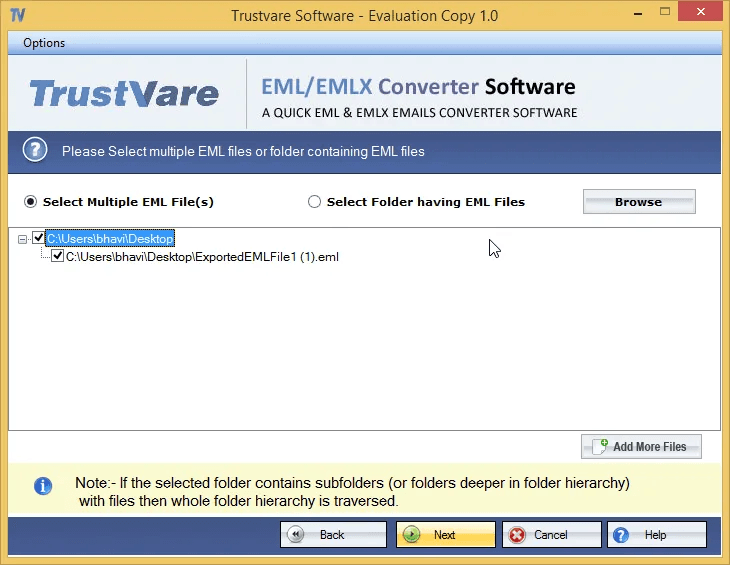
About this app
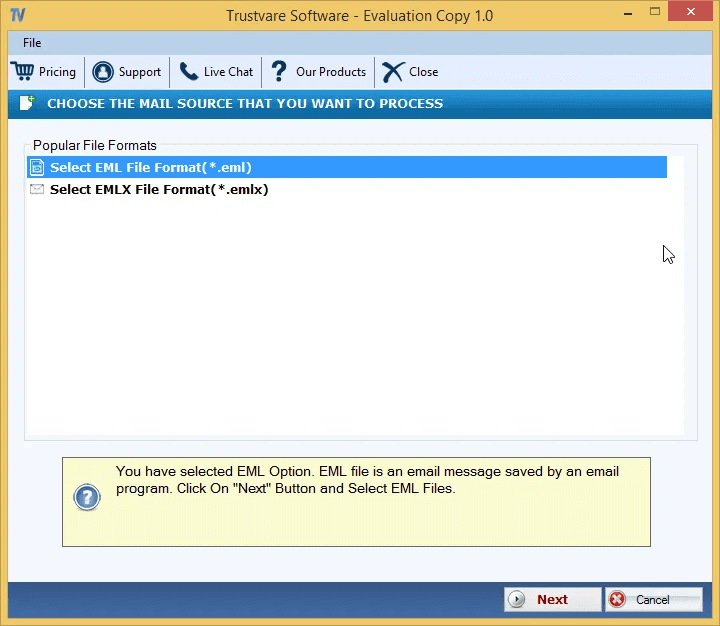
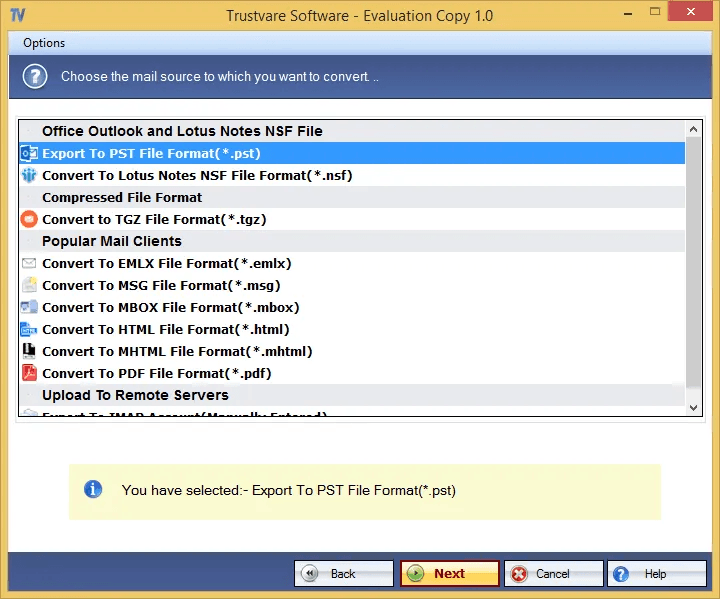
TrustVare EML to PST Converter is the most effective solution to export EML files to PST format for Microsoft Outlook. It works with EML files exported from popular email programs such as Mozilla Thunderbird, Windows Live Mail, Apple Mail and other supported email clients. Users can create email archives in Microsoft Outlook 2007, 2010, 2013, 2016, 2019 and 2021. This application supports Windows 7, Windows 8, Windows 8.1, Windows 10 and Windows 11. The interface is user-friendly and simplifies process for both new and experienced users. It is a perfect choice for home users, IT professionals, and organizations who are looking for a safe way to convert email data and access Outlook. Download the free trial version to test the features and convert the first 10 items in each folder.
Key features
- 1Standalone EML to PST conversion without requiring Outlook or an EML-supporting client.
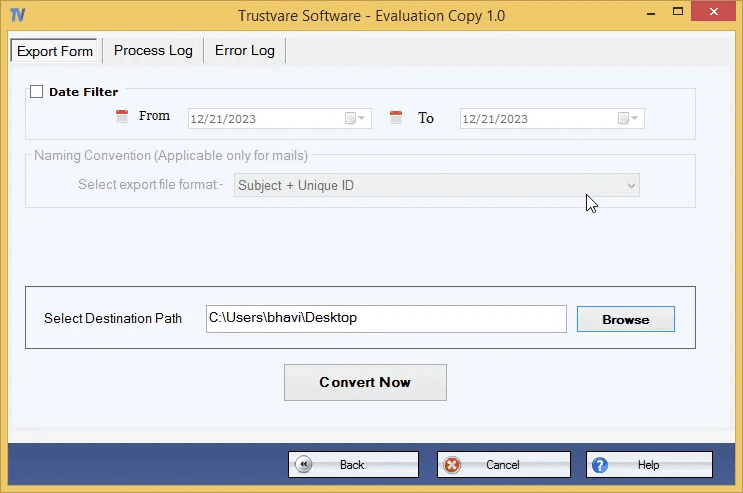
- 2Batch conversion with preview pane and date/subject filtering for selective exports.
- 3Multi-format export: PST, NSF, TGZ, EMLX, MSG, MBOX, HTML, MHTML, PDF, and IMAP.
- 4Free trial converts the first 10 items per folder; licensed version is unlimited.
Target customer profile
Drawn from the product itself, not from a survey.
Demographic
IT administrators in small to medium businesses
Pain points
Manual EML to PST conversion is time-consuming and error-prone
Primary needs
Batch conversion with high accuracy and no dependency on email clients
Demographic
Individuals switching from Thunderbird, Windows Live Mail, or Apple Mail to Outlook
Pain points
Losing email structure and attachments during migration
Primary needs
Preservation of email metadata and attachments in PST format
Demographic
Forensic investigators and legal professionals
Pain points
Need to convert large volumes of EML files for e-discovery without altering data
Primary needs
Selective conversion and preview features to ensure only relevant files are exported
Scout Review
Written by AI from measured evidence, scored out of 100.
TrustVare EML to PST Converter is a competent, narrowly-scoped migration tool with a fast site and a documented four-step workflow. The design is dated and the landing experience is cluttered, but the core product does what it says. Security headers are half-done and accessibility has real gaps. Growth is limited by a crowded category, but the standalone, batch, multi-format angle is a legitimate wedge for IT admins and legal users moving Thunderbird or Apple Mail archives into Outlook.
Measure by measure
Usability
58Four-step workflow (import, preview, pick format, convert) is documented and the free trial converts 10 items per folder. Competing CTAs and a blocking cookie modal add friction up front.
Design
44Dated Windows-era app screenshots and a cookie modal that covers the hero. Feature grids are organized but dense, with small text and repeated sections that blur together.
Speed
88Lighthouse mobile 96/100 (LCP 2.6s, CLS 0, TBT 6ms) and desktop 99/100. The desktop app itself is a few MB, so the whole thing is snappy end to end.
Security
52HTTPS enforced with CSP, SPF and DMARC in place, but no HSTS, frame protection, X-Content-Type-Options, Referrer-Policy or Permissions-Policy. No published audits or bug bounty.
Accessibility
58Lighthouse a11y 86/100 with real failures: low contrast text, unlabeled form elements, links without discernible names. No WCAG statement or multi-language support found.
Growth
58Real, specific problem (EML to PST migration) with a clear wedge: standalone, batch, preview, multi-format export. Category is crowded with free and paid alternatives, so headroom is real but limited.
Improvement areas
- Security headers: add HSTS, frame protection, X-Content-Type-Options, Referrer-Policy, Permissions-Policy.
- Accessibility: fix contrast, form labels, and link names flagged by Lighthouse.
- Landing page: move or delay the cookie modal and reduce CTA clutter.
- Design: refresh app screenshots and typography to match the product's speed.
Design & Usability
The landing page is organized but dated — feature grids, bullet lists, and app screenshots with Windows 7-era chrome. A cookie preferences modal covers the hero on first load, which is the opposite of a first impression. Usability is better than the design suggests: the docs lay out a clean four-step flow (import, preview, choose format, convert), the free trial converts 10 items per folder, and the desktop app is genuinely simple. The friction is all on the marketing side — competing CTAs, dense copy, and a modal that has to be dismissed before you can read anything.
Speed & Security
Speed is the standout: Lighthouse mobile 96/100 with a 2.6s LCP and 6ms total blocking time, desktop 99/100, and the desktop app itself is a few MB. Security is the weak spot: HTTPS, CSP, SPF and DMARC are in place, but HSTS, frame protection, X-Content-Type-Options, Referrer-Policy and Permissions-Policy are all missing — 6 of 12 header checks. No SOC 2, ISO, pen-test or bug bounty is published. For a tool that handles email archives and legal/forensic data, that's a gap worth closing.
Accessibility & Growth
Accessibility lands at 86/100 on Lighthouse with concrete failures: insufficient color contrast, form elements without labels, and links without discernible names. There's no WCAG statement and no multi-language support in the collected content. Growth is a judgment call on the idea: EML-to-PST migration is a real, specific problem with a clear wedge — standalone conversion, batch processing, preview, and multi-format export (PST, NSF, MSG, MBOX, PDF). The category is crowded with free and cheap alternatives, so the ceiling is real but not enormous. Domain age (2021) and social presence are context, not the score.
Conclusion
If you need to move EML archives into Outlook and don't want to fight manual import, the free trial (10 items per folder) is a low-risk way to test it. Just don't judge it by the homepage — the cookie modal and Windows 7 screenshots undersell a tool that actually works.
Suggestions for improvement
- Fix the cookie modal so it doesn't cover the hero headline and download CTA on first load.
- Add HSTS, X-Content-Type-Options, Referrer-Policy and Permissions-Policy to close the security header gap.
- Fix the three Lighthouse a11y failures: contrast, form labels, and link names.
- Refresh the app screenshots and landing page typography to match the speed of the product.
Alternatives comparison
Named competitors, point by point. Nobody paid to appear here or to be left out.
 TrustVare EML to PST Converter TrustVare EML to PST Converter | ||
|---|---|---|
| Standalone conversion (no Outlook required) | Yes — explicitly standalone | Not specified |
| Batch conversion | Yes — unlimited with license | Not specified |
| Free trial limits | First 10 items per folder | Not specified |
| Export formats | PST, NSF, TGZ, EMLX, MSG, MBOX, HTML, MHTML, PDF, IMAP | Not specified |
| Preview and filtering | Yes — preview pane plus date/subject filters | Not specified |
| Published security audits | None found | Not specified |
Comparing options? See TrustVare EML to PST Converter alternatives, scored side by side
More Productivity apps
View all Productivity
Qamarero
92An all-in-one hospitality software for restaurants and ba...

The Stack Newsletter
92A weekly newsletter delivering curated tech jobs, intervi...

EmbedMyReviews
92White-label reputation management software for agencies s...

StoryPad
92Privacy-first open source journal app with a continuous t...

Puzzly – B2B Lead Generation & Sales Intelligence Platform
92Puzzly is an all-in-one B2B lead generation platform that...

Notion
92All-in-one AI workspace for docs, projects, and knowledge...

Vibe Coding Agent Skills
92A free, open-source platform offering 110 AI agent skills...

CC Switch
91Open-source desktop app for switching AI coding providers...

username.md
90One verified handle for your online identity, readable by...

What the GIF
89Frame-perfect video-to-GIF maker that runs entirely in yo...

AuditCloser
89White-label website audits that close deals for digital a...

NudgeWin
89Automated quote follow-up for trades and service businesses.


A platform dedicated to providing unbiased reviews of newly launched applications, analyzing everything from their features to their full potential.
info@scoutforge.net© 2026 Scoutforge. All rights reserved.
