

A platform dedicated to providing unbiased reviews of newly launched applications, analyzing everything from their features to their full potential.
info@scoutforge.net© 2026 Scoutforge. All rights reserved.
A platform dedicated to providing unbiased reviews of newly launched applications, analyzing everything from their features to their full potential.
info@scoutforge.net© 2026 Scoutforge. All rights reserved.
A platform dedicated to providing unbiased reviews of newly launched applications, analyzing everything from their features to their full potential.
info@scoutforge.net© 2026 Scoutforge. All rights reserved.
Cycling through all six. Tap any point to stop.
Measured on six things
Backup IMAP Emails for Easy Data Management
Dated 2010s-era layout with dense text, cluttered feature lists, and inconsistent branding. The UI shown in docs is a basic Windows dialog. Functional but visually unpolished.
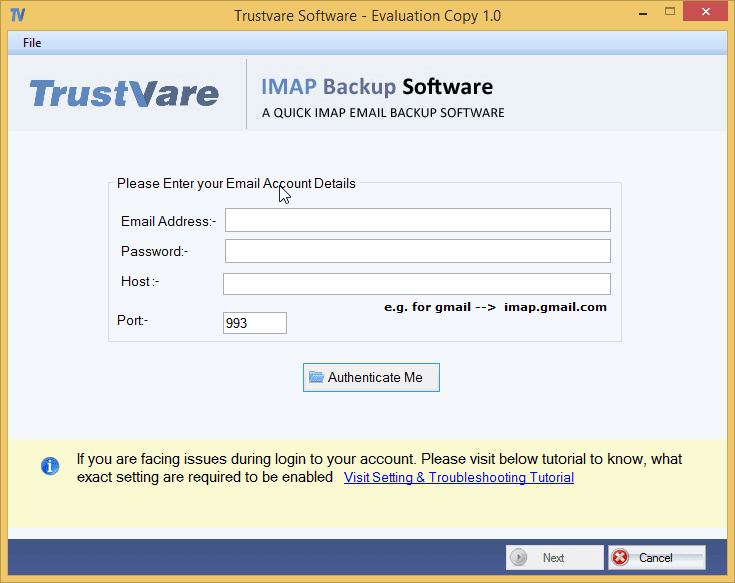
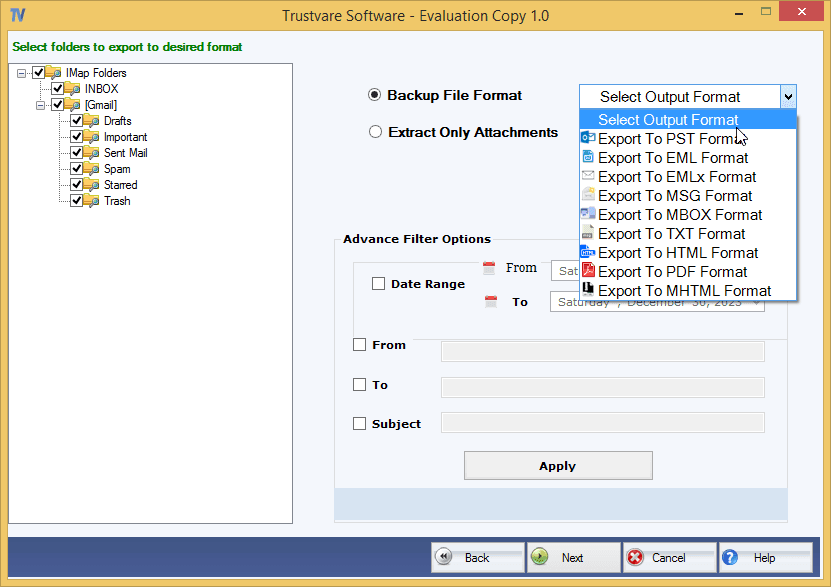
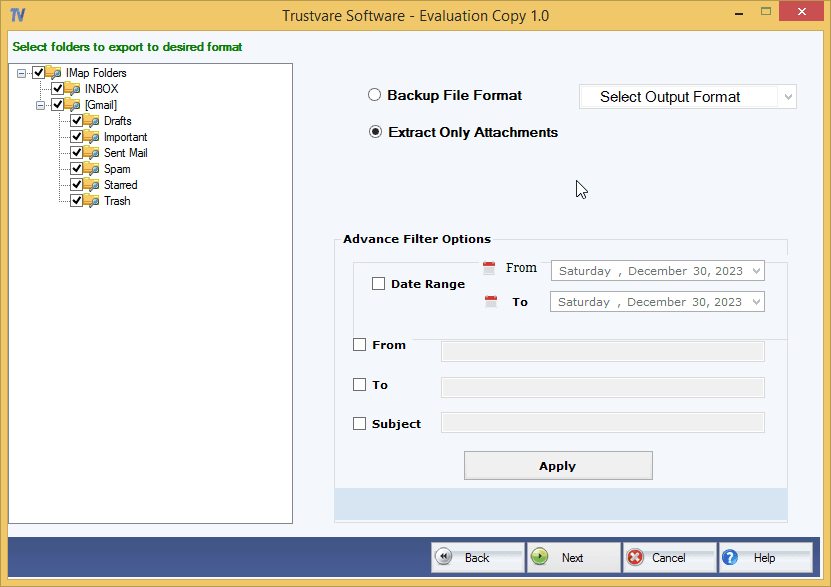
TrustVare IMAP Backup is an email backup utility which saves mailbox data from IMAP-compatible accounts for migration, archiving and offline use. It supports IMAP-enabled accounts from services including Gmail, Yahoo Mail, Zoho Mail and other providers which offer IMAP access. The software enables email backup in many file formats such as PST, EML, MSG, MBOX and PDF which provides more alternatives to users while transferring or saving mailbox data for different purposes. Depending on their needs users can choose to back up certain folders or the entire inbox. During the process, the tool can also save the email content, attachments and folder structure, allowing the mailbox to remain organized as it was originally. Its support for popular email file formats makes it excellent for email migration across applications and platforms. The software is compatible with Windows 11, 10, 8.1, 8, 7 and older editions. A demo version is available to test its features before purchasing a license.
Drawn from the product itself, not from a survey.
Written by AI from measured evidence, scored out of 100.
TrustVare IMAP Backup is a functional email backup utility that does what it says: saves IMAP mailbox data to various formats. It's fast, with a lightweight website, and offers a free demo. But it's held back by dated design, thin documentation, email-only support, and a middling security posture. The tool competes in a crowded space where free alternatives like Thunderbird exist. For users who need multi-format export and don't mind the lack of polish, it's serviceable. For everyone else, the rough edges and security gaps may be dealbreakers. It's a competent but unremarkable product that could use a modern refresh and stronger security transparency.
Docs offer a 5-step how-to and a free demo, but lack troubleshooting or FAQ. Support is email-only. Onboarding is straightforward for a desktop utility.
Dated 2010s-era layout with dense text, cluttered feature lists, and inconsistent branding. The UI shown in docs is a basic Windows dialog. Functional but visually unpolished.
Lighthouse mobile 95/100 (LCP 2.6s, CLS 0, TBT 18ms), desktop 99/100. The site is lightweight and snappy, with no user complaints about lag.
HTTPS enforced, CSP, SPF, DMARC present. Missing HSTS, frame protection, and other headers (6/12). No SOC 2 or pen-test claims. Privacy policy is generic.
Lighthouse accessibility 87/100, but fails on color contrast, form labels, and link names. No WCAG statement or multi-language support. Keyboard navigation likely limited.
Real problem: email backup for migration/archiving. Differentiates via multi-format export and selective backup, but competes with free tools like Thunderbird. No unique wedge.
TrustVare IMAP Backup looks like it was designed a decade ago and never updated. The homepage is a wall of text with inconsistent branding—'IMAP Backup', 'Cloud Mail Backup', and 'Webmail backup' all refer to the same tool. The UI shown in docs is a basic Windows dialog, functional but far from modern. Usability is similarly dated: the docs offer a five-step how-to and a free demo, which is helpful, but there's no FAQ, troubleshooting, or live support. Email-only support is a bottleneck. Onboarding is straightforward for a desktop utility, but the lack of polish and support options drags the experience down. For a paid tool, users expect more than a bare-bones help page.
Speed is the standout: Lighthouse mobile 95/100 (LCP 2.6s, CLS 0, TBT 18ms) and desktop 99/100. The site is lightweight and loads instantly, with no user complaints about lag. Security, however, is middling. HTTPS is enforced, and CSP, SPF, and DMARC are present, but HSTS, frame protection, and other headers are missing—only 6/12 checklist points. There's no SOC 2, ISO, or pen-test claim, and the privacy policy is generic. For a tool that handles sensitive email credentials, that's a concern. Users are asked to enter their cloud account login details, yet the security posture doesn't inspire confidence. A stronger security page and more headers would help.
Accessibility scores 87/100 on Lighthouse, but fails on color contrast, form labels, and link names—basic issues that affect screen reader users. There's no WCAG statement or multi-language support, and keyboard navigation is likely limited. For a Windows desktop tool, accessibility is often an afterthought, but the website itself should be a baseline. Growth potential is moderate: the problem—backing up IMAP email for migration or archiving—is real and persistent. The tool differentiates via multi-format export (PST, EML, MSG, MBOX, PDF) and selective folder backup. However, it competes with free tools like Thunderbird and other paid utilities. There's no unique wedge beyond format breadth, and the target customer isn't sharply defined. The category has room, but TrustVare needs a clearer reason to be chosen.
Conclusion
If you need a quick, no-frills way to back up IMAP email to PST, MBOX, or PDF, TrustVare gets the job done. The demo lets you test before buying, and the speed is excellent. But the dated interface, sparse docs, and missing security certifications make it hard to recommend over free or more polished alternatives. It's a tool that works, but it won't wow you. For a paid product, expect to pay for the convenience of format breadth—just don't expect modern design or enterprise-grade security.
Named competitors, point by point. Nobody paid to appear here or to be left out.
 TrustVare IMAP Backup Software TrustVare IMAP Backup Software | ||
|---|---|---|
| Supported export formats | PST, EML, MSG, MBOX, PDF, EMLX, HTML, MHTML | Not specified |
| Free demo available | Yes | Not specified |
| Platform compatibility | Windows 11, 10, 8.1, 8, 7 | Not specified |
Comparing options? See TrustVare IMAP Backup Software alternatives, scored side by side

An all-in-one hospitality software for restaurants and ba...

A weekly newsletter delivering curated tech jobs, intervi...

White-label reputation management software for agencies s...

Privacy-first open source journal app with a continuous t...

Puzzly is an all-in-one B2B lead generation platform that...

All-in-one AI workspace for docs, projects, and knowledge...

A free, open-source platform offering 110 AI agent skills...

Open-source desktop app for switching AI coding providers...

One verified handle for your online identity, readable by...

Frame-perfect video-to-GIF maker that runs entirely in yo...

White-label website audits that close deals for digital a...

Automated quote follow-up for trades and service businesses.
A platform dedicated to providing unbiased reviews of newly launched applications, analyzing everything from their features to their full potential.
info@scoutforge.net© 2026 Scoutforge. All rights reserved.
