Cycling through all six. Tap any point to stop.
Measured on six things
All-in-one AI workspace for slides, docs, code, and design.
Growth
52Real problem (tool fragmentation) but the wedge is blurry — 'all-in-one' against Notion, Microsoft, Google, and Canva. Multi-model access and AI Sheets are differentiators, but the broad targeting dilutes the pitch. Category has headroom, but incumbents are entrenched.
Screenshots
1 / 1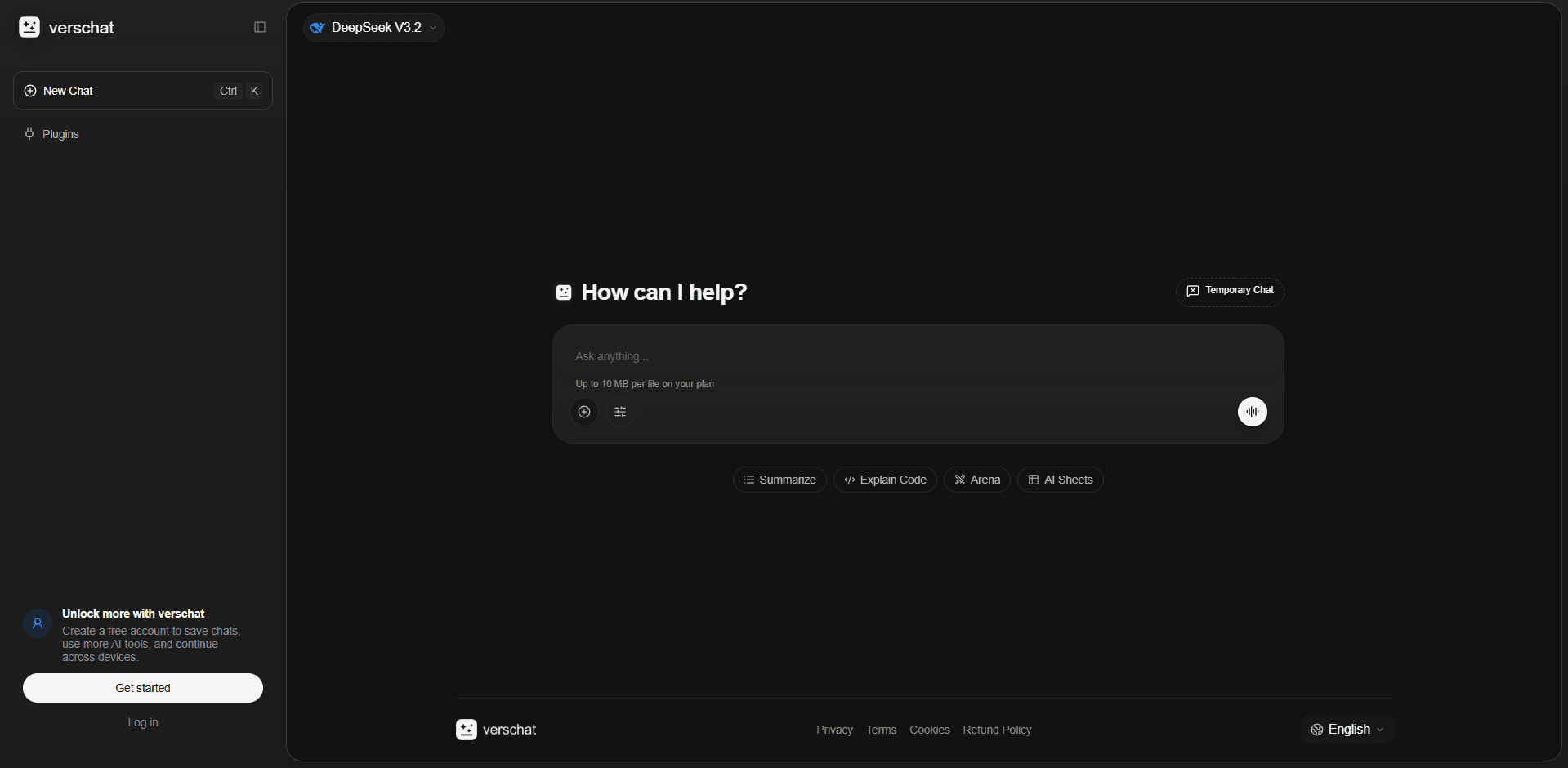
About this app
Verschat is an all-in-one AI workspace that brings together slides, docs, code, and design into a single, unified platform. It's designed to streamline your workflow by eliminating the need to switch between multiple tools. With Verschats, you can create presentations, write documents, generate code, and design graphics all in one place, powered by AI. The platform includes a chat interface, AI-powered tools for summarizing, explaining code, and more, plus features like temporary chats and AI Sheets for data analysis. It integrates popular AI models like DeepSeek and offers a free tier to get started. Whether you're a student, professional, or creative, Verschats aims to boost your productivity and creativity by providing a cohesive AI-driven environment.
Key features
- 1Multi-model AI access: DeepSeek, Mistral, Kimi, Gemini in one interface
- 2AI Arena for comparing model responses side-by-side
- 3Editable AI Sheets for data analysis with export capability
- 4Temporary chat for privacy-conscious conversations
- 5Web research integration with source review
- 6Code workspace with preview and iteration support
Target customer profile
Drawn from the product itself, not from a survey.
Demographic
Students and educators
Pain points
Have to juggle multiple tools for notes, presentations, and research; need quick summaries and explanations.
Primary needs
A unified platform for creating study materials, summarizing content, and generating ideas.
Demographic
Business professionals and knowledge workers
Pain points
Switching between different SaaS tools for documents, slides, and coding; lack of integration and AI assistance.
Primary needs
Efficient workflows, AI-generated content, and a single workspace to manage various tasks.
Demographic
Developers and technical writers
Pain points
Need to write code and documentation separately; want AI help for code explanations and generation.
Primary needs
A platform that combines code editing with AI assistance and documentation tools.
Demographic
Creative professionals and marketers
Pain points
Time-consuming design processes; need to produce visual content quickly.
Primary needs
AI-powered design tools and easy creation of presentations and graphics.
Scout Review
Written by AI from measured evidence, scored out of 100.
Verschat is a promising but incomplete AI workspace. Its performance is outstanding — Lighthouse 100/100 with sub-second LCP — and the dark-themed interface is visually clean. Security headers are solid, and accessibility scores well. However, the app UI doesn't deliver on the homepage's promises: slides, docs, and design tools are nowhere to be seen in the interface. Navigation is minimal, and the main pane is mostly empty space. The multi-model approach and AI Sheets are differentiators, but the broad targeting against entrenched competitors like Notion and Microsoft makes growth an uphill battle. It's a solid foundation with real potential, but it needs to close the gap between marketing and product.
Measure by measure
Usability
55Navigation is sparse: just 'New Chat' and a model name. No visible way to reach slides, docs, or design tools promised on the homepage. The workflow explanation is clear, but the app UI doesn't reflect it. No docs or help center found. Free tier exists but signup flow untested.
Design
58Clean dark theme with good contrast, but the main pane is mostly empty black space. Sidebar lacks hierarchy and the 'Plugins' label has no content. Prompt chips are inconsistent ('AI Anime' among productivity tools). Feels unfinished despite a polished color scheme.
Speed
85Exceptional performance: Lighthouse desktop 100/100, LCP 612ms, CLS 0, TBT 25ms. FCP at 281ms. The site is lightweight and snappy with no heavy assets detected. No user complaints about lag found.
Security
72Strong baseline: HTTPS, HSTS, CSP, frame protection, and other headers all present (10/12 checklist). Missing SPF and DMARC records. No SOC 2, ISO, or pen-test reports published. Privacy policy exists but depth unverified. No bug bounty program found.
Accessibility
78Lighthouse accessibility audit 98/100 with two minor failures: heading order not sequential and some visible labels lack matching accessible names. High contrast dark theme aids readability. No WCAG statement or multi-language support found. Keyboard navigation untested but likely functional given SPA structure.
Growth
52Real problem (tool fragmentation) but the wedge is blurry — 'all-in-one' against Notion, Microsoft, Google, and Canva. Multi-model access and AI Sheets are differentiators, but the broad targeting dilutes the pitch. Category has headroom, but incumbents are entrenched.
Improvement areas
- No visible navigation to slides, docs, or design tools in the app UI
- Main pane is mostly empty black space, making the interface feel unfinished
- Missing pricing page and detailed documentation/help center
- No SOC 2, ISO, or pen-test reports published
- SPF and DMARC records not configured
- Heading order and accessible name issues flagged by Lighthouse
Design & Usability
Verschat presents a clean, dark-themed interface that's visually consistent but functionally sparse. The homepage promises slides, docs, code, and design tools, yet the app UI shows only a chat interface with a model selector and a few prompt chips. Navigation is minimal — 'New Chat' and a dropdown — with no visible path to the promised workspaces. The main pane is dominated by empty black space, making the product feel unfinished. The workflow explanation on the homepage is clear, but the app doesn't reflect it. For a tool that claims to reduce tool-switching, the lack of visible modes is a significant usability gap. The free tier and temporary chat are nice touches, but without docs or a help center, users are left to figure things out on their own.
Speed & Security
Performance is a clear win: Lighthouse scores 100/100 on desktop with LCP at 612ms and zero layout shift. The site is lightweight and responsive, with no heavy assets slowing it down. Security is solid at the baseline — HTTPS, HSTS, CSP, and frame protection are all in place, scoring 10/12 on the header checklist. However, missing SPF and DMARC records leave email spoofing unaddressed, and there's no published SOC 2, ISO, or pen-test report. For a tool handling documents and code, the lack of formal security certifications is a gap, though not unusual for a product at this stage. The privacy policy exists but its depth is unverified. Overall, speed is excellent and security is competent but not exceptional.
Accessibility & Growth
Accessibility is strong with a 98/100 Lighthouse score, though two minor issues persist: heading order isn't sequential and some visible labels lack matching accessible names. The high-contrast dark theme aids readability. No WCAG statement or multi-language support was found. Growth potential is moderate — the problem of tool fragmentation is real, and multi-model access plus editable AI Sheets are genuine differentiators. However, the target audience is broad (students, professionals, developers, creatives), which dilutes the pitch. Competing against Notion AI, Microsoft 365 Copilot, Google Workspace, and Canva means facing entrenched incumbents with massive distribution. The 'all-in-one' positioning needs a sharper wedge to stand out.
Conclusion
Verschat has the bones of a good product — fast, secure, and accessible — but it's currently a chat interface wearing an 'all-in-one workspace' costume. The roadmap is ambitious, and the multi-model integration is genuinely useful. If the team can bring the promised slides, docs, and design tools into the actual UI, this could be a compelling alternative to the incumbents. For now, it's a well-built chatbot with big dreams. Worth watching, but not yet ready to replace your stack.
Suggestions for improvement
- Add visible navigation to slides, docs, and design tools in the app UI
- Publish a pricing page and detailed documentation/help center
- Fix heading order and accessible name issues flagged by Lighthouse
- Add SPF and DMARC records to improve email security posture
Alternatives comparison
Named competitors, point by point. Nobody paid to appear here or to be left out.
 Verschat Verschat |  Notion AI Notion AI |  Microsoft 365 Copilot Microsoft 365 Copilot |  Google Workspace (with Gemini) Google Workspace (with Gemini) |  Canva Magic Studio Canva Magic Studio | |
|---|---|---|---|---|---|
| AI model access | Multiple models: DeepSeek, Mistral, Kimi, Gemini | Single integrated AI model (Anthropic/OpenAI) | Microsoft's Copilot (GPT-4 based) | Gemini integrated across Workspace | Magic Studio with multiple AI tools |
| Workspace types | Chat, code, sheets; slides/docs/design promised but not visible | Docs, wikis, databases, projects | Word, PowerPoint, Excel, Teams, Outlook | Docs, Sheets, Slides, Gmail, Drive | Design, presentations, documents, whiteboards |
| AI comparison feature | AI Arena for side-by-side model comparison | No comparison feature | No comparison feature | No comparison feature | No comparison feature |
| Editable spreadsheet | AI Sheets with editable cells and export | Databases with limited spreadsheet-like views | Excel with full spreadsheet capabilities | Sheets with full spreadsheet capabilities | No spreadsheet feature |
| Free tier | Free tier with temporary chat and 10 MB file limit | Free plan with limited AI responses | Free with limited Copilot features | Free tier with limited Gemini features | Free tier with limited Magic Studio features |
| Web research integration | Web search and deep research with source review | Limited web search in AI responses | Bing search integration | Google Search integration | No web research feature |
Notion AI
A comprehensive workspace with integrated AI for writing, brainstorming, and project management.
Microsoft 365 Copilot
Integrates AI into Word, PowerPoint, Excel, and more for seamless document creation and analysis.
Google Workspace (with Gemini)
Google's suite with AI-powered features in Docs, Sheets, and Slides for collaborative work.
Canva Magic Studio
AI-powered design and presentation tools for creating visual content quickly.
Comparing options? See Verschat alternatives, scored side by side
More Productivity apps
View all Productivity
Notion
92All-in-one AI workspace for docs, projects, and knowledge...

Qamarero
92An all-in-one hospitality software for restaurants and ba...

EmbedMyReviews
92White-label reputation management software for agencies s...

StoryPad
92Privacy-first open source journal app with a continuous t...

Puzzly – B2B Lead Generation & Sales Intelligence Platform
92Puzzly is an all-in-one B2B lead generation platform that...

The Stack Newsletter
92A weekly newsletter delivering curated tech jobs, intervi...

Vibe Coding Agent Skills
92A free, open-source platform offering 110 AI agent skills...

QRBliss
91Branded QR codes with AI Brand Sync, 15 free dynamic code...

Gerty
91Private, local AI assistant for Mac that runs offline

CC Switch
91Open-source desktop app for switching AI coding providers...

username.md
90One verified handle for your online identity, readable by...

PitchWhip
90AI cold call scripts & direct dials from LinkedIn


A platform dedicated to providing unbiased reviews of newly launched applications, analyzing everything from their features to their full potential.
info@scoutforge.net© 2026 Scoutforge. All rights reserved.
