

A platform dedicated to providing unbiased reviews of newly launched applications, analyzing everything from their features to their full potential.
info@scoutforge.net© 2026 Scoutforge. All rights reserved.
A platform dedicated to providing unbiased reviews of newly launched applications, analyzing everything from their features to their full potential.
info@scoutforge.net© 2026 Scoutforge. All rights reserved.
A platform dedicated to providing unbiased reviews of newly launched applications, analyzing everything from their features to their full potential.
info@scoutforge.net© 2026 Scoutforge. All rights reserved.
Cycling through all six. Tap any point to stop.
Measured on six things
Privacy-first on-device Mac calendar sync tool.
Mac-only with Windows/iOS on vague roadmap. Lifetime option and reasonable pricing (£19.99/yr or £39.99 lifetime) aid retention. Niche but strong for privacy-focused freelancers. Early-stage with limited visibility or user testimonials found.
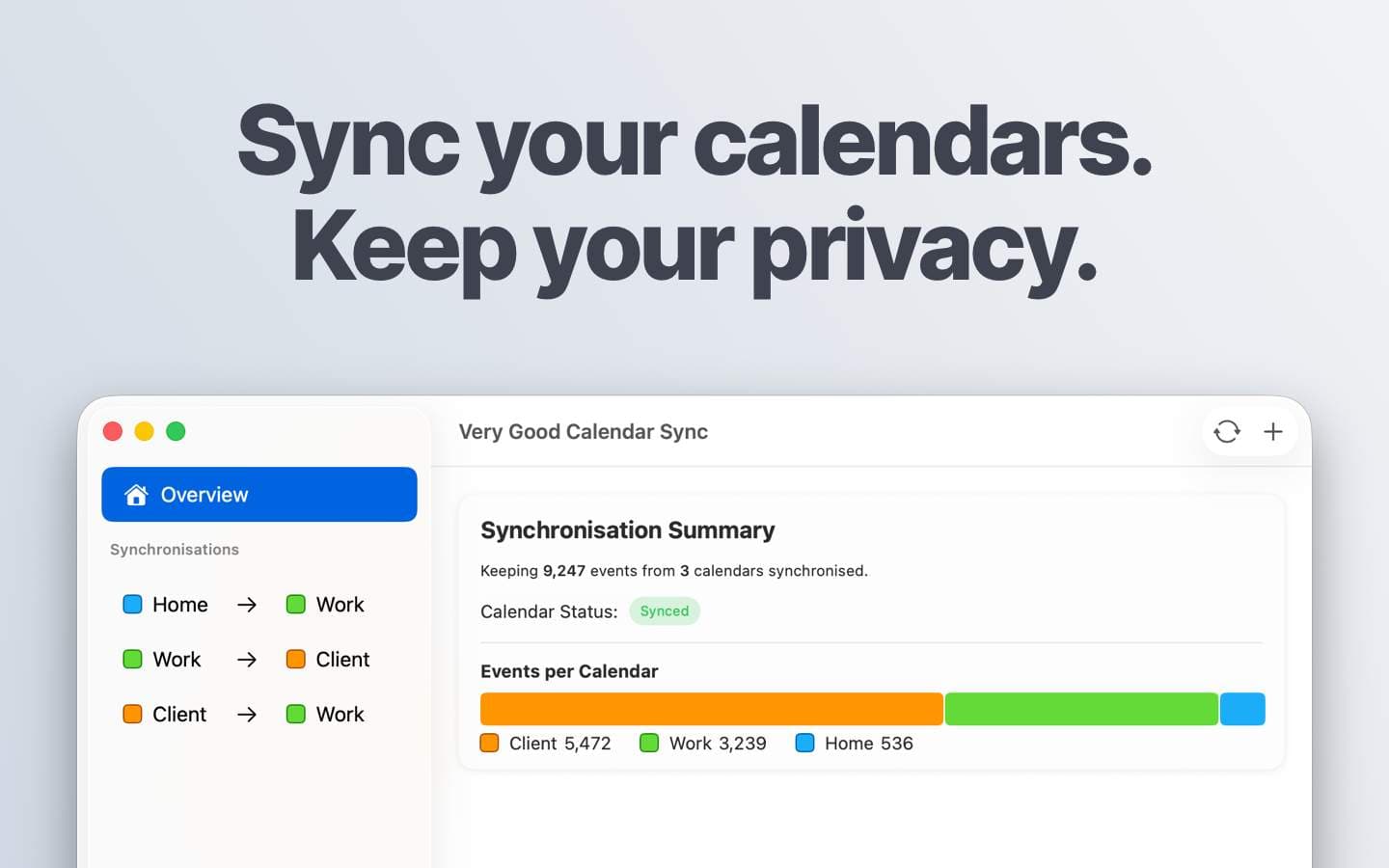
Very Good Calendar Sync is a breath of fresh air for anyone juggling multiple calendars. This Mac-only app runs quietly in your menu bar, synchronizing Google, Microsoft, Apple, and CalDAV calendars without ever sending your data to the cloud. It lets you clone events with full details or redact them to show only that you're busy—perfect for sharing availability without oversharing your life. Setup takes two minutes, and the first sync is free. The app is built by a developer who got tired of double-bookings and third-party apps demanding access to personal calendars. Whether you're a freelancer, consultant, or just someone with a work and personal calendar, this tool keeps your schedules honest and your privacy intact.
Drawn from the product itself, not from a survey.
Demographic
Freelancers & consultants
Pain points
Manually cross-checking client calendars; double-bookings
Primary needs
Automated sync without exposing client data
Demographic
Employees with multiple calendars (work & personal)
Pain points
Team members can't see personal appointments; risk of conflicts
Primary needs
Redact personal details while showing availability
Demographic
Agencies & cross-functional teams
Pain points
Confusion between internal and client-facing schedules
Primary needs
Real-time, accurate availability across teams
Demographic
Privacy-conscious professionals
Pain points
Distrust of cloud-based sync services; data exposure risks
Primary needs
On-device processing with no external data transmission
Written by AI from measured evidence, scored out of 100.
Very Good Calendar Sync is a focused, privacy-obsessed tool that solves real calendar pain points better than most by staying entirely on your Mac. Its redaction features, seamless macOS integration, and zero-data-leak policy make it excellent for consultants and anyone juggling sensitive schedules. It won't replace your main calendar app, but it will stop the double-bookings and oversharing that plague multi-calendar users. Not the prettiest or most feature-packed, but in the areas that actually matter—privacy, simplicity, and reliability—it punches well above its weight. Strong recommendation for the privacy-conscious Mac user.
Two-minute setup using macOS Internet Accounts. Menu bar icon for effortless background syncing. Intuitive clone vs redact options plus day/time filters. No extra logins or accounts to link—feels native.
Clean, minimal menu bar-first native macOS design that stays out of the way. Simple setup wizard and straightforward redact/clone toggles. Lacks polish in visuals compared to modern apps—no fancy screenshots or themes noted.
Purely on-device local sync means near-instant updates when calendars change—no polling delays or cloud roundtrips. Automatic on changes while Mac is awake. OneCal claims ~4s real-time; this is effectively immediate locally.
Zero data leaves your device. No servers, no analytics, no data collection. Uses macOS credential storage directly. Perfect for privacy-conscious users avoiding cloud exposure that OneCal and CalendarBridge require.
Native macOS menu bar app inherits some system accessibility (VoiceOver, keyboard nav likely). No specific contrast, font size, or additional a11y features mentioned. Limited to Mac only reduces reach.
Mac-only with Windows/iOS on vague roadmap. Lifetime option and reasonable pricing (£19.99/yr or £39.99 lifetime) aid retention. Niche but strong for privacy-focused freelancers. Early-stage with limited visibility or user testimonials found.
Very Good Calendar Sync nails the basics with a no-nonsense menu bar presence and dead-simple two-minute setup that leverages existing macOS accounts. The core interaction—choosing to clone full events or redact them to 'busy' blocks with optional time/day filters—is elegant and directly addresses the double-booking and oversharing problems freelancers and consultants face daily. Design is utilitarian rather than flashy, which fits a background utility perfectly. It feels native because it is. Compared to cloud alternatives that require account linking and dashboard logins, this is refreshingly invisible until you need it. Usability is where it shines brightest—set it and mostly forget it while it prevents calendar chaos without exposing your life.
Local on-device processing delivers effectively instant synchronization whenever your calendars update, with no cloud latency, polling intervals, or server delays. This is meaningfully faster than OneCal's reported multi-second syncs or the 10+ minute polling some competitors use. Security is the standout: absolutely nothing leaves your Mac. No data is stored, analyzed, or transmitted. This is a massive differentiator against OneCal (cloud-based with server storage) and CalendarBridge (requires account linking and cloud infrastructure). For privacy-conscious users tired of granting third-party apps broad calendar access, this is as good as it gets. The trade-off is that sync only happens while the Mac is awake and the app is running.
Accessibility is average for a native menu bar utility—likely supports standard macOS tools but lacks documented enhancements or broad platform support. Growth potential is moderate: the privacy-first, on-device pitch resonates strongly with the target audience of freelancers, agencies, and security-minded professionals, and lifetime pricing helps. However, being Mac-only in a multi-device world limits its appeal. The developer has a clear roadmap for expansion, but execution will determine if it grows beyond a niche tool. It excels at its narrow mission but needs broader availability to reach its full potential.
Conclusion
If you're done feeding your calendar data to cloud services and just want calendars that play nicely without exposing your doctor's appointments, this is the one. Simple, effective, and actually respects your privacy. The developer built it because existing options sucked. Mission accomplished.
Named competitors, point by point. Nobody paid to appear here or to be left out.
 Very Good Calendar Sync Very Good Calendar Sync |  OneCal OneCal |  Calendarbridge Calendarbridge | |
|---|---|---|---|
| Sync Architecture | Fully on-device, local only | Cloud-based, server processed | Cloud-based with account linking |
| Privacy (Data Transmission) | Nothing leaves device | Data stored/processed on servers | Cloud infrastructure, OAuth access |
| Event Redaction | Clone full or redact to busy | Similar redaction features | Privacy controls, busy/private |
| Setup Complexity | 2 minutes, uses macOS accounts | Account creation + linking | Requires account linking |
| Platforms | Mac only (others on roadmap) | Web + multiple platforms | Multi-platform (incl. mobile) |
OneCal
Cloud-based calendar sync with similar redaction features but stores data on servers.
Calendarbridge
Syncs calendars across platforms but requires account linking and cloud storage.
Comparing options? See Very Good Calendar Sync alternatives, scored side by side
What the review was written against. A verdict with no sources is an opinion.

An all-in-one hospitality software for restaurants and ba...

A weekly newsletter delivering curated tech jobs, intervi...

White-label reputation management software for agencies s...

Privacy-first open source journal app with a continuous t...

Puzzly is an all-in-one B2B lead generation platform that...

All-in-one AI workspace for docs, projects, and knowledge...

A free, open-source platform offering 110 AI agent skills...

Open-source desktop app for switching AI coding providers...

One verified handle for your online identity, readable by...

Frame-perfect video-to-GIF maker that runs entirely in yo...

White-label website audits that close deals for digital a...

Automated quote follow-up for trades and service businesses.
A platform dedicated to providing unbiased reviews of newly launched applications, analyzing everything from their features to their full potential.
info@scoutforge.net© 2026 Scoutforge. All rights reserved.
