Cycling through all six. Tap any point to stop.
Measured on six things
Convert Outlook OST files to EML format Securely
Security
28HTTPS not enforced, no HSTS, CSP, or frame protection; only SPF present (1/12 checklist points). No DMARC, no security page, no compliance claims. Weak even for a small utility.
Screenshots
1 / 4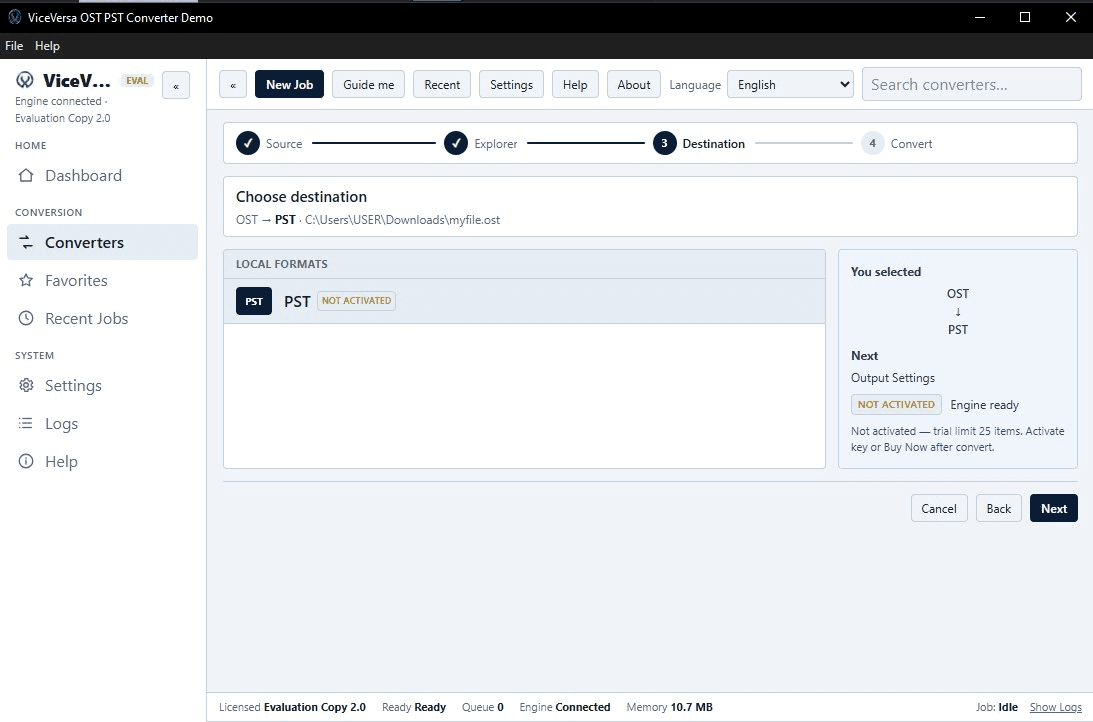
About this app
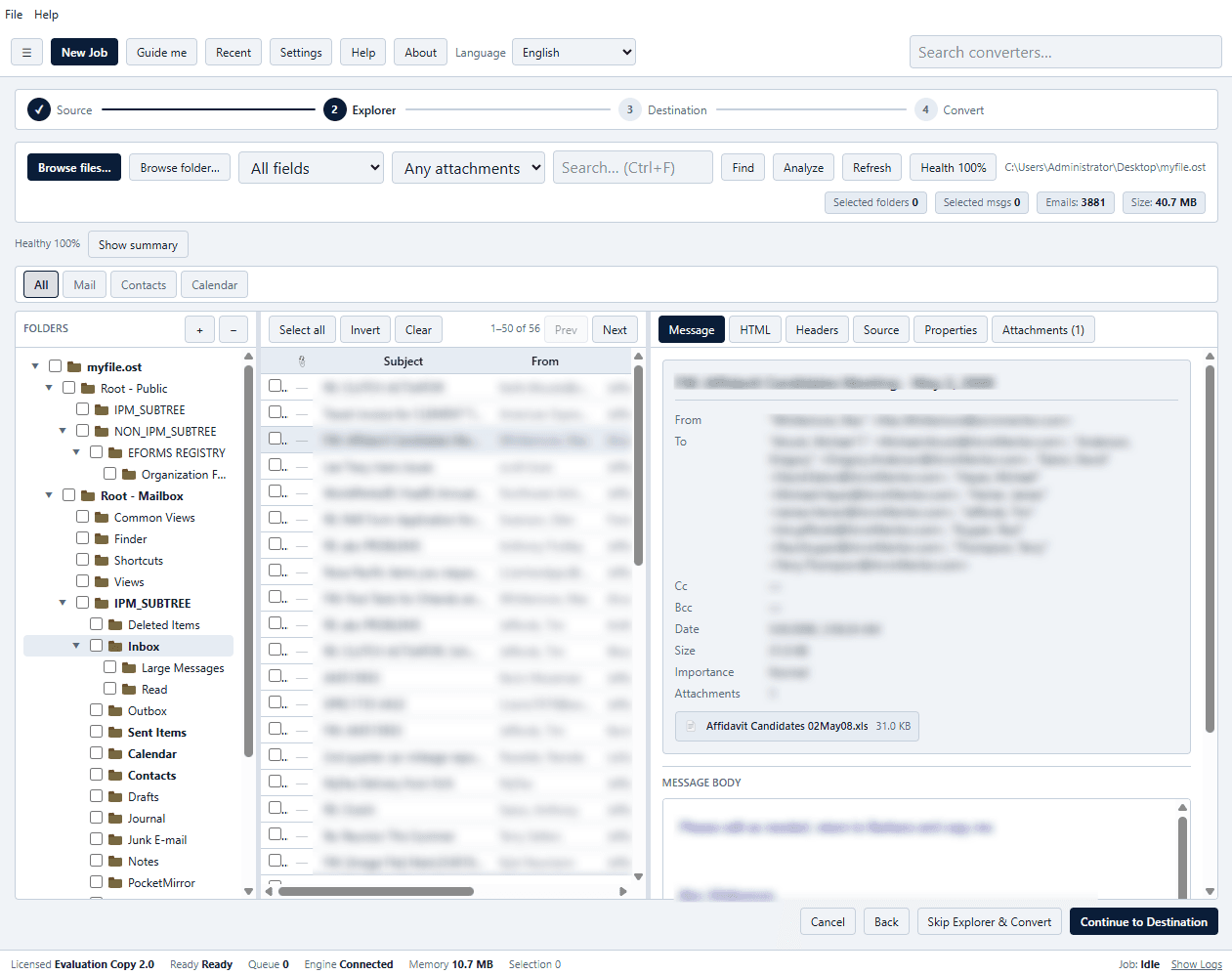
ViceVersa OST to EML Converter is a reliable application developed for converting OST files into EML format. It helps users retrieve and transfer mailbox emails from OST files into individual EML files for easier storage, organization, and compatibility with email applications. The software offers a user-friendly interface that simplifies the conversion process, making it suitable for both technical and non-technical users. All resulting EML files are easily opened in Windows Live Mail, Thunderbird, Apple Mail and many others. No external application installation is needed; it works fully independently. Additionally, the OST EML Converter works smoothly on Windows OS.
Key features
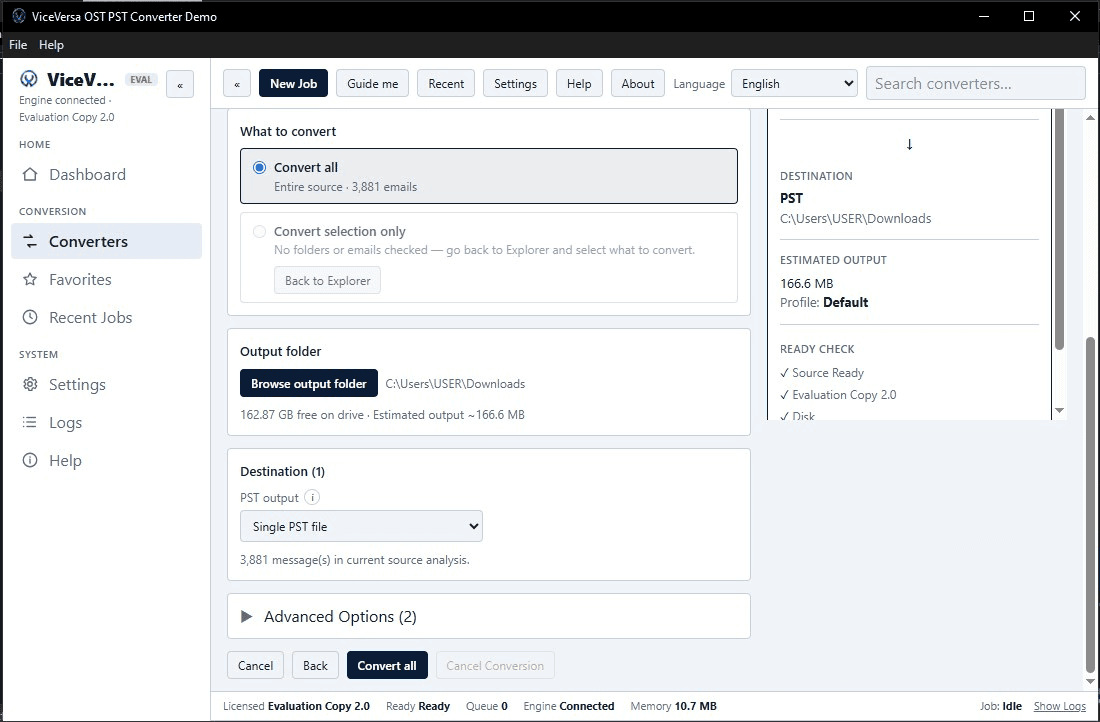
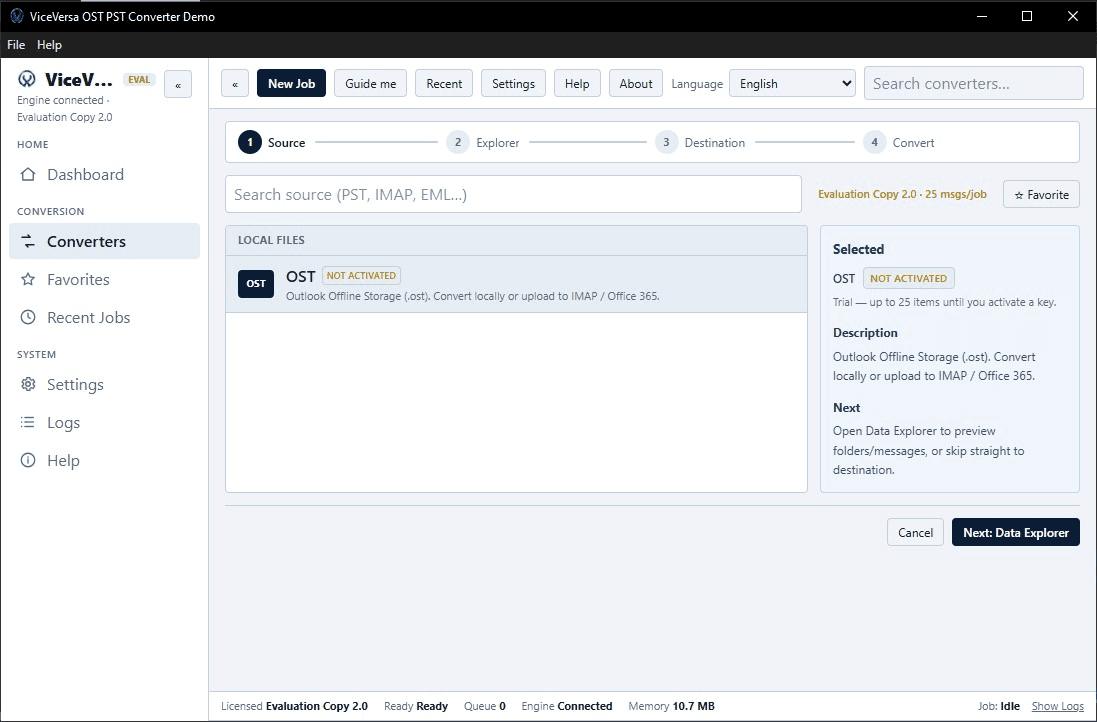
- 1Converts OST files to EML format in a simple three-step flow: load OST, pick EML, set output folder and convert.
- 2Free trial available via ViceVersa-OST-EML-Converter.exe; Personal license $29 for one machine and one year of updates.
- 3Works on Windows 11, 10, 8.1, 8, and 7; output EML files open in Windows Live Mail, Thunderbird, Apple Mail, and others.
Target customer profile
Drawn from the product itself, not from a survey.
Demographic
IT professionals managing email migrations
Pain points
OST files locked to Outlook; difficult to export data for archiving or migration
Primary needs
A reliable tool to extract OST data to EML for system transitions
Demographic
Departing employees needing to retain email history
Pain points
Cannot access OST files after leaving organization; email data trapped
Primary needs
Portable email format (EML) for personal archiving and future access
Demographic
Small business owners using Outlook without Exchange
Pain points
OST files not portable; hard to share or backup email outside Outlook
Primary needs
Convert OST to EML for external backup and client compatibility
Scout Review
Written by AI from measured evidence, scored out of 100.
ViceVersa OST to EML Converter is a competent, narrowly focused desktop utility that does one thing: convert OST files to EML. The landing page is clean, the three-step flow is clear, and the free trial lets you test before buying. Speed is genuinely good (Lighthouse 84 mobile, 99 desktop), and the $29 price undercuts the established competition. But the app UI is dated, the security posture is weak (1/12 headers, no HTTPS enforcement), accessibility has structural gaps, and the product offers no differentiator beyond price against SysTools and Stellar. It's a solid choice if you need exactly this conversion and nothing else, but it's not a category leader.
Measure by measure
Usability
62Three-step flow is clear and trial is free, but no live demo, no search, and docs are just an FAQ. Onboarding is straightforward for a desktop utility.
Design
58Clean, consistent landing page with clear hero and CTAs, but repetitive feature cards and a dated Windows app UI drag it to average. Functional, not memorable.
Speed
72Lighthouse mobile 84/100 (LCP 3.8s, TBT 0ms) and desktop 99/100. Lightweight marketing page loads fast; no user complaints about lag found.
Security
28HTTPS not enforced, no HSTS, CSP, or frame protection; only SPF present (1/12 checklist points). No DMARC, no security page, no compliance claims. Weak even for a small utility.
Accessibility
68Lighthouse 90/100 with minor ARIA and landmark failures. No a11y statement or multi-language support, and Windows-only limits platform coverage. Solid automated score, thin manual signals.
Growth
54Real problem (OST lock-in) with a specific audience, but no differentiator beyond price against SysTools and Stellar. Niche category with limited headroom.
Improvement areas
- Security headers are almost entirely absent (1/12 checklist points); HTTPS not enforced, no HSTS, CSP, or DMARC.
- App UI uses dated Windows desktop styling with flat panels and dense information layout; landing page feature cards repeat the same message.
- No live demo, no search in nav, and documentation is limited to an FAQ; no accessibility statement or multi-language support.
Design & Usability
The landing page is clean and the hero does its job: bold headline, clear CTAs, and a floating app mockup that shows exactly what you're buying. The three-step flow (load OST, pick EML, convert) is communicated well both on the site and in the app's wizard-style progress bar. But the design stops at 'competent.' Three feature cards repeat the same OST→EML message with near-identical copy, and the app UI itself looks like a Windows 7 utility — flat panels, standard title bar, dense information layout. Usability is similarly functional: free trial, clear pricing, and a straightforward flow, but no live demo, no search in the nav, and documentation is just an FAQ. For a desktop utility aimed at IT professionals, that's probably enough. For anyone else, it's a shrug.
Speed & Security
Speed is the strongest measured dimension: Lighthouse mobile 84/100 with a 3.8s LCP and 0ms TBT, desktop 99/100. The site is a lightweight marketing page with no heavy framework, and no user complaints about lag surfaced in the collected evidence. Security is the opposite story. The HTTP probe found HTTPS not enforced, no HSTS, no CSP, no frame protection, no X-Content-Type-Options, no Referrer-Policy, no Permissions-Policy, and no DMARC — just SPF, for a 1/12 checklist score. For a tool that handles entire email archives, that's a real gap. There's no security page, no compliance claims, and no published audits. The privacy policy is a cookie notice that says it stores no personal details. That's not a security posture; it's an absence of one.
Accessibility & Growth
Accessibility scores 90/100 on Lighthouse, which sounds great until you read the failing audits: ARIA roles missing required children, lists containing non-li elements, and no main landmark. Those are basic structural issues that automated tools catch and manual testing would catch harder. There's no accessibility statement, no WCAG mention, and no multi-language support. The Windows-only desktop app also limits platform coverage. Growth is a judgment call on the idea: the problem is real (OST files are locked to Outlook, and people need portable EML exports for migration and archiving), and the target customer is specific (IT professionals, departing employees, small businesses without Exchange). But the differentiator against SysTools and Stellar is essentially price — $29 versus their typical $49+. That's a wedge, but a thin one. The category has room, but ViceVersa isn't claiming a segment the incumbents can't serve.
Conclusion
If you're an IT pro with a pile of OST files and a $29 budget, this will get the job done. The trial is free, the flow is simple, and the output is standard EML that opens anywhere. But if you need broader format support, better security, or a tool with a modern interface, the alternatives are worth the extra money. ViceVersa has built a functional utility, not a standout product. It works. That's the whole review.
Suggestions for improvement
- Enforce HTTPS and add basic security headers (HSTS, CSP, X-Content-Type-Options) — 1/12 is not a passing grade for a tool handling email archives.
- Modernize the app UI: the Windows 7-era flat panels and dense layout make it look older than it is.
- Add a live demo or interactive walkthrough so users can see the conversion flow before downloading the trial.
- Publish a real help center or documentation beyond the FAQ — IT professionals want to know about edge cases, error handling, and batch limits.
Alternatives comparison
Named competitors, point by point. Nobody paid to appear here or to be left out.
 ViceVersa OST to EML Converter ViceVersa OST to EML Converter |  SysTools OST Converter SysTools OST Converter |  Stellar Converter for OST Stellar Converter for OST | |
|---|---|---|---|
| Output formats supported | EML only (one-way OST → EML) | EML, PST, MSG, and more | EML, PDF, and other formats |
| Pricing (entry-level) | $29 Personal (1 machine, 1 year updates) | Typically $49+ for standard license | Typically $49+ for standard license |
| Free trial available | Yes (ViceVersa-OST-EML-Converter.exe) | Yes (trial version with limitations) | Yes (trial version with limitations) |
| Security posture (HTTPS, headers, compliance) | HTTPS not enforced; 1/12 security headers; no compliance claims | HTTPS enforced; standard security headers; no public SOC 2 | HTTPS enforced; standard security headers; no public SOC 2 |
| Platform support | Windows 11, 10, 8.1, 8, 7 only | Windows only | Windows and macOS |
SysTools OST Converter
Converts OST to EML, PST, MSG, and more with advanced options.
Stellar Converter for OST
Professional OST conversion tool supporting EML, PDF, and other formats.
Comparing options? See ViceVersa OST to EML Converter alternatives, scored side by side
More Productivity apps
View all Productivity
Qamarero
92An all-in-one hospitality software for restaurants and ba...

The Stack Newsletter
92A weekly newsletter delivering curated tech jobs, intervi...

EmbedMyReviews
92White-label reputation management software for agencies s...

StoryPad
92Privacy-first open source journal app with a continuous t...

Puzzly – B2B Lead Generation & Sales Intelligence Platform
92Puzzly is an all-in-one B2B lead generation platform that...

Notion
92All-in-one AI workspace for docs, projects, and knowledge...

Vibe Coding Agent Skills
92A free, open-source platform offering 110 AI agent skills...

CC Switch
91Open-source desktop app for switching AI coding providers...

username.md
90One verified handle for your online identity, readable by...

What the GIF
89Frame-perfect video-to-GIF maker that runs entirely in yo...

AuditCloser
89White-label website audits that close deals for digital a...

NudgeWin
89Automated quote follow-up for trades and service businesses.


A platform dedicated to providing unbiased reviews of newly launched applications, analyzing everything from their features to their full potential.
info@scoutforge.net© 2026 Scoutforge. All rights reserved.
