Cycling through all six. Tap any point to stop.
Measured on six things
Remove burned-in text, subtitles and logos from your videos
Security
52HTTPS enforced, secure cookies, SPF and DMARC in place. But no HSTS, CSP, frame protection or Referrer-Policy, and no published SOC 2, ISO or bug bounty. File links are shareable by anyone holding them.
Screenshots
1 / 1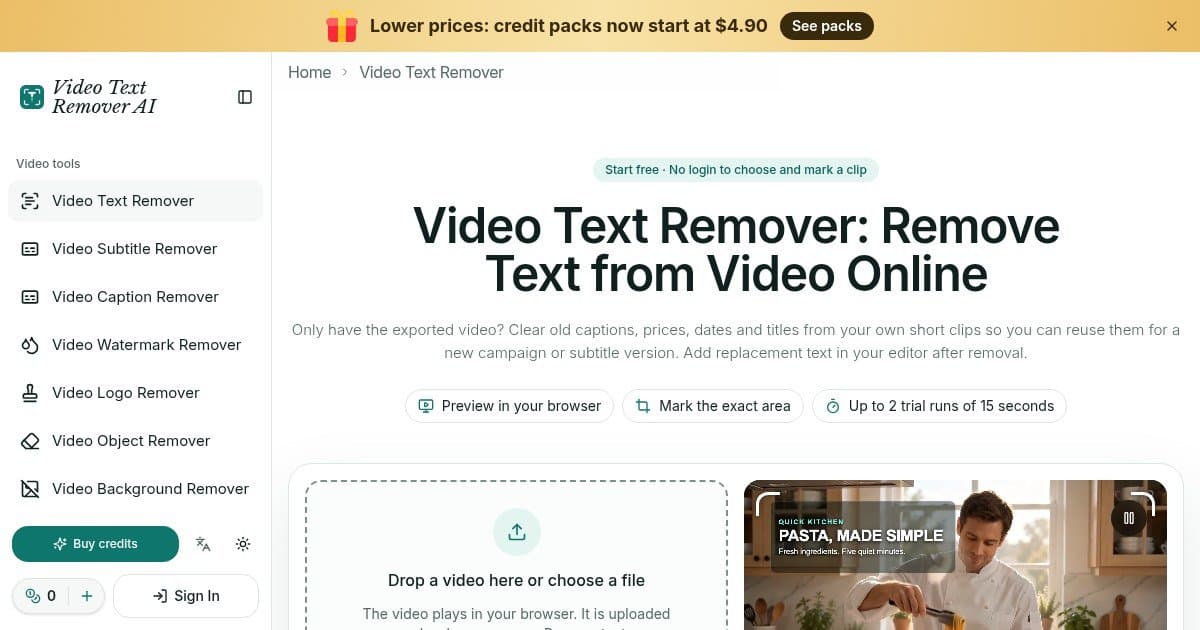
About this app
Video Text Remover AI is a browser-based tool for removing burned-in text from your own exported videos. Choose an MP4, MOV or WebM clip (up to 60 seconds and 50 MB), preview it in your browser, drag up to three boxes over the words and set when each box applies on the timeline. The AI rebuilds the picture behind the text instead of blurring it. The same editor also handles subtitles, captions, watermarks, logos, objects and backgrounds, and a free audio remover makes a silent copy in your browser. Choosing and marking a clip is free with no login; each account gets two trial runs for clips up to 15 seconds. Paid runs use credits (1 credit = 1 second; the cost is shown before you submit, failed runs are refunded in credits). Only edit videos you own or have permission to change.
Key features
- 1Browser-based removal of burned-in text, logos, watermarks and objects from MP4/MOV/WebM clips up to 60s and 50 MiB
- 2Up to three time-ranged selection boxes per clip with in-browser preview before submission
- 3Per-second credit pricing from $4.90 with no subscription required; failed runs refunded; free audio remover
Target customer profile
Drawn from the product itself, not from a survey.
Scout Review
Written by AI from measured evidence, scored out of 100.
Video Text Remover AI is a focused, honestly-priced tool for a real problem: stripping logos, text and watermarks from short clips you own. The free preview and per-second credit model are genuinely user-friendly, and the accessibility score is excellent. The weak spots are mobile performance (7.7s LCP) and a thin security posture — no CSP, HSTS or published audits — which matters for anyone handling client footage. Design is clean but template-y, and the crowded category means discovery is the real challenge.
Measure by measure
Usability
68Upload constraints are stated upfront, marking a clip is free without login, and cost is shown before submission with failed runs refunded. Dense tables and FAQ below the fold add friction for newcomers.
Design
70Clean teal-accented UI with clear hierarchy, prominent upload zone and honest before/after examples. Sidebar of 8+ tools and repeated hero templates add density and a whiff of template reuse.
Speed
58Desktop Lighthouse 86/100 is solid, but mobile sits at 62/100 with a 7.7s LCP and 5.1s FCP — the page takes a while to become usable on a phone. CLS 0.02 and TBT 80ms are fine.
Security
52HTTPS enforced, secure cookies, SPF and DMARC in place. But no HSTS, CSP, frame protection or Referrer-Policy, and no published SOC 2, ISO or bug bounty. File links are shareable by anyone holding them.
Accessibility
82Lighthouse accessibility 100/100 with only one minor failing audit on accessible names. Language switcher and theme toggle present. Automated checks don't cover full WCAG, so this sits in the upper band.
Growth
58Real, specific problem with a clear wedge: browser preview, per-second credits from $4.90, no subscription lock-in. Category is crowded with general editors and eraser tools, so headroom depends on execution.
Improvement areas
- Mobile performance: 7.7s LCP and 62/100 Lighthouse score need work
- Security headers: no HSTS, CSP, frame protection or Referrer-Policy; no published audits
- Design density: 8+ tool sidebar and repeated hero templates reduce focus
Design & Usability
The design is competent and consistent — teal accents, clear upload constraints, and honest before/after examples that even label themselves as same-model demos rather than real user tasks. The sidebar of eight-plus tools and repeated hero templates make it feel like a template farm rather than a focused product. Usability is the stronger half: you can pick and mark a clip for free without logging in, the cost is shown before submission, and failed runs are refunded. The two 15-second trial runs are a reasonable taste, but the dense comparison tables and long FAQ push the actual 'try it' moment below the fold.
Speed & Security
Speed is a tale of two devices: desktop Lighthouse 86/100 is genuinely good, but mobile 62/100 with a 7.7s LCP and 5.1s FCP means phone users wait a long time for the page to become usable. Security is the weakest dimension. HTTPS, secure cookies, SPF and DMARC are in place, but HSTS, CSP, frame protection and Referrer-Policy are all missing, and there's no published SOC 2, ISO or bug bounty. The site is candid that file links are accessible to anyone holding them and that files are kept for 7 days — honest, but not reassuring for anyone handling client footage.
Accessibility & Growth
Accessibility is the standout: Lighthouse 100/100 with only one minor failing audit on accessible names, plus a language switcher and theme toggle. Automated checks don't cover everything, but this is well above category norm. Growth is a judgement on the idea: removing burned-in logos and text from owned short clips is a real, specific problem, and the wedge — browser preview, per-second credits from $4.90, no subscription, refunded failures — is genuinely differentiated from general editors. The category is crowded, and the domain is brand new, so the question is whether the pricing granularity and honest positioning are enough to get discovered before users default to a full editor.
Conclusion
If you need to remove a logo from a 30-second clip and don't want a subscription, this is a sensible, transparent option with a fair trial. If you're handling sensitive client footage or need to work on mobile, wait for the security headers and performance to catch up. The honesty about limitations — same-model examples, shareable file links, refunded failures — is refreshing and worth rewarding.
Suggestions for improvement
- Add HSTS, CSP, frame protection and Referrer-Policy headers; publish a security page
- Improve mobile LCP — 7.7s is well above the 2.5s threshold; consider image optimization and edge caching
- Fix the one failing accessibility audit on accessible names
- Surface the free trial and pricing more prominently above the fold
Alternatives comparison
Named competitors, point by point. Nobody paid to appear here or to be left out.
 Video Text Remover AI Video Text Remover AI |  |  |  | |
|---|---|---|---|---|
| Pricing model | Per-second credits from $4.90, no subscription required | Not specified | Not specified | Not specified |
| Free trial | 2 trial runs up to 15s each, no login to preview | Not specified | Not specified | Not specified |
| Browser-based processing preview | Yes — choose, play and mark clips locally before submission | Not specified | Not specified | Not specified |
| Max clip length / size | 60 seconds / 50 MiB | Not specified | Not specified | Not specified |
| Accessibility score (Lighthouse) | 100/100 | Not specified | Not specified | Not specified |
Comparing options? See Video Text Remover AI alternatives, scored side by side
More Productivity apps
View all Productivity
Qamarero
92An all-in-one hospitality software for restaurants and ba...

The Stack Newsletter
92A weekly newsletter delivering curated tech jobs, intervi...

EmbedMyReviews
92White-label reputation management software for agencies s...

StoryPad
92Privacy-first open source journal app with a continuous t...

Puzzly – B2B Lead Generation & Sales Intelligence Platform
92Puzzly is an all-in-one B2B lead generation platform that...

Notion
92All-in-one AI workspace for docs, projects, and knowledge...

Vibe Coding Agent Skills
92A free, open-source platform offering 110 AI agent skills...

CC Switch
91Open-source desktop app for switching AI coding providers...

username.md
90One verified handle for your online identity, readable by...

What the GIF
89Frame-perfect video-to-GIF maker that runs entirely in yo...

AuditCloser
89White-label website audits that close deals for digital a...

NudgeWin
89Automated quote follow-up for trades and service businesses.


A platform dedicated to providing unbiased reviews of newly launched applications, analyzing everything from their features to their full potential.
info@scoutforge.net© 2026 Scoutforge. All rights reserved.
