Cycling through all six. Tap any point to stop.
Measured on six things
Calculates ROI, payback period and annualised ROI from amount invested, revenue and months, so investments of different lengths compare fairly. Free, no sign-up.
Speed
46Lighthouse mobile 48/100 with a 7.5s LCP and 7.2s FCP is slow for a page whose entire job is three text inputs and some arithmetic. Desktop 61/100 is better but still mid-band. CLS 0 is the one clean number.
Screenshots
1 / 1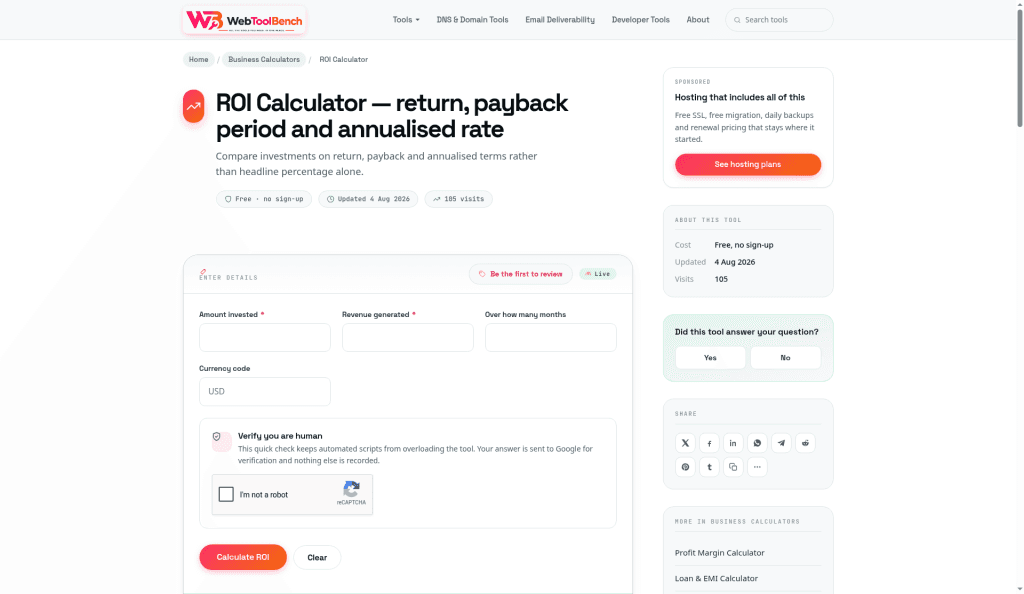
About this app
Free web calculator for return on investment. Enter the amount invested, the revenue generated and the number of months, and it returns ROI, net gain, payback period and annualised ROI. The worked example shows two campaigns with the same 150% ROI: one pays back in 2 months, the other in 16, and annualised they differ by more than twenty times. The page explains what ROI leaves out (time, risk, opportunity cost) and why marketing ROI depends on attribution. No sign-up, and nothing you enter is stored.
Key features
- 1Calculates ROI, net gain, payback period and annualised ROI from three inputs (amount invested, revenue generated, months) plus a currency code.
- 2Worked Campaign A vs B example showing identical 150% headline ROI but 2-month vs 16-month payback and 1,462% vs 58% annualised return.
- 3Editorial content on what ROI leaves out (time, risk, opportunity cost, ongoing cost) and why marketing ROI depends on attribution assumptions.
- 4No sign-up required, nothing stored, and explicit disclosure that reCAPTCHA answers go to Google for verification only.
Target customer profile
Drawn from the product itself, not from a survey.
Demographic
Marketing professionals
Pain points
Struggling to attribute revenue accurately and compare campaign ROI over different timeframes.
Primary needs
A quick way to calculate and compare ROI, payback period, and annualised returns for campaigns.
Demographic
Small business owners
Pain points
Limited working capital and need to prioritize investments with fast payback periods.
Primary needs
Tools to assess cash flow impact and compare investment opportunities efficiently.
Demographic
Individual investors
Pain points
Difficulty comparing investments with different durations and understanding true annualised returns.
Primary needs
A simple calculator that shows ROI, payback period, and annualised ROI for informed decisions.
Scout Review
Written by AI from measured evidence, scored out of 100.
Web Tool Bench's ROI Calculator is a genuinely well-thought-out free tool wrapped in a mediocre page. The core insight — that raw ROI is misleading without time, and that payback period plus annualised ROI is what actually makes investments comparable — is correct, well-explained, and demonstrated with a worked example that lands. The FAQ is substantive. The privacy posture (no sign-up, nothing stored) is exactly right for the category. Against Calculator.net, it wins on features and loses on nothing except brand recognition. But the execution around the tool needs work: a 48/100 mobile Lighthouse score on a page that does arithmetic is indefensible, the eight-card sidebar buries the calculator, and the reCAPTCHA-before-result flow contradicts the 'instant' promise. The product is better than its packaging. Fix the speed, trim the sidebar, and pick one customer segment — the bones here are good.
Measure by measure
Usability
62Three inputs and a currency code is about as low-friction as an ROI calculator gets, and the FAQ plus worked example teach the concept. The reCAPTCHA before any result undercuts the 'free and instant' pitch.
Design
58Clean white layout with clear orange CTAs and a strong worked example, but the eight-card right sidebar fights the calculator for attention and the black monospace result boxes clash with the light UI.
Speed
46Lighthouse mobile 48/100 with a 7.5s LCP and 7.2s FCP is slow for a page whose entire job is three text inputs and some arithmetic. Desktop 61/100 is better but still mid-band. CLS 0 is the one clean number.
Security
63HTTPS enforced, frame protection, X-Content-Type-Options, Referrer-Policy, Permissions-Policy, SPF and DMARC all present (9/13 checklist). Missing HSTS and CSP, and no published audit or bug-bounty program — normal for a new free tool.
Accessibility
82Lighthouse accessibility 97/100 with a single failing audit: insufficient colour contrast. Labelled form inputs and standard HTML give a solid baseline, but there's no a11y statement, no WCAG claim, and the site is English-only.
Growth
54A real, specific problem — raw ROI hides time — with a genuine differentiator (payback period + annualised ROI) that Calculator.net doesn't offer. But the target is three broad segments and the wedge is one extra formula.
Improvement areas
- Mobile Lighthouse performance of 48/100 with 7.5s LCP and 7.2s FCP — far too slow for a form-based calculator.
- reCAPTCHA placed directly in the result path contradicts the 'free and instant' promise and adds friction before any value is delivered.
- Eight-card right sidebar (sponsored hosting, share, most used, browse categories, quick tools) competes with the calculator for attention.
- No accessibility statement, no WCAG conformance claim, and English-only despite a 97/100 automated accessibility score.
Design & Usability
The calculator itself is well-conceived: three inputs, a currency code, and you get ROI, net gain, payback period and annualised ROI. The worked Campaign A vs B example — same 150% headline, 2-month vs 16-month payback, 1,462% vs 58% annualised — is the single best thing on the page and does more teaching than most paid courses. The FAQ answers are substantive, not filler. Where it slips is the shell around the tool: an eight-card right sidebar (sponsored hosting, share, most used, browse categories, quick tools) buries the actual calculator in chrome, and the reCAPTCHA sitting between the user and their first result directly contradicts the 'free and instant' promise printed two inches above it. The empty 'No reviews yet' card is honest but adds nothing. Strip the sidebar to two cards, move the CAPTCHA behind the scenes or drop it for a rate limit, and this becomes a genuinely pleasant tool.
Speed & Security
Speed is the weak spot. Lighthouse mobile scores 48/100 with a 7.5-second LCP and 7.2-second FCP — for a page that is essentially a form and some static text, that is a lot of waiting. Desktop is better at 61/100, and CLS of 0 means nothing jumps around once it does load, but the first-paint numbers are hard to defend when the competition (Calculator.net) is a plain HTML page. Security is more respectable than the score suggests: HTTPS enforced, frame protection, X-Content-Type-Options, Referrer-Policy, Permissions-Policy, SPF and DMARC all present — 9 of 13 checklist items. The gaps are HSTS and CSP, both of which are one-line additions. The privacy posture is genuinely good for a free tool: no sign-up, nothing stored, and the reCAPTCHA disclosure is explicit about what goes to Google. No SOC 2 or bug bounty, but that would be absurd for a calculator at this stage.
Accessibility & Growth
Accessibility is the strongest measured dimension: 97/100 on Lighthouse with a single failing audit for colour contrast. Labelled inputs and standard HTML give screen readers a fair shot, and the page is keyboard-navigable by default. The gaps are documentation rather than function — no accessibility statement, no WCAG conformance claim, English-only. Growth is the interesting question. The problem is real: raw ROI genuinely does hide time, and the annualised-ROI pitch is a legitimate wedge against Calculator.net, which returns a single percentage and stops. The editorial content on attribution and opportunity cost is better than most calculators bother with. But the product names three target segments — marketing professionals, small business owners, individual investors — and serves none of them specifically. The category (free online calculators) has enormous headroom but almost no defensibility: anyone can clone a formula. The realistic path is to own one segment hard — marketing attribution ROI is the most differentiated angle — rather than be the fourth-best general calculator.
Conclusion
The frustrating thing about this tool is that the hard part is done. The math is right, the explanation is clear, the worked example is genuinely instructive, and the privacy stance is honest. What's left is the easy part: make the page load in under two seconds, cut the sidebar from eight cards to two, and stop making people solve a CAPTCHA to divide two numbers. Do those three things and this becomes the ROI calculator you'd actually bookmark. Leave them and it stays a good idea behind a slow door. The annualised-ROI angle is the differentiator — lean into it, name a specific customer, and this has a real shot.
Suggestions for improvement
- Fix mobile performance: 48/100 Lighthouse with 7.5s LCP is unacceptable for a form-based calculator. Inline critical CSS, defer non-essential scripts, and audit what's blocking first paint.
- Move or remove the reCAPTCHA from the result path. A rate limit or honeypot achieves the same anti-abuse goal without contradicting the 'free and instant' promise.
- Cut the right sidebar from eight cards to two or three. The calculator is the product; sponsored hosting and 'browse categories' are noise around it.
- Pick one target segment — marketing attribution ROI is the most differentiated — and build a dedicated landing page plus content for it instead of serving three audiences generically.
Alternatives comparison
Named competitors, point by point. Nobody paid to appear here or to be left out.
 Web Tool Bench ROI Calculator Web Tool Bench ROI Calculator |  Calculator.net ROI Calculator Calculator.net ROI Calculator | |
|---|---|---|
| Annualised ROI output | Yes — returns annualised ROI alongside raw ROI | No — returns raw ROI only |
| Payback period calculation | Yes — shows months to recover capital | No |
| Worked comparison example | Yes — Campaign A vs B with same 150% ROI, different annualised returns | No — formula and definition only |
| Educational content on ROI limitations | Yes — covers time, risk, opportunity cost, attribution | Minimal — definitions and formula |
| Sign-up required | No — free, no account, nothing stored | No — free, no account |
| Mobile page performance (Lighthouse) | 48/100 mobile, LCP 7.5s | Not measured in this review |
Comparing options? See Web Tool Bench ROI Calculator alternatives, scored side by side
More Finance apps
View all Finance
CreateMyCoin
92A no-code Solana token creator that deploys SPL tokens in...

CalcFi
92A free, comprehensive financial calculator platform with ...

Stellar Staff
88A top-rated virtual assistant agency that matches busines...

BringMe Money
88AI invoice follow-up that drafts reminders and tracks next steps.

Receipt Bot
88Automated bookkeeping software that extracts data from re...

OpenBudget
87Connect your bank to AI for real answers about your money.

StockFit API
87A developer-first financial data API providing structured...

HISAB 360
87A Windows Excel add-in that pulls your ledger data into the workbook, reconciles it, and drafts the reports - all in plain English, inside Excel.

Stripdo
87Stripdo is a smart invoicing tool that automatically gene...

Credyt
87Real-time monetization infrastructure for AI products tha...

FX Terminal
87Free browser-based forex research terminal: live charts, economic calendar, COT reports, retail sentiment, strength meter and bond yields. No signup.https://fxterminal.app/

ValueScreener
86Screen stocks using 30+ value disciplines. Receive an email when your investment thesis breaks.


A platform dedicated to providing unbiased reviews of newly launched applications, analyzing everything from their features to their full potential.
info@scoutforge.net© 2026 Scoutforge. All rights reserved.
