Cycling through all six. Tap any point to stop.
Measured on six things
A local Windows app for building responsive websites with...
Accessibility
50No a11y measurement or WCAG mentions. Visual editor likely keyboard-navigable, but screen reader support and docs unverified.
Screenshots
1 / 1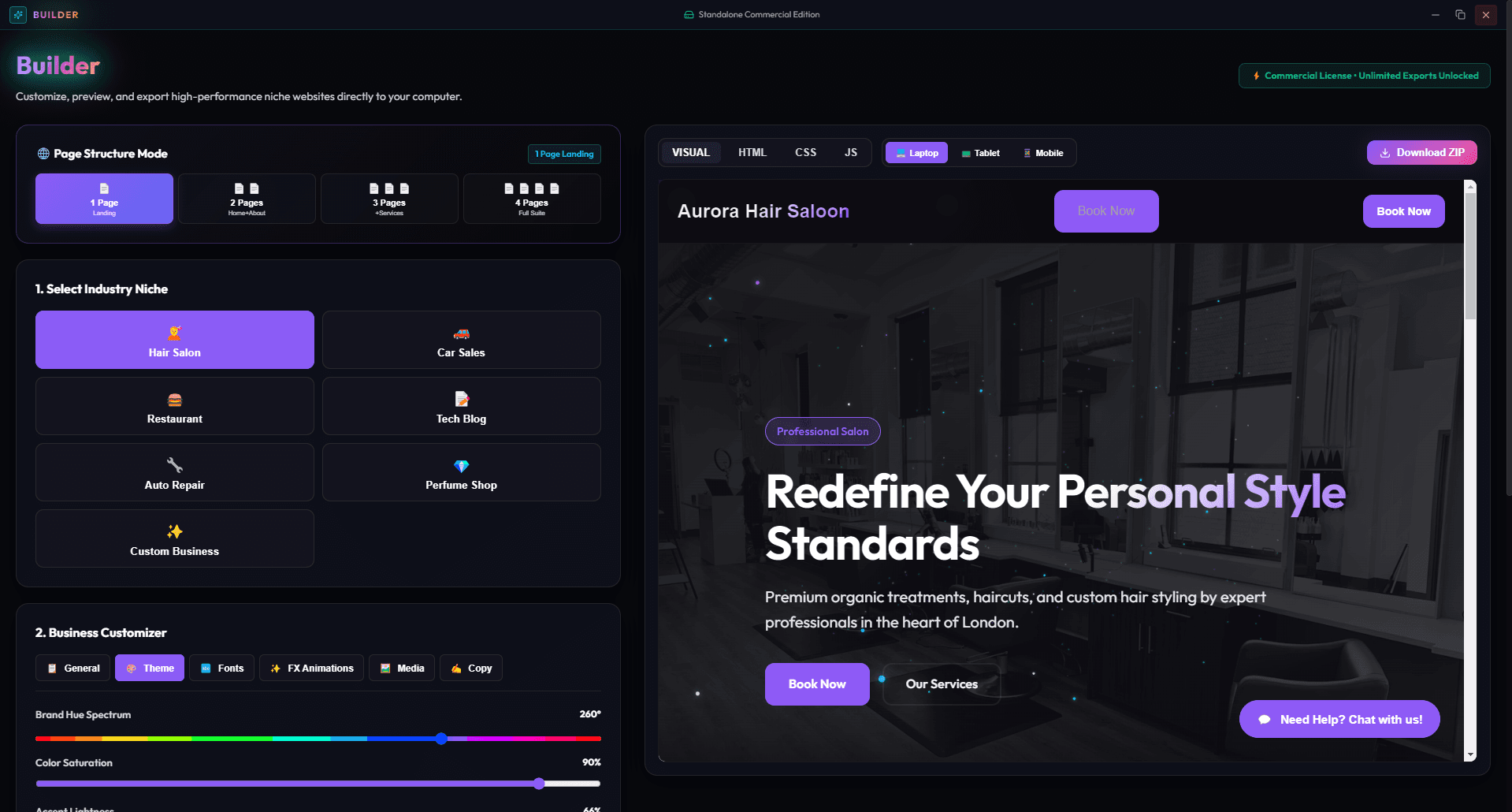
About this app
Website Builder Premium is a desktop application that lets you create professional websites right on your Windows PC without any coding. It offers a range of clean niche templates, extensive customization for colors, fonts, and layout, and a real-time responsive preview. Once you're happy with your design, you can export the complete HTML, CSS, and JavaScript source code to your local disk. This makes it perfect for freelancers, small businesses, or hobbyists who want to own their files and avoid monthly fees. The app is user-friendly, but robust enough for quick projects or prototypes.
Key features
- 1Drag-and-drop website builder for Windows PC, no coding required.
- 2Real-time responsive preview to see changes across devices.
- 3Export complete HTML, CSS, and JavaScript source code to local disk.
Target customer profile
Drawn from the product itself, not from a survey.
Demographic
Freelance web designers and developers
Pain points
Need quick prototyping without coding, but prefer clean code output.
Primary needs
Efficient tool that generates production-ready code and customizable templates.
Demographic
Small business owners or entrepreneurs
Pain points
Lack technical skills, but need an online presence.
Primary needs
Affordable, easy-to-use tool to create and export a professional website.
Demographic
Students or hobbyists learning web development
Pain points
Struggle with coding complexities and need a visual guide.
Primary needs
A hands-on tool to learn HTML/CSS by seeing code output.
Scout Review
Written by AI from measured evidence, scored out of 100.
Website Builder Premium is a desktop website builder that promises code ownership without coding. Its core value—exporting clean HTML/CSS/JS—addresses a real pain point for freelancers and hobbyists. However, the lack of verifiable design and usability evidence (no screenshots, no docs) makes it hard to recommend over established alternatives. Security headers are solid, but accessibility and speed are unproven. It's a competent idea in a crowded market, needing stronger execution and proof to stand out.
Measure by measure
Usability
62Drag-and-drop, real-time preview, and code export promise easy use for non-coders. No docs or tutorials found to back the learning curve.
Design
55No live interface captured; maker promo card only. Claims clean templates but visual quality unverified. Desktop app UI not judged.
Speed
55No performance measurement available. Desktop app exports static code, implying local speed, but no benchmarks or user reports to confirm.
Security
72Strong HTTP security headers (10/12), HTTPS enforced. No SOC 2 or audit claims; standard for a desktop tool. No incidents found.
Accessibility
50No a11y measurement or WCAG mentions. Visual editor likely keyboard-navigable, but screen reader support and docs unverified.
Growth
62Real problem: code ownership without monthly fees. Differentiated vs. cloud builders, but crowded with Bootstrap Studio. Niche appeal.
Improvement areas
- Provide more visual proof: screenshots, video demos, and sample exported sites.
- Add comprehensive documentation and tutorials for non-technical users.
- Include accessibility features and a clear privacy policy for user data.
Design & Usability
Website Builder Premium targets non-coders and learners with a drag-and-drop interface and code export. The design is unverified—no live screenshots were available, only a maker promo card. Usability claims are strong on paper: real-time preview and clean code output. However, the lack of documentation or tutorials is a gap for the target audience. Compared to Wix's guided setup and Bootstrap Studio's polished UI, this app needs to prove its ease-of-use with actual screenshots and user guides.
Speed & Security
Speed is unmeasured; as a desktop app exporting static code, it likely runs locally without network lag, but no benchmarks exist. Security is a bright spot: the HTTP probe shows robust headers (HSTS, CSP, etc.), though no SOC 2 or audit claims are made—typical for a small desktop tool. The absence of a security page or incident history is not a flaw but a stage-of-life reality. Users should expect standard local file handling, not enterprise-grade compliance.
Accessibility & Growth
Accessibility is unverified—no WCAG mentions or keyboard navigation tests. The growth potential hinges on the 'own your code' angle, which appeals to freelancers and learners tired of monthly fees. However, the category is crowded with Wix, Squarespace, and Bootstrap Studio. The wedge is real but narrow: it must out-execute Bootstrap Studio on code quality and out-simplify cloud builders. If it nails the export workflow and adds tutorials, it could carve a niche; otherwise, it's a 'me too' tool.
Conclusion
If you're a freelancer who wants to avoid monthly fees and own your code, this app could be a fit—but only if it delivers on its promises. The lack of visible screenshots and documentation is a red flag; try the free trial or demo to see if the interface matches the hype. For now, it's a 'wait and see' product with potential, not a must-buy.
Suggestions for improvement
- Add a live demo or free trial to let users test the drag-and-drop and export features before buying.
- Publish a few video tutorials or a knowledge base to help non-coders get started quickly.
- Showcase real exported websites in the store listing to prove the code quality and template design.
- Include an accessibility statement and test keyboard navigation to broaden your audience.
Alternatives comparison
Named competitors, point by point. Nobody paid to appear here or to be left out.
 Website Builder Premium Website Builder Premium |  Wix Wix |  Squarespace Squarespace |  Bootstrap Studio Bootstrap Studio | |
|---|---|---|---|---|
| Pricing model | One-time purchase (desktop app), no monthly fees | Free tier with ads; premium plans from ~$17/month | Plans start at ~$16/month, billed annually | One-time license (~$59) with free updates |
| Code ownership | Exports full HTML/CSS/JS to local disk | Proprietary platform; limited code export | Proprietary platform; no direct code export | Exports clean HTML/CSS/JS, similar to target |
| Hosting included | No hosting; user must host exported files | Yes, hosting included in all plans | Yes, hosting included in all plans | No hosting; exports files for external hosting |
| Ease of use for non-coders | Claims drag-and-drop, but no docs to verify | Very user-friendly with AI and templates | User-friendly but steeper learning curve than Wix | Visual but requires some web knowledge |
Wix
Cloud-based website builder with drag-and-drop, hosting included.
Squarespace
Premium website builder known for beautiful templates and all-in-one hosting.
Bootstrap Studio
Desktop app for building responsive websites with a visual interface, exports clean code.
Comparing options? See Website Builder Premium alternatives, scored side by side
More Website Builders apps
View all Website Builders
Unicorn Platform
82.5AI-powered no-code website builder for startups, SaaS, an...

SiteSpin
82SiteSpin is an AI website builder. Tell it what you do, and it writes a real, custom website. No templates. No drag-and-drop.

Sitely
80A macOS-native website builder with drag-and-drop simplicity, AI assistance, and offline editing for non-coders.

ViralVant
80AI-powered landing page builder for quick, high-converting pages.

PhotonPages Free Favicon Generator
80A web-based tool that instantly converts logos into complete sets of website branding assets, including favicons and social media images, with no registration required.

ByteSites
80AI-powered website builder that instantly creates functional sites without coding, offering lifetime ownership and no subscriptions.

GYFT - Curated Framer Template Marketplace
80Curated Framer templates from independent creators.

WebViewGold
79WebViewGold converts websites into native iOS and Android apps without coding, ideal for quick app deployment.

MarsX
79MarsX is an ambitious development platform that bridges visual no-code building with traditional programming through AI, MicroApps, and a full IDE.

Landing Now
79AI-powered platform that generates custom landing pages from simple English descriptions for non-technical users.

Joker Visual Dev Platform
79A cloud-based development tool blending visual drag-and-drop with AI coding assistance to speed up app creation.

Stunning
79AI-powered platform for building fullstack web apps through conversational AI, reducing development time and technical barriers.


A platform dedicated to providing unbiased reviews of newly launched applications, analyzing everything from their features to their full potential.
info@scoutforge.net© 2026 Scoutforge. All rights reserved.
