Is this your app?
Claim Joker Visual Dev Platform to manage its page, add your badge and see your traffic — free, and it stays free.
Cycling through all six. Tap any point to stop.
Measured on six things
A cloud-based development tool blending visual drag-and-drop with AI coding assistance to speed up app creation.
Accessibility
60Minimal accommodations with limited language options and poor screen reader support. Basic keyboard navigation only.
Screenshots
1 / 5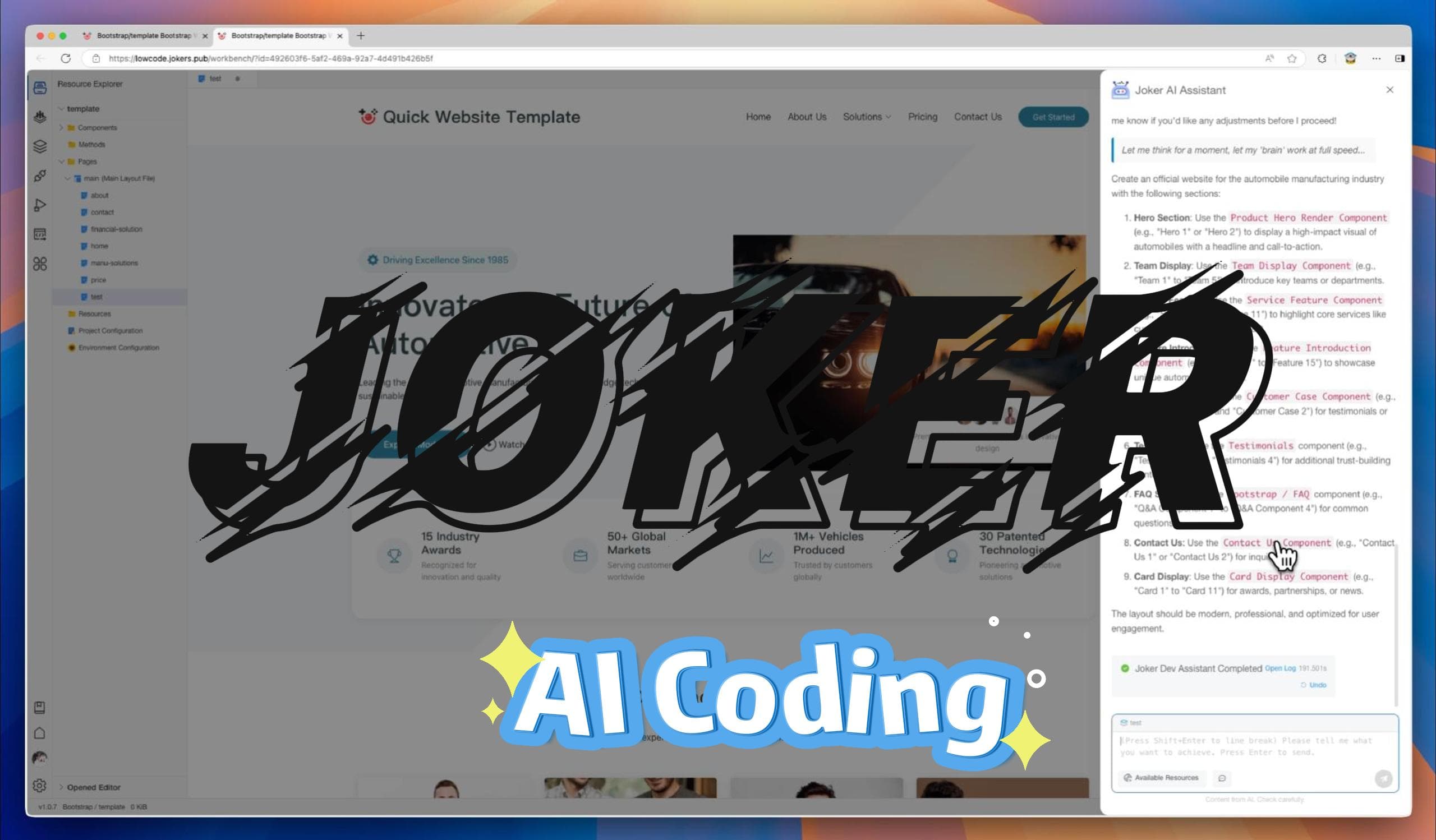
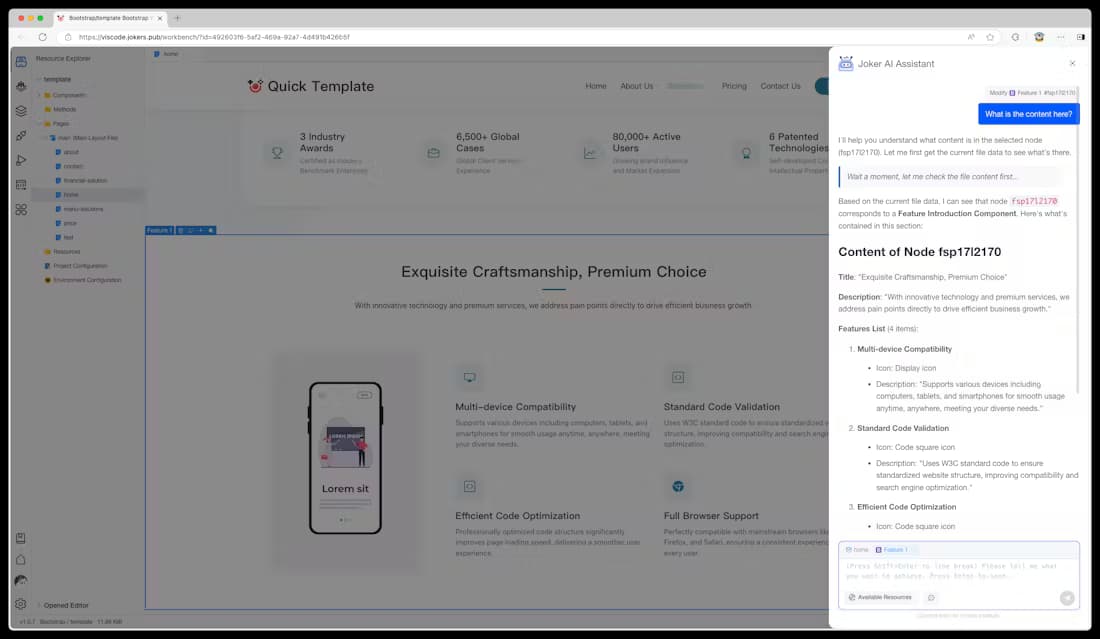
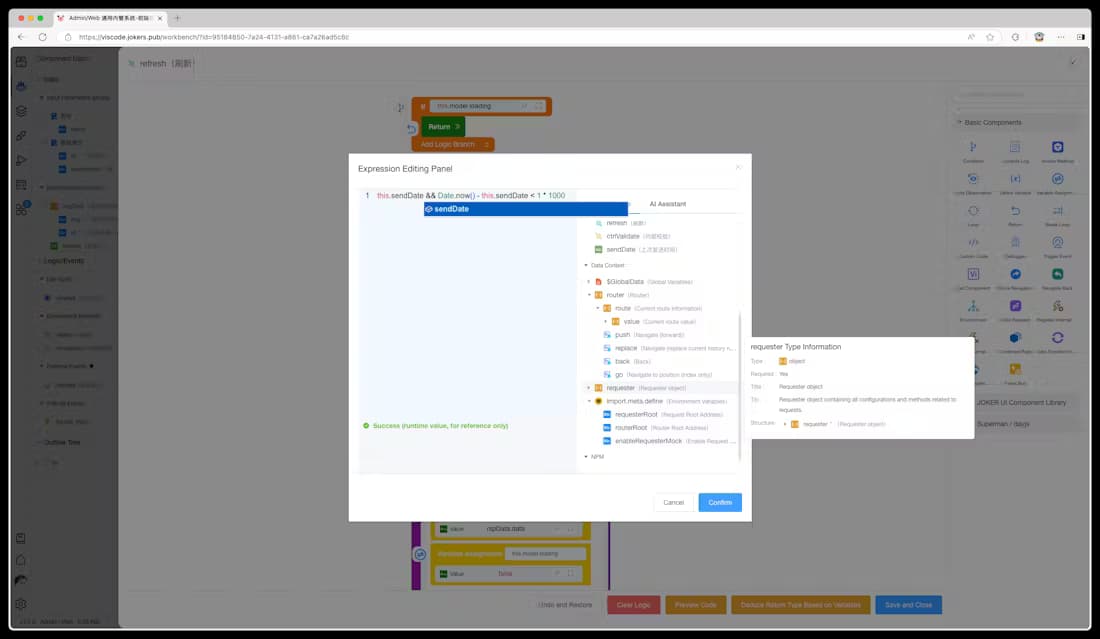
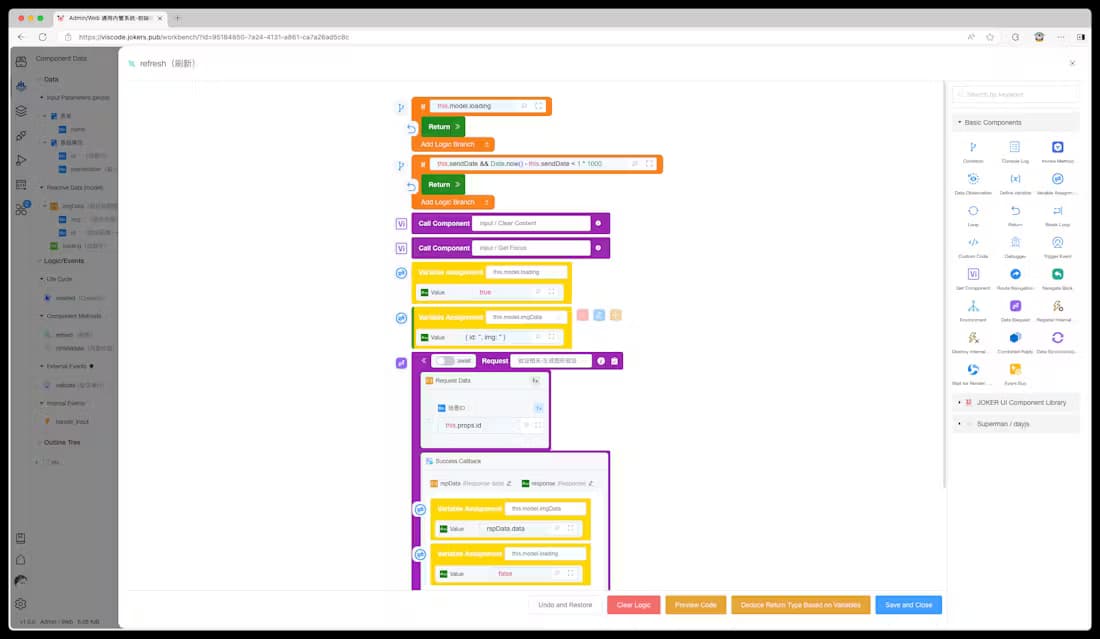
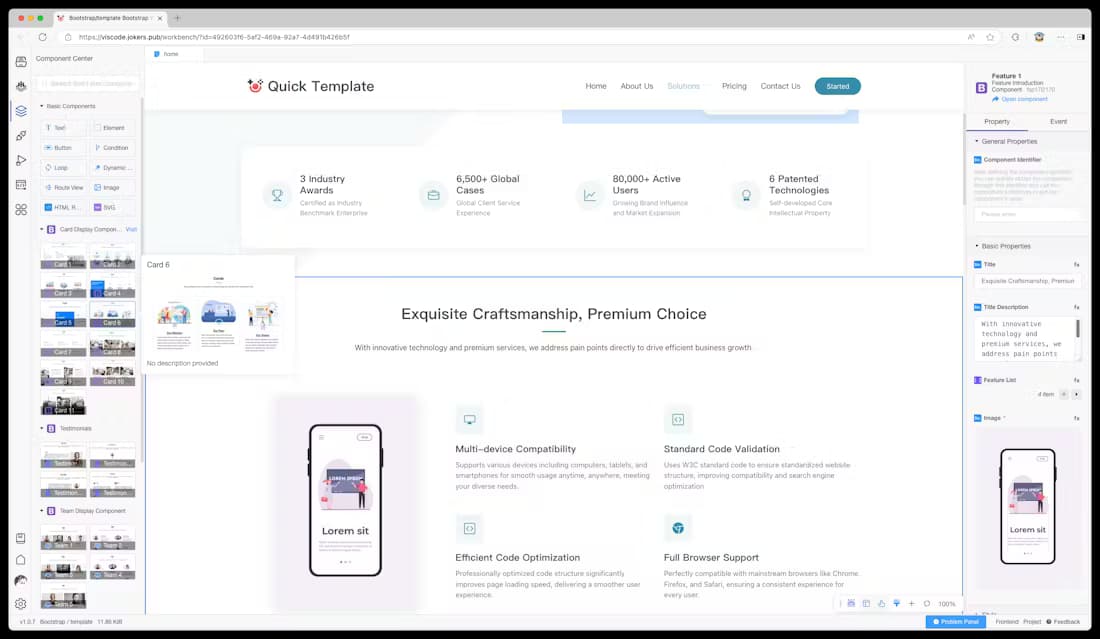
About this app
Joker Visual Dev Platform is an innovative tool that combines visual building tools with AI-powered coding help, designed to reduce repetitive tasks for developers. It features a marketplace with over 5,000 pre-built components, real-time AI suggestions, and full lifecycle management from design to deployment. Ideal for frontend and low-code developers, it excels in visual logic handling and offers a VS Code-like interface with dual views. While it has strong performance and team features, it lacks offline mode and comprehensive accessibility, making it best for those prioritizing efficiency and AI integration in development workflows.
Key features
- 1VS Code-inspired layout with intuitive drag mechanics and contextual AI prompts
- 2Extensive component library with over 5,000 pre-built elements and robust filtering
- 3Excellent growth potential in low-code/AI markets with active community and marketplace
Target customer profile
Drawn from the product itself, not from a survey.
Demographic
Frontend Developers
Pain points
Repetitive UI coding, slow prototyping, component reusability issues
Primary needs
Faster development cycles, visual component management, reduced boilerplate code
Demographic
Low-Code Developers
Pain points
Limited customization, poor logic handling, dependency on templates
Primary needs
Balanced simplicity and flexibility, visual logic building, AI assistance
Demographic
Dev Team Leads
Pain points
Inconsistent components, collaboration bottlenecks, documentation gaps
Primary needs
Centralized component library, version control, team permission settings
Scout Review
Written by AI from measured evidence, scored out of 100.
Joker Visual Dev Platform successfully bridges the gap between visual development and AI-assisted coding, offering genuine time savings for frontend developers drowning in repetitive tasks. Its strength lies in thoughtful integration of visual and code workflows rather than treating them as separate paradigms. The component marketplace and logic handling capabilities set it apart from pure AI code assistants or basic visual builders.
Measure by measure
Usability
80Slight learning curve for logic mapping, but excellent component management with 5,000+ pre-built elements.
Design
90VS Code-inspired layout with intuitive drag mechanics and contextual AI prompts that anticipate developer needs.
Speed
80Responsive cloud performance with snappy AI suggestions, but completely dependent on internet connection.
Security
70Basic encryption and team permissions, but lacks clear compliance certifications and offline security features.
Accessibility
60Minimal accommodations with limited language options and poor screen reader support. Basic keyboard navigation only.
Growth
90Excellent positioning in growing low-code/AI markets with active community and component marketplace expansion.
Improvement areas
- Lacks offline mode, making it dependent on internet connectivity
- Poor accessibility with minimal screen reader support and limited language options
- Insufficient security features, missing clear compliance certifications and offline security
Design & Usability
Joker's interface strikes a perfect balance between familiarity and innovation. The VS Code-inspired layout immediately feels comfortable to developers, while the visual panels and drag-and-drop functionality add genuine value. The dual-view system eliminating mode switching is a game-changer, and contextual AI prompts that anticipate your next move show thoughtful UX design. The component library's card-based browsing with robust filtering makes navigating 5,000+ elements surprisingly manageable. While there's a learning curve with the logic connectors, the guided walkthroughs help bridge the gap between traditional coding and visual development.
Speed & Security
Performance-wise, Joker delivers snappy responses on stable connections with quick component loading and real-time AI suggestions that feel genuinely helpful rather than gimmicky. However, the complete reliance on cloud infrastructure means your development speed is hostage to your internet quality. Security features include basic encryption and solid project isolation with team permission controls, but the privacy policy lacks specifics about compliance certifications like SOC 2 or GDPR. The absence of offline mode is a significant concern for developers working in variable connectivity environments or handling sensitive projects.
Accessibility & Growth
Accessibility is clearly Joker's weakest area. While basic keyboard navigation exists, screen reader support is minimal, color contrast in logic mapping needs improvement, and language options appear limited to English and Chinese. This exclusionary approach misses opportunities in global markets. However, growth potential is exceptional - positioned perfectly in the booming low-code/AI development space with an active component community and marketplace dynamics that could drive network effects. The platform's foundation supports easy expansion into real-time collaboration, plugin ecosystems, and enterprise features.
Conclusion
If you're a developer tired of boilerplate code or a team lead struggling with component consistency, Joker offers a compelling solution that respects your coding skills while accelerating visual development. The AI integration feels purposeful rather than tacked-on, making it worth exploring for anyone in the low-code to pro-code spectrum. Give it a test drive if you value efficiency without sacrificing too much control.
Suggestions for improvement
- Prioritize implementing an offline mode with local caching to avoid complete dependency on internet connectivity.
- Conduct a comprehensive accessibility audit focusing on screen reader support, color contrast improvements, and expanded language options.
- Enhance permission granularity for enterprise teams and introduce real-time collaboration features for pair programming.
- Developing a plugin system would allow the community to extend AI capabilities beyond the core offering.
Alternatives comparison
Named competitors, point by point. Nobody paid to appear here or to be left out.
 Joker Visual Dev Platform |  Cursor |  Google Gemini Code Assist |  WeWeb | |
|---|---|---|---|---|
| Visual Development Interface | Full visual drag-and-drop with 5,000+ components | None - pure code editor | None - AI assistant only | Basic visual builder with limited components |
| AI Coding Assistance | Real-time contextual AI suggestions | Advanced AI code completion | Comprehensive AI code generation | Limited or no AI features |
| Component Logic Handling | Advanced visual logic mapping | Traditional code-based logic | AI-generated logic only | Basic visual logic with limitations |
| Offline Capability | None - cloud-only | Full offline functionality | Cloud-dependent | Limited offline features |
Cursor
AI-focused code editor without visual building components
Google Gemini Code Assist
Pure AI coding helper lacking visual development environment
WeWeb
Visual builder with weaker component logic capabilities
Comparing options? See Joker Visual Dev Platform alternatives, scored side by side
More Development & Engineering apps
View all Development & Engineering
Vibe Coding Agent Skills
92A free, open-source platform offering 110 AI agent skills...

CreateMyCoin
92A no-code Solana token creator that deploys SPL tokens in...

CC Switch
91Open-source desktop app for switching AI coding providers...

DemoVexa
90Turn your code into professional product demo videos with AI-generated scripts, animated UI, and natural voiceovers.

TaxID
90Fast EU VAT validation API for developers, covering 27 EU...

FontPlop
89Browser-based font viewer & tester for TTF, OTF, WOFF, WO...

deed.page
89Permanent web hosting for AI agents, no human step

Webfetch
89Web scraping API that turns any URL into HTML, text, Mark...

Claw Messenger
88Claw Messenger is an iMessage API service that gives AI a...

PERM Processing Time: Current DOL Queue & History
88PERM Processing Time is an independent data analysis platform that helps users navigate the U.S. Department of Labor’s permanent labor certification process.

DataHabibi
88AI-powered Dubai real estate data platform with 12M+ DLD ...

BeartIMAGE
88BeartIMAGE is a free, web-based image processing platform engineered for fast, bulk photo editing and conversion directly in your browser.


A platform dedicated to providing unbiased reviews of newly launched applications, analyzing everything from their features to their full potential.
info@scoutforge.net© 2026 Scoutforge. All rights reserved.
