Cycling through all six. Tap any point to stop.
Measured on six things
Wikipedia monitoring and edit alerts. We watch your Wikipedia page and email you within 60 seconds of any change, with the diff attached.
Security
52HTTPS enforced with basic headers (X-Content-Type-Options, Referrer-Policy), but no HSTS, CSP, or frame protection. Stripe handles payments. No SOC 2 or security certifications found. Within anchor band 44-60; basic but not exceptional.
Screenshots
1 / 1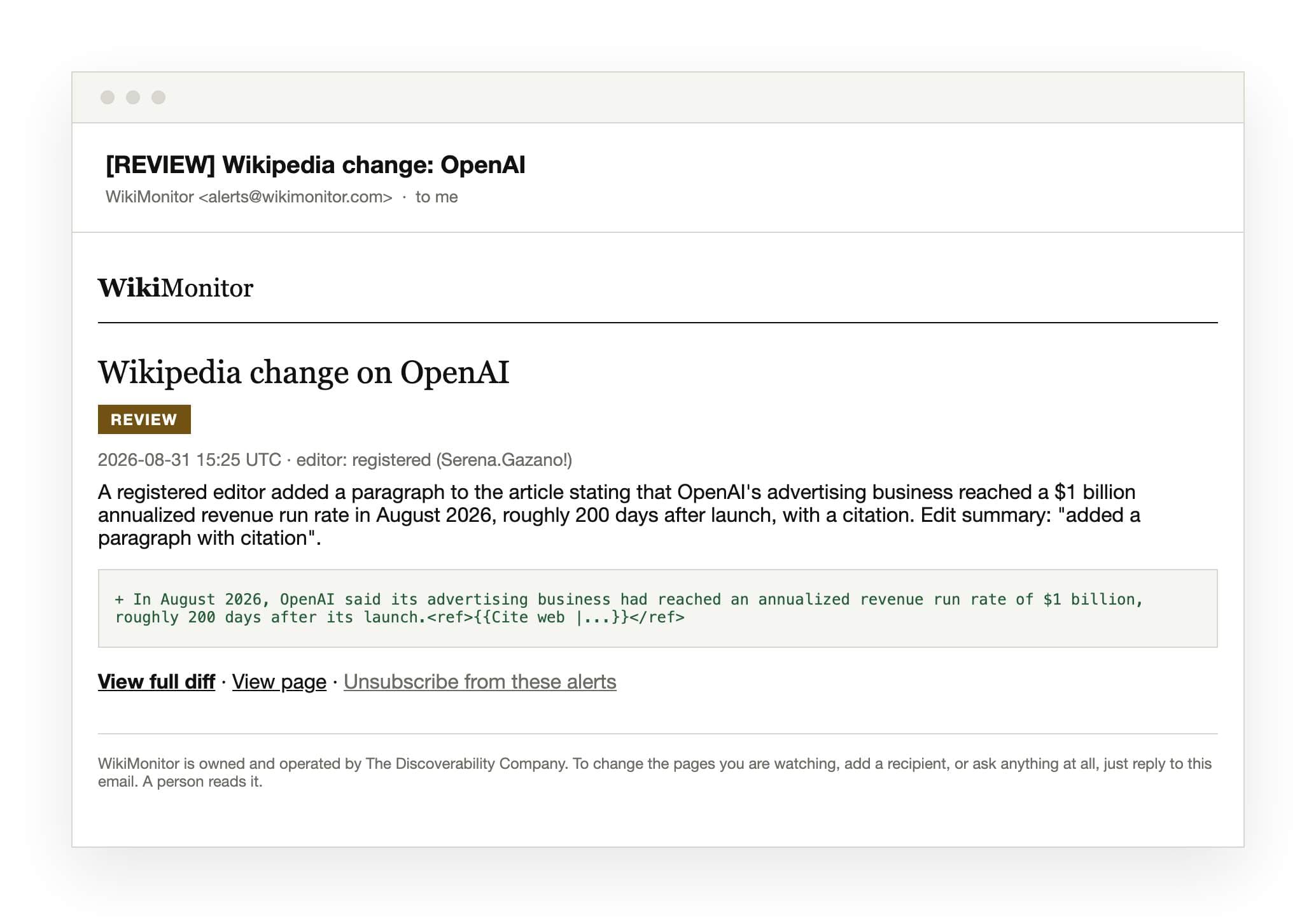
About this app
WikiMonitor is Wikipedia monitoring software that sends real-time Wikipedia edit alerts the moment your page changes. We watch the article continuously and email you within 60 seconds of any edit, with the change attached: what was added, what was removed, who edited it, and whether they were signed in. Wikipedia's own watchlist emails you once, carries no diff, and needs an account. Google Alerts misses edits entirely. WikiMonitor is purpose-built Wikipedia change monitoring for the people the page is about. Use it to monitor your Wikipedia page, track Wikipedia edits on executives and brands, watch competitors, and catch vandalism before it spreads to Google's knowledge panel and AI assistants. No dashboard to check. The alert is the product. From $99/year for one page, $399 for five, $699 for fifteen. Detection only: we monitor Wikipedia, we do not edit it.
Key features
- 1Real-time Wikipedia edit alerts within 60 seconds, delivered via email with the full diff attached
- 2No dashboard required — the alert email is the product, showing what was added/removed and who edited
- 3Tiered pricing from $99/year (1 page) to $699/year (15 pages) with white-labeling for agencies
Target customer profile
Drawn from the product itself, not from a survey.
Demographic
Business owners and executives
Pain points
Negative or inaccurate edits to their Wikipedia page go unnoticed, harming their brand reputation; lack of time to manually check the page.
Primary needs
Immediate notification of any changes to their Wikipedia page to respond quickly and protect their online image.
Demographic
PR and reputation management agencies
Pain points
Managing multiple client Wikipedia pages without an efficient monitoring system; risk of missing edits that could lead to client dissatisfaction.
Primary needs
A scalable solution to monitor multiple client pages, with custom branding and group organization to streamline their services.
Demographic
Public figures, celebrities, and politicians
Pain points
Unwanted edits by vandals or biased editors; lack of control over their Wikipedia content; need to track changes that could affect public perception.
Primary needs
Real-time alerts with detail on who made the edit to address misinformation and maintain accuracy.
Scout Review
Written by AI from measured evidence, scored out of 100.
WikiMonitor is a focused, early-stage tool solving a real problem: Wikipedia edits going unnoticed. Its core value — real-time alerts with the diff included, within 60 seconds — is clearly communicated and genuinely differentiated from free alternatives. The site is clean and the onboarding is minimal, though the lack of a dashboard (by design) means there's little to evaluate beyond the email template. Security is basic but functional, with Stripe handling payments. Speed and accessibility couldn't be measured this run, leaving some uncertainty. Growth potential is real but niche, with pricing that may limit adoption to PR agencies and high-profile individuals. For its target market, it's a competent, well-positioned product; for everyone else, it's a solution in search of a problem they didn't know they had.
Measure by measure
Usability
64Onboarding is dead simple: paste URL, enter email, pay. No dashboard to learn. Clear pricing and FAQ. Comparison table is genuinely useful. Lacks docs/help center, but the product is simple enough that email support may suffice.
Design
58No homepage render available; only email template screenshot shows clean, branded alert design. Site copy is well-structured with clear hierarchy, but no app UI or dashboard to evaluate. Category-typical for a focused utility.
Speed
55No Lighthouse measurement available this run; page load performance not assessed. Site appears lightweight with minimal JS (checkout requires JS only). No user complaints or benchmarks found. Category-typical band; not independently verified.
Security
52HTTPS enforced with basic headers (X-Content-Type-Options, Referrer-Policy), but no HSTS, CSP, or frame protection. Stripe handles payments. No SOC 2 or security certifications found. Within anchor band 44-60; basic but not exceptional.
Accessibility
52No Lighthouse accessibility measurement available. Site includes 'Skip to content' link suggesting keyboard nav support. No WCAG statement or accessibility documentation found. Email alerts are text-based and likely screen-reader friendly. Category-typical band.
Growth
62Real problem, clear niche: Wikipedia edit monitoring for reputation management. Differentiated from free tools with real-time diffs and reliability. But pricing is steep for individuals, and category may be niche. Growth depends on PR agency adoption.
Improvement areas
- Security headers incomplete — no HSTS, CSP, or frame protection; publish a security page
- No free trial or demo, making it hard to evaluate before paying annual fees
- Lack of documentation or help center beyond a basic FAQ and email support
Design & Usability
WikiMonitor presents a focused, no-nonsense value proposition: real-time Wikipedia edit alerts with the diff included. The site copy is clear and well-structured, with a helpful comparison table against free alternatives. Onboarding is minimal — enter a URL and email, pay, done — which suits the 'alert is the product' philosophy. However, the lack of any visible app UI or dashboard (by design) means there's little to evaluate beyond the email template. The pricing page is transparent with clear tiers, but the absence of a help center or documentation could frustrate less technical users. The email alert example is well-crafted, showing exactly what subscribers receive, which builds trust. Overall, the design is functional and clean, though not visually remarkable, and usability is strong for the core use case, with room for more onboarding support.
Speed & Security
Speed could not be measured this run — no Lighthouse data was captured, so performance claims rest on the site's apparent lightweight nature (minimal JavaScript, static content). The security posture is basic but adequate: HTTPS is enforced, and essential headers like X-Content-Type-Options and Referrer-Policy are present. However, the absence of HSTS, CSP, and frame protection headers leaves room for improvement, especially for a service handling reputation-sensitive data. Payment processing via Stripe is a positive signal, keeping card details off the site entirely. No SOC 2, ISO, or bug bounty programs are mentioned, which is typical for a young product but worth noting for enterprise buyers. The domain is only a year old, so there's no long track record to assess. Overall, security is functional for the current stage but not a differentiator, and speed remains unverified.
Accessibility & Growth
Accessibility is an area of uncertainty — no Lighthouse measurement was available, and the site makes no explicit WCAG claims. The presence of a 'Skip to content' link suggests some keyboard navigation consideration, and the text-based email alerts are likely screen-reader friendly. However, without testing, it's impossible to confirm color contrast, alt text usage, or screen reader compatibility. Growth potential is more promising: WikiMonitor addresses a genuine, underserved need — Wikipedia edits affecting brand reputation and search results. The differentiation from free tools (real-time diffs, reliability, no account needed) is concrete and well-articulated. The target customers (business owners, PR agencies, public figures) are specific, and the agency tier with white-labeling is a smart wedge. The main limitation is the niche size and the premium pricing, which may cap adoption. Growth hinges on PR agencies seeing this as a must-have tool rather than a nice-to-have.
Conclusion
WikiMonitor is a solid, purpose-built tool for a specific audience. If you're a business owner, executive, or PR professional managing Wikipedia presence, the $99/year entry point is reasonable for peace of mind. The real-time diff alerts are genuinely useful, and the comparison table makes a compelling case against free alternatives. However, the premium pricing for agencies ($699/year) and the lack of a free trial or demo might give potential customers pause. The product would benefit from a clearer security posture (HSTS, CSP) and published accessibility efforts. For now, it's a competent niche tool that does what it promises — no more, no less. If you need Wikipedia monitoring, it's worth a look; if you're on the fence, the email-based setup means you can try it with minimal commitment.
Suggestions for improvement
- Add a free trial or 'first alert free' option to let users experience the value before paying.
- Publish a security page detailing data handling, retention, and any compliance certifications.
- Create a simple help center or FAQ covering setup, troubleshooting, and alert customization.
- Consider a lower-cost monthly plan for individuals who balk at the annual commitment.
Alternatives comparison
Named competitors, point by point. Nobody paid to appear here or to be left out.
 WikiMonitor WikiMonitor |  Wikipedia Watchlist Wikipedia Watchlist |  Google Alerts Google Alerts | Page History RSS | |
|---|---|---|---|---|
| Real-time alerts | Within 60 seconds, with diff included | Once, then requires re-visit to re-arm | Not real-time, often misses edits | Requires RSS reader and manual setup |
| Shows the change (diff) | Yes, full diff with added/removed lines | No, only notification | No, only URL mention | Yes, via RSS feed |
| Keeps working without re-arming | Yes, continuous monitoring | No, stops after first notification | Yes, but unreliable | Yes, but requires RSS reader |
| Setup complexity | Minimal: URL and email, then checkout | Requires Wikipedia account and settings | Minimal, but limited functionality | Requires RSS reader and email bridge |
| Editor identity shown | Yes, shows username and login status | No | No | Yes, via RSS feed |
Wikipedia Watchlist
Wikipedia's built-in watchlist feature sends email notifications, but only once until you revisit the page, lacks details on the change.
Google Alerts
Google Alerts can monitor mentions of a URL, but it's not real-time, doesn't show the actual edit, and often misses Wikipedia changes.
Page History RSS
RSS feeds from Wikipedia page history require a reader and manual setup, but can be used to track changes without email alerts.
Comparing options? See WikiMonitor alternatives, scored side by side
More Productivity apps
View all Productivity
Qamarero
92An all-in-one hospitality software for restaurants and ba...

The Stack Newsletter
92A weekly newsletter delivering curated tech jobs, intervi...

EmbedMyReviews
92White-label reputation management software for agencies s...

StoryPad
92Privacy-first open source journal app with a continuous t...

Puzzly – B2B Lead Generation & Sales Intelligence Platform
92Puzzly is an all-in-one B2B lead generation platform that...

Notion
92All-in-one AI workspace for docs, projects, and knowledge...

Vibe Coding Agent Skills
92A free, open-source platform offering 110 AI agent skills...

CC Switch
91Open-source desktop app for switching AI coding providers...

username.md
90One verified handle for your online identity, readable by...

What the GIF
89Frame-perfect video-to-GIF maker that runs entirely in yo...

AuditCloser
89White-label website audits that close deals for digital a...

NudgeWin
89Automated quote follow-up for trades and service businesses.


A platform dedicated to providing unbiased reviews of newly launched applications, analyzing everything from their features to their full potential.
info@scoutforge.net© 2026 Scoutforge. All rights reserved.
