Cycling through all six. Tap any point to stop.
Measured on six things
AI workspace to create interactive documents, forms, and ...
Speed
30Lighthouse mobile performance 29/100 with LCP 25.9s — catastrophic load time. Desktop 35/100. Heavy SPA with no CDN hints. Users will bounce before seeing the orb.
Screenshots
1 / 1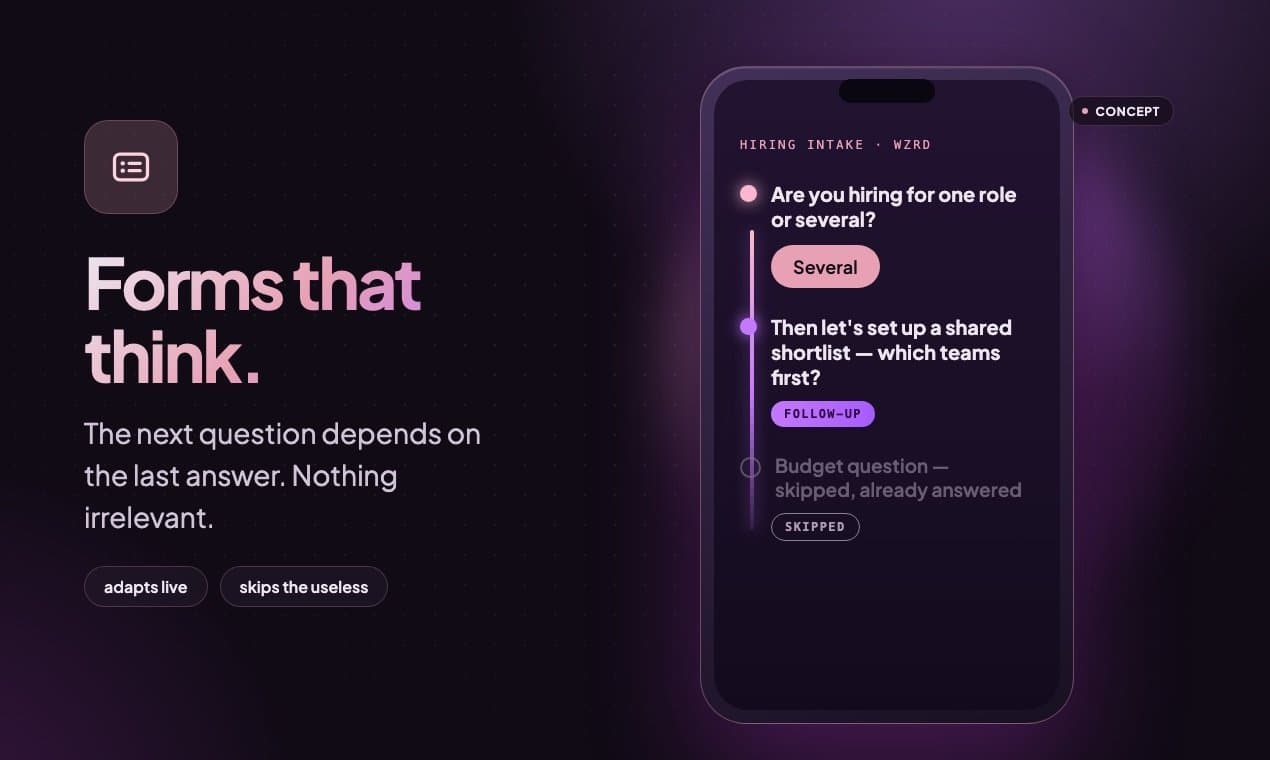
About this app
WZRD is an AI-powered workspace that transforms static documents, forms, and presentations into interactive, conversational experiences. You can start from a prompt or upload existing files, and WZRD will generate dynamic content that can speak, listen, and adapt to user input. It's designed for sales proposals, onboarding, lead capture, and more, turning every interaction into an opportunity for engagement and insight.
Key features
- 1Transform static documents, forms, and presentations into interactive conversational experiences
- 2Start from a prompt or upload existing files (Docs, Sheets, Slides, Forms) to generate dynamic content
- 3Adaptive interactions that speak, listen, and respond to user input in real-time
Target customer profile
Drawn from the product itself, not from a survey.
Demographic
Sales professionals at B2B companies
Pain points
Static proposals fail to engage prospects and address objections in real-time.
Primary needs
Create interactive proposals that answer questions and capture interest.
Demographic
HR and operations managers in growing startups
Pain points
Onboarding new employees is time-consuming and repetitive.
Primary needs
Automate onboarding with conversational workflows that guide new hires.
Demographic
Marketers looking for innovative lead generation
Pain points
Traditional forms have low completion rates and lack engagement.
Primary needs
Build conversational forms that qualify leads and increase conversions.
Scout Review
Written by AI from measured evidence, scored out of 100.
WZRD is an ambitious AI workspace that turns static documents into conversational experiences — a genuinely interesting idea with clear use cases in sales, onboarding, and lead gen. The dark, orb-centric design is cohesive and the phone mockup effectively demonstrates the adaptive form concept. However, the execution has significant gaps: the homepage wastes its top fold on empty black space with an unusable sidebar, load times are catastrophic (LCP 25.9s), security headers are minimal, and accessibility has three fixable but important audit failures. The product's differentiator — transforming existing files rather than building from scratch — is compelling against Typeform and Intercom, but the lack of visible traction and documentation makes it hard to recommend for production use yet. The idea is solid; the delivery needs work.
Measure by measure
Usability
62Clear workflow (upload/describe, generate, refine, go live) and intuitive phone mockup, but sidebar discoverability is poor and first-load clarity suffers. No docs or help center found.
Design
58Cohesive dark AI aesthetic with glowing orb and clear feature cards, but homepage top is empty black space with microscopic unlabeled sidebar. Below fold shows strong product concept via phone mockup.
Speed
30Lighthouse mobile performance 29/100 with LCP 25.9s — catastrophic load time. Desktop 35/100. Heavy SPA with no CDN hints. Users will bounce before seeing the orb.
Security
38HTTPS enforced but all other security headers missing (HSTS, CSP, frame protection). DNS lacks SPF/DMARC. No SOC 2 or security page found. Basic security posture for early-stage SaaS.
Accessibility
68Lighthouse audit 91/100 with three fixable issues: button names, heading order, missing main landmark. Dark theme with low-contrast sidebar icons is a concern. No a11y statement or multi-language support found.
Growth
62Real problem with clear differentiator: transforming existing documents into conversational experiences. Targets sales, HR, marketing with specific use cases. Category has headroom but competition is strong.
Improvement areas
- Catastrophic load times (LCP 25.9s) need urgent optimization with CDN and code splitting
- Missing security headers (HSTS, CSP, frame protection) and DNS records (SPF, DMARC)
- Accessibility audit failures: button names, heading order, and missing main landmark need fixes
Design & Usability
WZRD presents a cohesive dark AI aesthetic with a glowing purple orb that immediately signals 'futuristic product.' The feature cards for Slides/Docs/Sheets/Forms are clear and directly map to use cases. However, the homepage top is a near-empty black void with a microscopic, unlabeled sidebar — a significant usability failure on first load. The phone mockup in the maker media section is the strongest visual element, clearly demonstrating the adaptive form concept with visible skip states. The workflow (upload/describe, generate, refine, go live) is logical once discovered, but the lack of labels and discoverability in navigation undermines the experience. No docs or help center was found, which is a gap for a product with this complexity. Overall, the design has a strong concept but execution suffers from poor information hierarchy and empty space that doesn't feel intentional.
Speed & Security
Performance is the most critical issue: Lighthouse mobile performance scores 29/100 with LCP at 25.9 seconds — a catastrophic load time that will lose most visitors before the hero text renders. Desktop performance at 35/100 confirms this isn't a mobile-only problem; the heavy SPA architecture with no apparent CDN or edge caching is the likely culprit. Security posture is similarly weak: HTTPS is enforced, but HSTS, CSP, frame protection, X-Content-Type-Options, and Referrer-Policy headers are all missing. DNS records lack SPF and DMARC, leaving the domain vulnerable to email spoofing. No SOC 2, ISO certification, or security page was found, which is typical for early-stage products but still a concern for a tool handling sales proposals and customer data. The combination of slow load times and weak security headers makes this feel like a product that prioritized the demo over production readiness.
Accessibility & Growth
Accessibility is a mixed bag: the Lighthouse audit scores 91/100, but three failing audits (button names, heading order, missing main landmark) are exactly the issues that break screen reader navigation. The dark theme with low-contrast sidebar icons likely fails WCAG contrast requirements for low-vision users. No accessibility statement or multi-language support was found. Growth potential is more promising: the problem is real — static proposals and forms fail to engage modern buyers, and the AI conversation category has clear headroom. WZRD's differentiator is transforming existing documents rather than building from scratch, which is a genuine wedge against Typeform and Intercom. However, the 'interaction operations' positioning is ambitious and unproven, and the lack of visible traction signals (no reviews, no community, no funding announcements) makes it hard to assess whether the wedge will actually land. The idea has legs, but execution and proof are still pending.
Conclusion
WZRD has the right idea at the right time — conversational AI is reshaping how businesses engage customers, and transforming static documents into interactive experiences is a genuine wedge. But the current state feels like a demo waiting to become a product. Fix the load time (25.9s LCP is a dealbreaker), add basic security headers, label your sidebar, and publish some documentation. If the team can execute on the 'interaction operations' vision with real customer proof, this could carve out a meaningful niche. For now, it's a promising concept with a beautiful orb and a lot of empty space to fill.
Suggestions for improvement
- Optimize page load: implement code splitting, lazy loading, and a CDN to get LCP under 2.5s
- Add security headers (HSTS, CSP, frame protection) and configure SPF/DMARC for email security
- Fix the three accessibility audit failures: add button names, fix heading order, add main landmark
- Publish a docs/help center and add labels to sidebar navigation for better discoverability
Alternatives comparison
Named competitors, point by point. Nobody paid to appear here or to be left out.
 WZRD |  Typeform |  Notion |  Intercom | |
|---|---|---|---|---|
| Core approach | Transforms existing documents into conversational AI experiences | Creates conversational forms and surveys from scratch | All-in-one workspace for docs, notes, and project management | Customer messaging platform with chatbots and support automation |
| Primary use case | Sales proposals, onboarding, lead capture with adaptive interactions | Forms, surveys, quizzes, and lead generation | Documentation, knowledge base, project tracking | Customer support, engagement, and messaging |
| AI capabilities | AI generates interactive content that speaks, listens, and adapts to user input | Limited AI for form logic and basic personalization | Notion AI for writing assistance and summarization | Fin AI chatbot for automated customer support |
| Input flexibility | Upload existing Docs, Sheets, Slides, Forms or start from a prompt | Build forms from templates or scratch, no file upload | Create docs from templates or import from various formats | Set up chatbots from templates or custom flows |
| Target audience | Sales professionals, HR/operations managers, marketers at B2B companies | Marketers, product teams, researchers, small businesses | Teams, individuals, startups, enterprises for knowledge management | Customer support teams, SaaS companies, e-commerce |
| Pricing model | Not publicly disclosed on site | Freemium with paid plans starting around $25/month | Freemium with paid plans starting around $10/user/month | Paid plans starting around $74/month, custom enterprise pricing |
Typeform
Create engaging forms and surveys with a conversational interface.
Notion
All-in-one workspace for docs, notes, and project management.
Intercom
Customer messaging platform with chatbots and support automation.
Comparing options? See WZRD alternatives, scored side by side
More Productivity apps
View all Productivity
Puzzly – B2B Lead Generation & Sales Intelligence Platform
92Puzzly is an all-in-one B2B lead generation platform that...

Qamarero
92An all-in-one hospitality software for restaurants and ba...

EmbedMyReviews
92White-label reputation management software for agencies s...

StoryPad
92Privacy-first open source journal app with a continuous t...

Notion
92All-in-one AI workspace for docs, projects, and knowledge...

The Stack Newsletter
92A weekly newsletter delivering curated tech jobs, intervi...

Vibe Coding Agent Skills
92A free, open-source platform offering 110 AI agent skills...

QRBliss
91Branded QR codes with AI Brand Sync, 15 free dynamic code...

Gerty
91Private, local AI assistant for Mac that runs offline

Strukchad Property Management
91Property management for Kenyan letting agents: rent invoices raised every month, M-Pesa rent prompts to tenants, arrears tracking and landlord statements.

CC Switch
91Open-source desktop app for switching AI coding providers...

PitchWhip
90AI cold call scripts & direct dials from LinkedIn


A platform dedicated to providing unbiased reviews of newly launched applications, analyzing everything from their features to their full potential.
info@scoutforge.net© 2026 Scoutforge. All rights reserved.
