Cycling through all six. Tap any point to stop.
Measured on six things
Free 3D container loading calculator for mixed carton loads in 20GP, 40GP, 40HQ or 45HQ, with a loading sequence. Runs in the browser, no sign-up.
Security
41HTTPS is on, but no HSTS, CSP, frame protection, Referrer-Policy or Permissions-Policy, and no SPF/DMARC. Header checklist 3/12; no SOC 2, ISO or bug bounty found.
Screenshots
1 / 1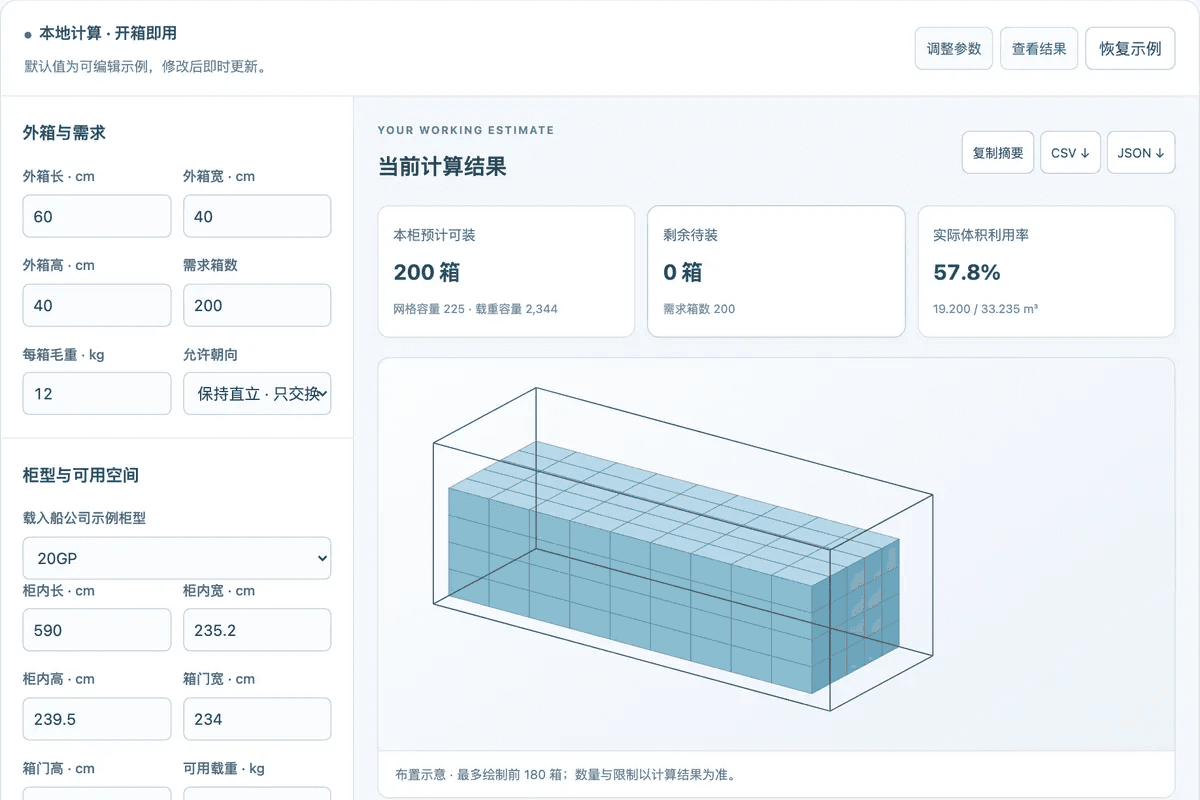
About this app
It runs in the browser, with no sign-up required. Enter carton sizes and quantities, choose a container type, and see a 3D plan of how the boxes can be packed. The tool is built for shippers and freight teams who need a quick loading plan before they book space.
Key features
- 1Free, no-signup 3D container loading calculator with mixed-carton support and centre-of-gravity checks.
- 2Excel/CSV import with column-name detection in Chinese, English, Spanish and German; local in-browser calculation.
- 3Step-by-step loading sequence, freight split and LCL-vs-FCL comparison; exports gated behind a ¥4.9/week pass.
Target customer profile
Drawn from the product itself, not from a survey.
Demographic
Export coordinators and shipping clerks at small-to-mid manufacturers
Pain points
CBM math overstates what fits; last-minute short-shipments and rework at the dock
Primary needs
Fast, accurate mixed-carton load plans for 20GP/40HQ without paid software
Demographic
Freelance freight forwarders and logistics brokers
Pain points
Explaining loading plans to clients; comparing LCL vs FCL and container mixes
Primary needs
Shareable 3D plans, PDF guides and freight split tables to justify quotes
Demographic
Warehouse loading supervisors and forklift teams
Pain points
Unclear stacking order; heavy cartons ending up on fragile ones; unstable loads
Primary needs
Step-by-step loading sequence, centre-of-gravity check and stackability rules
Demographic
E-commerce sellers and import buyers sourcing from overseas factories
Pain points
Not knowing how many cartons actually fit; surprise container costs
Primary needs
Free, no-signup calculator to sanity-check supplier quotes and book the right container
Scout Review
Written by AI from measured evidence, scored out of 100.
XunL Container Loading Calculator is a genuinely useful free tool wrapped in a padded, salesy page. The core — enter cartons, pick a container, get a 3D plan with fill %, CoG and a loading sequence — works, runs locally, and needs no signup. Excel/CSV import and multilingual column detection are real freight-team conveniences. Against EasyCargo and CubeMaster it wins on price (free) and against Freightos it wins on depth (3D, CoG, sequencing). Against itself it loses points for repeating the pass pitch three times, burying the tool under SEO panels, and shipping a thin security posture (3/12 headers, no DMARC). Accessibility is excellent. It's a solid 60-something product with a clear niche and a marketing page that needs an editor.
Measure by measure
Usability
66No signup, clear 'Calculate load' action, live results and Excel/CSV import with multilingual column detection are real strengths. The tool is buried under a very long page of secondary panels.
Design
58Result cards are genuinely scannable and the 3D preview is honest, but the page repeats its free-vs-pass pitch in three panels and identical blue 'Pass' buttons make gating hard to read.
Speed
70Lighthouse mobile 83/100 (LCP 2.9s, TBT 395ms), desktop 92/100, and calculation runs locally in-browser. The site itself admits big batches above 3000 cartons can freeze the tab.
Security
41HTTPS is on, but no HSTS, CSP, frame protection, Referrer-Policy or Permissions-Policy, and no SPF/DMARC. Header checklist 3/12; no SOC 2, ISO or bug bounty found.
Accessibility
80Lighthouse a11y 100/100 with only one failing audit (mismatched accessible names). Seven languages and a light/dark toggle round out a genuinely strong a11y profile for an indie tool.
Growth
62Real, specific pain (CBM lies, dock rework) with a free 3D + CoG + loading-sequence wedge that paid EasyCargo/CubeMaster and bare Freightos don't match at zero cost.
Improvement areas
- Security headers: add HSTS, CSP, Referrer-Policy, Permissions-Policy and DMARC/SPF (currently 3/12).
- Page structure: collapse the repeated free-vs-pass panels and move secondary freight/SEO sections below the fold.
- Button clarity: distinct labels and stronger contrast for gated and secondary actions.
Design & Usability
The tool itself is well-built: a two-column workspace with a clear 'Calculate load' primary action, live result cards (Loaded 600, Volume fill 68.3%, Highest stack 260cm) and a 3D preview that actually shows cartons in a dashed container outline. Excel/CSV import with column detection in four languages is a genuinely useful touch for freight teams. The problem is everything around the tool. The free-vs-pass pitch repeats across at least three panels, identical blue 'Pass' buttons make gating hard to parse, and secondary buttons read as disabled. Below the calculator the page runs long with freight split, LCL vs FCL, packing list and SEO sections — a user who just wants a load plan has to scroll past a lot of noise.
Speed & Security
Speed is solid where it counts: Lighthouse mobile 83/100 (LCP 2.9s, TBT 395ms), desktop 92/100, and calculation runs locally in the browser so results are instant for normal batches. The site honestly warns that above 3000 cartons the 3D preview may freeze the tab, which is a real ceiling for large shippers. Security is the weak spot: HTTPS is enforced but there's no HSTS, CSP, frame protection, Referrer-Policy or Permissions-Policy, and no SPF/DMARC on the domain — a 3/12 header checklist. The pricing page claims 'encrypted storage, audit logs' for company plans, but no SOC 2, ISO, pen-test or bug bounty surfaced in the evidence.
Accessibility & Growth
Accessibility is the standout: Lighthouse 100/100 with a single failing audit (mismatched accessible names), seven languages and a light/dark toggle — well ahead of most indie freight tools. Growth is a judgement on the idea, and the idea is decent: CBM math overstating what fits is a real, expensive problem, and a free tool with 3D mixed-carton plans, centre-of-gravity and a step-by-step loading sequence beats both bare Freightos CBM and paid EasyCargo/CubeMaster on price. The wedge is real but narrow — it's a free calculator inside a broader XunL business-tools suite, and the paid gating on exports limits how far the free tier can carry word-of-mouth.
Conclusion
If you're a freight forwarder or export coordinator who needs a quick, free sanity check on how many cartons actually fit before you book space, this earns a bookmark — the 3D plan and CoG check are worth the two minutes. If you need auditable security, SSO or enterprise compliance, look at EasyCargo. The tool is good; the page around it is trying too hard to sell you a ¥4.9 pass you probably don't need.
Suggestions for improvement
- Collapse the three free-vs-pass panels into one clear pricing note near the export buttons.
- Add HSTS, CSP, Referrer-Policy and DMARC — cheap wins that would move security from 41 to the 60s.
- Give the 'Pass' buttons distinct labels ('Export PDF · Pass', 'Share 3D · Pass') so gating is legible.
- Move freight split, LCL vs FCL and packing list into tabs or a collapsed section below the tool.
Alternatives comparison
Named competitors, point by point. Nobody paid to appear here or to be left out.
 XunL Container Loading Calculator | EasyCargo | CubeMaster |  Freightos CBM Calculator | |
|---|---|---|---|---|
| Price model | Free calculator; exports from ¥4.9/week pass | Paid subscription (desktop/web) | Commercial license | Free |
| 3D mixed-carton load plan | Yes, with loading sequence | Yes, optimised | Yes | No |
| Centre-of-gravity / stability check | Yes | Yes | Yes | No |
| Signup required | No (for calculation) | Yes (account) | Yes (license) | No |
| Excel/CSV import | Yes, multilingual columns | Yes | Yes | No |
EasyCargo
Professional 3D container and truck load planning software with mixed-cargo optimisation, though it's a paid desktop/web subscription aimed at larger logistics operations.
CubeMaster
Load planning tool for containers and trucks with 3D visualisation and pallet/carton handling, typically licensed commercially rather than free-to-use.
Freightos CBM Calculator
Simple free CBM and freight volume calculator useful for quick estimates, but without 3D mixed-carton load sequencing or centre-of-gravity checks.
Comparing options? See XunL Container Loading Calculator alternatives, scored side by side
More Productivity apps
View all Productivity
StoryPad
92Privacy-first open source journal app with a continuous t...

Puzzly – B2B Lead Generation & Sales Intelligence Platform
92Puzzly is an all-in-one B2B lead generation platform that...

Qamarero
92An all-in-one hospitality software for restaurants and ba...

Notion
92All-in-one AI workspace for docs, projects, and knowledge...

The Stack Newsletter
92A weekly newsletter delivering curated tech jobs, intervi...

EmbedMyReviews
92White-label reputation management software for agencies s...

Vibe Coding Agent Skills
92A free, open-source platform offering 110 AI agent skills...

QRBliss
91Branded QR codes with AI Brand Sync, 15 free dynamic code...

Gerty
91Private, local AI assistant for Mac that runs offline

Strukchad Property Management
91Property management for Kenyan letting agents: rent invoices raised every month, M-Pesa rent prompts to tenants, arrears tracking and landlord statements.

CC Switch
91Open-source desktop app for switching AI coding providers...

PitchWhip
90AI cold call scripts & direct dials from LinkedIn


A platform dedicated to providing unbiased reviews of newly launched applications, analyzing everything from their features to their full potential.
info@scoutforge.net© 2026 Scoutforge. All rights reserved.
