Cycling through all six. Tap any point to stop.
Measured on six things
Build layered knowledge maps on an open canvas.
Growth
58A real, specific wedge — layered maps with citations and smooth zoom — in a crowded knowledge-tool category. Differentiated enough to matter, but not yet a category the incumbents can't copy.
Screenshots
1 / 1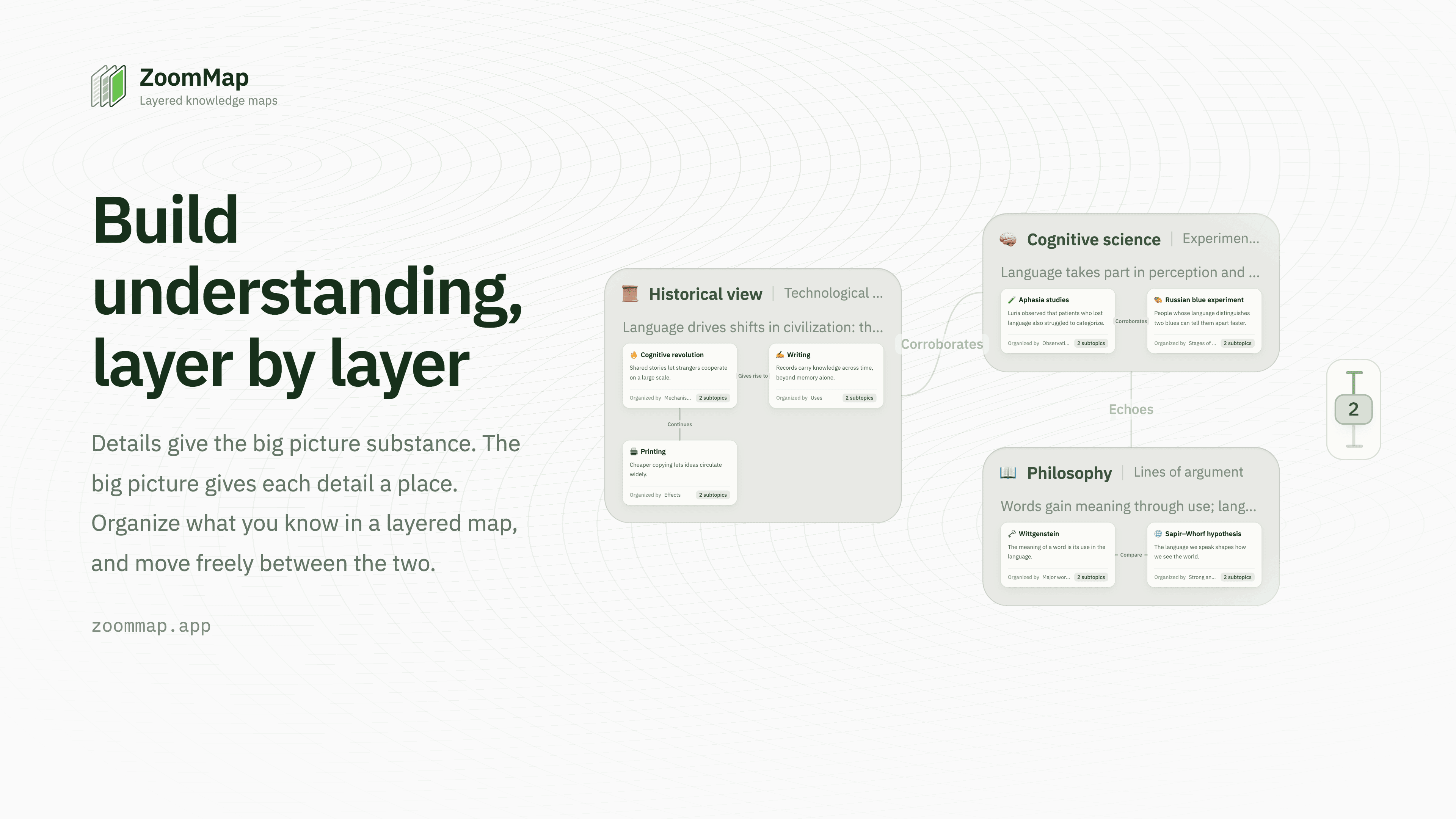
About this app
ZoomMap helps you build a layered knowledge map: nest cards, link ideas on an open canvas, cite your sources, and zoom smoothly between overview and detail. Great for research, reading notes, writing, and complex projects.
Key features
- 1Layered knowledge maps with nested cards and an open canvas for linking ideas.
- 2Source citations attached to cards, with a web-link importer that keeps images as separate blocks.
- 3Smooth zoom between overview and detail, plus shared maps readable without signing in.
- 4Free tier with 200 one-time points and 5 maps; paid plans from $10/month with AI model access.
Target customer profile
Drawn from the product itself, not from a survey.
Scout Review
Written by AI from measured evidence, scored out of 100.
ZoomMap is a young, fast, well-branded knowledge-mapping tool with a clear idea: nest cards, link ideas on an open canvas, cite sources, and zoom between overview and detail. The homepage communicates that idea well, the Lighthouse numbers are excellent, and the changelog shows active shipping. The weak spots are ordinary for an early product — thin security headers, two accessibility failures, no pricing cue above the fold, and a crowded category where the wedge is easy to copy. It's a competent, promising first release rather than a finished category leader.
Measure by measure
Usability
63Short, clear nav with a persistent 'Create a map' CTA and a changelog showing steady shipping. No pricing or free-tier cue above the fold, and density spikes fast once the mockups start.
Design
71Consistent green brand system, disciplined section structure, and product mockups that show the real interface. Held back by tiny low-contrast text in diagrams and padded empty bands between sections.
Speed
88Lighthouse mobile 100/100 with LCP 937ms, CLS 0 and TBT 0ms; desktop 99/100. Genuinely fast, well inside the top of the measured band.
Security
64HTTPS enforced with HSTS, plus X-Content-Type-Options, Referrer-Policy and SPF. Missing CSP, frame protection, Permissions-Policy and DMARC; no published audits or security page found.
Accessibility
79Lighthouse accessibility 96/100, but two real failures: insufficient contrast and visible text labels without matching accessible names. No WCAG statement found.
Growth
58A real, specific wedge — layered maps with citations and smooth zoom — in a crowded knowledge-tool category. Differentiated enough to matter, but not yet a category the incumbents can't copy.
Improvement areas
- Surface the free tier and a pricing cue above the fold instead of hiding it behind the Pricing page.
- Fix the two Lighthouse accessibility failures: contrast and matching accessible names on visible labels.
- Close the security header gaps (CSP, frame protection, Permissions-Policy, DMARC) and publish a security page.
- Enlarge hero diagram and feature mockup text so the core idea is readable at page scale.
Design & Usability
ZoomMap's homepage is a disciplined, well-branded pitch: a green system carried from logo to CTAs, a hero that shows the actual layered-card product before any copy, and section eyebrows that give the page a consistent technical-notebook voice. The problems are execution details — the hero diagram and three-column feature mockups set text too small and low-contrast to read at page scale, and large empty bands between sections make the page feel padded. Usability is competent but front-loaded with marketing: the nav is short and the 'Create a map' CTA is always visible, yet there's no pricing or free-tier cue above the fold, so a visitor has to click into Pricing to learn a free plan exists. The changelog shows steady shipping, which is a good sign for a young product.
Speed & Security
Speed is the standout: Lighthouse mobile 100/100 with LCP 937ms, CLS 0 and TBT 0ms, and desktop 99/100 — genuinely fast and well inside the top of the measured band. Security is more ordinary. HTTPS is enforced with HSTS, and X-Content-Type-Options, Referrer-Policy and SPF are present, but CSP, frame protection, Permissions-Policy and DMARC are all missing, giving a 7/12 header checklist. No SOC 2, ISO, pen-test or bug-bounty claims appear on the site. Payments run through Stripe, which is a reasonable baseline for a small product, but the security story is currently table stakes rather than a selling point.
Accessibility & Growth
Accessibility scores 96/100 on Lighthouse, but the automated run still flags two real failures: insufficient background/foreground contrast and visible text labels without matching accessible names. No WCAG statement or accessibility page was found. Growth is a judgement call on the idea: layered knowledge maps with citations and smooth zoom between overview and detail is a specific, useful workflow for research and writing, and the product names its audience clearly. But the category is crowded with note and knowledge tools, and the differentiator is copyable — the wedge is real but not yet a moat. The domain is only 0.2 years old and only a Twitter profile is listed, which is context on stage, not a verdict on the idea.
Conclusion
If you're doing research or long-form writing and want structure without a full PKM setup, ZoomMap is worth a free-tier trial — the layered-map idea is genuinely pleasant and the speed makes it feel lighter than most note tools. Go in expecting an early product: no published audits, no accessibility statement, and a pricing page that hides the free plan from the homepage. The foundation is solid; the next year of shipping will decide whether the wedge becomes a moat.
Suggestions for improvement
- Surface the free tier and a pricing cue above the fold so visitors don't have to click into Pricing to learn there's a $0 plan.
- Fix the two Lighthouse accessibility failures: raise contrast on body copy and diagram text, and give visible text labels matching accessible names.
- Add CSP, frame protection, Permissions-Policy and DMARC to close the header checklist, and publish a short security page.
- Enlarge the hero diagram and feature mockup text so the product's core idea is readable at page scale without zooming.
Alternatives comparison
Named competitors, point by point. Nobody paid to appear here or to be left out.
 ZoomMap |  | |
|---|---|---|
| Layered / nested knowledge maps | Yes — core feature: nest cards and zoom between overview and detail. | Not specified in provided details. |
| Source citations | Yes — cite sources on cards; web-link importer added 2026-09-27. | Not specified in provided details. |
| Open canvas linking | Yes — link ideas on an open canvas. | Not specified in provided details. |
| Free tier | Yes — $0, 200 one-time points, 5 maps, 1 GB storage, no credit card. | Not specified in provided details. |
| Paid pricing | Standard $10/month ($100 yearly); Pro $100/month ($1,000 yearly). | Not specified in provided details. |
| Shared maps without sign-in | Yes — anyone with the link can read a shared map and its sources. | Not specified in provided details. |
Comparing options? See ZoomMap alternatives, scored side by side
More Productivity apps
View all Productivity
Puzzly – B2B Lead Generation & Sales Intelligence Platform
92Puzzly is an all-in-one B2B lead generation platform that...

Qamarero
92An all-in-one hospitality software for restaurants and ba...

EmbedMyReviews
92White-label reputation management software for agencies s...

StoryPad
92Privacy-first open source journal app with a continuous t...

Notion
92All-in-one AI workspace for docs, projects, and knowledge...

The Stack Newsletter
92A weekly newsletter delivering curated tech jobs, intervi...

Vibe Coding Agent Skills
92A free, open-source platform offering 110 AI agent skills...

QRBliss
91Branded QR codes with AI Brand Sync, 15 free dynamic code...

Gerty
91Private, local AI assistant for Mac that runs offline

Strukchad Property Management
91Property management for Kenyan letting agents: rent invoices raised every month, M-Pesa rent prompts to tenants, arrears tracking and landlord statements.

CC Switch
91Open-source desktop app for switching AI coding providers...

PitchWhip
90AI cold call scripts & direct dials from LinkedIn


A platform dedicated to providing unbiased reviews of newly launched applications, analyzing everything from their features to their full potential.
info@scoutforge.net© 2026 Scoutforge. All rights reserved.
