Cycling through all six. Tap any point to stop.
Measured on six things
3D house and room design tool with AI-powered visualization. No download needed. Free to start.
Accessibility
56Lighthouse 85/100 but fails contrast, alt text, link names, and main landmark. No a11y statement or multi-language support. Keyboard navigation inferred.
Screenshots
1 / 1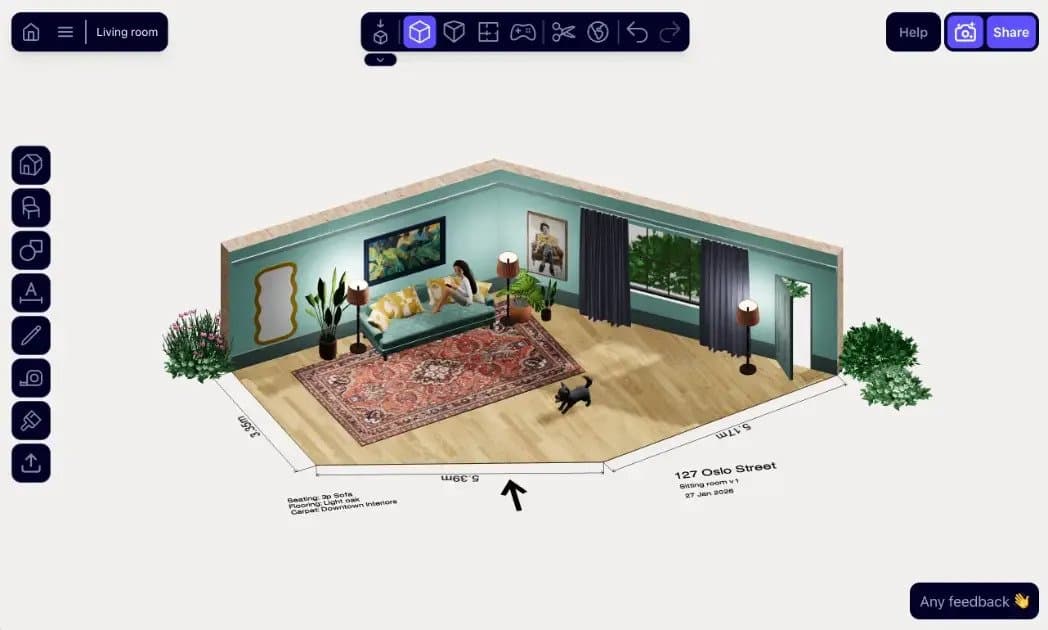
About this app
Arcadium 3D is a free tool for designing and visualizing residential spaces. Making 3D design as easy as a video game. Anyone can create floor plans, customize room layouts, and design complete house interiors. It's browser-based - so nothing to download and you can collaborate easily online with others. The tool combines straightforward design controls with AI-powered visualization, letting you quickly iterate on layouts and see photorealistic renderings of your designs. Ideal for homeowners exploring renovation ideas, interior designers prototyping concepts, or real estate professionals presenting properties. Typical projects include garden landscape design, interior design, architecture, kitchen layouts and bedroom design.
Key features
- 1Browser-based 3D house design tool with AI-powered visualizations.
- 2Free to use with drag-and-drop interface, no downloads required.
- 3Supports floor plans, interior design, landscape, and commercial spaces.
Target customer profile
Drawn from the product itself, not from a survey.
Demographic
Interior designers
Pain points
Needing quick mock-ups for client presentations, but finding traditional 3D software time-consuming and fiddly.
Primary needs
Fast, easy-to-use tool for creating realistic room designs and sharing them with clients for feedback.
Demographic
Architects
Pain points
Struggling to convey 3D ideas to clients using complex software that requires extensive training.
Primary needs
A simple yet precise tool to create 3D models and floor plans for communication, with AI visualizations.
Demographic
DIY home renovators
Pain points
Wanting to visualize home changes before committing, but lacking technical drafting skills.
Primary needs
An intuitive, free tool to design rooms, experiment with layouts, and see realistic results.
Scout Review
Written by AI from measured evidence, scored out of 100.
Arcadium 3D is a promising browser-based 3D design tool with a clean app interface and strong security headers. However, its homepage fails to showcase the product's capabilities, with an empty section and no visual proof of the AI features. Performance is decent but LCP could be improved. Accessibility is lacking, with several WCAG failures. Growth potential is moderate given the crowded market, but the free, AI-powered angle could carve a niche if the marketing improves. Overall, it's a solid tool undermined by a weak landing page.
Measure by measure
Usability
64Clear CTAs and organized app UI, but no demo/video on homepage. Docs and object library exist. User testimonials praise ease, but unverified.
Design
58Clean but sparse homepage; hero lacks visual proof of 3D/AI output, section 2 is empty. App UI itself is polished with clear isometric editor.
Speed
68Lighthouse 81/100 mobile and desktop, LCP 4.1s (needs improvement), but CLS 0 and TBT 25ms are excellent. No lag complaints found.
Security
72Strong HTTP security headers (HSTS, frame protection, etc.), but no CSP. No SOC 2/ISO claims found. Email security (SPF/DMARC) is configured.
Accessibility
56Lighthouse 85/100 but fails contrast, alt text, link names, and main landmark. No a11y statement or multi-language support. Keyboard navigation inferred.
Growth
62Real problem (easy 3D design) with clear differentiators: free, browser-based, AI. But crowded market with strong incumbents; wedge is ease, but limited headroom.
Improvement areas
- Homepage lacks visual proof of product; add demo video or screenshots.
- Accessibility issues: contrast, alt text, link names, main landmark.
- Performance: LCP 4.1s needs optimization; add CSP header.
Design & Usability
Arcadium's homepage is a mixed bag: the hero is a text-only beige field with a gradient headline, but the actual app screenshot shows a clean isometric editor with dimension labels and organized toolbars. The empty section 2 is a glaring dead zone that makes the page feel unfinished. Usability-wise, the CTAs are clear and the app UI looks intuitive, but the lack of a demo or video on the homepage means users must sign up to see value. Testimonials praise ease of use, but they're unverified. Overall, the product's core is solid, but the marketing page undersells it.
Speed & Security
Performance is decent: Lighthouse scores 81/100 on both mobile and desktop, with excellent CLS (0) and TBT (25ms), but LCP at 4.1s is a bit slow. Security is robust with HSTS, frame protection, and secure cookies, but missing CSP is a gap. No SOC 2 or ISO claims found, which is common for early-stage tools. Email security is configured with SPF and DMARC. The site loads without major issues, and no user complaints about speed were found. Overall, it's a solid technical foundation, but there's room to tighten LCP and add CSP.
Accessibility & Growth
Accessibility is a weak point: Lighthouse scores 85/100 but fails on contrast, alt text, link names, and main landmark. No a11y statement or multi-language support. Growth potential is moderate: the problem (easy 3D design) is real, and Arcadium differentiates with free, browser-based, AI-powered ease. However, the market is crowded with SketchUp, Floorplanner, and Planner 5D. The wedge is 'ease of use,' but that's not a strong moat. The AI feature could be a differentiator if executed well, but the site doesn't showcase it effectively. Early-stage traction (domain age 2.4 years) suggests room to grow, but competition is fierce.
Conclusion
If you're a DIY renovator or designer looking for a free, easy 3D tool, Arcadium is worth a try—the editor itself looks intuitive. But the homepage needs a serious overhaul to convince visitors. Add a demo video, fix the empty section, and improve accessibility. With those changes, it could compete with the big names. For now, it's a hidden gem waiting to be polished.
Suggestions for improvement
- Add a hero video or interactive 3D demo to showcase the product immediately.
- Fill the empty section 2 with feature highlights or screenshots of the editor.
- Improve accessibility: fix contrast, add alt text, and include a main landmark.
- Add a CSP header and consider publishing a security/privacy policy page.
Alternatives comparison
Named competitors, point by point. Nobody paid to appear here or to be left out.
 Arcadium 3D Arcadium 3D |  SketchUp SketchUp |  Floorplanner Floorplanner |  Planner 5D Planner 5D | |
|---|---|---|---|---|
| Pricing model | Free | Freemium, paid plans | Freemium, paid plans | Freemium, paid plans |
| AI features | AI visualizations of designs | Limited AI, mostly manual | No AI features | AI features limited in free version |
| Browser-based | Yes, fully browser-based | Web version available, but desktop app is primary | Yes, browser-based | Yes, browser-based |
| Ease of use | Designed for ease, like a video game | Steeper learning curve | Easy for floor plans | User-friendly |
| Collaboration | Share via URL | Limited collaboration in free version | Share via link | Share via link |
SketchUp
Popular 3D modeling software, but steeper learning curve and often paid.
Floorplanner
Easy floor plan creator, but less powerful 3D design features.
Planner 5D
User-friendly home design tool, but AI features may be limited in free version.
Comparing options? See Arcadium 3D alternatives, scored side by side
More 3D & Animation apps
View all 3D & Animation
Uni-1 by Luma AI
92Uni-1 is an advanced multimodal text-to-image AI model th...

LTX 2.3 AI Video Generator
91Fast, open-source AI video generator with 4K support, mul...

ButterKit
82macOS app for App Store screenshots: 3D mockups, auto-tra...

HeyVid AI
88HeyVid AI is a free all-in-one AI video and image generat...

DeepSwapAI
87AI face swap online with no subscription, pay per use.

MyRaxAI
87Generate unique AI-powered visuals for creative, personal, and commercial projects.

3D AI Studio
82.5AI-powered platform that transforms text or images into h...

Seedance 2.0
82AI video generator: prompts, photos, clips into 1080p vid...

Lyric Video Studio
82Lyric Video Studio transforms lyric video creation with DAW-inspired editing, AI integrations, and unique hardware flexibility at an affordable price.
ButterKit
82macOS app for App Store screenshots: 3D mockups, auto-tra...

Wan 2.7 AI Video Generator
82AI video generator with audio sync, multilingual support,...

GPT Image 2
82Create 4K AI images with perfectly rendered, readable text.


A platform dedicated to providing unbiased reviews of newly launched applications, analyzing everything from their features to their full potential.
info@scoutforge.net© 2026 Scoutforge. All rights reserved.
