

A platform dedicated to providing unbiased reviews of newly launched applications, analyzing everything from their features to their full potential.
info@scoutforge.net© 2026 Scoutforge. All rights reserved.
A platform dedicated to providing unbiased reviews of newly launched applications, analyzing everything from their features to their full potential.
info@scoutforge.net© 2026 Scoutforge. All rights reserved.
A platform dedicated to providing unbiased reviews of newly launched applications, analyzing everything from their features to their full potential.
info@scoutforge.net© 2026 Scoutforge. All rights reserved.
Cycling through all six. Tap any point to stop.
Measured on six things
macOS app for App Store screenshots: 3D mockups, auto-tra...
App Store listing confirms accessibility features for faster task completion. Strong localization support (18 offline, 50 total languages) helps reach global users. Native Mac app generally follows platform guidelines, though specific contrast/keyboard details are limited.
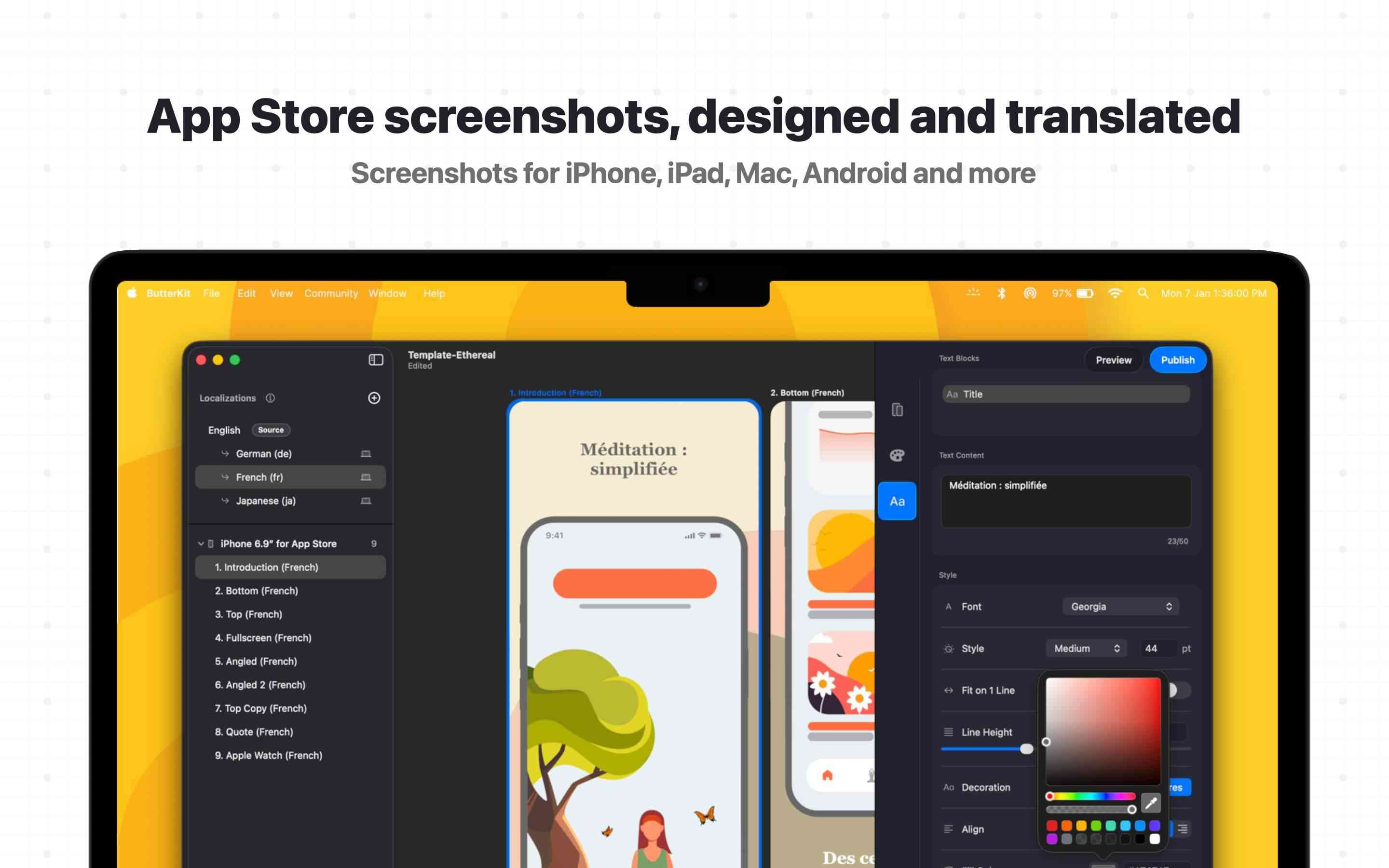
ButterKit is a game-changer for indie developers and design teams who need polished App Store screenshots without the headache. I've tried several tools, and ButterKit stands out because it actually understands the workflow. You can capture screenshots directly from Xcode Simulator, drag and drop PNGs onto photorealistic 3D devices, or link a Fastlane folder for automation. The 3D rendering is built on Metal, so it's buttery smooth even with multiple artboards. The translation feature is a lifesaver: on-device translation covers 18 languages for free, and cloud-based AI handles all 50 App Store languages. You can even upload screenshots and metadata (like descriptions and “What’s New”) directly to App Store Connect via API. It works offline for most tasks, integrates with AI coding agents via MCP, and offers both one-time purchase and subscription options. The templates are gorgeous, and the community marketplace keeps growing. The developer, Zach Spitulski, is a one-person shop who...
Drawn from the product itself, not from a survey.
Demographic
Indie iOS/macOS developers
Pain points
Spend too much time creating and localizing screenshots manually, struggle with clunky tools
Primary needs
Fast, automated screenshot capture, one-click localization, direct App Store Connect upload
Demographic
Small design studios
Pain points
Need to produce consistent, high-quality screenshots for multiple clients across many languages
Primary needs
Professional 3D mockups, bulk export, template libraries, integration with existing workflows like Fastlane
Demographic
Marketing agencies managing App Store assets
Pain points
Manual screenshot creation is error-prone and time-consuming, especially when localizing for global campaigns
Primary needs
Scalable screenshot generation, translation accuracy, easy collaboration via file linking
Demographic
Enterprise developers with CI/CD pipelines
Pain points
Screenshot generation is a bottleneck in automated releases, requiring manual steps
Primary needs
Automation via Fastlane, MCP server for AI agents, headless or scriptable screenshot creation
Written by AI from measured evidence, scored out of 100.
ButterKit is one of the strongest tools in its niche — a native, high-performance Mac app that combines stunning 3D mockups, seamless automation, powerful localization, and direct App Store Connect integration. Built by a solo developer with real startup experience, it prioritizes speed, privacy, and actual workflow understanding over flashy but limited web alternatives. Testimonials consistently mention massive time savings and better conversion rates. While the free version has a watermark and some advanced features are Pro-only, the overall experience is polished and genuinely delightful. It's exactly what indie developers have been waiting for.
Intuitive drag-and-drop from Xcode Simulator or Fastlane folders, one-click localization that syncs designs across languages, and direct App Store Connect API upload. Users report learning the app in ~10 seconds with a 100x workflow speedup.
Gorgeous, photorealistic 3D device mockups powered by a custom Metal rendering engine delivering up to 120fps edits. Professional templates, panoramic backgrounds, editable fonts/gradients, and a clean glassmorphic UI make outputs look premium and on-brand.
Native macOS app with Metal 3D engine for real-time 120fps editing. Offline-first for core tasks (rendering, 18-language translation). Fastlane linking and simulator capture eliminate manual steps entirely.
Local-first processing with no accounts, no data upload for core features, and optional cloud translation using your own API keys stored in macOS Keychain. Direct App Store Connect API integration follows official standards. One-person developer with transparent privacy policy.
App Store listing confirms accessibility features for faster task completion. Strong localization support (18 offline, 50 total languages) helps reach global users. Native Mac app generally follows platform guidelines, though specific contrast/keyboard details are limited.
Community marketplace for templates, one-person dev (Zach Spitulski) iterating quickly with sustainable one-time purchase + optional subscription. Strong testimonials, Discord/Reddit presence, and direct ASO impact via better localized screenshots and metadata sync.
ButterKit nails the sweet spot for indie iOS/macOS developers: beautiful, editable 3D photorealistic devices rendered smoothly via Metal, combined with dead-simple capture from Xcode Simulator or Fastlane folder linking. The template library is high-quality, with a growing community marketplace. Localization is a standout — on-device for 18 languages completely free/offline, or cloud for all 50 App Store languages. The UI is clean, modern, and users literally say they understood it in 10 seconds. Compared to web tools, the native Mac experience feels premium and integrated. Drag-and-drop, real-time previews, and synced designs across languages eliminate the usual headaches.
Performance is excellent thanks to the Metal engine (real-time edits at high frame rates) and offline-first architecture. Automation shines with Fastlane integration, direct batch export, and a built-in MCP server that lets AI coding agents (Claude, Cursor, etc.) handle screenshot generation, translation, and even App Store Connect publishing. Security is strong for this category: most work happens locally with no mandatory accounts or data sharing. Pro features (watermark removal, full metadata sync/upload via official API) require purchase but feel worth it. It's a huge leap over clunky web alternatives or manual Figma setups.
Global reach is a core strength with accurate translation for screenshots plus metadata (descriptions, What's New). This directly boosts ASO and conversion rates across 50 locales. Accessibility support is present per the App Store listing, though more details would help. As a one-person shop with a sustainable business model (one-time ~$59 or subscription), growth feels healthy and user-focused rather than ad-driven or bloated. The community aspects (marketplace, Discord) and glowing reviews suggest real product-market fit. It solves a genuine pain point for indie devs, studios, and agencies tired of error-prone manual localization.
Conclusion
If you're spending hours manually creating and localizing App Store screenshots, stop. ButterKit turns that chore into something almost enjoyable. Download the free version, try capturing from your simulator, and watch your workflow transform. Highly recommended for any serious iOS/macOS shipper.
Named competitors, point by point. Nobody paid to appear here or to be left out.
 ButterKit ButterKit |  AppLaunchpad AppLaunchpad |  Screens Screens |  Frame.io (for screenshots) Frame.io (for screenshots) |  Figma with plugins Figma with plugins | |
|---|---|---|---|---|---|
| Native macOS App with Xcode Simulator Capture | Yes, direct capture + Fastlane linking | No, web-based only | Limited screenshot features | Collaboration only, no capture | Manual plugins only |
| 3D Photorealistic Device Rendering | Yes, real-time Metal engine, 120fps | Basic mockups, web-based | No deep 3D rendering | Not specialized for mockups | 2D plugins only |
| Localization Support | 18 offline + all 50 App Store languages, metadata sync | Templates + some AI localization | Localized screenshots, limited translation | Collaboration, not localization-focused | Manual plugins for translation |
| Direct App Store Connect Upload | Yes, screenshots + metadata via official API | Export only | Export only | No | No native upload |
| Automation & AI Integration | Fastlane, built-in MCP for AI agents (Claude/Cursor) | Some automation, AI localization | Basic workflow automation | Collaboration workflows | Plugin-based only |
| Pricing Model | Free with watermark; ~$59 one-time or subscription for Pro | Subscription/web plans | Paid macOS app | Enterprise collaboration pricing | Figma subscription + plugins |
AppLaunchpad
Web-based App Store screenshot creator with templates and mockups, but lacks native macOS integration and direct Xcode capture.
Screens
macOS app for creating localized screenshots, but not as deep 3D rendering or translation features.
Frame.io (for screenshots)
Collaboration platform that can handle screenshots, but not purpose-built for App Store localization or bulk export.
Figma with plugins
Manual setup with plugins for device mockups and translation, but lacks direct Xcode capture and App Store Connect upload.
Comparing options? See ButterKit alternatives, scored side by side
What the review was written against. A verdict with no sources is an opinion.

An AI-powered interior and exterior design tool that tran...

Frame-perfect video-to-GIF maker that runs entirely in yo...

An AI-powered photo restoration app that brings old, blur...

BeartIMAGE is a free, web-based image processing platform engineered for fast, bulk photo editing and conversion directly in your browser.

AI-powered personalized face swap art platform creating c...

A free online AI-powered tool that instantly converts ima...

A massive collection of free printable coloring pages for...

Design And Animate QR Codes People Want to Scan

AI face swap for photos, videos, GIFs with free trial.

Try on a tattoo on your own body photo before you book.

Private, local-first image texture workbench.

Free AI background noise remover for audio and video with...
A platform dedicated to providing unbiased reviews of newly launched applications, analyzing everything from their features to their full potential.
info@scoutforge.net© 2026 Scoutforge. All rights reserved.
