Cycling through all six. Tap any point to stop.
Measured on six things
Migrate mailboxes between 99+ email clients and file form...
Speed
57Lighthouse mobile 62/100 with LCP 3.8s and TBT 969ms; desktop 73/100. CLS is a clean 0, but the page is heavy and slow to become interactive on mobile.
Screenshots
1 / 1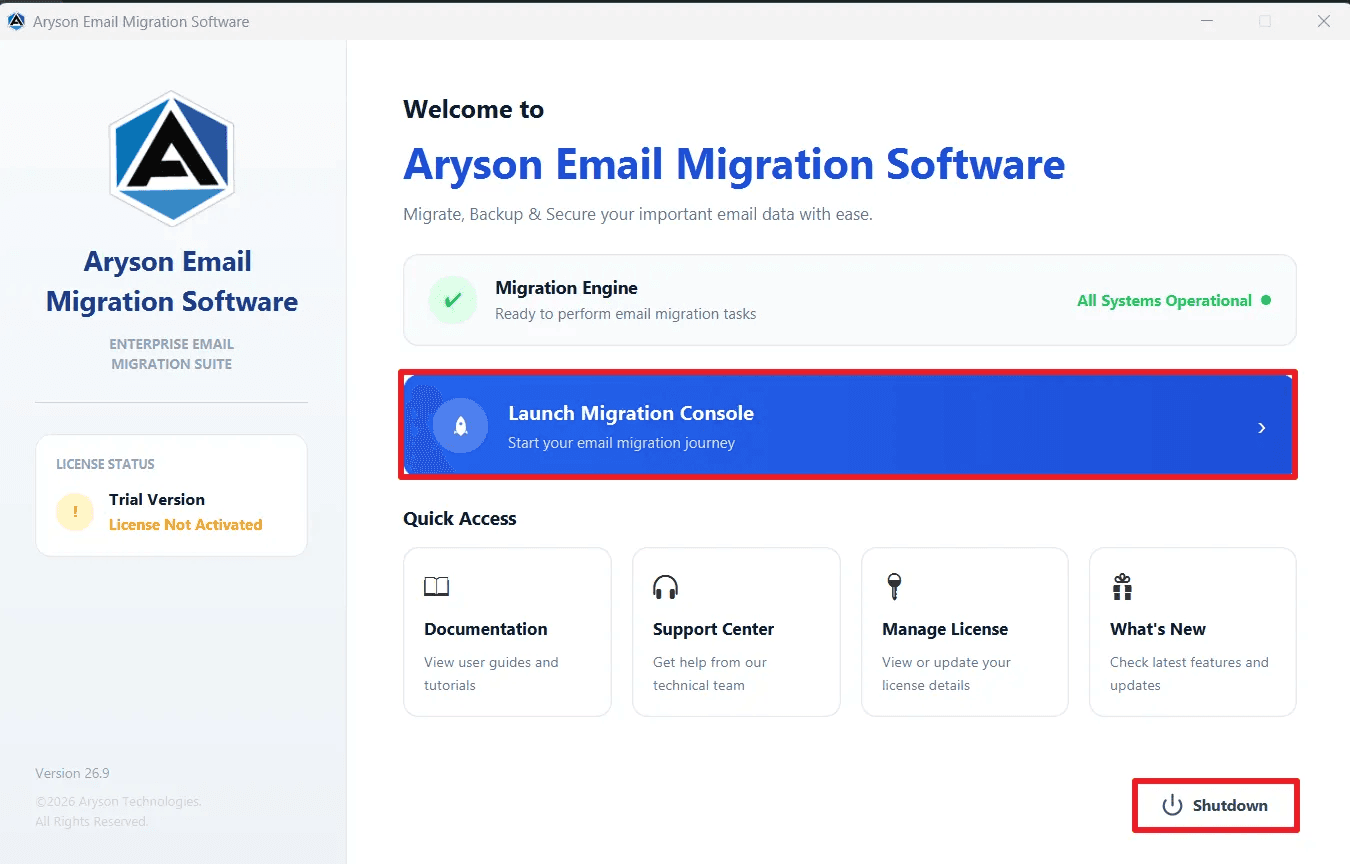
About this app
Aryson Email Migration Software is a comprehensive tool for migrating emails, contacts, calendars, and tasks across 99+ email clients and file formats. It supports PST/OST, IMAP/POP3, Office 365, GoDaddy Office 365, and Hotmail/Outlook, allowing seamless transfers to destinations like PST, PDF, Office 365, Google Workspace, and more. Key features include date-based filtering, duplicate removal, attachment handling, incremental migration, and detailed progress reports. The tool preserves folder hierarchy, metadata, and attachments, ensuring data integrity. With support for admin-level authentication and bulk migration, it's ideal for IT admins, compliance officers, and businesses of all sizes. Rated 4.9/5 by 2456 users and praised by Softpedia, CNET, and G2.
Key features
- 1Migrates PST/OST, IMAP/POP3, Office 365, GoDaddy O365, and Hotmail to PST, PDF, MBOX, EML, MSG, CSV, JSON, DOC, O365, Google Workspace, and more.
- 2Preserves folder hierarchy, metadata, attachments, and O365 permissions/rules/auto-replies (send as, send on behalf, full access).
- 3Date-range filtering, duplicate removal, attachment handling, and 'skip previously migrated' incremental migration.
Target customer profile
Drawn from the product itself, not from a survey.
Demographic
IT Administrators & Consultants
Pain points
Manual migration is time-consuming and error-prone; preserving folder structure and permissions is challenging.
Primary needs
Bulk migration, folder structure preservation, zero data loss, and advanced filtering.
Demographic
Compliance Officers
Pain points
Retrieving specific email records for audits is difficult; maintaining chain of custody is critical.
Primary needs
Date-based filtering, metadata retention, and secure export formats like PDF.
Demographic
Business Users (Non-technical)
Pain points
Complex migration tools require technical expertise; risk of data loss during migration.
Primary needs
User-friendly interface, straightforward migration steps, and data integrity.
Scout Review
Written by AI from measured evidence, scored out of 100.
Aryson Email Migration Software is a competent, long-lived enterprise utility (domain registered 2013) with a genuinely broad feature set: PST/OST, IMAP/POP3, O365, GoDaddy, Hotmail sources; PST/PDF/MBOX/EML/MSG/CSV/JSON/DOC targets; permission and rule migration; incremental skip; date and duplicate filters. The website is dense and dated but informative, the demo cap is fair, and the security headers are fully locked down. Weaknesses: slow mobile load, accessibility gaps behind a 91 score, no published compliance certifications, and a crowded competitive field where Microsoft and IMAPSync cover the two biggest use cases for free.
Measure by measure
Usability
64Clear role-based guidance, FAQs, video, and a guide link. The 100-item demo cap lets buyers test real migrations before paying — solid for the category.
Design
58Dense, text-heavy vendor page with workflow diagrams, role sections, and screenshots. Functional and information-rich but visually dated versus modern SaaS peers.
Speed
57Lighthouse mobile 62/100 with LCP 3.8s and TBT 969ms; desktop 73/100. CLS is a clean 0, but the page is heavy and slow to become interactive on mobile.
Security
76Full header stack (HSTS, CSP, frame protection, Referrer-Policy), SPF and DMARC in place, 12/12 probe checklist. No SOC 2/ISO claim surfaced in fetched content.
Accessibility
71Lighthouse 91/100, but contrast failures, broken heading order, small touch targets, and a missing main landmark remain. No WCAG statement published.
Growth
62Real recurring enterprise need (mailbox migrations), specific differentiators (permission/rule migration, incremental skip, admin Modern Auth), but crowded by free native tools and IMAPSync.
Improvement areas
- No published SOC 2, ISO 27001, or pen-test report — a gap for enterprise and compliance buyers.
- Mobile performance is weak (LCP 3.8s, TBT 969ms); the marketing site is heavy and slow to become interactive.
- Accessibility gaps remain despite a 91 Lighthouse score: contrast, heading order, touch targets, missing main landmark.
Design & Usability
Aryson's page is built like a spec sheet: workflow diagrams, role-based sections, feature bullets, screenshots, video, FAQs, and a guide link. It's information-dense and honest about what the tool does, which is more than most vendor pages manage. The trade-off is visual: this looks like a 2015 utility-software site, not a modern SaaS product, and the density makes scanning hard. Usability is stronger — the 100-item demo cap lets buyers run a real migration before paying, and the role-based framing (IT admin, compliance, support, business user) maps features to actual jobs. The guide and video shorten the learning curve for a tool that otherwise looks intimidating.
Speed & Security
Speed is the weak spot: Lighthouse mobile 62/100 with a 3.8s LCP and 969ms TBT, desktop 73/100. CLS is a clean 0, so layout is stable, but the page is heavy and slow to become interactive on mobile — ironic for a tool whose pitch is 'faster than manual migration'. Security is the opposite story: HTTPS enforced, HSTS, CSP, frame protection, X-Content-Type-Options, Referrer-Policy, Permissions-Policy, plus SPF and DMARC — a full 12/12 on the header probe. The site also states it doesn't store credentials or mailbox content. What's missing is a published SOC 2, ISO 27001, or pen-test report, which enterprise buyers in this category will ask for.
Accessibility & Growth
Accessibility scores 91/100 on Lighthouse but still fails on contrast, heading order, touch-target sizing, and a missing main landmark — automated checks only cover part of WCAG, and there's no published accessibility statement or WCAG conformance claim. Growth is a judgement on the idea: mailbox migration is a real, recurring enterprise problem, and Aryson differentiates with permission/rule migration, incremental 'skip previously migrated', admin Modern Auth, and date-based filtering. But the category is crowded — Microsoft's native migration tools cover the O365 case for free, and IMAPSync covers IMAP-to-IMAP at zero cost. Aryson's wedge is the breadth (99+ clients/formats) and the compliance-grade features, which is a real but narrow moat.
Conclusion
If you're an IT admin or compliance officer migrating mailboxes at scale and you need permission/rule preservation plus audit-friendly filtering, Aryson is a legitimate option worth trialing — the 100-item demo lets you verify it on your own data. If your migration is O365-to-O365 or IMAP-to-IMAP, start with Microsoft's native tools and IMAPSync before paying. The product is real and the security posture is solid; the marketing site just needs to catch up to the tool.
Suggestions for improvement
- Publish a SOC 2 or ISO 27001 report — enterprise buyers in this category will ask before signing.
- Cut mobile LCP below 2.5s and TBT below 300ms; the current 3.8s/969ms is the biggest technical liability.
- Fix the Lighthouse accessibility failures: contrast, heading order, touch targets, main landmark.
- Add an accessibility statement and WCAG conformance level to the site footer.
Alternatives comparison
Named competitors, point by point. Nobody paid to appear here or to be left out.
 Aryson Email Migration Software Aryson Email Migration Software |  Email Migration Email Migration | IMAPSync | |
|---|---|---|---|
| GUI-based migration (no command line required) | Yes — full GUI with wizard-style steps | Yes — guided Microsoft 365 migration wizard | No — command-line only |
| Source formats supported | PST, OST, IMAP, POP3, Office 365, GoDaddy O365, Hotmail/Outlook (99+ clients/formats) | Microsoft ecosystems only (Exchange, O365, IMAP) | IMAP to IMAP only |
| Destination formats supported | PST, PDF, MBOX, EML, MSG, CSV, JSON, DOC, DOCX, O365, Google Workspace, IMAP, Exchange Online | Microsoft 365 / Exchange Online | IMAP server only |
| Date-based filtering | Yes — date range filter built in | Limited — via PowerShell/batch filtering | Yes — via --maxage/--minage flags |
| Duplicate removal | Yes — built-in duplicate detection | No native dedup in migration wizard | Partial — via --skipcrossduplicates |
| Preserves folder hierarchy and permissions | Yes — folder structure, permissions, rules, auto-replies | Yes — native O365 migration preserves structure and permissions | Folder hierarchy yes; permissions no |
| Pricing model | Paid license; free demo migrates 100 items/folder or 1 full O365 account | Free with Microsoft 365 subscription | Free open-source (donation-supported) |
Email Migration
Native tool for migrating mailboxes to Office 365, but limited to Microsoft ecosystems.
IMAPSync
Open-source command-line tool for IMAP to IMAP migration, lacking GUI and advanced filters.
Comparing options? See Aryson Email Migration Software alternatives, scored side by side
More Productivity apps
View all Productivity
Qamarero
92An all-in-one hospitality software for restaurants and ba...

The Stack Newsletter
92A weekly newsletter delivering curated tech jobs, intervi...

EmbedMyReviews
92White-label reputation management software for agencies s...

StoryPad
92Privacy-first open source journal app with a continuous t...

Puzzly – B2B Lead Generation & Sales Intelligence Platform
92Puzzly is an all-in-one B2B lead generation platform that...

Notion
92All-in-one AI workspace for docs, projects, and knowledge...

Vibe Coding Agent Skills
92A free, open-source platform offering 110 AI agent skills...

CC Switch
91Open-source desktop app for switching AI coding providers...

username.md
90One verified handle for your online identity, readable by...

PitchWhip
90AI cold call scripts & direct dials from LinkedIn

What the GIF
89Frame-perfect video-to-GIF maker that runs entirely in yo...

AuditCloser
89White-label website audits that close deals for digital a...


A platform dedicated to providing unbiased reviews of newly launched applications, analyzing everything from their features to their full potential.
info@scoutforge.net© 2026 Scoutforge. All rights reserved.
