Cycling through all six. Tap any point to stop.
Measured on six things
Secure Gmail backup and migration tool with multiple form...
Design
52Dense legacy-vendor layout: 20+ stacked feature bullets, star-rating widget with no verifiable source, and screenshots buried behind tabs. Functional but visually dated versus modern SaaS peers.
Screenshots
1 / 1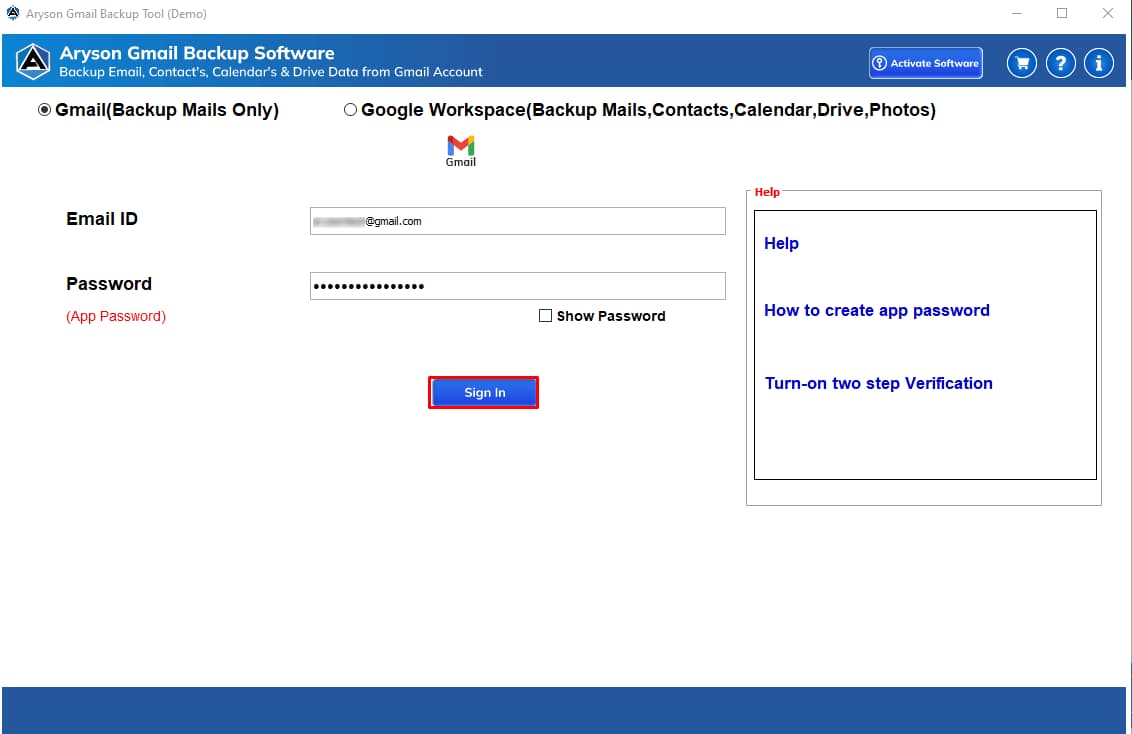
About this app
Aryson Gmail Backup Tool is a professional software designed to back up Gmail emails safely and efficiently. It allows users to save Gmail data in multiple file formats such as PST, MSG, MBOX, EML, EMLX, HTML, PDF, CSV, DOCX, JPEG, DOCM, TEXT, and PNG, or migrate emails directly to email clients like Gmail, Office 365, HostGator, Hotmail, IMAP, iCloud Mail, Zoho Mail, Yandex Mail, and Google Workspace. With features like selective backup, incremental backup, batch processing, and secure OAuth login, it ensures complete data protection while keeping the process simple and reliable. The tool supports backing up the complete Gmail mailbox including Inbox, Sent, Drafts, Spam, and Trash. It offers advanced filters to skip duplicate emails and date-based backup, and allows backup without attachments. Additional features include splitting PST files, freeing up Gmail server space, and compatibility with all major Windows versions. The software is available for Windows, Mac, and Linux, with ...
Key features
- 1Backup Gmail to 13+ formats including PST, MBOX, EML, PDF, CSV, DOCX, and HTML
- 2Incremental and batch backup with selective folders, date filters, and duplicate skipping
- 3Direct migration to Office 365, Gmail, Zoho, iCloud, Yandex, IMAP, and Google Workspace
- 4Secure Google OAuth login without storing Gmail passwords; PST splitting for large archives
Target customer profile
Drawn from the product itself, not from a survey.
Demographic
IT administrators and system administrators
Pain points
Managing large Gmail mailboxes and ensuring data integrity during backup.
Primary needs
Efficient batch backup, incremental backup, and secure authentication.
Demographic
Small to medium business owners
Pain points
Risk of data loss and storage limitations in Gmail.
Primary needs
Complete backup to local storage, migration to other platforms, and space management.
Demographic
Individual professionals and freelancers
Pain points
Need for offline access and compliance with data retention policies.
Primary needs
Selective backup, multiple file formats, and easy restoration.
Scout Review
Written by AI from measured evidence, scored out of 100.
Aryson Gmail Backup Tool is a competent, feature-deep utility wrapped in a dated marketing site. The engineering underneath is solid — 12/12 security headers, OAuth without password storage, 85/100 mobile Lighthouse, and a feature set (incremental, batch, selective, date filters, PST split, 13 output formats, migration to Office 365/Zoho/iCloud) that genuinely outpaces Google Takeout and MailStore Home on flexibility. Where it stumbles is presentation and transparency: a bullet-wall homepage, a 4.8/5 rating widget with no verifiable source, pricing hidden behind a click, and accessibility failures that a 91/100 automated score papers over. It's a working tool that deserves a better storefront.
Measure by measure
Usability
63Feature depth is real — selective, incremental, batch, date filters, skip-duplicates, PST split. Free demo and a Guide tab exist. But pricing is hidden behind 'Buy Now' and the page buries the workflow in bullet soup.
Design
52Dense legacy-vendor layout: 20+ stacked feature bullets, star-rating widget with no verifiable source, and screenshots buried behind tabs. Functional but visually dated versus modern SaaS peers.
Speed
71Lighthouse mobile 85/100 (LCP 1.1s, CLS 0.003) is genuinely good; desktop 72/100 with 565ms TBT shows heavier desktop assets. Solid, not exceptional.
Security
76Full security header suite (HSTS, CSP, frame protection, Referrer-Policy, Permissions-Policy), SPF and DMARC configured — 12/12 probe points. OAuth without password storage is the right call. No published audit found.
Accessibility
70Lighthouse a11y 91/100, but real failures remain: contrast, heading order, touch targets, missing main landmark, role=presentation conflicts. No WCAG statement published.
Growth
58Real recurring pain (Gmail caps, retention compliance) with a genuine wedge over Takeout and MailStore: format conversion, migration, scheduling. But the category is crowded with near-identical vendors.
Improvement areas
- Pricing is not shown on the homepage — only reachable via 'Buy Now'
- 4.8/5 rating from 3,695 reviews has no link to a verifiable third-party platform
- Accessibility failures: contrast, heading order, touch targets, missing main landmark
- No published SOC 2, ISO 27001, or penetration test documentation
Design & Usability
Aryson Gmail Backup Tool's site is a time capsule from the era when 'professional software' meant stacking every feature into a bulleted wall and calling it a landing page. The design is functional and the screenshots exist, but they're buried behind tabs while 20+ bullets do the talking. Usability is where the product actually earns its keep: selective backup, incremental sync, batch multi-account handling, date filters, duplicate skipping, PST splitting, and a free demo plus a Guide tab. That's a genuinely deep toolkit for the category. The friction is commercial, not functional — pricing is hidden behind a 'Buy Now' click, and the workflow is described in prose rather than shown.
Speed & Security
Speed is a pleasant surprise: Lighthouse mobile 85/100 with a 1.1s LCP and near-zero layout shift, though desktop drops to 72/100 with 565ms of total blocking time — heavier desktop assets are dragging it down. Security is the strongest dimension. The HTTP probe returned a full 12/12: HTTPS enforced, HSTS, CSP, frame protection, X-Content-Type-Options, Referrer-Policy, Permissions-Policy, plus SPF and DMARC on the domain. The product uses Google OAuth without storing Gmail passwords, which is exactly the right pattern for a tool that touches your inbox. The gap is third-party attestation — no SOC 2, ISO 27001, or published penetration test was found, which is normal for a vendor at this scale but caps the score.
Accessibility & Growth
Accessibility scores 91/100 on Lighthouse but the failing audits are the ones that matter to real users: insufficient color contrast, non-sequential heading order, undersized touch targets, a missing main landmark, and role=presentation conflicts. No WCAG conformance statement is published. On growth, the idea is sound — Gmail storage limits and data-retention compliance are real, recurring pains, and the product has a genuine wedge over Google Takeout (which exports raw data with no format conversion, scheduling, or migration) and MailStore Home (personal-only, no Gmail-to-Office 365 migration). The limit is the category itself: dozens of near-identical 'Gmail Backup Tool' vendors compete on the same feature list, and nothing here is structurally hard to copy.
Conclusion
If you're an IT admin or SMB owner who needs Gmail backed up to PST/MBOX/PDF and optionally migrated to Office 365, this does the job and does it with proper OAuth and a hardened site. Try the free demo first — it exists, use it. If you're an individual who just wants their mail off Google's servers, Google Takeout is free and probably enough. The product is real; the marketing is the weak link.
Suggestions for improvement
- Publish pricing on the page instead of hiding it behind 'Buy Now' — comparison shoppers bounce at that click.
- Link the 4.8/5, 3,695-review rating to a verifiable third-party source (G2, Capterra, Trustpilot) or drop the widget.
- Fix the accessibility failures Lighthouse flagged: contrast, heading order, touch targets, and add a main landmark.
- Add a SOC 2 or ISO 27001 attestation page — for a tool that handles inbox data, that's the trust signal buyers look for.
Alternatives comparison
Named competitors, point by point. Nobody paid to appear here or to be left out.
 Aryson Gmail Backup Tool Aryson Gmail Backup Tool |  MailStore Home MailStore Home |  Google Takeout Google Takeout | |
|---|---|---|---|
| Backup Gmail to local file formats | 13+ formats: PST, MBOX, EML, EMLX, MSG, PDF, DOCX, DOCM, TXT, HTML, CSV, JPEG, PNG | Archives to MailStore's own database format; export to EML/MSG available | Exports Gmail as MBOX archive only; no format conversion |
| Migrate Gmail to another email service | Yes — Office 365, Gmail, HostGator, Hotmail, IMAP, iCloud, Zoho, Yandex, Google Workspace | No direct migration; archiving only | No — export only, no import to other providers |
| Incremental / scheduled backup | Yes — incremental backup saves only newly added emails | Yes — scheduled automatic archiving | No — manual export only, with optional scheduled exports |
| Pricing model | Paid license with free demo; price not shown on homepage | Free for personal use | Free |
| Platform support | Windows, Mac, Linux | Windows only | Web-based, any browser |
MailStore Home
Free email archiving software for personal use that supports Gmail backup.
Google Takeout
Google's official data export tool that allows downloading Gmail data.
Comparing options? See Aryson Gmail Backup Tool alternatives, scored side by side
More Productivity apps
View all Productivity
The Stack Newsletter
92A weekly newsletter delivering curated tech jobs, intervi...

Qamarero
92An all-in-one hospitality software for restaurants and ba...

EmbedMyReviews
92White-label reputation management software for agencies s...

StoryPad
92Privacy-first open source journal app with a continuous t...

Notion
92All-in-one AI workspace for docs, projects, and knowledge...

Puzzly – B2B Lead Generation & Sales Intelligence Platform
92Puzzly is an all-in-one B2B lead generation platform that...

Vibe Coding Agent Skills
92A free, open-source platform offering 110 AI agent skills...

Gerty
91Private, local AI assistant for Mac that runs offline

CC Switch
91Open-source desktop app for switching AI coding providers...

username.md
90One verified handle for your online identity, readable by...

PitchWhip
90AI cold call scripts & direct dials from LinkedIn

What the GIF
89Frame-perfect video-to-GIF maker that runs entirely in yo...


A platform dedicated to providing unbiased reviews of newly launched applications, analyzing everything from their features to their full potential.
info@scoutforge.net© 2026 Scoutforge. All rights reserved.
