Cycling through all six. Tap any point to stop.
Measured on six things
A Microsoft 365 backup and cross-tenant migration tool fo...
Accessibility
57Lighthouse a11y 78/100. Failing audits include unnamed buttons, low contrast, broken heading order, missing main landmark and ARIA role mismatches. No WCAG statement or a11y page found on the site.
Screenshots
1 / 1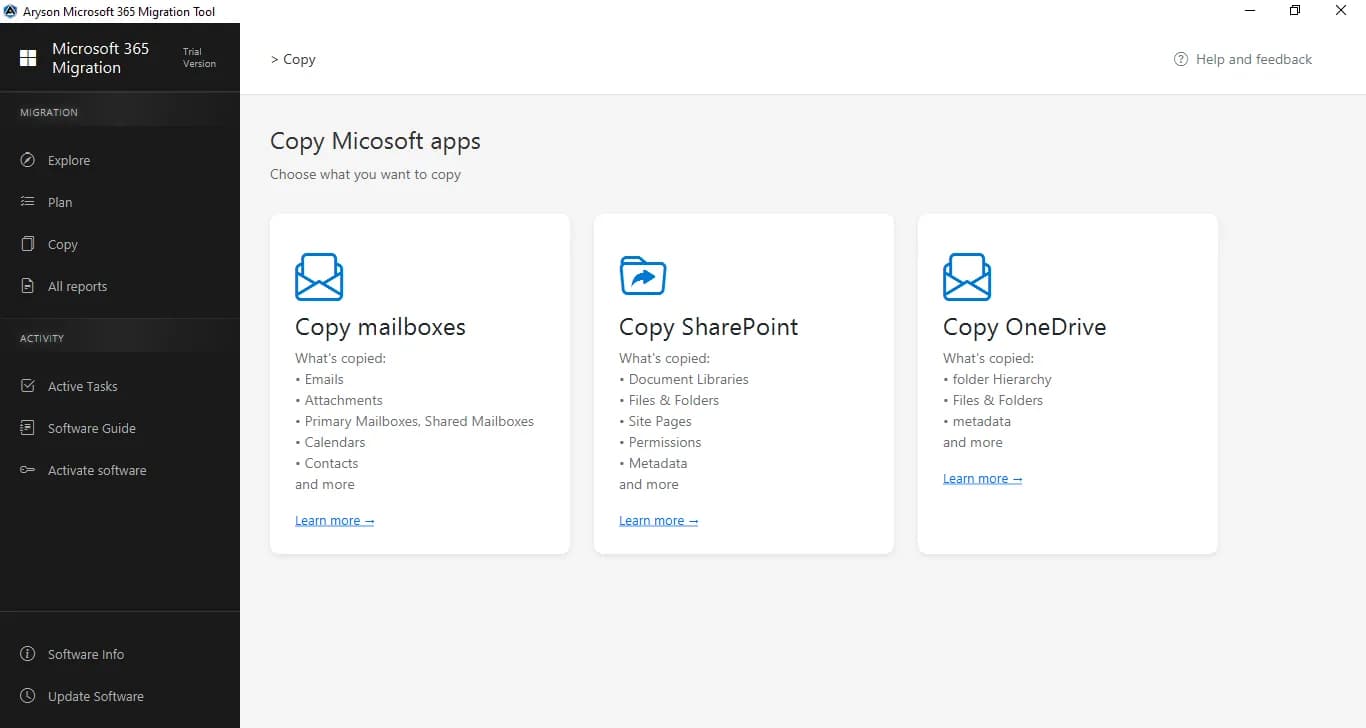
About this app
Aryson Office 365 Backup & Restore Tool is a comprehensive solution designed for administrators who need to secure and migrate Microsoft 365 data. It handles mailboxes, SharePoint, OneDrive, and Teams, using secure Graph API authentication. The tool excels at bulk operations, allowing you to move 1000+ mailboxes between tenants. Key features include advanced filtering, CSV-based mapping for bulk users and sites, incremental backups to skip previously migrated data, and a deduplication engine to keep your destination clean. You can also back up mailboxes to local PST files and split large PSTs for easier management. The software provides a detailed restore process that preserves folder hierarchies, metadata, and permissions, ensuring data integrity throughout the process. It's a powerful utility for businesses going through mergers, acquisitions, or restructuring, offering a centralized way to manage large-scale data transfers. The interface is designed to be straightforward, guiding...
Key features
- 1Bulk tenant-to-tenant migration of 1000+ mailboxes with CSV-based mapping and custom folder naming.
- 2Covers Exchange mailboxes, SharePoint, OneDrive and Teams with Graph API and Modern Auth / Client ID-Secret.
- 3Deduplication engine, skip-migrated incremental filters, PST export and splitting, and Exact Copy preserving version history and permissions.
Target customer profile
Drawn from the product itself, not from a survey.
Demographic
IT Managers and System Administrators in mid-to-large enterprises
Pain points
Managing complex tenant-to-tenant migrations, ensuring data integrity, minimizing downtime during M&A activities.
Primary needs
A reliable, bulk migration tool with granular control, detailed reporting, and secure authentication.
Demographic
Managed Service Providers (MSPs) and Cloud Consultants
Pain points
Handling backup and migration projects for multiple clients efficiently, needing a scalable and repeatable process.
Primary needs
A cost-effective solution with flexible licensing, bulk mapping via CSV, and comprehensive support for all M365 workloads.
Demographic
Small to Medium Businesses (SMBs) with limited IT staff
Pain points
Lack of expertise for complex migrations, fear of data loss, need for a simple yet powerful backup solution.
Primary needs
An intuitive interface, clear guidance, and a tool that covers essential workloads like Exchange and OneDrive without a steep learning curve.
Scout Review
Written by AI from measured evidence, scored out of 100.
Aryson Office 365 Backup & Restore is a competent, long-established M365 migration and backup utility with a genuinely fast site, a clean security-header posture and a well-articulated migration pitch. The measured profile is jagged: speed 78 and security 76 are real strengths, design 58 and accessibility 57 are the drag. The product's differentiators — 1000+ mailbox bulk moves, CSV mapping, dedup, PST splitting, Exact Copy preserving version history and permissions — are concrete and aimed at a real buyer: the IT admin running a merger migration under deadline. Against Veeam and Spanning, Aryson is behind on enterprise trust signals (no SOC 2 or ISO surfaced) and behind on visual polish, but ahead on migration-specific workflow depth and price flexibility. The demo limits are published honestly, which is more than many competitors do. The main risks are procurement friction from missing compliance paperwork and an accessibility story that won't survive an enterprise a11y review.
Measure by measure
Usability
63Clear self-serve path with Features, Specifications, Video, FAQs and Guide, plus a demo with stated limits. CSV bulk mapping and skip-migrated filters cut repeat admin work. Docs depth beyond FAQs is unverified.
Design
58Dense, spec-sheet style landing page with per-workload tabs and heavy bullet lists. Functional and information-rich, but visually dated versus Veeam and Spanning's cleaner product pages.
Speed
78Lighthouse mobile 91/100 (LCP 1.8s, CLS 0.002, TBT 283ms) is genuinely fast. Desktop drops to 74/100, so the heavier desktop payload is the weak spot. No benchmarks for actual migration throughput.
Security
76Full header set verified: HSTS, CSP, frame protection, Referrer-Policy, Permissions-Policy, plus SPF and DMARC — 12/12. Graph API with Modern Auth and Client ID/Secret avoids stored credentials. No SOC 2 or ISO claim found.
Accessibility
57Lighthouse a11y 78/100. Failing audits include unnamed buttons, low contrast, broken heading order, missing main landmark and ARIA role mismatches. No WCAG statement or a11y page found on the site.
Growth
62Real recurring problem — tenant-to-tenant M365 migration during M&A — with concrete wedges: 1000+ mailbox bulk moves, CSV mapping, dedup, PST splitting. Crowded category against Veeam and Spanning, but the M&A migration niche is underserved.
Improvement areas
- No SOC 2, ISO 27001 or pen-test documentation surfaced — a blocker for enterprise procurement.
- Accessibility audit at 78/100 with unnamed buttons, contrast failures and missing main landmark; no WCAG statement.
- Documentation stops at FAQs and a video — no migration playbook or API/permissions reference for the 1000+ mailbox scenario.
Design & Usability
Aryson's Office 365 Backup & Restore page is built like a spec sheet: four workload tabs, dozens of bullets, a 4.8/5 rating from 2001 reviews and a 1.5M download counter. It's information-dense and honest about what each workload does, but visually it lags behind Veeam and Spanning, which present the same capability with cleaner hierarchy. Usability is stronger than design: Features, Specifications, Video, FAQs and Guide are all one click away, and the free demo publishes its own limits (one full mailbox, then 500 emails/100 contacts per mailbox; SharePoint files over 20MB skipped; Teams capped at 50 messages). CSV bulk mapping, custom folder naming and skip-migrated filters are the kind of details that save admins real hours on repeat jobs. The gap is depth — FAQs are not documentation, and there's no visible API reference or migration playbook for the 1000+ mailbox scenario the site leads with.
Speed & Security
Speed is the strongest measured dimension. Lighthouse mobile scores 91/100 with LCP 1.8s, CLS 0.002 and TBT 283ms — a genuinely snappy, stable page. Desktop drops to 74/100, which suggests heavier desktop-only assets or third-party scripts; worth trimming but not disqualifying. Security is solid on the infrastructure side: HTTPS enforced with HSTS, CSP, frame protection, X-Content-Type-Options, Referrer-Policy and Permissions-Policy all present, plus SPF and DMARC configured — 12/12 on the header checklist. The product itself uses Graph API with Modern Auth and Client ID/Secret, which is the right pattern for M365 tooling and avoids storing mailbox credentials. What's missing is the paperwork enterprise buyers expect: no SOC 2, ISO 27001, pen-test summary or bug bounty program surfaced in the site content. For a tool handling full mailbox and SharePoint data, that's the gap that will slow procurement.
Accessibility & Growth
Accessibility is the weakest measured dimension: Lighthouse 78/100 with unnamed buttons, insufficient contrast, non-sequential headings, a missing main landmark and ARIA role/child mismatches. Touch targets are also flagged, which matters because the site pushes mobile download buttons. There's no accessibility statement or WCAG conformance claim anywhere in the fetched content, so buyers with procurement a11y requirements have nothing to point at. Growth is a different story. The problem is real and recurring — tenant-to-tenant migration during mergers, acquisitions and restructures — and the site names specific wedges: 1000+ mailbox bulk moves, CSV-based mapping, deduplication, PST export and splitting, and Exact Copy preserving version history, permissions and sensitivity labels. That's a sharper pitch than generic 'backup your M365' positioning. The limit is category crowding: Veeam and Spanning own the enterprise backup conversation, and Aryson's differentiation lives in the migration workflow rather than the backup one. The M&A migration niche is underserved enough to sustain the product, but it caps how large the addressable market gets.
Conclusion
If you're an IT manager staring down a tenant-to-tenant migration and you need CSV bulk mapping, deduplication and PST export without a six-figure Veeam quote, Aryson is worth a demo — the workflow features are real and the site is fast enough to prove the vendor ships working software. If you're an enterprise buyer who needs SOC 2 on file before the PO clears, or an accessibility team that will audit the marketing site, budget extra time for those conversations. The product is strongest exactly where it claims to be: bulk migration with granular control. It's weakest where it stays quiet: compliance documentation and inclusive design. Start with the free demo, verify the 1000+ mailbox path on a small pilot tenant, and ask sales directly for their security questionnaire responses before you commit.
Suggestions for improvement
- Publish a SOC 2 Type II report or at least an ISO 27001 certificate — enterprise procurement will ask and currently there's nothing to hand them.
- Add an accessibility statement and fix the Lighthouse failures: name the buttons, fix contrast, add a main landmark, correct heading order.
- Ship real documentation beyond FAQs — a migration playbook for the 1000+ mailbox scenario and an API/permissions reference would close the usability gap.
- Trim desktop-only assets to bring the 74/100 desktop Lighthouse score closer to the 91/100 mobile score.
Alternatives comparison
Named competitors, point by point. Nobody paid to appear here or to be left out.
 Aryson Office 365 Backup & Restore Tool Aryson Office 365 Backup & Restore Tool |  Veeam Backup for Microsoft 365 Veeam Backup for Microsoft 365 | Spanning Backup for Microsoft 365 | |
|---|---|---|---|
| Primary focus | Backup plus tenant-to-tenant migration across Exchange, SharePoint, OneDrive and Teams | Enterprise-grade M365 backup with strong restore and scalability | Cloud-to-cloud M365 backup with rapid restore and ease of use |
| Tenant-to-tenant migration | Yes — 1000+ mailboxes, CSV bulk mapping, custom folder naming | Backup-first; migration is not the primary use case | Backup-first; migration is not the primary use case |
| Deduplication and incremental backup | Yes — duplicate detection plus skip-migrated filters | Yes — incremental backup with deduplication | Yes — incremental backup with deduplication |
| Local PST export | Yes — mailbox to PST with large-file splitting | Export to PST supported via restore/export options | Export options available; PST not the headline feature |
| Free trial / demo | Free demo — 1 full mailbox, then 500 emails/100 contacts per mailbox; 20MB SharePoint cap; 50 Teams messages | Free trial available | Free trial available |
| Compliance certifications | None surfaced on site (no SOC 2 / ISO claim found) | Enterprise compliance program with published certifications | Strong security posture with published compliance documentation |
Veeam Backup for Microsoft 365
An enterprise-grade backup solution that offers robust protection for Exchange Online, SharePoint Online, OneDrive for Business, and Microsoft Teams. It's known for its reliability and scalability.
Spanning Backup for Microsoft 365
A cloud-to-cloud backup solution that provides comprehensive protection and rapid restore capabilities for M365 data. It's known for its ease of use and strong security features.
Comparing options? See Aryson Office 365 Backup & Restore Tool alternatives, scored side by side
More Productivity apps
View all Productivity
The Stack Newsletter
92A weekly newsletter delivering curated tech jobs, intervi...

Qamarero
92An all-in-one hospitality software for restaurants and ba...

EmbedMyReviews
92White-label reputation management software for agencies s...

StoryPad
92Privacy-first open source journal app with a continuous t...

Notion
92All-in-one AI workspace for docs, projects, and knowledge...

Puzzly – B2B Lead Generation & Sales Intelligence Platform
92Puzzly is an all-in-one B2B lead generation platform that...

Vibe Coding Agent Skills
92A free, open-source platform offering 110 AI agent skills...

Gerty
91Private, local AI assistant for Mac that runs offline

CC Switch
91Open-source desktop app for switching AI coding providers...

username.md
90One verified handle for your online identity, readable by...

PitchWhip
90AI cold call scripts & direct dials from LinkedIn

What the GIF
89Frame-perfect video-to-GIF maker that runs entirely in yo...


A platform dedicated to providing unbiased reviews of newly launched applications, analyzing everything from their features to their full potential.
info@scoutforge.net© 2026 Scoutforge. All rights reserved.
