Cycling through all six. Tap any point to stop.
Measured on six things
Open, preview, and convert Outlook Mac OLM files without ...
Growth
52Real, narrow problem (OLM files without Outlook) with a specific IT/legal buyer. But the feature set is near-identical to SysTools, Stellar, and Kernel, leaving little structural wedge.
Screenshots
1 / 1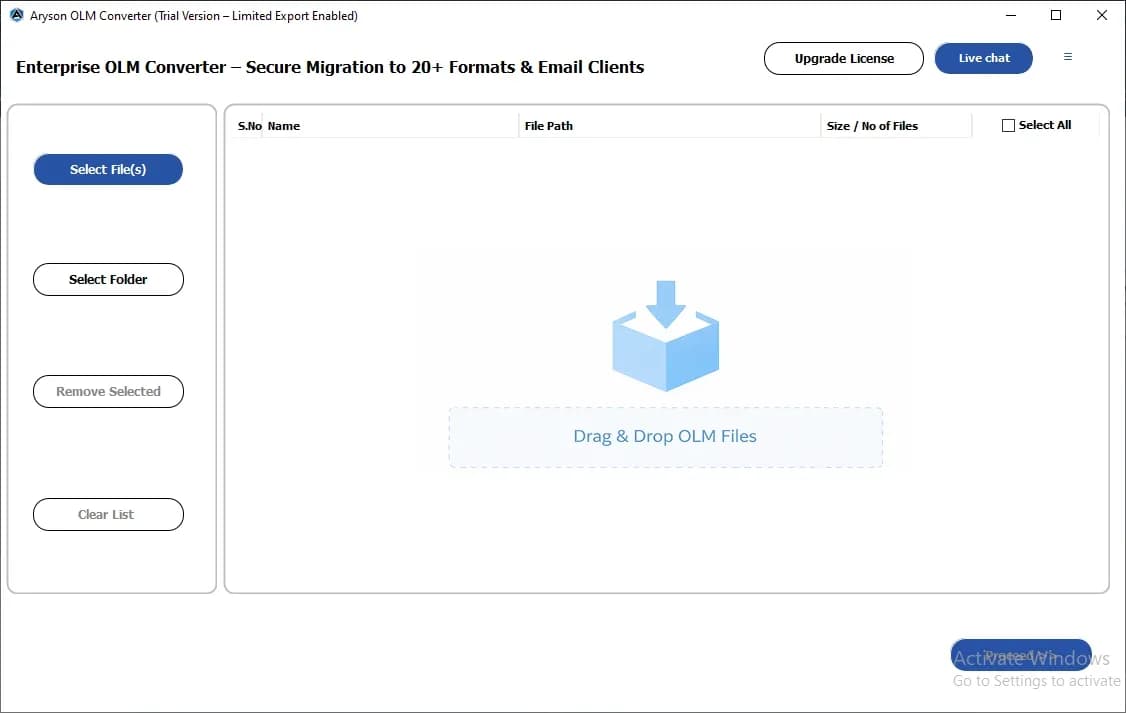
About this app
Aryson OLM Viewer Tool is a dedicated utility for macOS and Windows that lets you open, read, and convert Outlook for Mac OLM files without needing Microsoft Outlook installed. It is designed for both individual users and IT teams who need to access or migrate legacy Mac Outlook data. The tool provides a clean preview panel for emails, attachments, calendars, contacts, tasks, and notes, and supports batch loading of multiple OLM files. Conversion is available to over 8 formats including PST, MBOX, EML, MSG, PDF, DOCX, CSV, ICS, VCF, and PNG. Migration to cloud services like Microsoft 365, Google Workspace, Gmail, Outlook.com, and IMAP is also supported with secure authentication. Standout features include date-range filtering, duplicate removal, custom folder naming, and splitting large PST/MBOX files. The free demo version allows exporting up to 50 items per folder, while the premium version unlocks full capabilities for $29.
Key features
- 1Open and preview OLM files (emails, calendars, contacts, tasks, notes) without Outlook installed.
- 2Convert OLM to 8+ formats including PST, MBOX, EML, MSG, PDF, DOCX, CSV, ICS, VCF, and PNG.
- 3Migrate OLM data to Microsoft 365, Google Workspace, Gmail, Outlook.com, and IMAP with authentication.
- 4Date-range filtering, duplicate removal, custom folder naming, and PST/MBOX splitting.
- 5Batch loading of multiple OLM files via buttons or drag-and-drop.
- 6Free demo exports up to 50 items per folder; full version priced at $29.
Target customer profile
Drawn from the product itself, not from a survey.
Demographic
IT administrators managing Mac Outlook archives
Pain points
Cannot open OLM files on Windows, risk of data loss during migration
Primary needs
Batch conversion of OLM to PST/PDF, migration to Microsoft 365/Google Workspace
Demographic
Legal and compliance teams needing email exports
Pain points
Inability to access OLM archives for audits, need for secure PDF/MSG exports
Primary needs
Conversion to PDF/MSG with date filters, migration reports for documentation
Demographic
Individual users with old Mac Outlook backups
Pain points
No Outlook available, files are orphaned or damaged, limited free tools
Primary needs
Free viewer to open and read OLM files, export to common formats like PST or MBOX
Scout Review
Written by AI from measured evidence, scored out of 100.
Aryson OLM Viewer Tool is a competent, fast, and cheap utility for a genuinely annoying problem: OLM files you cannot open without a Mac or Outlook. The marketing site is one of the fastest reviewed, and transport security is fully buttoned up. The weaknesses are the dated UI, a stingy 50-item demo cap, no published compliance audits, and a feature set that mirrors its three main competitors almost line for line. It is a reasonable buy at $29 for an individual or small IT team that needs a one-off conversion, but it does not yet make a compelling case over the established alternatives for larger or compliance-sensitive buyers.
Measure by measure
Usability
62Clear feature set with drag-and-drop, folder navigation, and search. The 50-item demo cap and download-only trial add friction, but the workflow itself is straightforward for the target IT user.
Design
58Functional but dated vendor-style landing page and classic three-pane desktop UI. Dense feature lists and inconsistent typography read as legacy utility software rather than modern tooling.
Speed
88Lighthouse mobile 98/100 (LCP 1.1s, CLS 0.003, TBT 136ms) and desktop 97/100. The marketing site is genuinely fast and lightweight.
Security
74Strong transport security: HTTPS enforced, HSTS, CSP, frame protection, and full header checklist (12/12), plus SPF and DMARC. No published SOC 2, ISO, or independent audit claims.
Accessibility
70Lighthouse accessibility 91/100, but failing audits include insufficient color contrast, non-sequential headings, small touch targets, and a missing main landmark. No WCAG statement published.
Growth
52Real, narrow problem (OLM files without Outlook) with a specific IT/legal buyer. But the feature set is near-identical to SysTools, Stellar, and Kernel, leaving little structural wedge.
Improvement areas
- No published SOC 2, ISO 27001, or independent security audit despite targeting compliance buyers.
- Free demo capped at 50 items per folder, limiting real-world evaluation.
- Dated desktop UI and dense, legacy-style landing page.
- Lighthouse accessibility failures: contrast, heading order, touch targets, missing main landmark.
Design & Usability
Aryson OLM Viewer Tool presents itself as a workmanlike desktop utility: a dense, feature-list-heavy landing page and a classic three-pane interface. For the target user — an IT admin or legal team member who just needs to crack open an OLM archive — the design is functional and the workflow is clear. Drag-and-drop loading, folder hierarchy navigation, and subject/to/from search are all sensible. The friction is in the trial: the free demo caps exports at 50 items per folder, and there is no browser-based demo, so evaluating the tool means downloading and installing a desktop app. At $29 the price is aggressive, but the experience is dated rather than delightful.
Speed & Security
Speed is the standout measured strength: Lighthouse mobile performance 98/100 with LCP 1.1s and near-zero layout shift, and desktop 97/100. The marketing site is genuinely snappy. Security is solid on transport — HTTPS enforced, HSTS, CSP, frame protection, and a full 12/12 header checklist, plus SPF and DMARC. What is missing is the deeper trust layer: no published SOC 2, ISO 27001, or independent penetration test, which matters for the legal and compliance buyers the product explicitly targets. For a $29 utility handling sensitive email archives, that gap is worth noting.
Accessibility & Growth
Accessibility scores 91/100 on Lighthouse, but the failing audits are real: insufficient color contrast, non-sequential heading order, small touch targets, a missing main landmark, and role conflicts. There is no published WCAG conformance statement. Growth is the harder question. The problem is real and specific — opening legacy Mac Outlook OLM files without Outlook, especially on Windows — and the buyer is identifiable. But the feature set (8+ export formats, cloud migration, date filters, dedupe, PST/MBOX splitting) is essentially the same menu offered by SysTools, Stellar, and Kernel. Price is the differentiator, and price is the easiest thing for a competitor to match.
Conclusion
If you need to open or convert a handful of OLM files and you want to spend $29 instead of $99, Aryson is a defensible choice — the core viewing and conversion workflow is there, the site is fast, and the security basics are in place. If you are a legal or compliance team that needs audit trails and vendor certifications, look at the established players first. Either way, download the demo and test it against your actual OLM files before paying; the 50-item cap is enough to know whether the preview and export quality meet your bar.
Suggestions for improvement
- Publish a SOC 2 or ISO 27001 attestation, or at minimum a security whitepaper, to satisfy compliance buyers.
- Raise the demo export cap or offer a time-limited full trial so evaluators can test real migrations.
- Modernize the desktop UI and landing page typography to match the speed and polish of the marketing site.
- Fix the Lighthouse accessibility failures (contrast, heading order, touch targets, main landmark) and publish a WCAG statement.
Alternatives comparison
Named competitors, point by point. Nobody paid to appear here or to be left out.
 Aryson OLM Viewer Tool Aryson OLM Viewer Tool |  SysTools OLM Viewer SysTools OLM Viewer |  Stellar Converter for OLM Stellar Converter for OLM |  Kernel OLM Viewer Kernel OLM Viewer | |
|---|---|---|---|---|
| Free demo export limit | 50 items per folder | Limited free preview; paid for full export | Free trial with preview; paid for full conversion | Free viewer with limited export options |
| Export formats supported | PST, MBOX, EML, MSG, PDF, DOCX, CSV, ICS, VCF, PNG, Thunderbird | PST, PDF, EML, MSG, MBOX, HTML, RTF and more | PST, EML, MSG, PDF, HTML, RTF, MBOX | Limited export options in free version |
| Cloud migration support | Microsoft 365, Google Workspace, Gmail, Outlook.com, IMAP, GoDaddy | Office 365, Exchange, IMAP | Office 365 and other cloud options | Not a primary focus |
| Pricing | $29 full version | Higher, tiered licensing | Higher, tiered licensing | Free viewer with paid upgrades |
| Platform support | Windows and macOS | Windows | Windows | Windows |
SysTools OLM Viewer
A popular alternative that offers similar OLM viewing and conversion features, including export to PST, PDF, and other formats.
Stellar Converter for OLM
A tool to convert OLM files to PST and other formats, with preview and migration capabilities.
Kernel OLM Viewer
Free OLM viewer that allows opening and reading OLM files without Outlook, with limited export options.
Comparing options? See Aryson OLM Viewer Tool alternatives, scored side by side
More Productivity apps
View all Productivity
The Stack Newsletter
92A weekly newsletter delivering curated tech jobs, intervi...

Qamarero
92An all-in-one hospitality software for restaurants and ba...

EmbedMyReviews
92White-label reputation management software for agencies s...

StoryPad
92Privacy-first open source journal app with a continuous t...

Notion
92All-in-one AI workspace for docs, projects, and knowledge...

Puzzly – B2B Lead Generation & Sales Intelligence Platform
92Puzzly is an all-in-one B2B lead generation platform that...

Vibe Coding Agent Skills
92A free, open-source platform offering 110 AI agent skills...

Gerty
91Private, local AI assistant for Mac that runs offline

CC Switch
91Open-source desktop app for switching AI coding providers...

username.md
90One verified handle for your online identity, readable by...

PitchWhip
90AI cold call scripts & direct dials from LinkedIn

What the GIF
89Frame-perfect video-to-GIF maker that runs entirely in yo...


A platform dedicated to providing unbiased reviews of newly launched applications, analyzing everything from their features to their full potential.
info@scoutforge.net© 2026 Scoutforge. All rights reserved.
