Cycling through all six. Tap any point to stop.
Measured on six things
Repair corrupt Outlook PST files and recover mailbox data...
Accessibility
56Lighthouse a11y 82/100, but real failures remain: low contrast, broken heading order, missing alt text, unnamed links, small touch targets, and no main landmark. No WCAG statement published.
Screenshots
1 / 1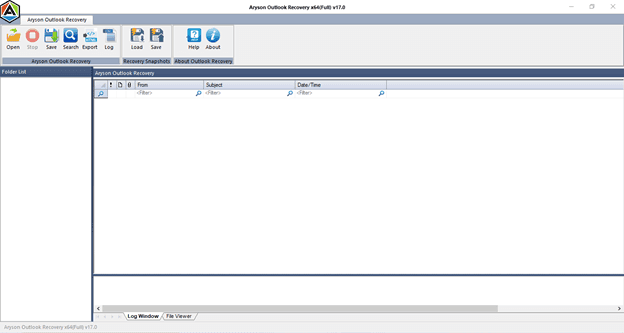
About this app
Aryson Outlook PST Repair Tool is a Windows utility designed to repair corrupt, damaged, or inaccessible Outlook PST files and recover mailbox items like emails, contacts, calendars, tasks, notes, and journals. It serves as a robust alternative to Microsoft's ScanPST.exe, offering three recovery modes (Standard, Advanced, and Deep) to handle any level of corruption. The tool supports encrypted and password-protected PST files, as well as both ANSI and Unicode formats. Key features include previewing recoverable data before saving, selective recovery using date filters, and exporting recovered data to multiple formats such as PST, EML, MSG, DBX, MBOX, and Archive. It also allows attaching the repaired PST directly to Outlook. With a user-friendly interface and compatibility across all Windows versions and Outlook editions, Aryson PST Repair ensures a seamless recovery experience. The free version allows previewing recovered data, while the full version (priced at $49) enables saving ...
Key features
- 1Three recovery modes (Standard, Advanced, Deep) for varying corruption levels, plus encrypted and password-protected PST support.
- 2Preview recoverable mailbox items before saving; free version allows preview, $49 full version enables saving.
- 3Export recovered data to PST, EML, MSG, DBX, MBOX, or Archive, and attach the repaired PST directly to Outlook.
Target customer profile
Drawn from the product itself, not from a survey.
Demographic
IT Managers and System Administrators
Pain points
Frequent PST corruption, large mailbox sizes, error messages like 'PST cannot be accessed' or 'file not a personal folders file'.
Primary needs
Reliable, deep-level repair of oversized or severely corrupted PST files without data loss.
Demographic
HR Professionals and Executives
Pain points
Loss of critical communication records due to Outlook crashes or accidental deletion; need for secure recovery.
Primary needs
Recovery of deleted emails and folders, preview before saving, and export to portable formats like MBOX.
Demographic
Small Business Owners and Office Managers
Pain points
Limited IT budget, lack of technical expertise, and need for a cost-effective solution to fix Outlook issues.
Primary needs
Easy-to-use tool with a free preview option, selective recovery, and compatibility with older Outlook versions.
Demographic
Individual Outlook Users
Pain points
Sudden PST corruption causing loss of personal emails and contacts; frustration with failed ScanPST attempts.
Primary needs
Affordable, one-time repair solution that recovers all mailbox items and restores Outlook functionality.
Scout Review
Written by AI from measured evidence, scored out of 100.
Aryson Outlook PST Repair is a workmanlike Windows utility with a dated marketing site and a surprisingly solid technical foundation. The measured numbers tell a split story: performance is strong (mobile 86/100, LCP 1.1s) and security headers are complete (12/12, HSTS, CSP, DMARC), but accessibility fails on basics like alt text, heading order and contrast, and there's no published compliance certification for a tool that touches sensitive mailboxes. The product itself is well-scoped — three recovery modes, encrypted PST support, multi-format export, a free preview before the $49 purchase — and it competes credibly with Stellar, SysTools and Kernel on features. The site is the weak link: dense, dated, and light on trust signals. Fix the accessibility failures and publish a security page, and this moves from 'fine' to 'recommended'.
Measure by measure
Usability
64Clear feature/spec/FAQ tabs, a free preview demo, and documented recovery modes make the flow understandable. Onboarding is download-and-run, with no live web demo or in-app walkthrough.
Design
58Functional but dated Windows-utility marketing: dense long-scroll page, crowded typography, and stock-style testimonials. Screenshots and a demo video help, but the visual craft trails polished peers.
Speed
70Lighthouse mobile 86/100 (LCP 1.1s, CLS 0.001) and desktop 81/100. Fast first paint and stable layout; the 515ms TBT is the main drag on an otherwise snappy page.
Security
76Full header hygiene (HSTS, CSP, frame protection, Referrer/Permissions-Policy) plus SPF and DMARC — 12/12 on the probe. No published SOC 2/ISO or bug bounty found, so compliance depth is unverified.
Accessibility
56Lighthouse a11y 82/100, but real failures remain: low contrast, broken heading order, missing alt text, unnamed links, small touch targets, and no main landmark. No WCAG statement published.
Growth
58Real, recurring problem with named error codes and a clear wedge (three modes, encrypted PST, multi-format export) against Stellar/SysTools/Kernel. Niche category with modest headroom.
Improvement areas
- Accessibility: fix missing alt text, heading order, color contrast, unnamed links, and small touch targets flagged by Lighthouse.
- Trust signals: publish a security page with data-handling details and ideally a SOC 2 or pen-test summary.
- Onboarding: add guidance on which recovery mode to choose and a live or video walkthrough of the workflow.
Design & Usability
The site is a long, dense marketing scroll with feature bullets, error-code lists, and testimonial blocks packed shoulder to shoulder. It's not pretty, but it's organized: Features, Specifications, Screenshots, Video, Guide, FAQs, Download and Buy Now are all one click away, and a demo video plus screenshots let you see the tool before downloading. Usability is where Aryson does better than its looks suggest — a free preview build lets you scan and preview recovered data before paying the $49, and the three recovery modes (Standard, Advanced, Deep) plus date filters are documented on-page. The gap is onboarding: it's a Windows download-and-run utility with no live web demo and no in-app walkthrough, so first-time users lean on the FAQ and guide tabs. Competent, not delightful.
Speed & Security
Measured performance is genuinely good: Lighthouse mobile 86/100 with LCP 1.1s, CLS 0.001 and FCP 1.1s, and desktop 81/100. The one blemish is a 515ms total blocking time, which suggests some main-thread work on load — noticeable on a low-end phone but not painful. Security is the strongest measured dimension: HTTPS enforced with HSTS, a Content-Security-Policy, frame protection, X-Content-Type-Options, Referrer-Policy and Permissions-Policy all present, plus SPF and DMARC configured — 12/12 on the header probe. What's missing is the paper trail: no published SOC 2, ISO 27001, penetration test summary, or bug bounty that we could find. For a tool that handles sensitive mailbox data, that's the gap worth closing.
Accessibility & Growth
Accessibility is the weak spot. Lighthouse scores 82/100, but the failing audits are the ones that actually bite: insufficient color contrast, headings out of sequential order, images without alt attributes, links with no discernible name, touch targets too small to hit reliably, and no main landmark for screen-reader navigation. There's no WCAG conformance statement on the site. Growth is a more interesting story: PST corruption is a real, recurring, well-documented pain — Aryson lists the exact error codes users search for (0x80040600, 'not a Personal Folders File', the 2GB limit) — and the product has a genuine wedge against Stellar, SysTools and Kernel with three recovery modes, encrypted PST support, and export to PST/EML/MSG/DBX/MBOX/Archive. The category is mature and crowded, so headroom is modest, but the need isn't going away.
Conclusion
If you're staring at a corrupt PST and ScanPST already failed you, Aryson is a reasonable $49 bet — the free preview lets you confirm it can see your data before you pay, which is more than some competitors offer. Just don't expect a modern SaaS experience: this is a Windows utility with a 2013-era website attached. The technical bones are better than the storefront suggests.
Suggestions for improvement
- Fix the accessibility failures Lighthouse flagged: add alt text, repair heading order, raise color contrast, and label links.
- Publish a security/trust page with data-handling details and, ideally, a SOC 2 or pen-test summary.
- Add a short in-app or on-site walkthrough of the three recovery modes so first-timers know which to pick.
- Modernize the landing page: less dense scroll, cleaner typography, and real (verifiable) testimonials instead of stock-style quotes.
Alternatives comparison
Named competitors, point by point. Nobody paid to appear here or to be left out.
 Aryson Outlook PST Repair Tool Aryson Outlook PST Repair Tool |  Stellar Repair for Outlook Stellar Repair for Outlook |  SysTools Outlook PST Recovery SysTools Outlook PST Recovery |  Kernel for Outlook PST Repair Kernel for Outlook PST Repair | |
|---|---|---|---|---|
| Recovery modes | Standard, Advanced, Deep | Standard and Advanced modes | Standard and Advanced modes | Multiple scan modes |
| Encrypted / password-protected PST support | Yes | Yes | Yes | Yes |
| Export formats | PST, EML, MSG, DBX, MBOX, Archive | PST, EML, MSG, RTF, HTML, PDF | PST, EML, MSG, MBOX, HTML | PST, EML, MSG, HTML, RTF |
| Free preview before purchase | Yes (free version previews recovered data) | Yes (demo version) | Yes (demo version) | Yes (trial version) |
| Price (single-user license) | $49 | Tiered, higher than $49 | Tiered, higher than $49 | Tiered, higher than $49 |
Stellar Repair for Outlook
A popular PST repair tool that fixes corrupt Outlook files and recovers emails, contacts, and more. It offers advanced features like selective recovery and saving in multiple formats.
SysTools Outlook PST Recovery
A comprehensive tool to repair damaged PST files and recover mailbox data. It supports all Outlook versions and provides options to save in PST, EML, MSG, and other formats.
Kernel for Outlook PST Repair
An efficient PST repair tool that recovers emails, attachments, calendars, and other items from corrupt PST files. It includes advanced scanning and preview features.
Comparing options? See Aryson Outlook PST Repair Tool alternatives, scored side by side
More Productivity apps
View all Productivity
The Stack Newsletter
92A weekly newsletter delivering curated tech jobs, intervi...

Qamarero
92An all-in-one hospitality software for restaurants and ba...

EmbedMyReviews
92White-label reputation management software for agencies s...

StoryPad
92Privacy-first open source journal app with a continuous t...

Notion
92All-in-one AI workspace for docs, projects, and knowledge...

Puzzly – B2B Lead Generation & Sales Intelligence Platform
92Puzzly is an all-in-one B2B lead generation platform that...

Vibe Coding Agent Skills
92A free, open-source platform offering 110 AI agent skills...

Gerty
91Private, local AI assistant for Mac that runs offline

CC Switch
91Open-source desktop app for switching AI coding providers...

username.md
90One verified handle for your online identity, readable by...

PitchWhip
90AI cold call scripts & direct dials from LinkedIn

What the GIF
89Frame-perfect video-to-GIF maker that runs entirely in yo...


A platform dedicated to providing unbiased reviews of newly launched applications, analyzing everything from their features to their full potential.
info@scoutforge.net© 2026 Scoutforge. All rights reserved.
