Cycling through all six. Tap any point to stop.
Measured on six things
Free, private, local video compressor that never uploads ...
Security
52HTTPS enforced with X-Content-Type-Options, Referrer-Policy and Permissions-Policy set, and the local-only model is a real privacy win. But no HSTS, no CSP, no frame protection, no DMARC, and no published audits — 6/12 on the header checklist.
Screenshots
1 / 1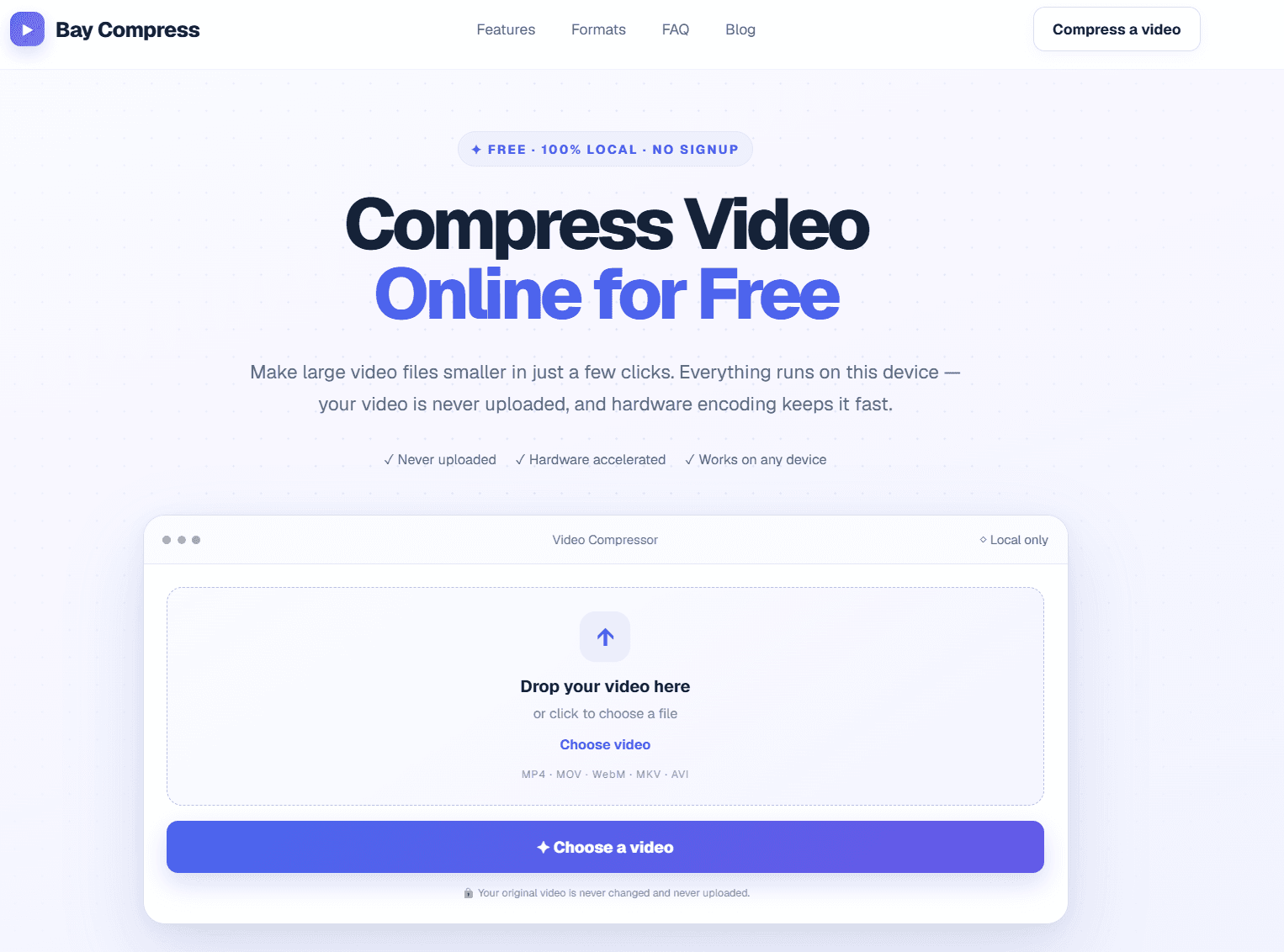
About this app
Bay Compress is a free online video compression tool that runs entirely in your browser, leveraging WebCodecs hardware acceleration to shrink large video files without uploading them to a server. It supports MP4, MOV, WebM, MKV, and AVI formats, outputting universally compatible H.264 MP4. With three compression levels (Basic, Balanced, Strong) and optional resolution scaling, users can easily reduce file sizes for sharing on Discord, email, or social media. The tool emphasizes privacy, speed, and simplicity—no signup, no watermarks, and no file size limits. Whether you're a content creator, professional, or casual user, Bay Compress offers a seamless, secure solution for video compression directly on your device.
Key features
- 1100% local compression via WebCodecs — video never uploaded, no server queue, no file-size limit.
- 2Three compression levels (Basic/Balanced/Strong) plus resolution scaling with live expected-size estimates before encoding.
- 3Supports MP4, MOV, WebM, MKV and AVI input, outputs universally compatible H.264 MP4. No signup, no watermark.
Target customer profile
Drawn from the product itself, not from a survey.
Demographic
Content creators and social media influencers
Pain points
Large video files exceed platform upload limits and take too long to upload.
Primary needs
Fast, private compression to meet platform size restrictions without quality loss.
Demographic
Remote workers and professionals
Pain points
Email attachment size limits prevent sharing large video presentations or demos.
Primary needs
Reliable compression to small file sizes for email without relying on cloud uploads.
Demographic
Casual users and students
Pain points
Limited storage space on devices and slow internet for uploading videos to online compressors.
Primary needs
Free, easy-to-use tool that compresses videos locally without technical expertise.
Scout Review
Written by AI from measured evidence, scored out of 100.
Bay Compress is a free, browser-based video compressor that runs entirely on-device using WebCodecs hardware acceleration. It handles MP4, MOV, WebM, MKV and AVI, outputs universally compatible H.264 MP4, and offers three compression levels plus resolution scaling with live size estimates. No signup, no watermark, no file-size limit. The measured numbers are strong: Lighthouse mobile 91/100, desktop 98/100, accessibility 95/100. The weak spots are security hardening (6/12 on headers, no CSP, no HSTS, no DMARC, no published audits) and thin documentation beyond the FAQ. Design is polished but template-familiar. Growth potential is real — the local-only model is a genuine differentiator against cloud competitors — but the domain is brand new and the category is crowded. A solid, well-executed indie tool with a clear privacy angle and room to sharpen its security posture.
Measure by measure
Usability
72Drop a file, pick a level, download — no signup, no watermark, no size cap. Live expected-size estimates before encoding is a genuinely useful touch. No dedicated docs or help center beyond the FAQ.
Design
74Clean dark hero with a working drop-zone widget in the fold, consistent iconography, and a concrete 248MB→62MB before/after card. Polished for an indie tool, though it leans on familiar SaaS landing-page patterns.
Speed
82Lighthouse mobile 91/100 (LCP 2.7s, TBT 28ms) and desktop 98/100. Client-side WebCodecs encoding with a hardware-accelerated path means no upload round-trip — the real speed win is architectural, not just page weight.
Security
52HTTPS enforced with X-Content-Type-Options, Referrer-Policy and Permissions-Policy set, and the local-only model is a real privacy win. But no HSTS, no CSP, no frame protection, no DMARC, and no published audits — 6/12 on the header checklist.
Accessibility
78Lighthouse accessibility 95/100 with only a color-contrast failure. Responsive layout and keyboard-friendly controls, but no WCAG statement, no a11y page, and no multi-language support mentioned.
Growth
58Real, recurring pain (Discord/email/social upload caps) with a genuine wedge: local-only WebCodecs compression, no signup, no watermark, no size limit. Domain is 0.1 years old — early, but the idea has room.
Improvement areas
- Security headers incomplete: no HSTS, no CSP, no frame protection, no DMARC — 6/12 on the checklist.
- Documentation is limited to a short FAQ; no help center, troubleshooting guide, or browser compatibility matrix.
- No WCAG conformance statement or accessibility page; color contrast fails the Lighthouse audit.
Design & Usability
Bay Compress is a browser-based video compressor that does the one thing its cloud competitors can't: it never uploads your file. The homepage leads with a working drop-zone widget right in the fold, a 248MB→62MB before/after card, and a clean three-step explainer. Design is polished for an indie tool — dark hero, consistent iconography, format badges for MP4/MOV/WebM/MKV/AVI — though it borrows heavily from the standard SaaS landing template. Usability is where it earns its keep: no signup, no watermark, no file-size cap, and live expected-size estimates before you commit to an encode. Three levels (Basic/Balanced/Strong) plus resolution scaling (Original/1080p/720p/480p) cover the common cases. The gap is documentation — there's an FAQ, but no help center, no troubleshooting guide, and no explanation of what happens when WebCodecs isn't available beyond a one-line mention of the FFmpeg.wasm fallback.
Speed & Security
Speed is the strongest measured dimension. Lighthouse gives mobile 91/100 (LCP 2.7s, TBT 28ms) and desktop 98/100, and the architecture backs it up: encoding runs client-side via WebCodecs with a hardware-accelerated path preferred, so there's no upload round-trip and no server queue. The FFmpeg.wasm fallback keeps it working when WebCodecs fails, which is the right call. Security is more mixed. HTTPS is enforced and X-Content-Type-Options, Referrer-Policy and Permissions-Policy are set, and the local-only model is a genuine privacy advantage over Clideo, VEED and FreeConvert — your video never touches a server. But the header checklist lands at 6/12: no HSTS, no CSP, no frame protection, no DMARC record, and no published SOC 2, ISO, pen-test or bug-bounty page. For a tool handling personal video files, the missing CSP and HSTS are the ones worth fixing first.
Accessibility & Growth
Accessibility scores 95/100 on the Lighthouse audit, with the single failure being insufficient color contrast — a common dark-mode issue. The site is responsive, the controls are keyboard-reachable, and the copy explicitly mentions phone and tablet use. What's missing is the paperwork: no WCAG conformance statement, no dedicated accessibility page, and no multi-language support. On growth, the idea holds up. The problem is real and recurring — Discord upload caps, Gmail attachment limits, social platform size restrictions — and the target customer is specific enough to matter: content creators, remote workers, and casual users who don't want to hand their files to a server. The wedge is structural: Clideo, VEED and FreeConvert all process in the cloud, so 'we never upload your video' is something they can't copy without rebuilding. The limit is that compression is a commodity — the domain is 0.1 years old, and the moat is a technical choice, not a network effect. It can grow, but it needs distribution, not just a better architecture.
Conclusion
If you regularly hit Discord's upload cap or Gmail's attachment limit and you'd rather not hand your footage to a server, Bay Compress does the job without asking for an account or stamping a logo on your output. The local-only architecture is the real story here — it's not a marketing line, it's why the tool is fast and why your files stay yours. The trade-offs are honest ones for an early-stage product: no compliance paperwork, no help center, no accessibility statement. None of those are dealbreakers for a free utility, but they're the difference between a useful tool and one a team can standardize on. Worth bookmarking. Worth watching to see if the security headers catch up to the architecture.
Suggestions for improvement
- Add HSTS, a Content-Security-Policy, and X-Frame-Options — the header checklist is 6/12 and CSP is the biggest gap for a tool handling user files.
- Publish a short security/privacy page explaining exactly what the FFmpeg.wasm fallback fetches and confirming no video data leaves the device.
- Build out a help center beyond the FAQ: troubleshooting WebCodecs failures, browser compatibility matrix, and expected encode times by resolution.
- Add a WCAG conformance statement and fix the color-contrast failure flagged by Lighthouse — it's the only accessibility audit that fails.
Alternatives comparison
Named competitors, point by point. Nobody paid to appear here or to be left out.
 Bay Compress Bay Compress |  Clideo Clideo |  VEED.IO VEED.IO |  FreeConvert FreeConvert | |
|---|---|---|---|---|
| Processing location | 100% local in-browser via WebCodecs; video never uploaded | Cloud/server-side processing; file uploaded | Cloud upload required for editing and compression | Server-side processing with file size limits |
| Signup required | No signup, no account | Account required for larger files and full features | Account required for editing and exports | No signup for basic use; account for larger files |
| File size limit | No file size limit (limited by device memory) | Free tier capped; larger files require paid plan | Free tier capped; paid plans for larger uploads | Free tier has file size limits; paid for more |
| Watermark on output | No watermarks, ever | Watermark on free tier | Watermark on free tier | No watermark on compression |
| Additional editing features | Compression only; no editing tools | Trim, crop, merge, add subtitles and more | Full browser-based video editor with collaboration | Conversion and compression; limited editing |
| Output format | H.264 MP4 (universal compatibility) | Multiple formats including MP4, MOV, AVI | MP4 and other formats | Wide range of output formats |
Clideo
Online video compressor with cloud processing and additional editing features.
VEED.IO
Browser-based video editor and compressor with cloud upload and collaborative tools.
FreeConvert
Online file converter and compressor with server-side processing and file size limits.
Comparing options? See Bay Compress alternatives, scored side by side
More Productivity apps
View all Productivity
Qamarero
92An all-in-one hospitality software for restaurants and ba...

The Stack Newsletter
92A weekly newsletter delivering curated tech jobs, intervi...

EmbedMyReviews
92White-label reputation management software for agencies s...

StoryPad
92Privacy-first open source journal app with a continuous t...

Puzzly – B2B Lead Generation & Sales Intelligence Platform
92Puzzly is an all-in-one B2B lead generation platform that...

Notion
92All-in-one AI workspace for docs, projects, and knowledge...

Vibe Coding Agent Skills
92A free, open-source platform offering 110 AI agent skills...

CC Switch
91Open-source desktop app for switching AI coding providers...

username.md
90One verified handle for your online identity, readable by...

PitchWhip
90AI cold call scripts & direct dials from LinkedIn

What the GIF
89Frame-perfect video-to-GIF maker that runs entirely in yo...

AuditCloser
89White-label website audits that close deals for digital a...


A platform dedicated to providing unbiased reviews of newly launched applications, analyzing everything from their features to their full potential.
info@scoutforge.net© 2026 Scoutforge. All rights reserved.
