Cycling through all six. Tap any point to stop.
Measured on six things
Private on-device checks for measurable US passport and visa photo requirements, with explainable results and optional HD print bundles.
Security
42HTTPS enforced but HSTS, CSP, frame protection, and other headers missing (3/12 checklist). On-device processing claim is strong privacy signal. No SOC 2 or audit found.
Screenshots
1 / 1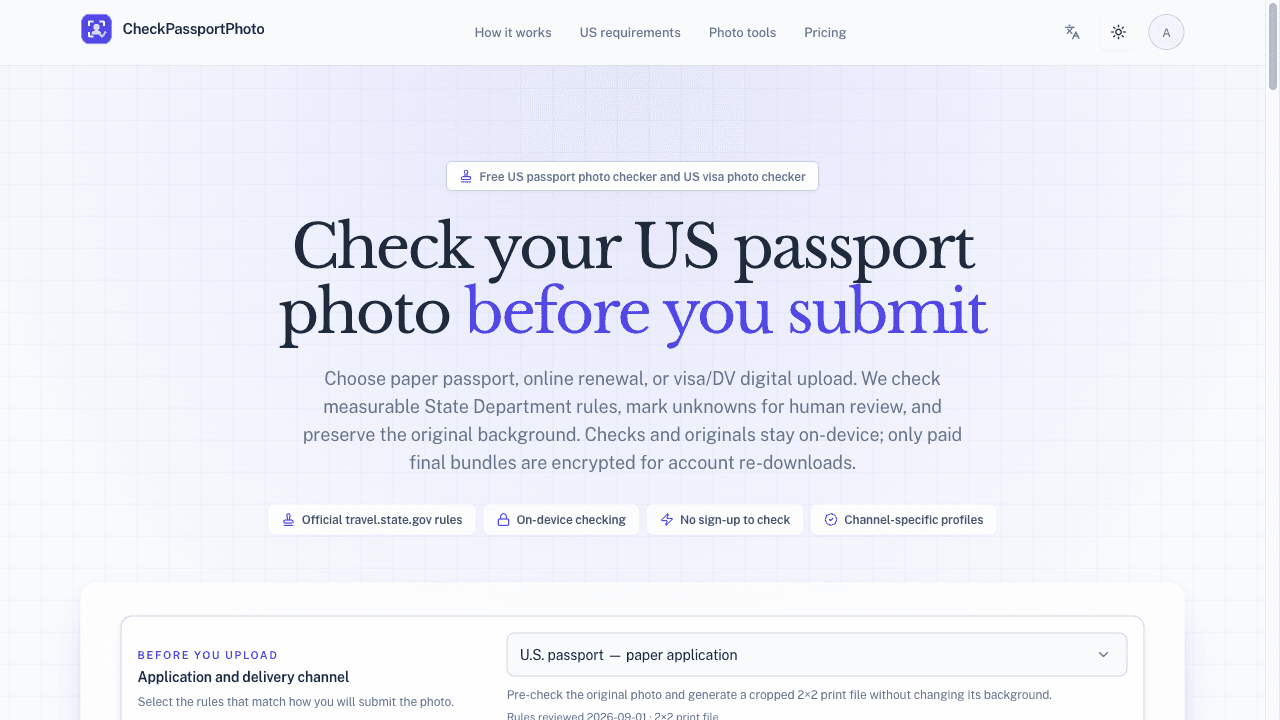
About this app
CheckPassportPhoto helps people check measurable US passport and visa photo requirements privately in their browser. It gives explainable results and explicitly marks checks it cannot determine. Free crop and resize preserves the original background. Optional HD print bundles are available. It does not guarantee government acceptance.
Key features
- 1Channel-specific US passport/visa photo pre-check (paper, online renewal, visa/DV) with explainable results.
- 2On-device processing: originals and checks stay in browser; only paid bundles encrypted for 30-day re-downloads.
- 3Free crop/resize preserving original background; paid bundles include HD JPEG, 4×6 and A4 print sheets at 300 DPI.
- 4Free tools: background changer, passport photo cropper, size comparator, and US requirements guide.
- 5Pricing: free checks, $2.99 single, $4.99 family pack, $19.99/mo Pro (100 bundles, commercial use).
Target customer profile
Drawn from the product itself, not from a survey.
Demographic
Professionals like photographers or travel agents who prepare passport photos for clients
Pain points
Need to ensure photos are compliant but lack time for manual verification; want to offer value-added service
Primary needs
Batch processing, commercial license, reliable checks, and fast turnaround
Scout Review
Written by AI from measured evidence, scored out of 100.
CheckPassportPhoto is a well-positioned early-stage tool for a real, measurable problem: ensuring US passport and visa photos meet State Department rules before submission. Its design is cohesive and purpose-built, with a channel-first flow and clear visual messaging around privacy and explainability. Usability is strong — free checks need no account, and the three-step guide is easy to follow. Performance is middling on mobile (LCP 3.9s), and security headers are thin despite a strong on-device privacy claim. Accessibility is good but has two fixable Lighthouse failures. Growth potential is solid given the clear differentiator and underserved professional niche, though the domain is very young. Overall, a competent, focused tool that executes its core promise well, with room to harden security and polish a few visual details.
Measure by measure
Usability
72Clear channel-first flow, no-account free checking, three-step guide with large numbered cards. Pricing transparent. Slight competition between dashed dropzone and surrounding cards.
Design
70Cohesive purple-accented design with purpose-built upload flow. Clean sans-serif, consistent iconography. Minor issues: low-contrast dropzone border, slight visual mismatch between desktop renders.
Speed
57Lighthouse mobile 70/100 with LCP 3.9s and FCP 3.9s — slow initial paint on mobile. TBT 327ms and CLS 0.078 acceptable. No user lag complaints found.
Security
42HTTPS enforced but HSTS, CSP, frame protection, and other headers missing (3/12 checklist). On-device processing claim is strong privacy signal. No SOC 2 or audit found.
Accessibility
68Lighthouse a11y 94/100. Two failing audits: contrast ratio and heading order. No WCAG statement or keyboard guide found. Language switch and theme toggle present.
Growth
68Real problem, clear channel-specific differentiator, free tier lowers barrier. Early stage (domain 0.2 years) but category has headroom for explainable, private photo checking.
Improvement areas
- Mobile performance: LCP and FCP at 3.9s need optimization for faster first paint.
- Security headers: add HSTS, CSP, frame protection, and DMARC to strengthen trust.
- Accessibility: fix contrast ratio on dropzone border and correct heading order.
- Clarify visual consistency between desktop renders (grid background appears inconsistently).
Design & Usability
CheckPassportPhoto presents a clean, cohesive design with a consistent purple accent and iconography that ties the hero, steps, and feature sections together. The channel selector placed above the upload zone makes the 'select rules first' flow intuitive, and the three-step guide with large numbered cards supports quick scanning. The free checker requires no account, lowering the barrier to value. However, the dropzone's light gray border lacks contrast against the page background, and there's a slight visual mismatch between desktop renders (grid background appearing in one tile but not others). Usability is strong overall: pricing is transparent, the flow is logical, and the 'no black box' messaging is reinforced visually with lock/eye icons. The main friction is the visual competition between the dashed upload box and surrounding cards, which could confuse first-time users about where to click.
Speed & Security
Performance is a mixed bag: Lighthouse mobile scores 70/100 with LCP and FCP both at 3.9 seconds, indicating slow initial render on mobile networks. TBT at 327ms and CLS at 0.078 are acceptable but not stellar. No user complaints about lag were found, but the slow first paint could deter impatient visitors. Security shows a stronger privacy story: HTTPS is enforced, and the site prominently claims on-device processing with originals never uploaded. Paid bundles are encrypted for 30-day re-downloads. However, the HTTP header probe reveals a weak posture: no HSTS, CSP, frame protection, or DMARC, scoring just 3/12 checklist points. No SOC 2 or independent audit was found. The on-device claim is a genuine differentiator, but the missing security headers undermine trust for a tool handling personal photos.
Accessibility & Growth
Accessibility is decent but imperfect: Lighthouse scores 94/100, with two failing audits — insufficient contrast ratio and non-sequential heading order. No WCAG statement or keyboard navigation guide was found, though a language switch and theme toggle are present. Growth potential is promising: the problem is real (US passport/visa photo compliance is measurable and failure-prone), and the target customers (photographers, travel agents) have recurring needs. The differentiator is clear — channel-specific profiles (paper, online renewal, visa/DV) with explainable results and explicit 'unknown' marking, unlike vague resizing tools. The free tier with no signup lowers the barrier, and the Pro plan targets commercial use. The domain is only 0.2 years old with no traction signals, but the category has headroom for a private, explainable checker. The main limit is the narrow US-only focus and reliance on State Department rules that could change.
Conclusion
For a tool that's been live for barely two months, CheckPassportPhoto shows surprising polish and a clear sense of purpose. The free checker with no signup is a smart hook, and the channel-specific approach genuinely sets it apart from generic resizers. If the team tightens mobile performance, adds the missing security headers, and fixes those two accessibility audits, this could become a go-to for photographers and travel agents. The US-only focus is a limitation, but within that niche, it's solving a real pain point with transparency. Worth a try if you're tired of guessing whether your client's photo will pass — just don't expect it to work miracles on a bad background.
Suggestions for improvement
- Add HSTS, CSP, and frame protection headers to strengthen the security posture and build trust.
- Improve mobile LCP by optimizing image loading and reducing render-blocking resources.
- Fix the two accessibility audit failures: increase contrast on the dropzone border and correct heading order.
- Consider adding a batch upload feature for Pro users to streamline client photo checking.
Alternatives comparison
Named competitors, point by point. Nobody paid to appear here or to be left out.
 CheckPassportPhoto CheckPassportPhoto |  CVS Photo CVS Photo | ||
|---|---|---|---|
| Photo compliance checking | Channel-specific pre-check (paper, online, visa/DV) with explainable results and explicit 'unknown' marking. | Physical printing service; no automated compliance checking or channel-specific guidance. | - |
| On-device privacy | All checks run in-browser; originals never uploaded; only paid bundles encrypted for re-download. | Photos uploaded to CVS servers for printing; no on-device processing claim. | - |
| Pricing model | Free checks; $2.99 single, $4.99 family pack, $19.99/mo Pro for 100 bundles. | Pay per print at store or online; no subscription or bundle pricing for checks. | - |
| Target customer | Professionals (photographers, travel agents) needing reliable, explainable checks and commercial license. | General consumers needing quick physical prints at local stores. | - |
| Output format | HD JPEG, 4×6 and A4 print sheets at 300 DPI, preserving original background. | Standard print sizes at store; digital downloads available but not channel-specific. | - |
Comparing options? See CheckPassportPhoto alternatives, scored side by side
More Travel & Exploration apps
View all Travel & Exploration
Roami eSIM
88A global travel eSIM app offering instant activation, no ...

TheBean.ai
84Adaptive AI personal trainer that evolves with your progr...

EchoWi
83Track and optimize your brand's visibility in AI answers.

Bracket2026
82Interactive 48-team World Cup 2026 bracket predictor with...

Vote-n-Venture
79AI-powered group travel planning app that simplifies decision-making with collaborative voting and bookable itineraries.

Remember
78An iOS app that enhances memory by capturing, tagging, and organizing items with smart contextual features.
SpeakSpots
78An AI-powered travel assistant that creates personalized itineraries via WhatsApp, perfect for quick and easy trip planning.

Suitpax
78AI-powered CRM for corporate travel, streamlining workflows with AI assistants for itinerary planning and expense tracking.

Urban Rider
76Urban Rider is a specialized navigation app for scooter and moped riders, offering highway-free routes optimized for 15-31 mph speeds.

Trefundo AI
76AI-powered tool that automates refunds for non-refundable hotel bookings, saving travelers money and hassle.

LocoMap
76A user-friendly, privacy-focused platform for creating and sharing personalized maps with collaborative features.

Carpooly
76Carpooly is a smart carpooling platform that simplifies ride-sharing for schools, work commutes, and daily transportation needs.


A platform dedicated to providing unbiased reviews of newly launched applications, analyzing everything from their features to their full potential.
info@scoutforge.net© 2026 Scoutforge. All rights reserved.
