Is this your app?
Claim LocoMap to manage its page, add your badge and see your traffic — free, and it stays free.
Cycling through all six. Tap any point to stop.
Measured on six things
A user-friendly, privacy-focused platform for creating and sharing personalized maps with collaborative features.
Accessibility
50Poor accessibility with no screen reader support, limited keyboard navigation, and English-only interface.
Screenshots
1 / 2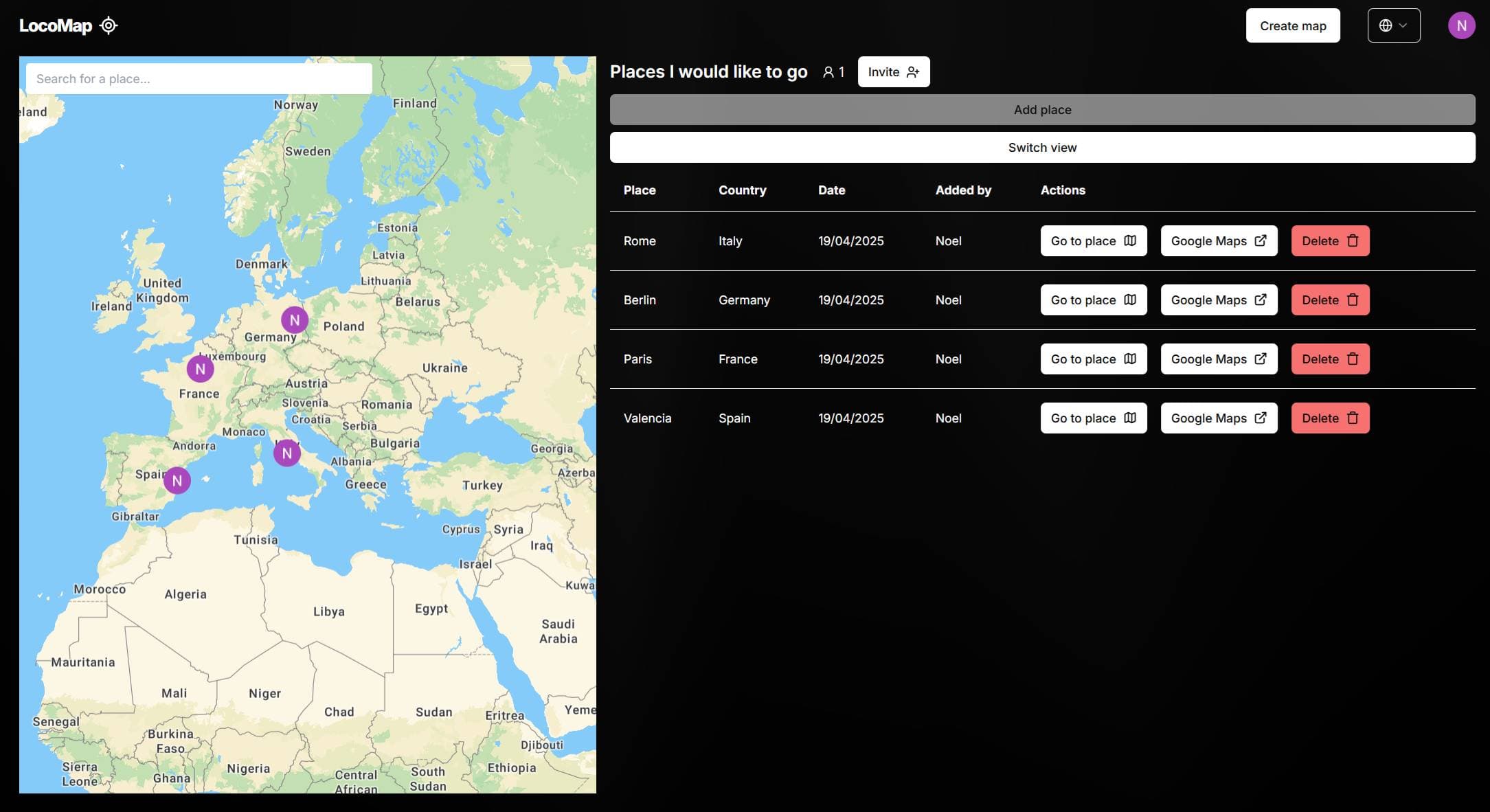
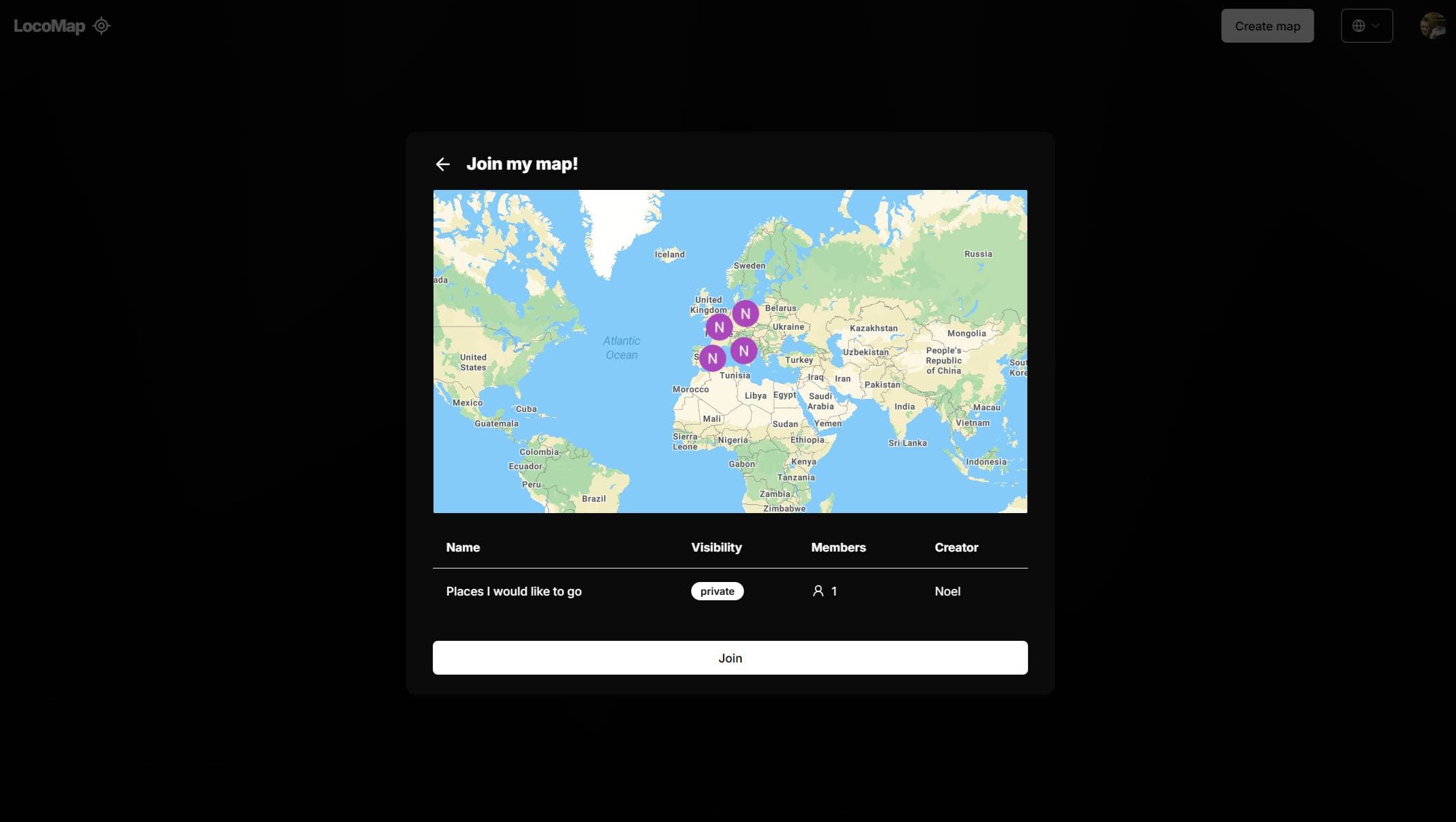
About this app
LocoMap is a minimalist and privacy-centric tool that allows users to create named maps, pin favorite locations like cafes or hiking trails, and invite others to collaborate in real-time. It's ideal for travelers, event planners, and social groups who need a simple way to share itineraries or coordinate venues without the complexity and data concerns of mainstream map tools. While it lacks advanced GIS features, its clean interface and emphasis on data control make it a standout choice for casual, privacy-aware users. The Pro version offers unlimited maps for power users, enhancing its utility for more extensive projects.
Key features
- 1Clean minimalist interface with easy pin placement and collaboration
- 2Privacy-focused approach with password protection for Pro users
- 3Fast loading and lightweight design ideal for basic mapping tasks
Target customer profile
Drawn from the product itself, not from a survey.
Demographic
Travel enthusiasts and backpackers
Pain points
Overwhelming map tools; privacy concerns with location tracking
Primary needs
Lightweight way to share itineraries or hidden gems
Demographic
Event planners and social groups
Pain points
Coordinating venues via messy group chats
Primary needs
Centralized map for collaborative planning
Demographic
Remote teams
Pain points
Finding coworking spaces or meetup spots
Primary needs
Secure, shared location database
Scout Review
Written by AI from measured evidence, scored out of 100.
LocoMap excels as a privacy-first, minimalist mapping solution perfect for travelers, event planners, and social groups who want to share locations without Big Tech's data collection. Its clean interface and straightforward collaboration make it ideal for quick trip planning or group coordination. While it lacks advanced features and accessibility options, its core functionality delivers exactly what it promises - simple, private map sharing.
Measure by measure
Usability
80Intuitive for basic mapping with easy pin placement and collaboration, though missing in-app chat features.
Design
70Clean minimalist interface with navy blue/gray palette, but lacks customization options for pins and map styles.
Speed
80Generally fast loading with lightweight design, but occasional lag during map zooming operations.
Security
70Privacy-focused approach with password protection for Pro users, but lacks detailed encryption documentation.
Accessibility
50Poor accessibility with no screen reader support, limited keyboard navigation, and English-only interface.
Growth
90Strong market potential in privacy-conscious mapping space with clear expansion opportunities.
Improvement areas
- Lacks customization options for pins and map styles
- Poor accessibility with no screen reader support and limited keyboard navigation
- Missing in-app chat features and detailed encryption documentation
Design & Usability
LocoMap's interface embraces a clean, distraction-free aesthetic with a muted navy blue and gray color scheme that keeps the focus squarely on your maps. The layout is straightforward - search, click, and save locations without unnecessary clutter. While the minimalist approach works well for basic mapping tasks, the lack of customization options feels limiting. You can't change pin colors or adjust map styles beyond the basics, which might frustrate users wanting more personalization. Collaboration features work smoothly with easy invite links, though the absence of in-app chat means you'll need to coordinate elsewhere when discussing pinned locations.
Speed & Security
Performance-wise, LocoMap loads quickly thanks to its lightweight architecture, though you might notice occasional lag when zooming in and out of maps. The platform emphasizes privacy as a core feature, which is refreshing in an era of data-hungry mapping services. Pro users benefit from password-protected maps, adding a layer of security for sensitive itineraries. However, the lack of detailed documentation about encryption methods and data retention policies leaves some questions unanswered. For casual users, the security measures feel adequate, but privacy-conscious organizations might want more transparency about how their location data is handled.
Accessibility & Growth
Accessibility is LocoMap's weakest area - there's no screen reader optimization, limited keyboard navigation, and only English language support. The absence of high-contrast modes or font adjustment options makes it challenging for users with visual impairments. Despite these limitations, the app has significant growth potential. The demand for privacy-focused mapping tools is growing, and LocoMap's simple foundation could easily expand with additional features. The Pro version's unlimited maps already show they're thinking about power users, and there's clear room for mobile app development and enhanced collaboration tools.
Conclusion
If you're tired of overwhelming map tools and value your location privacy, LocoMap is definitely worth exploring. The free tier lets you test the waters before committing to Pro features. For casual mapping needs without the complexity of mainstream alternatives, this platform hits the sweet spot between functionality and simplicity.
Suggestions for improvement
- Adding pin customization with color and icon options would significantly enhance visual organization.
- Implementing WCAG-compliant accessibility features, including screen reader support and keyboard navigation, is crucial for inclusivity.
- Multi-language support would open the platform to international users.
- A detailed privacy whitepaper would build trust with security-conscious organizations.
- Finally, a mobile app would complete the experience for on-the-go map editing and sharing.
Alternatives comparison
Named competitors, point by point. Nobody paid to appear here or to be left out.
 LocoMap LocoMap |  Google My Maps Google My Maps |  MapChart MapChart |  Snazzy Maps Snazzy Maps | |
|---|---|---|---|---|
| Privacy Focus | High - Core feature | Low - Google data collection | Medium - Basic privacy | Low - Google Maps based |
| Real-time Collaboration | Yes - Smooth invite system | Yes - Google ecosystem | No - Static maps only | No - Style customization only |
| Customization Options | Basic - Limited pin/map styles | Advanced - Extensive styling | Regional - Static map styles | Professional - Google Maps styling |
| Ease of Use | High - Minimalist interface | Medium - Feature-rich but complex | High - Simple static maps | Low - Technical knowledge required |
| Mobile Experience | Web-only - No dedicated app | Excellent - Full mobile support | Web-only - Mobile friendly | Web-only - Technical interface |
Google My Maps
More feature-rich but lacks LocoMap's privacy focus and minimalist design.
MapChart
Better for static regional maps but no real-time collaboration.
Snazzy Maps
Offers Google Maps styling, but requires technical know-how.
Comparing options? See LocoMap alternatives, scored side by side
More Lifestyle & Entertainment apps
View all Lifestyle & Entertainment
Factory Direct Mattress Overland Park
92A locally-owned mattress store in Overland Park, KS offer...

RoomCreator
92An AI-powered interior and exterior design tool that tran...

SheetScroll
90> You play; SheetScroll turns the page. It listens through the microphone or a MIDI piano and holds the page until it's sure where you are.

Hireci
89Save every recipe. Plan every meal.

TUNL - Cave Flyer
89A hold-to-thrust cave flyer with a new daily level, ghost races, and a global leaderboard.

Portrait Gift
88AI-powered personalized face swap art platform creating c...

TranscriptYou
88Free YouTube transcript generator with timestamps and AI ...

Roami eSIM
88A global travel eSIM app offering instant activation, no ...

FaceSwapAI
87AI face swap for photos, videos, GIFs with free trial.

youtubetomp3.ink
87Free online YouTube to MP3 converter with no signup or so...

InviteVia
87InviteVia is a digital invitation platform for creating beautiful online invitations for weddings, birthdays, engagements, parties, and special events. Choose a template, customize your invitation, collect RSVPs, and share it instantly through WhatsApp, Instagram, SMS, or a simple link. No guest accounts or app downloads required.

Coloring Pages Pro
87A massive collection of free printable coloring pages for...


A platform dedicated to providing unbiased reviews of newly launched applications, analyzing everything from their features to their full potential.
info@scoutforge.net© 2026 Scoutforge. All rights reserved.
