Cycling through all six. Tap any point to stop.
Measured on six things
Make finished TikTok, Reels and YouTube videos from a prompt: script, AI visuals, voiceover, captions and music, rendered to a ready-to-post MP4.
Speed
57Desktop Lighthouse 90/100 but mobile drops to 70 with a 5.4s LCP — more than double the 'good' threshold. CLS is near-perfect at 0.001 and TBT is modest at 367ms, so it's weight, not jank.
Screenshots
1 / 1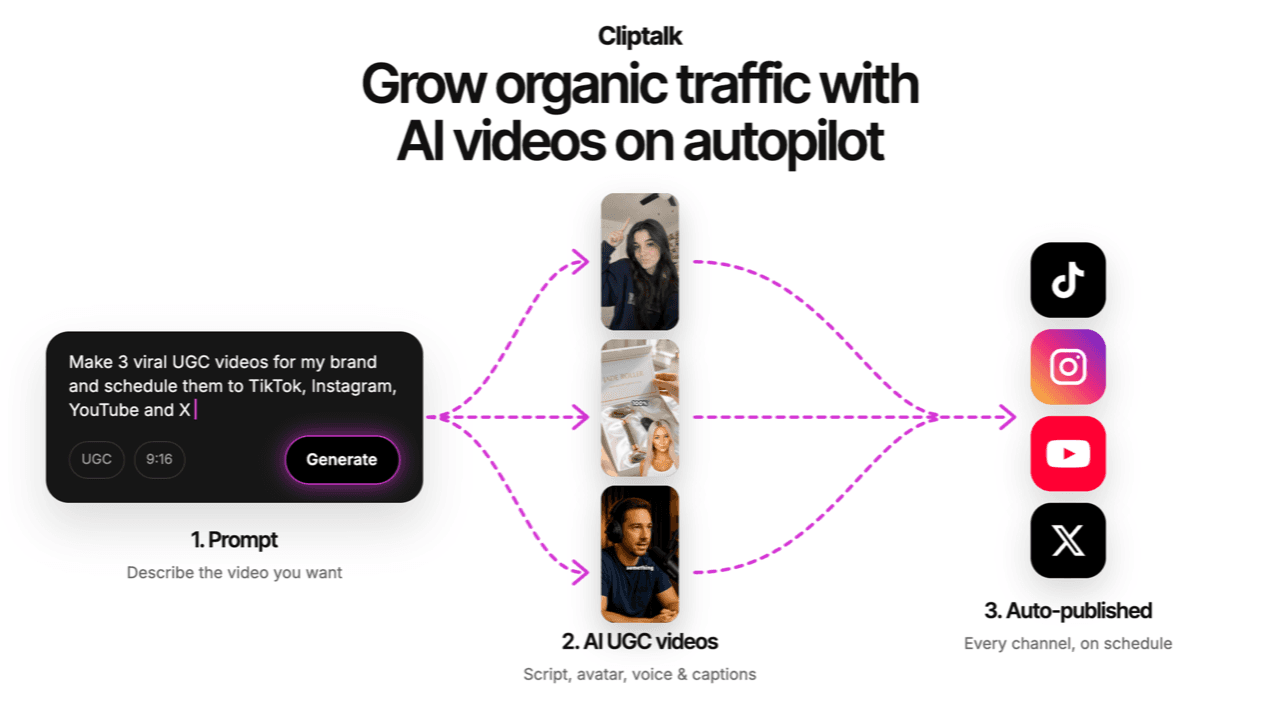
About this app
ClipTalk turns a prompt, script or product page into a finished video for TikTok, Instagram Reels, YouTube Shorts or YouTube. Describe the video in plain words and it writes the script, generates the visuals, adds a voiceover, captions and music, and renders an MP4 that is ready to post. Templates cover UGC-style product ads, faceless stories, explainers, quizzes, micro-dramas and music videos, in 9:16, 1:1, 4:5 or 16:9. Paste a link to a video you like and ClipTalk remakes its format for your brand. Edit in a timeline or just ask: cut silences, fix captions, change the music, voice, speed or layout. It also works inside Claude, ChatGPT and Cursor through its MCP server, and has a REST API. New accounts start with free credits; paid plans from $19/month.
Key features
- 1Prompt-to-video generation: script, visuals, voiceover, captions and music rendered to MP4 in 9:16, 1:1, 4:5 or 16:9
- 2MCP server for Claude, ChatGPT and Cursor plus a REST API for programmatic video generation
- 3140+ AI voices and characters in 30+ languages, with 30-second voice cloning and a manual timeline editor
Target customer profile
Drawn from the product itself, not from a survey.
Scout Review
Written by AI from measured evidence, scored out of 100.
ClipTalk is a genuinely capable AI video generator with a real editor underneath the marketing — timeline, captions, voice cloning, 140+ AI voices, 30+ languages, and a natural-language editing layer that lets non-editors skip the timeline entirely. The MCP server and REST API are the most interesting differentiators; most competitors in this space don't ship either. The measured profile is uneven in the way real products are: accessibility is excellent at 96/100, design is solid, usability is good, but mobile speed (LCP 5.4s) and security hygiene (no CSP, HTTPS not enforced) drag the average down. Pricing is transparent and the free tier is real. If you're producing short-form content at volume and want an API-first tool, this is worth a trial. If you need enterprise compliance paperwork, look elsewhere.
Measure by measure
Usability
68Free tier with 50 credits, clear three-tier pricing, and a FAQ that actually answers billing and cancellation. Natural-language editing plus a manual timeline covers both skill levels. Onboarding depth unverified.
Design
71Consistent dark theme with purple accents and real editor screenshots instead of mockups. Hero thumbnails clip at the edge and six identical feature cards lack hierarchy, but overall craft is above indie average.
Speed
57Desktop Lighthouse 90/100 but mobile drops to 70 with a 5.4s LCP — more than double the 'good' threshold. CLS is near-perfect at 0.001 and TBT is modest at 367ms, so it's weight, not jank.
Security
63Nine of thirteen header checks pass including HSTS, frame protection, secure cookies, SPF and DMARC. HTTPS isn't enforced and there's no CSP. Stripe handles checkout. No SOC 2 or ISO claim found.
Accessibility
80Lighthouse accessibility 96/100 with only two failing audits: contrast ratio and label/accessible-name mismatch. Strong automated score, though no public a11y statement or keyboard-support documentation was found.
Growth
62Real, growing category with a specific wedge: MCP server plus REST API plus viral-format remixing at $19-39/mo. Differentiated, but the short-form AI video space is brutally crowded.
Improvement areas
- Mobile performance: LCP 5.4s is more than double the 'good' threshold, driven by heavy hero media
- Security headers: HTTPS not enforced and no Content-Security-Policy despite handling uploaded media and voice clones
- Accessibility polish: two failing audits (contrast ratio, accessible name mismatch) block a clean 100
- Design hierarchy: six identical feature cards with no icons force users to read every line to find value
Design & Usability
ClipTalk's homepage is a competent dark-mode SaaS page: consistent purple accents, large real editor screenshots, and a clear three-step narrative. The weak spots are hierarchy — six feature cards of identical weight with no icons force you to read every one — and hero thumbnails that clip at the right edge. Usability is stronger: a free tier with 50 credits, transparent three-tier pricing, and an FAQ that actually covers cancellation, credits and monetization. The dual editing model (natural language or manual timeline) is the right call for a tool aimed at non-editors. Onboarding depth and docs quality couldn't be verified from the collected content, so the score stays in the good-but-not-exceptional band.
Speed & Security
Speed is a split verdict. Desktop Lighthouse lands at 90/100, but mobile drops to 70 with an LCP of 5.4 seconds — more than double Google's 'good' threshold and the single biggest drag on the score. CLS at 0.001 and TBT at 367ms show the page isn't janky, it's just heavy, most likely from the hero video stack. Security is middling: nine of thirteen header checks pass, including HSTS, frame protection, secure cookies, SPF and DMARC, and Stripe handles checkout. But HTTPS isn't enforced and there's no Content-Security-Policy, and no SOC 2, ISO or pen-test claim appears anywhere in the collected content. For a tool handling user-uploaded media and voice clones, that's a gap worth closing.
Accessibility & Growth
Accessibility is the strongest measured dimension: Lighthouse scores 96/100, with only two failing audits — insufficient color contrast and visible text labels that don't match accessible names. Both are fixable in an afternoon. No public accessibility statement or keyboard-navigation documentation was found, so the score sits at the top of the automated band rather than above it. Growth is a judgement on the idea: AI short-form video is a real, expanding category, and ClipTalk's wedge — an MCP server for Claude/ChatGPT/Cursor, a REST API, and viral-format remixing from a pasted link — is more specific than most competitors' 'AI makes videos' pitch. At $19-39/mo it undercuts agency-style tools. The honest limit: CapCut, Opus Clip, HeyGen and Synthesia all sit in this space with more distribution, and the MCP angle is copyable within a quarter.
Conclusion
The verdict: ClipTalk is a strong indie-tier AI video tool with one genuinely differentiated feature (the MCP server) and two fixable weaknesses (mobile LCP and security headers). Try the free 50 credits before committing to the $39/mo Pro tier — the watermark on free videos will tell you fast whether the output quality clears your bar. If it does, the API access on Pro is the reason to pay.
Suggestions for improvement
- Fix mobile LCP: 5.4s is double the 'good' threshold. Lazy-load or poster-frame the hero video stack.
- Enforce HTTPS redirects and add a Content-Security-Policy header — both are one-line fixes with real security value.
- Fix the two failing a11y audits: contrast ratios and accessible names on labeled elements.
- Add icons or visual differentiation to the six feature cards so users can scan instead of read.
Alternatives comparison
Named competitors, point by point. Nobody paid to appear here or to be left out.
 ClipTalk ClipTalk |  | |
|---|---|---|
| Starting price | $19/mo (free tier with 50 credits, watermark) | Not provided in app details |
| MCP server / API access | Yes — MCP for Claude/ChatGPT/Cursor plus REST API on Pro | Not provided in app details |
| Voice cloning | Yes — 30-second sample, Pro plan | Not provided in app details |
| Aspect ratios supported | 9:16, 1:1, 4:5, 16:9 | Not provided in app details |
| Languages | 30+ languages for voiceover and captions | Not provided in app details |
Comparing options? See ClipTalk alternatives, scored side by side
More Marketing & Sales apps
View all Marketing & Sales
Puzzly – B2B Lead Generation & Sales Intelligence Platform
92Puzzly is an all-in-one B2B lead generation platform that...

EmbedMyReviews
92White-label reputation management software for agencies s...

Geogrid
92A UULE-powered local rank tracker for SEO agencies, offer...

Vibe Coding Agent Skills
92A free, open-source platform offering 110 AI agent skills...

AuditCloser
89White-label website audits that close deals for digital a...

What the GIF
89Frame-perfect video-to-GIF maker that runs entirely in yo...

Stellar Staff
88A top-rated virtual assistant agency that matches busines...

Startup Science
88A unified platform replacing 12-20 disconnected tools for...

Creastor
88An all-in-one platform for creators to sell digital produ...

KiTalent
88An AI-enhanced executive search firm delivering pre-mappe...

Mover Marketing AI Local SEO
88Specialized SEO services for moving companies to dominate...

LaunchGrill
88Analyze your landing page and get a score, teardown, and ...


A platform dedicated to providing unbiased reviews of newly launched applications, analyzing everything from their features to their full potential.
info@scoutforge.net© 2026 Scoutforge. All rights reserved.
