

A platform dedicated to providing unbiased reviews of newly launched applications, analyzing everything from their features to their full potential.
info@scoutforge.net© 2026 Scoutforge. All rights reserved.
A platform dedicated to providing unbiased reviews of newly launched applications, analyzing everything from their features to their full potential.
info@scoutforge.net© 2026 Scoutforge. All rights reserved.
A platform dedicated to providing unbiased reviews of newly launched applications, analyzing everything from their features to their full potential.
info@scoutforge.net© 2026 Scoutforge. All rights reserved.
Cycling through all six. Tap any point to stop.
Measured on six things
Move, Save and Archive Webmail Data with One Powerful Backup Tool
Lighthouse mobile performance 38/100 with a brutal 12.2s LCP and 992ms TBT; desktop 62/100. The long-scroll homepage with many images and repeated CTA blocks is the likely culprit.
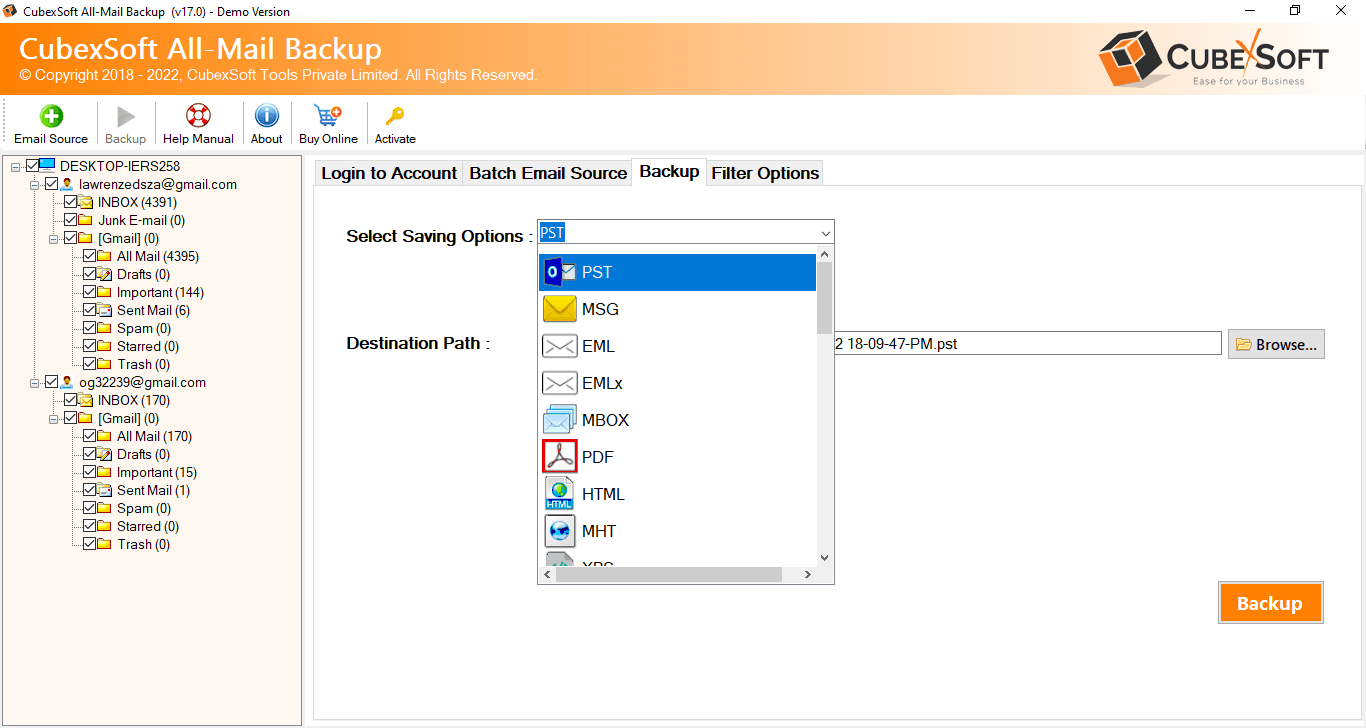
CubexSoft All-Mail Backup Tool is built for users who need a flexible method to preserve and migrate email data from different online mailbox services. Instead of manually downloading individual messages, users can connect their supported email account, select the required folders, choose an output destination, and begin the backup process. The application supports numerous webmail sources and provides multiple saving options, including PST, MSG, PDF, MBOX, EML, HTML, CSV, OLM, and several cloud or email server destinations. It can preserve mailbox organization and available email properties while also offering filters for selective data backup. Multiple accounts can be processed through batch mode, which is helpful for organizations managing several mailboxes. Email Backup Software is compatible with Windows and macOS, and its free demo version enables users to evaluate the software before purchasing a full license.
Drawn from the product itself, not from a survey.
Written by AI from measured evidence, scored out of 100.
CubexSoft All-Mail Backup Tool is a competent, broad-coverage email backup and migration utility for Windows and macOS. It handles 90+ webmail sources and 30+ output destinations, supports batch processing and granular filters, and offers a free demo with a 30-day money-back guarantee — all of which makes it easy to evaluate before buying. The marketing site is dated and slow (mobile Lighthouse 38/100, 12.2s LCP), and the desktop UI looks utilitarian. Security headers are mostly in place but DMARC and Permissions-Policy are missing, and there's no published compliance certification despite the tool handling live email credentials. Accessibility is decent on automated checks but has real gaps in ARIA roles, contrast, and landmarks. The idea is sound and the execution is workmanlike; it's a solid pick if you need breadth, less compelling if you need polish or enterprise-grade assurances.
Broad source and format coverage (90+ webmail, 30+ outputs), batch mode, filters, and a free demo plus 30-day money-back lower the risk. Support Center, FAQs and Knowledgebase exist, though depth is unverified.
Marketing site is a dense, ALL-CAPS long-scroll page with repeated download CTAs; functional but dated and cluttered. Desktop app UI is only visible via screenshots, which look utilitarian rather than polished.
Lighthouse mobile performance 38/100 with a brutal 12.2s LCP and 992ms TBT; desktop 62/100. The long-scroll homepage with many images and repeated CTA blocks is the likely culprit.
HTTPS enforced with HSTS, CSP, frame protection, X-Content-Type-Options and Referrer-Policy; SPF present. DMARC and Permissions-Policy are missing, and no SOC 2/ISO/pen-test claim is published.
Lighthouse accessibility 91/100, but failing audits include aria-role mismatches, insufficient color contrast, and a missing main landmark. No WCAG statement or a11y page found on the site.
Real problem (email backup/migration is tedious and risky), specific wedge in 90+ sources and 30+ formats with batch mode for orgs. Domain age 10+ years is context, not the score. Differentiated but in a crowded utility category.
CubexSoft's All-Mail Backup Tool is a Windows/macOS desktop utility that pulls email from 90+ webmail sources and writes it out to PST, MSG, PDF, MBOX, EML, HTML, CSV, OLM, or straight into another mail server. The marketing site is a long-scroll, ALL-CAPS-heavy page with repeated download CTAs — functional but dated, and the desktop app UI (visible only through screenshots) looks utilitarian rather than refined. Usability is where the product earns its keep: batch mode for multiple accounts, date/from/to/subject filters, selective folder export, and a free demo plus 30-day money-back policy that lets you test before committing. Support Center, Technical FAQs and a Knowledgebase are linked, though their depth isn't verifiable from the homepage alone. The core value proposition — one tool instead of a dozen single-source converters — is coherent and clearly stated.
Speed is the weak spot. Lighthouse mobile performance lands at 38/100 with a 12.2-second LCP, 5.1-second FCP and 992ms TBT; desktop is a better but still mediocre 62/100. The long-scroll homepage with many images and repeated CTA blocks is the likely cause, and it's a bad first impression for a tool whose whole pitch is 'stop wasting time on manual email work.' Security is stronger: HTTPS is enforced with HSTS, CSP, frame protection, X-Content-Type-Options and Referrer-Policy all present, plus SPF on the mail side. Missing are DMARC and Permissions-Policy, and there's no published SOC 2, ISO, pen-test or bug-bounty program — notable for a tool that asks users to hand over live email credentials. Ten of twelve header checks is a solid showing, but the compliance story is thin.
Accessibility scores 91/100 on Lighthouse, which sounds strong until you read the failing audits: aria-* attributes that don't match their roles, insufficient color contrast, and a missing main landmark. No WCAG conformance statement or dedicated accessibility page was found. On growth, the idea holds up reasonably well. Email backup and migration is a real, recurring pain — especially for IT admins juggling multiple mailboxes — and CubexSoft's wedge is breadth: 90+ sources, 30+ output formats, batch processing, and filters that let you pull just the Sent folder or just headers. That's a genuine differentiator against single-source converters. The limit is the category itself: it's a mature utility space with free and cheap alternatives, and the ceiling is essentially 'people who already searched for this exact problem.' The 10-year-old domain shows staying power, but the positioning doesn't yet show a wedge incumbents structurally can't copy.
Conclusion
If your job involves rescuing mailboxes from a dozen different providers and you want one tool instead of a folder full of installers, CubexSoft's breadth is genuinely hard to beat — and the free demo means you can verify that claim on your own data before spending anything. Go in with clear expectations: the site is slow and dated, the app UI won't win design awards, and there's no SOC 2 badge to wave at your compliance team. For solo admins and small IT shops doing occasional migrations, that trade-off is reasonable. For larger organizations with strict security review processes, the missing DMARC, Permissions-Policy and published audit trail will be harder to get past. Try the demo, confirm it handles your specific source and destination, and let the 30-day refund window do the rest.
Named competitors, point by point. Nobody paid to appear here or to be left out.
 CubexSoft Email Backup Tool CubexSoft Email Backup Tool | ||
|---|---|---|
| Supported email sources | 90+ webmail sources including Gmail, Office 365, Exchange, Yahoo, IMAP/POP3, ProtonMail, Zimbra | Not specified in App Details |
| Output formats and destinations | PST, MSG, PDF, MBOX, EML, HTML, CSV, OLM plus direct export to Gmail, Office 365, Exchange, Amazon Workmail, IBM Verse | Not specified in App Details |
| Batch processing and filters | Batch mode for multiple accounts; date range, to, from and subject filters; selective folder export | Not specified in App Details |
| Platform support | Windows and macOS desktop application | Not specified in App Details |
| Trial and pricing | Free demo version available; paid license with 30-day money-back guarantee | Not specified in App Details |
Comparing options? See CubexSoft Email Backup Tool alternatives, scored side by side

All-in-one AI workspace for docs, projects, and knowledge...

Vendor Space is an all-in-one vendor management platform ...

Export all your Apple Voice Memos to one text file.

InviteVia is a digital invitation platform for creating beautiful online invitations for weddings, birthdays, engagements, parties, and special events. Choose a template, customize your invitation, collect RSVPs, and share it instantly through WhatsApp, Instagram, SMS, or a simple link. No guest accounts or app downloads required.

Managed event staffing across the US and Canada with loca...

Cloud AI agents with persistent disk, memory, and real CL...

Local-first time tracker for freelancers with invoicing, ...

NDIS provider management software for small Australian teams to roster workers, capture service records and prepare invoices.

Business workspace for solo founders and small teams.

AI batch renaming tool that reads file content to auto-na...

Project, resource, and financial management for client-fo...

Weighted decision scorecards for B...2B teams, no account ne
A platform dedicated to providing unbiased reviews of newly launched applications, analyzing everything from their features to their full potential.
info@scoutforge.net© 2026 Scoutforge. All rights reserved.
