Cycling through all six. Tap any point to stop.
Measured on six things
DeleteTik removes TikTok reposts, likes, favorites, and posted videos in bulk from Chrome or Edge, with local processing, filters, and no password sharing.
Security
52HTTPS, SPF and DMARC are in place, and the no-password local-processing design is a real security win. But HSTS, CSP, frame protection and every other header are missing — 4/13 on the probe.
Screenshots
1 / 1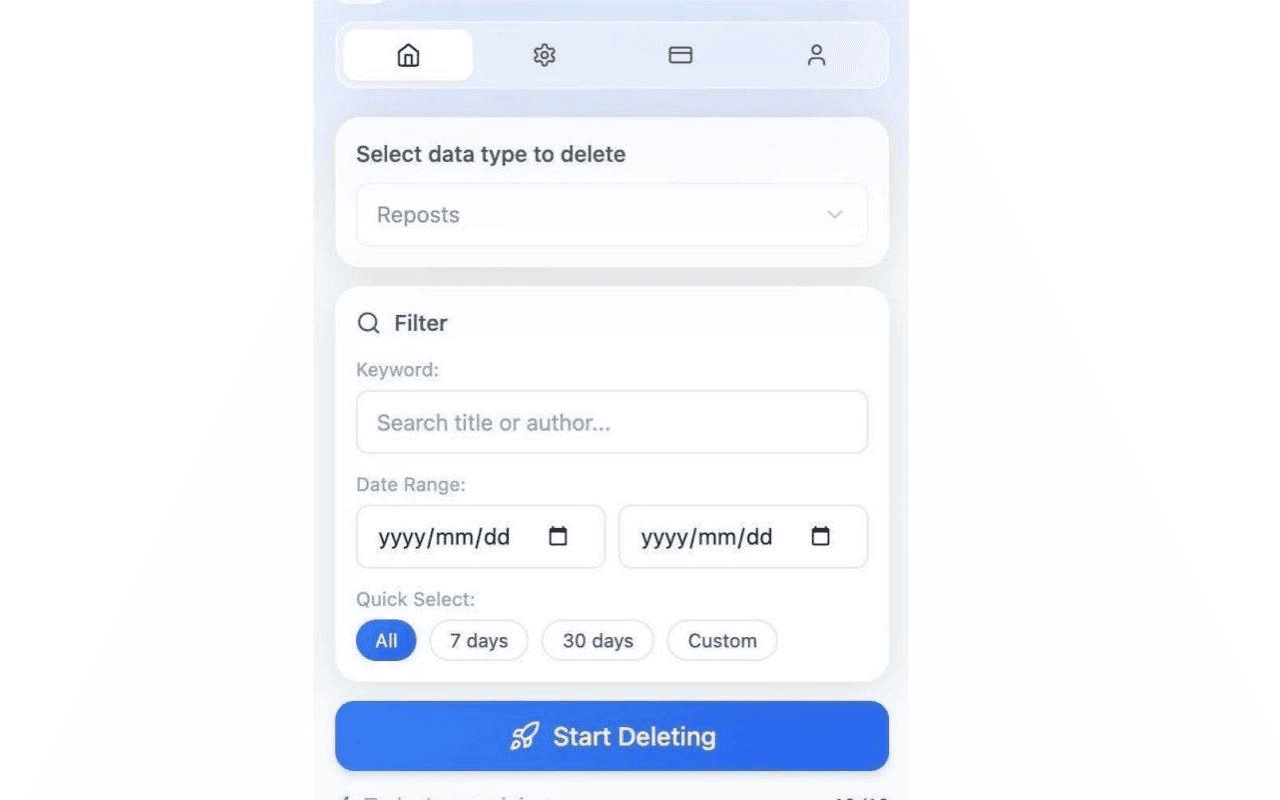
About this app
DeleteTik is a Chrome and Edge extension that removes TikTok reposts, liked videos, favorites, and published videos locally in your browser without password sharing. Filter by date or keyword, review matches, export CSV/JSON records, and run paced batch cleanups, with a free daily tier.
Key features
- 1Bulk delete TikTok videos, favorites, reposts and liked videos from a Chrome or Edge extension.
- 2Runs 100% locally in the browser with no password sharing or credential entry.
- 3Filter by date range or keyword, review matches, and export records as CSV or JSON.
- 4Paced batch cleanup with a visual dashboard and a free daily tier.
Target customer profile
Drawn from the product itself, not from a survey.
Scout Review
Written by AI from measured evidence, scored out of 100.
DeleteTik is a Chrome and Edge extension for bulk-deleting TikTok videos, favorites, reposts and liked videos, running locally in the browser with no password sharing. The site is fast on mobile (95/100 Lighthouse, 1.3s LCP) and the accessibility audit is strong at 96/100. The product logic is clear: pick a cleanup target, filter by date or keyword, review matches, export CSV/JSON, and run paced batches. Where it falls short is polish and hardening — a blank first screen, a clashing illustration, native date inputs, install buttons clipped at the fold, and a website missing most standard security headers. The idea is specific and defensible; the execution needs another pass.
Measure by measure
Usability
63Clear workflow-per-goal structure, an FAQ, and a logical filter order make the task legible. Install buttons are small and clipped at the fold, and testimonials carry no verifiable source.
Design
57Modern grotesque headline and tidy card-based filter panel, but a full-screen blank gap above the hero, clashing neon illustration, and native date inputs undercut the polish.
Speed
86Lighthouse mobile 95/100 with 1.3s LCP and zero CLS is genuinely fast. Desktop drops to 68/100, so the experience is uneven across devices.
Security
52HTTPS, SPF and DMARC are in place, and the no-password local-processing design is a real security win. But HSTS, CSP, frame protection and every other header are missing — 4/13 on the probe.
Accessibility
79Lighthouse a11y 96/100 with only a contrast failure, matching the small light-grey hero copy. No WCAG statement or a11y page found, so the automated score is doing most of the work.
Growth
62A real, specific problem — scrubbing TikTok history without handing over credentials — with a local-first wedge and per-content-type workflows. Early stage, but the idea has a clear reason to exist.
Improvement areas
- Blank first screen above the hero in the live render — likely a lazy-load or reveal animation issue.
- Missing standard security headers (HSTS, CSP, frame protection, Referrer-Policy, Permissions-Policy).
- Unverifiable stock-style testimonials with no links to real users.
- Install CTAs clipped at the fold and native date inputs breaking visual consistency.
Design & Usability
DeleteTik's homepage has a real design idea — a geometric grotesque headline, a floating pill navbar, and a filter panel that walks you from data type to keyword to date range to action in a sensible order. The problem is execution: the captured render opens with roughly a full screen of blank off-white before the hero appears, the dark neon illustration fights the pale page, and native browser date inputs sit inside otherwise custom-styled controls. Usability is stronger than design. The site organizes itself around cleanup targets (videos, favorites, reposts, likes, setup), answers common questions in an FAQ, and puts the 'never asks for your password' trust line right in the hero. But the install CTAs are small pills clipped at the fold, and the six testimonials are generic quotes with no links to real people.
Speed & Security
Speed is the standout. Lighthouse mobile scores 95/100 with a 1.3s LCP, zero cumulative layout shift and 107ms total blocking time — the page arrives fast and stays put. Desktop drops to 68/100, which suggests the desktop build carries more weight than it needs to, but there are no user complaints about lag in the collected evidence. Security is a mixed picture. The product's core design choice is genuinely good: processing happens locally in the browser, no password is ever requested, and the site enforces HTTPS with SPF and DMARC configured. But the HTTP probe found only 4 of 13 checklist items — no HSTS, no Content-Security-Policy, no frame protection, no X-Content-Type-Options, no Referrer-Policy, no Permissions-Policy. For a tool whose entire pitch is trust, the website's own headers are thin.
Accessibility & Growth
Accessibility scores 96/100 on Lighthouse with a single failing audit: insufficient color contrast between background and foreground. That matches what the visual audit saw — small light-grey hero body copy on a pale background, and small light nav labels inside a dark capsule. No WCAG statement or dedicated accessibility page was found, so the automated score is carrying most of the weight. Growth is a judgement about the idea, and the idea is sound: bulk-deleting TikTok history is a real, recurring need, and doing it locally without credential sharing is a concrete reason to pick this over tools that ask for your password. The per-content-type workflows (videos, favorites, reposts, likes) show the product understands the job. The limit is that the category is crowded and the wedge — no password — is copyable. The domain was registered in early 2026, so this is very early.
Conclusion
DeleteTik is solving a problem people actually have, and solving it the right way — locally, without asking for credentials. That alone puts it ahead of a lot of the category. What holds it back is the layer around the product: the landing page opens with a blank screen, the security headers are thin for a trust-first tool, and the social proof is unverifiable. None of that is hard to fix. Tighten the hero, add the standard headers, replace the stock testimonials with linked real ones, and this becomes a much easier recommendation.
Suggestions for improvement
- Fix the blank first screen — lazy-load or reveal animation is hiding the hero on arrival.
- Add HSTS, CSP, frame protection, X-Content-Type-Options, Referrer-Policy and Permissions-Policy headers.
- Replace generic testimonials with linked, verifiable user quotes or remove them.
- Enlarge the install CTAs and move them fully above the fold; replace native date inputs with styled pickers.
Alternatives comparison
Named competitors, point by point. Nobody paid to appear here or to be left out.
 DeleteTik |  | ||
|---|---|---|---|
| Runs locally without password sharing | Yes — core design claim | Not specified | Not specified |
| Filter by date range or keyword | Yes | Not specified | Not specified |
| Export records as CSV/JSON | Yes | Not specified | Not specified |
| Free tier available | Yes — free daily tier | Not specified | Not specified |
| Browser support | Chrome and Edge | Not specified | Not specified |
Comparing options? See DeleteTik alternatives, scored side by side
More Social Media apps
View all Social Media
Voqusa
89Transcribe social media video and audio links into text (free signup, 5 free credits, then pay-as-you-go)

TranscriptYou
88Free YouTube transcript generator with timestamps and AI ...

LurkAPI
88Public social media data as clean JSON, in one request

Evoriqa
88White-label AI customer service agent for small businesse...

ZombieTrend AI
87ZombieTrend AI turns two photos into an emotional zombie love story video with a heartfelt hug, memory flashback, sound, no watermark, and a free scene preview.

BlueVetaUpright
86API that detects product photo rotation and tells you how...

Music Visualizer
86Online music visualizer for audio-reactive videos.

Maeve Social
85Plan, approve, publish to nine social platforms, manage your inbox, and report from one social media workspace.

Xquik
85Search X tweets, export followers & monitor accounts through REST, MCP & SDKs.

CleanAudio AI
85Free AI background noise remover for audio and video with...

RepGet
85RepGet is an AI-powered platform for SEO automation, content publishing, backlink building and AI search visibility.

SnitchFeed
85AI-powered social listening for startups & SMBs to find h...


A platform dedicated to providing unbiased reviews of newly launched applications, analyzing everything from their features to their full potential.
info@scoutforge.net© 2026 Scoutforge. All rights reserved.
