Cycling through all six. Tap any point to stop.
Measured on six things
DeleteTweets bulk-removes X posts, retweets, replies, and likes with keyword, date, and engagement filters, archive import, backups, and local processing.
Security
52HTTPS enforced and SPF/DMARC set, but no HSTS, CSP, frame protection or secure cookies — 4/13 checklist. Local-first, no-OAuth design is a real privacy plus; no audits published.
Screenshots
1 / 1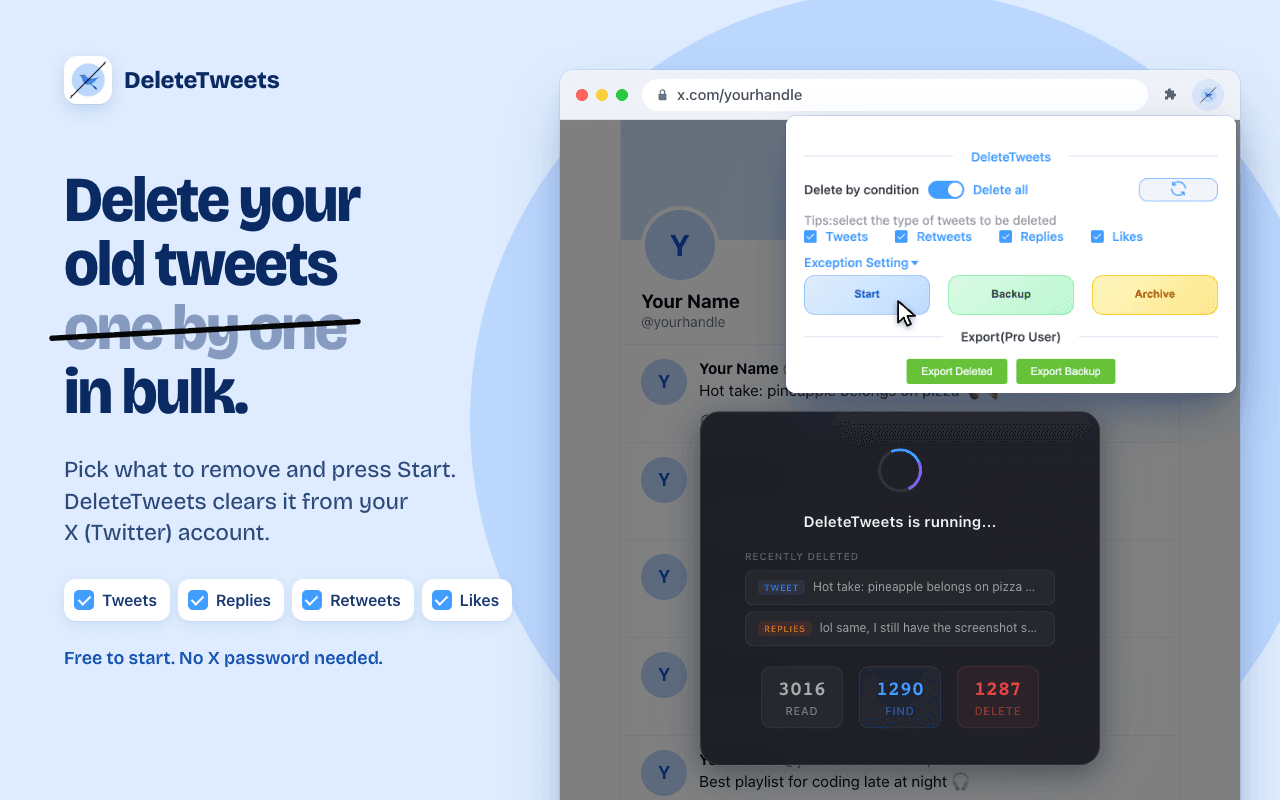
About this app
DeleteTweets is a Chrome and Edge extension that removes X/Twitter posts, retweets, replies, and likes locally in your browser session without password sharing. Filter by date, keyword, engagement, or type with keyword exceptions. Pro adds official X archive ZIP import, local backups, and exports.
Key features
- 1Bulk-deletes tweets, retweets, replies and likes locally in the browser with no server-side OAuth handoff
- 2Keyword, date-range and engagement filters plus a semicolon-separated exception whitelist to protect posts
- 3Pro adds official X archive ZIP import, local backups and exports for reaching older history
Target customer profile
Drawn from the product itself, not from a survey.
Scout Review
Written by AI from measured evidence, scored out of 100.
DeleteTweets is a focused, well-architected utility with a real reason to exist: it deletes your X history locally in the browser, without handing your credentials to a web app, and it adds archive import, exception whitelists and backups that the web-app competitors charge for or cap. The marketing site is fast (96 mobile Lighthouse) and has a distinct visual voice, but it's inconsistent — a blank gradient hero, clashing brand treatments, a low-contrast privacy pill, and a nav with no install CTA. Security is the sharpest split: the extension's local-first, no-OAuth, Manifest V3 design is exactly right, while the website ships with almost no security headers. Accessibility is strong on automated checks but fails contrast on the very claim that matters most. Growth is solid: a specific, defensible wedge in a crowded category, with a ceiling set by being a single-platform utility.
Measure by measure
Usability
62Three-step flow and a comparison table answer the big questions, and install buttons are prominent. But the header has no CTA and there's no visible docs/help center — onboarding leans on the store listing.
Design
58Distinct script/sans headline and a clean promo card, but the homepage opens with ~1,500px of empty gradient and the navy/light-blue treatments clash. Average craft, inconsistent brand.
Speed
88Lighthouse mobile 96/100 with 1.1s LCP, zero CLS and 212ms TBT; desktop 90/100. A genuinely snappy marketing site with no measured lag complaints.
Security
52HTTPS enforced and SPF/DMARC set, but no HSTS, CSP, frame protection or secure cookies — 4/13 checklist. Local-first, no-OAuth design is a real privacy plus; no audits published.
Accessibility
80Lighthouse a11y 95/100, but two real failures: insufficient color contrast and no main landmark. The tiny low-contrast eyebrow pill compounds it. No WCAG statement published.
Growth
68A real, specific wedge: local extension vs web-app deleters, with archive import, whitelists and no Pro cap. The 'clean up before a job search' need is durable and underserved.
Improvement areas
- Website security headers are thin: no HSTS, CSP, frame protection or Referrer-Policy (4/13 checklist)
- Homepage hero renders ~1,500px of empty gradient; navy/light-blue brand treatments clash
- No visible docs/help center and no primary install CTA in the top nav
- Fails Lighthouse contrast audit on the eyebrow pill; no main landmark or accessibility statement
Design & Usability
DeleteTweets has a real visual voice — the italic script headline against white sans is distinctive, and the promo card's strikethrough on 'one by one' lands the value in a single glance. The running-state modal with READ/FIND/DELETE counters is a smart, legible way to show bulk progress. But the execution wobbles: the homepage capture opens with roughly 1,500px of empty gradient before any hero content, the navy homepage and light-blue promo card read as two different brands, and the eyebrow pill carrying the 'done locally' claim is tiny and low-contrast. Usability is competent but leaky — the three-step flow and the comparison table answer the right questions, and install buttons are prominent in the hero, yet the top nav offers five links and no primary CTA, and there's no visible docs or help center in the captured content. Onboarding effectively outsources itself to the Chrome Web Store listing.
Speed & Security
Speed is the standout: Lighthouse mobile 96/100 with a 1.1s LCP, zero cumulative layout shift and 212ms total blocking time, desktop 90/100. The marketing site is lean and snappy, and nothing in the collected evidence suggests lag complaints. Security is a split verdict. The product's architecture is genuinely privacy-forward — deletion runs locally in the browser session, there's no server-side OAuth handoff, and it ships as a Manifest V3 extension with no remote code execution, which is exactly the right posture for a tool that touches your X account. The website, however, is under-hardened: HTTPS is enforced and SPF/DMARC are set, but there's no HSTS, no CSP, no frame protection, no X-Content-Type-Options, no Referrer-Policy and no Permissions-Policy — 4 of 13 checklist points. No SOC 2, ISO, pen-test or bug bounty is published. For an indie extension that's not disqualifying, but it's clearly behind what a security-conscious buyer would want.
Accessibility & Growth
Accessibility scores 95/100 on Lighthouse, which is strong, but the two failing audits are real: insufficient color contrast and a missing main landmark. The visual audit independently flags the tiny low-contrast eyebrow pill, so the contrast failure isn't theoretical — it's hiding the product's core privacy claim. No WCAG statement or accessibility page is published, and multi-language support isn't evidenced. Growth is the most interesting dimension. The category — bulk tweet deletion — is crowded with web apps (TweetDelete, TweetDeleter, TweetEraser) that all ask you to sign in and all impose monthly caps. DeleteTweets' wedge is concrete and defensible: a local browser extension with no OAuth handoff, archive ZIP import for older history, keyword exception whitelists, backup/export, and no monthly cap on Pro. The 'clean up before a job search' need is durable and the privacy angle is a genuine reason to switch. The limit is ceiling, not idea: it's a single-purpose utility tied to one platform's API surface, with no network effects or accumulating data advantage, so it can win a niche but not compound.
Conclusion
If you want your old tweets gone without giving a stranger your login, DeleteTweets is the right shape of tool and the local-first architecture is the honest differentiator. Before you trust it with a large cleanup, note that the website itself is under-hardened and publishes no audits — the extension may be careful, but the vendor's public security posture is thin. The fastest wins are cheap: add HSTS and a CSP, fix the contrast on the eyebrow pill, put an install button in the nav, and publish a short docs page. None of that is hard, and all of it would move this from 'promising indie tool' to 'the obvious pick.'
Suggestions for improvement
- Add HSTS, a Content-Security-Policy and frame protection to the site — 4/13 header checklist is the weakest signal for a privacy-first product.
- Fix the color contrast on the eyebrow pill and add a <main> landmark; both are flagged by Lighthouse and the pill hides your best claim.
- Put a primary Install CTA in the top nav — five links and no button is a conversion leak on every page.
- Publish a short docs/help page and an accessibility statement; onboarding currently outsources itself to the Chrome Web Store listing.
Alternatives comparison
Named competitors, point by point. Nobody paid to appear here or to be left out.
 DeleteTweets |  |  | ||
|---|---|---|---|---|
| Runs locally in the browser (no account upload / OAuth) | Yes — Chrome/Edge extension, local-first | Web app — requires X sign-in | Web app — requires X sign-in | Web app — requires X sign-in |
| Free tier that can actually delete | Free to start; no monthly cap on Pro | Recent data only on free | Pricing unclear | No free plan |
| Monthly deletion cap | No cap on Pro | 500/mo on Pro | 3,000/mo cap | 500/mo cap |
| Archive ZIP import for older history | Yes — Pro | Not stated | Not stated | Archive export only |
| Backup and export workflow | Built-in backup + export (Pro) | Premium only | Paid add-on | Not stated |
| Exception whitelist / keyword protection | Yes — semicolon-separated keywords | Not stated | Not stated | Not stated |
Comparing options? See DeleteTweets alternatives, scored side by side
More Social Media apps
View all Social Media
Voqusa
89Transcribe social media video and audio links into text (free signup, 5 free credits, then pay-as-you-go)

TranscriptYou
88Free YouTube transcript generator with timestamps and AI ...

LurkAPI
88Public social media data as clean JSON, in one request

Evoriqa
88White-label AI customer service agent for small businesse...

ZombieTrend AI
87ZombieTrend AI turns two photos into an emotional zombie love story video with a heartfelt hug, memory flashback, sound, no watermark, and a free scene preview.

BlueVetaUpright
86API that detects product photo rotation and tells you how...

Music Visualizer
86Online music visualizer for audio-reactive videos.

Maeve Social
85Plan, approve, publish to nine social platforms, manage your inbox, and report from one social media workspace.

Xquik
85Search X tweets, export followers & monitor accounts through REST, MCP & SDKs.

CleanAudio AI
85Free AI background noise remover for audio and video with...

RepGet
85RepGet is an AI-powered platform for SEO automation, content publishing, backlink building and AI search visibility.

SnitchFeed
85AI-powered social listening for startups & SMBs to find h...


A platform dedicated to providing unbiased reviews of newly launched applications, analyzing everything from their features to their full potential.
info@scoutforge.net© 2026 Scoutforge. All rights reserved.
