Cycling through all six. Tap any point to stop.
Measured on six things
Free on-device dog age calculator: size-aware human-year estimates from the AKC chart—no account.
Security
52HTTPS enforced with HSTS and a Referrer-Policy, and calculations run on-device. But the header checklist is 5/12: no CSP, no frame protection, no X-Content-Type-Options, no Permissions-Policy, and no SPF/DMARC. No compliance claims.
Screenshots
1 / 1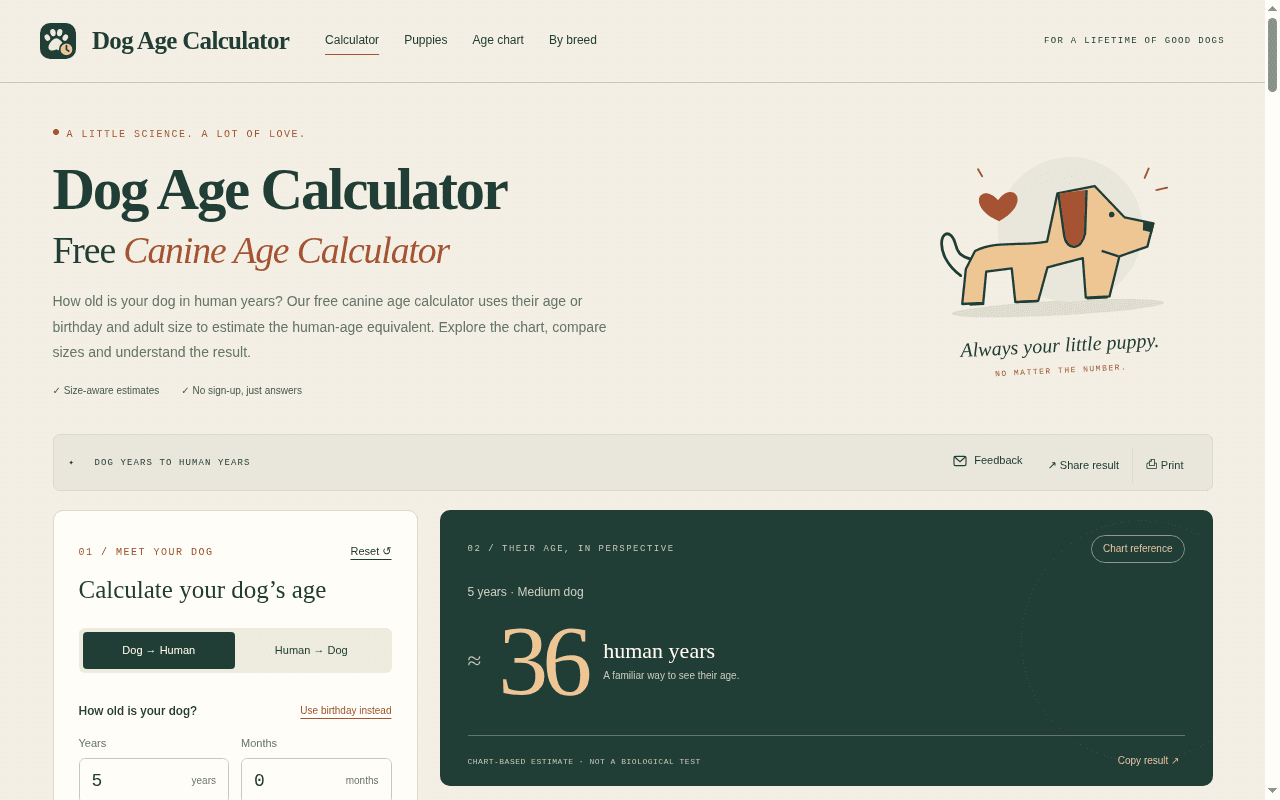
About this app
Dog Age Calculator (also called a canine age calculator) estimates a dog’s human-age equivalent from calendar age or birthday plus adult size (Small–Giant). Uses the AKC published age chart with monthly interpolation, charts, and reverse conversion. Educational estimates only—not a biological or veterinary assessment.
Key features
- 1Size-aware human-age estimate using the AKC published chart with monthly interpolation between milestones.
- 2Birthday mode plus reverse conversion (Human → Dog), with optional breed search to seed adult size.
- 3Interactive age curve chart, downloadable reference table, and shareable/printable results — no sign-up.
Target customer profile
Drawn from the product itself, not from a survey.
Scout Review
Written by AI from measured evidence, scored out of 100.
Dog Age Calculator is a well-made little tool with a real point of view: it uses the AKC chart with monthly interpolation and adult size rather than the tired ×7 rule, and it presents the answer with more design care than most funded products manage. The calculator is pre-filled, the result is above the fold, and it loads instantly. Where it falls short is scope and hardening — a text-heavy lower half dilutes the tool-first experience, one contrast failure undercuts an otherwise clean accessibility score, and the security headers are half-finished. None of that is fatal for a free, no-account utility.
Measure by measure
Usability
74Value lands above the fold: a pre-filled 5-year Medium example with the answer already showing. Preset chips, birthday mode and reverse conversion are discoverable, and there's no sign-up. The direction toggle is easy to misread at a glance.
Design
71Confident editorial identity: serif display with clean sans, forest-green/cream/terracotta palette applied consistently, and a big result number that anchors the page. Held back by tiny light-grey secondary text and a text-heavy lower half.
Speed
88Lighthouse 100/100 on both mobile and desktop, LCP 901ms, CLS 0, TBT 0ms. On-device calculation and a lightweight static page mean there's essentially nothing to wait for.
Security
52HTTPS enforced with HSTS and a Referrer-Policy, and calculations run on-device. But the header checklist is 5/12: no CSP, no frame protection, no X-Content-Type-Options, no Permissions-Policy, and no SPF/DMARC. No compliance claims.
Accessibility
79Lighthouse accessibility 97/100 with one failing audit: insufficient color contrast. That matches the visual audit's small, light-grey secondary text. No WCAG statement or multi-language support found, but the core flow is clean and keyboard-reachable.
Growth
58A real, evergreen question with a genuinely better method than the ×7 rule, and both listed alternatives are static reference pages rather than interactive tools. Differentiated, but a narrow, ad-or-nothing category.
Improvement areas
- Security headers incomplete (5/12): no CSP, frame protection, X-Content-Type-Options, Permissions-Policy, SPF or DMARC.
- One accessibility failure — insufficient contrast on small light-grey secondary text throughout the page.
- Text-heavy lower half pushes the reference table far from the calculator; chart y-axis lacks scale labels.
Design & Usability
The design is the strongest thing here. A serif display face against a clean sans, a restrained forest-green/cream/terracotta palette, and a result card that puts a giant '36 human years' front and center — you understand the answer before you read a word. The calculator panel is logically ordered, and the highlighted table row makes your specific case findable among sixteen. Usability matches: the example is pre-filled, the answer is above the fold, preset chips lower the effort to try it, and there's no sign-up. The friction is downstream — a long explanatory essay and 'How to use' section sit between the tool and the reference table, and the direction toggle is easy to misread.
Speed & Security
Speed is essentially flawless: Lighthouse 100/100 on mobile and desktop, LCP 901ms, CLS 0, TBT 0ms. The page is lightweight and the calculation runs in the browser, so there's nothing to wait on. Security is the weak flank. HTTPS is enforced with HSTS and a Referrer-Policy, and the on-device model means little data ever leaves the browser — a real mitigating factor. But the header probe scores 5/12: no CSP, no frame protection, no X-Content-Type-Options, no Permissions-Policy, and no SPF/DMARC records. For a no-account calculator that's low-stakes, but it's clearly behind a hardened peer.
Accessibility & Growth
Accessibility scores 97/100 with exactly one failing audit: insufficient color contrast. That's not a mystery — the visual audit independently flagged the size-tile weight ranges, chart footnote and 'AKC chart ages 1–16' caption as small and light grey. Fix the contrast and this is close to clean; there's no WCAG statement or multi-language support, but the core flow is keyboard-reachable and responsive. Growth is the honest question mark. The problem is real and evergreen, the size-aware AKC method beats the ×7 rule, and both listed alternatives are static reference material rather than interactive tools — a genuine wedge. But it's a once-in-a-while lookup with no retention loop, and the category ceiling is search traffic plus ads.
Conclusion
If you want a fast, good-looking answer to 'how old is my dog in human years,' this does the job better than the chart image it's competing with, and it explains its method and limits honestly instead of pretending to measure biology. The fixes are small and specific: raise the contrast on secondary text, tighten the essay below the calculator, add the missing security headers, and give the chart a real y-axis. Do those and this moves from 'nice free tool' to genuinely best-in-class for its niche.
Suggestions for improvement
- Fix the contrast failure on secondary text — size-tile weight ranges, chart footnote and the AKC caption are all too light.
- Add CSP, X-Frame-Options, X-Content-Type-Options and Permissions-Policy; publish SPF/DMARC for the domain.
- Move or collapse the long explanatory essay so the calculator and reference table sit closer together.
- Give the age curve chart more y-axis ticks so the curve reads as a scale, not decoration.
Alternatives comparison
Named competitors, point by point. Nobody paid to appear here or to be left out.
 Dog Age Calculator |  AKC Age Chart (Manual) |  General Life Span Guides | |
|---|---|---|---|
| Interactive calculation (vs. reading a static chart) | Yes — enter age or birthday, get instant result | No — static image, read manually | No — explanatory article, no calculator |
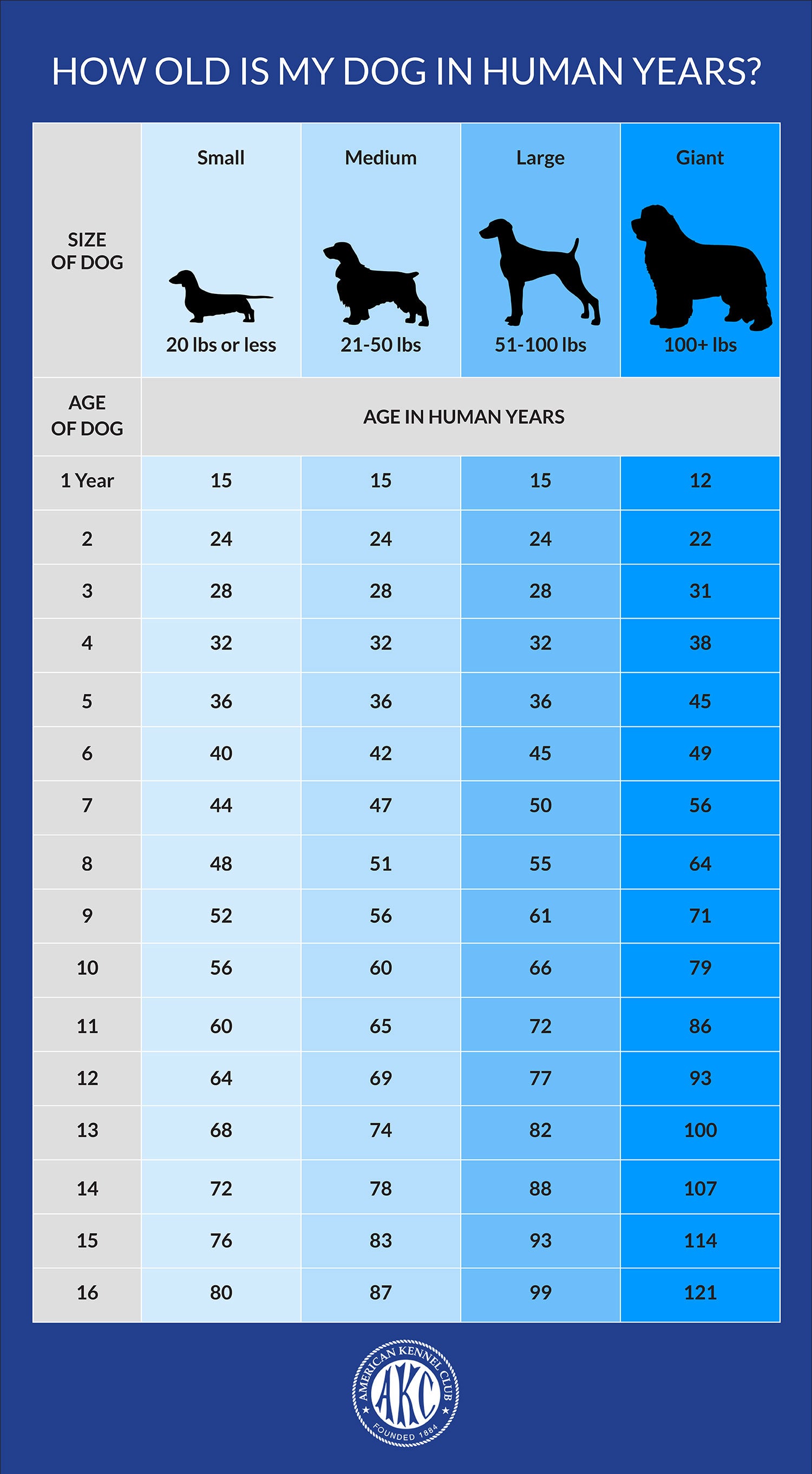
| Size-aware estimate (Small–Giant) | Yes — four adult-size categories | Yes — chart columns by size | Discussed in prose, not per-size lookup |
| Monthly interpolation / birthday input | Yes — months interpolated, birthday mode | No — whole-year milestones only | No |
| Reverse conversion (Human → Dog) | Yes — toggle direction | No | No |
| Cost / sign-up required | Free, no account | Free, no account | Free, no account |
 AKC Age Chart (Manual)
Referencing the original published charts manually.
General Life Span Guides
Reading general veterinary advice on canine aging.
Comparing options? See Dog Age Calculator alternatives, scored side by side
More Health Applications apps
View all Health Applications
StoryPad
92Privacy-first open source journal app with a continuous t...

Pushup RPG: Fitness Quest
90Pushup RPG is a camera-based push-up counter and fitness RPG for home workouts. Real push-ups and squats become attacks as you defeat 48 foes across 8 biomes, earn XP and loot, join guilds, and battle in live 40-second duels. Free on iOS and Android.

Gryper
89Workout tracker with muscle heatmaps and volume landmarks

Peanut Tennis
89Find tennis courts & tournaments in Australia

Snapkin: Photo Calorie Counter
88Snapkin is a calorie tracker you use by photographing your plate.

Innermost
87An AI-powered emotional support app that acts as a person...

SevenGrid
87SevenGrid shows your whole week on one screen. A missed day is an empty cell, not a broken streak. No account, no ads, pay once.

Cat Years to Human Years
86Free cat age calculator converting cat years to human years.

FitLifeBud
84AI meal plans for your week, with one aisle-sorted shopping list

Timix - A Modern Timer
84Turn timers into powerful routines with automation, widge...

WellWired
84AI explained simply for older adults, with safety lessons...

SayLift
84Voice workout log and calorie counter for iPhone


A platform dedicated to providing unbiased reviews of newly launched applications, analyzing everything from their features to their full potential.
info@scoutforge.net© 2026 Scoutforge. All rights reserved.
