Cycling through all six. Tap any point to stop.
Measured on six things
Migrate IMAP mailboxes to Office 365 securely and efficie...
Design
58Long-scroll marketing page with feature blocks, screenshots, specs, guide and video tabs. Functional and information-dense, but visually dated compared to modern SaaS landing pages; the desktop utility's own UI is only visible via screenshots.
Screenshots
1 / 1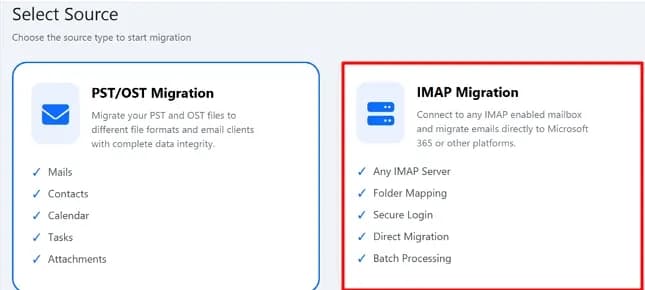
About this app
The DRS Softech IMAP to Office 365 Migration Tool is a specialized utility designed to move email data from any IMAP-enabled account to Microsoft 365. It supports popular services like Gmail, Yahoo, Zoho, and more, ensuring complete mailbox transfer including emails, attachments, folders, and metadata. The tool offers both single and batch migration modes, with CSV mapping for large-scale projects. Advanced features include incremental migration to skip previously moved data, email filtering, duplicate removal, and detailed reporting. Security is paramount, with modern authentication methods and no data storage. The tool is compatible with Windows and Mac, and provides a free trial for up to 100 items per folder. It's an ideal solution for IT administrators, enterprises, and individuals seeking a reliable and efficient migration process.
Key features
- 1Single and CSV-based batch migration of IMAP mailboxes (Gmail, Yahoo, Zoho, AOL, Outlook.com) to Microsoft 365.
- 2Incremental migration that skips previously transferred data, plus date/sender/subject/folder filtering and duplicate removal.
- 3Modern and client-secret authentication for admin-level migrations, with no credential or mailbox data stored.
Target customer profile
Drawn from the product itself, not from a survey.
Demographic
IT administrators in medium to large enterprises
Pain points
Migrating hundreds of mailboxes manually is time-consuming and error-prone.
Primary needs
Batch migration with CSV mapping, incremental transfers, and detailed reports.
Demographic
Small business owners and individuals
Pain points
Limited technical expertise and budget for complex migration tools.
Primary needs
Simple, secure, and affordable solution with a free trial to test before purchase.
Demographic
Managed Service Providers (MSPs) and IT consultants
Pain points
Needing to migrate client data from various IMAP servers frequently and reliably.
Primary needs
Support for multiple IMAP providers, secure authentication, and repeatable processes.
Scout Review
Written by AI from measured evidence, scored out of 100.
DRS Softech's IMAP to Office 365 Migration Tool is a competent, narrowly-scoped desktop utility backed by a fast, information-rich marketing site. The measured evidence is genuinely good on speed (94 mobile / 99 desktop Lighthouse) and solid on web security headers, and the feature list — CSV batch mapping, incremental migration, duplicate removal, filtering, reporting, modern auth — maps directly onto what an IT admin actually needs during a mailbox cutover. The weaknesses are equally concrete: dated visual design, a trial capped at 100 items per folder, accessibility failures on the site itself, and missing SPF/DMARC. Against Microsoft's free native tool and MigrationWiz, it is a reasonable middle option rather than a clear winner.
Measure by measure
Usability
60Screenshots, specs, a software guide and a video give buyers real pre-purchase material, and CSV batch mode is documented. The 100-items-per-folder trial cap means you cannot validate a real migration before paying.
Design
58Long-scroll marketing page with feature blocks, screenshots, specs, guide and video tabs. Functional and information-dense, but visually dated compared to modern SaaS landing pages; the desktop utility's own UI is only visible via screenshots.
Speed
80Lighthouse mobile 94/100 (LCP 1.2s, CLS 0.005, TBT 207ms) and desktop 99/100. The marketing site is genuinely fast and stable; no user complaints about lag surfaced in the collected evidence.
Security
74HTTPS enforced with HSTS, CSP, frame protection and a full header set (10/12 checklist points), and the tool claims no data storage plus modern/client-secret auth. But the domain publishes no SPF or DMARC records.
Accessibility
58Lighthouse accessibility 82/100, dragged down by failing contrast ratios, images without alt text, links with no discernible name, undersized touch targets and a missing main landmark. No WCAG statement published.
Growth
58A real, recurring enterprise need — IMAP-to-M365 mailbox migration — with a specific buyer (IT admins, MSPs) and concrete differentiators: CSV batch mapping, incremental skip, duplicate removal, reporting.
Improvement areas
- Free trial capped at 100 items per folder — too small to validate a real multi-mailbox migration before purchase.
- No SPF or DMARC records on drssoftech.com, a credibility gap for an email-focused vendor.
- Site accessibility failures: missing alt text, unnamed links, low contrast, small touch targets, no main landmark.
Design & Usability
The site is a dense, functional marketing page: feature blocks, a screenshots tab, a specification tab, a software guide and a video, plus claims of 30K+ downloads and a 4.9 rating across 8,990 reviews. It gives a buyer plenty to read, but the visual language is dated next to modern SaaS competitors, and the desktop app's own interface is only visible through screenshots rather than a live demo. Usability is competent rather than smooth: CSV batch mapping is a real setup step for admins, and the free trial caps at 100 items per folder, which is enough to confirm the tool connects but not enough to validate a genuine multi-mailbox migration before purchase.
Speed & Security
Speed is the standout measured result: Lighthouse mobile 94/100 with LCP 1.2s, CLS 0.005 and TBT 207ms, and desktop 99/100. The marketing site loads fast and stays visually stable, and nothing in the collected evidence suggests lag complaints. Security is strong on the web side — HTTPS enforced, HSTS, CSP, frame protection, X-Content-Type-Options, Referrer-Policy and Permissions-Policy, 10 of 12 checklist points — and the product claims no credential or mailbox storage plus modern and client-secret authentication for admin migrations. The gap is email-domain hygiene: no SPF and no DMARC records were found, which is a notable omission for a company whose business is email.
Accessibility & Growth
Accessibility lands at 82/100 on Lighthouse, held back by concrete failures: insufficient contrast, images without alt attributes, links with no discernible name, touch targets too small, no main landmark and role=presentation conflicts. No WCAG conformance statement is published. Growth is a judgement on the idea rather than traction: IMAP-to-Microsoft 365 migration is a real, recurring, budgeted enterprise task, and the product names a specific buyer — IT admins and MSPs — with concrete differentiators in CSV batch mapping, incremental skip, duplicate removal, filtering and reporting. The honest limit is the competition: Microsoft's native migration tool is free and MigrationWiz owns the premium slot, so DRS Softech has to win on price and batch convenience rather than category leadership.
Conclusion
If you are an IT admin with a few dozen IMAP mailboxes to move and you want batch CSV mapping without MigrationWiz pricing, this is worth a trial run — just budget for the fact that the 100-item cap will not prove a real migration works. If you are moving one mailbox, Microsoft's native tool is free and probably sufficient. The product's fundamentals are sound and its site is fast; the work ahead is presentation, accessibility and email-domain hygiene, not the migration engine itself.
Suggestions for improvement
- Raise the trial cap or offer a time-limited full trial so admins can validate a real multi-mailbox migration before buying.
- Publish SPF and DMARC records for drssoftech.com — an email migration vendor without them is an easy credibility hit.
- Fix the Lighthouse accessibility failures: alt text, link names, contrast ratios, touch target sizing and a main landmark.
- Modernize the landing page visuals and add a live in-browser demo or annotated UI walkthrough instead of static screenshots.
Alternatives comparison
Named competitors, point by point. Nobody paid to appear here or to be left out.
 DRS Softech IMAP to Office 365 Migration Tool DRS Softech IMAP to Office 365 Migration Tool |  Microsoft 365 Migration Tool (Native) Microsoft 365 Migration Tool (Native) |  MigrationWiz MigrationWiz | |
|---|---|---|---|
| Batch migration of multiple mailboxes | Yes — CSV-based account mapping for bulk migrations | Yes — CSV-based bulk IMAP migration in the M365 admin center | Yes — project-based bulk migration with mapping |
| Incremental / delta migration | Yes — skip previously migrated data option | Limited — rerun-based, no native delta sync | Yes — incremental/delta passes are a core feature |
| Duplicate removal and email filtering | Yes — duplicate detection plus date/sender/subject/folder filters | No — no duplicate removal or granular filtering | Filtering yes; duplicate handling limited |
| Pricing model | One-time license with free trial (100 items per folder) | Free with Microsoft 365 subscription | Per-mailbox / per-GB licensing, higher cost |
| Detailed migration reporting | Yes — status reports and active task monitoring | Basic migration status only | Yes — detailed project and item-level reporting |
| Deployment model | Windows and Mac desktop application | Browser-based, inside M365 admin center | Cloud-hosted SaaS |
Microsoft 365 Migration Tool (Native)
Microsoft's built-in migration tool allows IMAP migration but may lack advanced features like duplicate removal and detailed reporting.
MigrationWiz
A cloud-based migration tool by BitTitan that supports IMAP to Office 365 migrations with advanced options, but at a higher cost.
Comparing options? See DRS Softech IMAP to Office 365 Migration Tool alternatives, scored side by side
More Productivity apps
View all Productivity
The Stack Newsletter
92A weekly newsletter delivering curated tech jobs, intervi...

Qamarero
92An all-in-one hospitality software for restaurants and ba...

EmbedMyReviews
92White-label reputation management software for agencies s...

StoryPad
92Privacy-first open source journal app with a continuous t...

Notion
92All-in-one AI workspace for docs, projects, and knowledge...

Puzzly – B2B Lead Generation & Sales Intelligence Platform
92Puzzly is an all-in-one B2B lead generation platform that...

Vibe Coding Agent Skills
92A free, open-source platform offering 110 AI agent skills...

Gerty
91Private, local AI assistant for Mac that runs offline

CC Switch
91Open-source desktop app for switching AI coding providers...

username.md
90One verified handle for your online identity, readable by...

PitchWhip
90AI cold call scripts & direct dials from LinkedIn

What the GIF
89Frame-perfect video-to-GIF maker that runs entirely in yo...


A platform dedicated to providing unbiased reviews of newly launched applications, analyzing everything from their features to their full potential.
info@scoutforge.net© 2026 Scoutforge. All rights reserved.
