Cycling through all six. Tap any point to stop.
Measured on six things
Find where any photo was taken: GPS first, AI when it’s missing.
Security
42HTTPS enforced and third-party AI processing disclosed, but the header probe scores 3/12: no HSTS, CSP, frame protection, Referrer-Policy or DMARC. No SOC 2, pen-test or bug bounty claims found.
Screenshots
1 / 1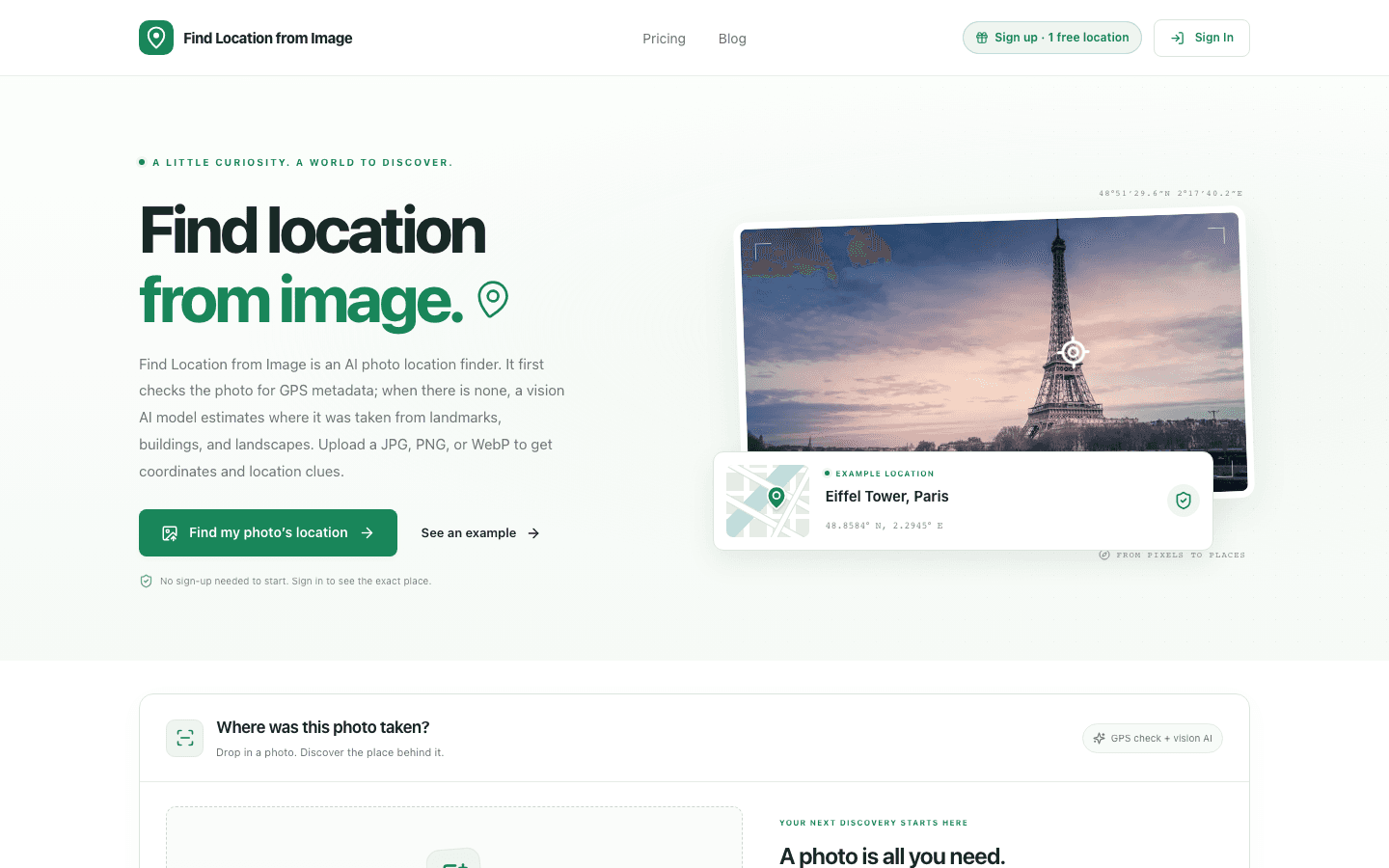
About this app
the AI analysis that returns up to three candidates with a confidence level you upload a photo, the GPS data is read first, and when there is none, AI names the place and coordinates.
Key features
- 1EXIF GPS metadata check first, vision AI fallback when GPS is stripped
- 2Returns up to three candidate locations with confidence levels and visual clues
- 3Drag-and-drop upload (JPG/PNG/WebP up to 10 MB) with a no-photo example fallback
- 4Country shown free; exact location, coordinates and clues unlocked after sign-in
Target customer profile
Drawn from the product itself, not from a survey.
Scout Review
Written by AI from measured evidence, scored out of 100.
Find Location From Image is a clean, fast, honestly-pitched photo geolocation tool. It checks EXIF GPS first and falls back to vision AI, returns up to three candidates with confidence, and gates the exact spot behind sign-in. The site is well-crafted and the speed is excellent. The gaps are security headers (3/12 on the probe), two real accessibility failures, and a pricing model that treats a curiosity tool like a subscription. It's a good v1 with a clear next chapter.
Measure by measure
Usability
64Clear above-fold CTA, a working drag-and-drop mock, an example fallback, and honest gating (country free, exact spot after sign-in). The five-step explainer restates the three-step one and pads the page.
Design
70Cohesive green-and-neutral palette, a real product mock in section 2, and monospace coordinates give it a map-like identity. Undercut by duplicated how-it-works sections and tiny low-contrast labels.
Speed
90Lighthouse mobile 96/100 (LCP 1.4s, CLS 0.002, TBT 215ms) and desktop 100/100. Genuinely fast, no lag complaints in the collected evidence.
Security
42HTTPS enforced and third-party AI processing disclosed, but the header probe scores 3/12: no HSTS, CSP, frame protection, Referrer-Policy or DMARC. No SOC 2, pen-test or bug bounty claims found.
Accessibility
80Lighthouse a11y 97/100, but two real failures: insufficient contrast on small labels and visible text without matching accessible names. No WCAG statement or a11y page found.
Growth
58Real problem, specific wedge: EXIF GPS first, vision AI fallback. But pay-per-photo pricing targets one-off curiosity, not a habit — hard to compound.
Improvement areas
- Security headers missing (3/12 on probe): no HSTS, CSP, frame protection, Referrer-Policy or DMARC
- Two Lighthouse accessibility failures: contrast on small labels and mismatched accessible names
- Duplicated how-it-works sections pad the page and dilute density
- Pay-per-photo pricing ($9.90 / $19.99 / $99) may not fit repeat usage patterns
Design & Usability
The homepage is genuinely well-composed: a restrained green-and-neutral palette, a tilted Eiffel Tower hero with a floating coordinate card, and — best of all — a real drag-and-drop mock in section 2 that demonstrates the product instead of describing it. Usability follows through: the CTA is above the fold, 'no sign-up needed' is stated plainly, and the gating is honest (country free, exact spot after sign-in). The problem is padding. The three-step and five-step 'how it works' sections say the same thing twice, and the tiny low-contrast captions and step numbers hurt readability on exactly the details the product is about.
Speed & Security
Speed is the standout: Lighthouse mobile 96/100 with LCP 1.4s and CLS 0.002, desktop a clean 100/100. Whatever stack this runs on, it's lean. Security is the weak flank. HTTPS is enforced and the site is refreshingly upfront that photos without GPS are sent to an AI provider, but the header probe scores 3/12 — no HSTS, no CSP, no frame protection, no Referrer-Policy, no DMARC. For a tool that ingests personal photos, that's a thin perimeter. No SOC 2, pen-test or bug bounty claims appear anywhere in the collected evidence.
Accessibility & Growth
Accessibility scores 97/100 on Lighthouse, which is strong, but the two failing audits are telling: insufficient contrast on small labels and visible text without matching accessible names. The product's core output is tiny coordinate text — that's the thing to fix first. No WCAG statement or a11y page exists. Growth is a judgment call: the problem is real (photos with stripped GPS), the wedge is specific (EXIF first, vision AI fallback), and the honest disclaimers about accuracy build trust. But pay-per-photo pricing ($9.90 single, $19.99 for three, $99 subscription) targets one-off curiosity rather than a repeatable habit, which caps how far this compounds.
Conclusion
If you've got a photo with no GPS and you want to know where it was taken, this does the job quickly and doesn't pretend to be more accurate than it is — which is rare and worth rewarding. The next round should be unglamorous: ship the security headers, fix the two contrast/label failures, and reconsider whether $9.90 per photo is the right ask for a tool people use once per trip.
Suggestions for improvement
- Ship the missing security headers (HSTS, CSP, X-Frame-Options, Referrer-Policy, DMARC) — the probe scores 3/12.
- Fix the two Lighthouse accessibility failures: contrast on small labels and accessible names on labeled buttons.
- Collapse the three-step and five-step 'how it works' sections into one — the duplication pads the page.
- Reconsider pay-per-photo pricing; a small monthly cap or credit bundle would fit repeat usage better.
Alternatives comparison
Named competitors, point by point. Nobody paid to appear here or to be left out.
 Find Location From Image |  |  | ||
|---|---|---|---|---|
| Pricing model | $9.90 single photo, $19.99 for 3, $99 subscription | Not specified | Not specified | Not specified |
| GPS metadata check before AI | Yes — EXIF GPS read first, AI only as fallback | Not specified | Not specified | Not specified |
| Number of candidate locations returned | Up to three, with confidence levels | Not specified | Not specified | Not specified |
| Sign-up required to see result | Country free; exact spot requires sign-in | Not specified | Not specified | Not specified |
| Published accuracy benchmark | No — site explicitly states no benchmark published | Not specified | Not specified | Not specified |
Comparing options? See Find Location From Image alternatives, scored side by side
More Travel & Exploration apps
View all Travel & Exploration
Peanut Tennis
89Find tennis courts & tournaments in Australia

Roami eSIM
88A global travel eSIM app offering instant activation, no ...

TheBean.ai
84Adaptive AI personal trainer that evolves with your progr...

EchoWi
83Track and optimize your brand's visibility in AI answers.

Stampsy App
83Find every country you've been to in your photos and collect a passport stamp for each one.

Bracket2026
82Interactive 48-team World Cup 2026 bracket predictor with...

Vote-n-Venture
79AI-powered group travel planning app that simplifies decision-making with collaborative voting and bookable itineraries.

SpeakSpots
78An AI-powered travel assistant that creates personalized itineraries via WhatsApp, perfect for quick and easy trip planning.
Remember
78An iOS app that enhances memory by capturing, tagging, and organizing items with smart contextual features.

Suitpax
78AI-powered CRM for corporate travel, streamlining workflows with AI assistants for itinerary planning and expense tracking.

Carpooly
76Carpooly is a smart carpooling platform that simplifies ride-sharing for schools, work commutes, and daily transportation needs.

LocoMap
76A user-friendly, privacy-focused platform for creating and sharing personalized maps with collaborative features.


A platform dedicated to providing unbiased reviews of newly launched applications, analyzing everything from their features to their full potential.
info@scoutforge.net© 2026 Scoutforge. All rights reserved.
