Cycling through all six. Tap any point to stop.
Measured on six things
Flock camera map and detour routes for drivers
Speed
47Desktop Lighthouse is a healthy 91, but mobile is 55/100 with a 7.8s LCP and 450ms TBT — the map-heavy hero is dragging first paint on phones. Click-to-load video embeds are a genuine win.
Screenshots
1 / 1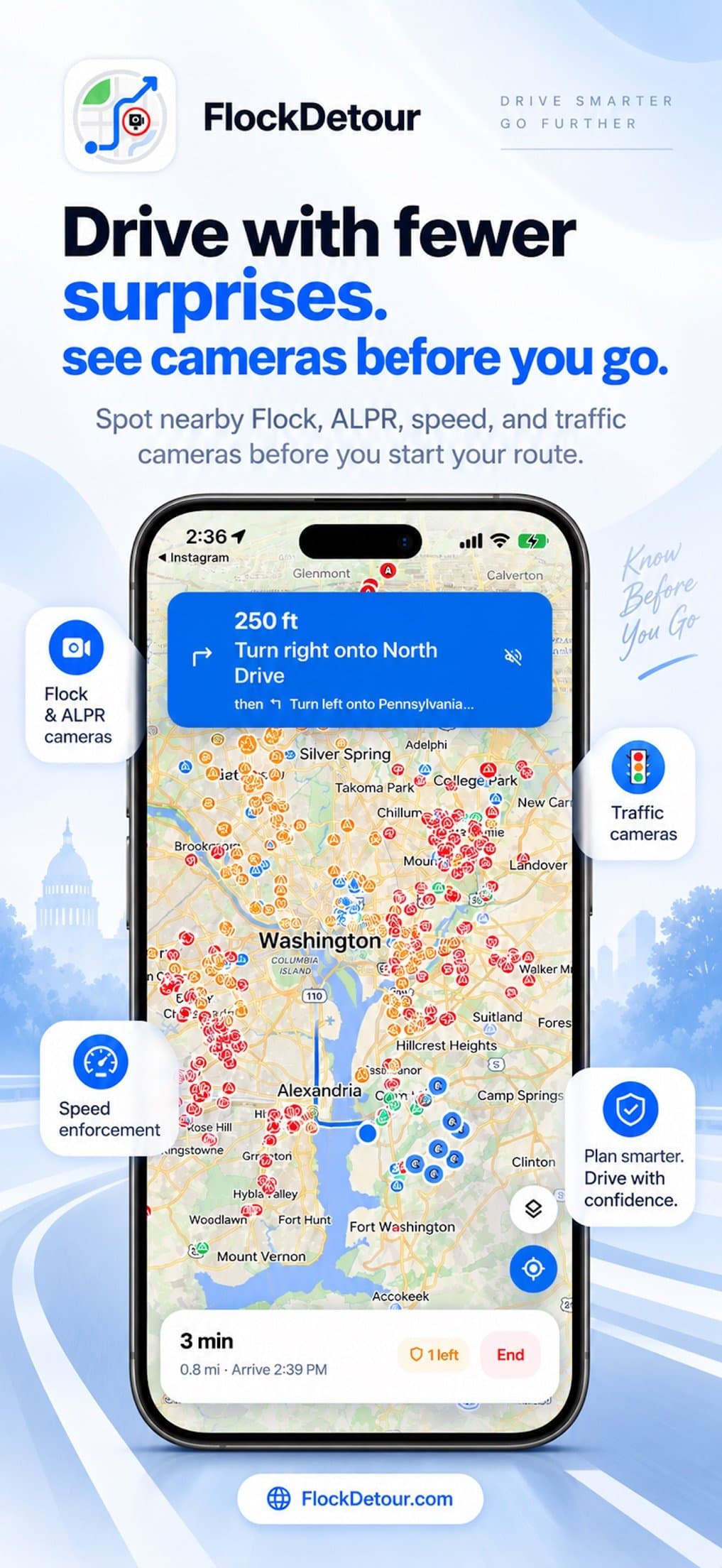
About this app
FlockDetour is a free map of Flock Safety and other license plate readers (ALPR), plus GPS navigation that compares the fastest route with detours passing fewer known cameras. Each route shows the minutes and miles it adds and how many readers it passes. Works with Apple CarPlay. The map, fastest-route preview, agency records and news are free; turn-by-turn navigation and the Balanced and Fewer cameras modes need FlockDetour Pro. App Store: https://apps.apple.com/us/app/flockdetour-flock-camera-map/id6805554348 Website: https://flockdetour.com
Key features
- 1Free web map of 200,000+ documented ALPR/Flock camera records with source links, refreshed weekly
- 2Route comparison showing fastest vs. fewer-camera detour with minutes added and reader counts per route
- 3iPhone and Android app with turn-by-turn guidance, proximity alerts, offline map areas and CarPlay support
Target customer profile
Drawn from the product itself, not from a survey.
Demographic
Privacy-conscious commuters who drive daily
Pain points
Unwanted surveillance and data collection by ALPR cameras
Primary needs
Routes that avoid known cameras without adding too much time
Demographic
Activists and journalists covering surveillance
Pain points
Lack of transparent, source-linked camera data
Primary needs
Access to open data and research tools to investigate local ALPR networks
Demographic
Rideshare and delivery drivers working in multiple areas
Pain points
Uncertainty about camera locations and potential privacy exposure
Primary needs
Turn-by-turn navigation with alerts for nearby documented cameras
Scout Review
Written by AI from measured evidence, scored out of 100.
FlockDetour is a focused, well-built answer to a specific question: how many known plate readers does this route pass, and what does avoiding them cost me? The open-data discipline is the standout — every pin is meant to have a source, counts are dated and caveated ('a floor, not a ceiling'), and the site is refreshingly honest that no route is guaranteed camera-free. The app UI is clean and the security headers are better than most paid SaaS. The weaknesses are mobile performance (7.8s LCP), a Pro gate that lands on the exact feature the free tier advertises, and a category where the map itself is commoditized.
Measure by measure
Usability
68No account, on-device history, free web map and free route comparison get you to value fast. Turn-by-turn and the Balanced/Fewer cameras modes sit behind Pro, and the 3-rating store sample says nothing about learning curve.
Design
71Judging the app UI and store material: consistent blue accent, color-coded pins, readable turn-by-turn overlay and clean filter chips. Homepage hero is noisy with overlapping camera labels; app bottom-nav icons are washed out.
Speed
47Desktop Lighthouse is a healthy 91, but mobile is 55/100 with a 7.8s LCP and 450ms TBT — the map-heavy hero is dragging first paint on phones. Click-to-load video embeds are a genuine win.
Security
76Full header suite verified — HSTS, CSP, frame protection, Referrer and Permissions policies, SPF and DMARC, 12/12 probe points. No-account, on-device history design limits exposure. No published audit or bug bounty.
Accessibility
80Automated axe audit returns a perfect 100/100, and the site is responsive with readable contrast in body copy. Counterweights: single-language localization and low-contrast bottom-nav icons in the app screenshots.
Growth
62Real, specific problem with a demonstrable wedge: route comparison with per-route camera counts and source-linked open data, plus CarPlay. Early (domain 0.2 years) but the idea has room.
Improvement areas
- Mobile performance: 7.8s LCP and 55/100 Lighthouse score undercut a phone-first product
- Pro gate lands on turn-by-turn and the Balanced/Fewer cameras modes — the features the free tier advertises
- No published security audit, pen-test or bug bounty despite a strong 12/12 header posture
Design & Usability
The app is the product here, and the store screenshots show a competent one: color-coded pins, a clean camera list with search and filter chips, and a turn-by-turn banner that reads clearly. The homepage is marketing and mostly holds up — bold headline, blue underline on 'detour', a live record counter — but the hero illustration is cluttered with overlapping camera labels and the video thumbnail feels bolted on. Usability is the stronger half: no account, on-device history, a free web map and free route comparison mean you can evaluate the core tradeoff in under a minute. The catch is that the thing you came for — turn-by-turn, and the Balanced and Fewer cameras modes — is Pro-gated, so the free experience is a preview rather than a product.
Speed & Security
Speed is a tale of two devices. Desktop Lighthouse lands at 91, but mobile is 55/100 with a 7.8s LCP and 450ms total blocking time — for a map product whose users are, by definition, on phones, that's the number that matters. The click-to-load YouTube and TikTok embeds are a smart, honest choice that keeps third-party weight off the page until asked. Security is the quiet overachiever: the probe found HTTPS enforced with HSTS, a CSP, frame protection, X-Content-Type-Options, Referrer-Policy, Permissions-Policy, plus SPF and DMARC — 12/12. The architecture backs it up: no account, no ads, no trackers, trip history on device. What's missing is any published audit, pen-test or bug bounty, so the posture is strong but self-attested.
Accessibility & Growth
Accessibility scores a clean 100/100 on the automated axe run, which covers contrast, labels and semantics but not the whole of WCAG. The visible soft spots are in the app: bottom-nav icons and labels rendered in very light gray, and localization in exactly one language. No accessibility statement was found on the site. Growth is the interesting question. The category — ALPR awareness — is real and growing, and FlockDetour's wedge is concrete: it doesn't just map cameras like DeFlock, it prices the detour in minutes and miles and counts the readers on each route, with source-linked open data behind every pin (207,779 active records, refreshed weekly). CarPlay integration is a genuine differentiator against a browser map. The limit is that the wedge is narrow: the same privacy-motivated driver can get the map free elsewhere, and the paid tier is the navigation layer, which is exactly where Apple and Google Maps are free and excellent.
Conclusion
Worth installing if you drive a fixed commute and want to know what your route actually passes — the free web comparison alone answers that in a minute. Pay for Pro only if turn-by-turn with camera counts is something you'd use weekly; otherwise the free map plus your existing navigation gets you most of the value. The bigger question is durability: the camera data is the moat, and it depends on community corrections and public records staying available. If the dataset keeps growing and the mobile load time gets fixed, this becomes a genuinely useful daily tool rather than a curiosity.
Suggestions for improvement
- Fix mobile LCP — 7.8s on a map product used on phones is the single highest-leverage performance win available.
- Raise contrast on the app's bottom-nav icons and labels; light gray on white fails the spirit of the 100/100 audit.
- Publish a security page with a pen-test summary or bug bounty to convert a strong header posture into verifiable trust.
- Add at least one more localization and an accessibility statement to match the automated a11y score.
Alternatives comparison
Named competitors, point by point. Nobody paid to appear here or to be left out.
 FlockDetour FlockDetour |  DeFlock DeFlock | FlockHopper | |
|---|---|---|---|
| Camera map coverage | 207,779 active records, refreshed weekly, source-linked | Crowdsourced community map of Flock Safety cameras | Camera locations with alerts and route suggestions |
| Route comparison with time/camera tradeoff | Yes — fastest vs. detour, minutes added and reader counts per route | No — map and advocacy focus | Yes — route suggestions avoiding Flock cameras |
| Turn-by-turn navigation | Yes, in-app (FlockDetour Pro), with CarPlay | No — web map only | Alerts and route suggestions; not full navigation |
| Free tier | Free map, fastest-route preview, records and news; Pro for navigation | Free, community-driven | Free app with camera alerts |
| Data sourcing transparency | OpenStreetMap, public records, procurement docs; corrections flow back under open licenses | Crowdsourced contributor submissions | Not detailed in collected evidence |
| Account required | No — no account, history stays on device | No account for browsing | Not detailed in collected evidence |
DeFlock
A community-driven map of Flock Safety cameras, focusing on crowdsourced data and advocacy.
FlockHopper
An app that helps drivers avoid Flock cameras by providing alerts and route suggestions.
Comparing options? See FlockDetour alternatives, scored side by side
More Travel & Exploration apps
View all Travel & Exploration
Roami eSIM
88A global travel eSIM app offering instant activation, no ...

TheBean.ai
84Adaptive AI personal trainer that evolves with your progr...

EchoWi
83Track and optimize your brand's visibility in AI answers.

Bracket2026
82Interactive 48-team World Cup 2026 bracket predictor with...

Vote-n-Venture
79AI-powered group travel planning app that simplifies decision-making with collaborative voting and bookable itineraries.

Remember
78An iOS app that enhances memory by capturing, tagging, and organizing items with smart contextual features.
SpeakSpots
78An AI-powered travel assistant that creates personalized itineraries via WhatsApp, perfect for quick and easy trip planning.

Suitpax
78AI-powered CRM for corporate travel, streamlining workflows with AI assistants for itinerary planning and expense tracking.

Urban Rider
76Urban Rider is a specialized navigation app for scooter and moped riders, offering highway-free routes optimized for 15-31 mph speeds.

Trefundo AI
76AI-powered tool that automates refunds for non-refundable hotel bookings, saving travelers money and hassle.

LocoMap
76A user-friendly, privacy-focused platform for creating and sharing personalized maps with collaborative features.

Carpooly
76Carpooly is a smart carpooling platform that simplifies ride-sharing for schools, work commutes, and daily transportation needs.


A platform dedicated to providing unbiased reviews of newly launched applications, analyzing everything from their features to their full potential.
info@scoutforge.net© 2026 Scoutforge. All rights reserved.
