Cycling through all six. Tap any point to stop.
Measured on six things
Task & Project Collaboration Tool With Chats, Notes, and Handover Functionality
Speed
46Lighthouse mobile 55/100 with a 9.8s LCP and 4.0s FCP; desktop 51/100. First paint is slow on both form factors, well behind category norms.
Screenshots
1 / 2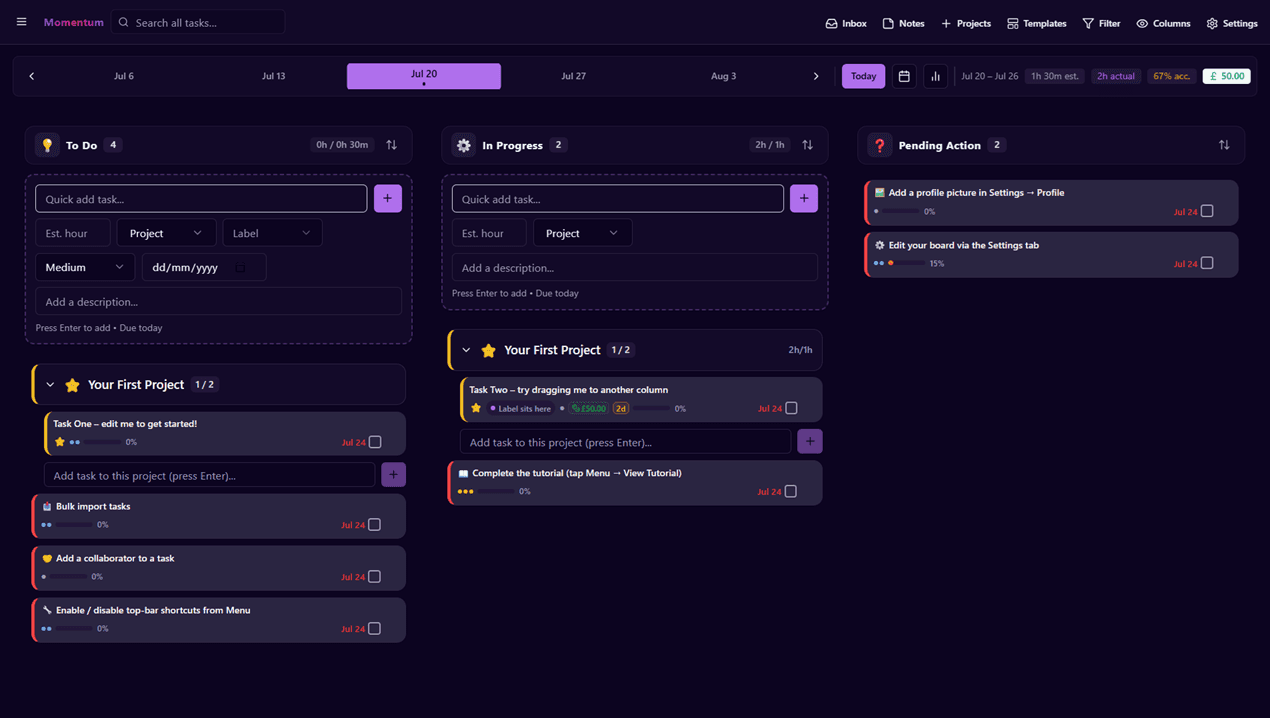
About this app
Momentum is a modern task management and collaboration platform built for individuals, freelancers, and growing teams who want to stay productive without sacrificing enjoyment. Momentum also focuses on alleviating real-world frictions - providing solutions and structure to common tasks that are often overlooked. With Momentum, you can: - Turn handwritten notes or printed photos into fully editable digital notes - Easily leave tasks in a handover - Eliminate scattered communication by keeping group chats, notes, tasks, and messages tied directly to specific projects. - Keep your workflow clean by handling stale work in bulk. - Go beyond basic tracking with built-in stopwatches, session histories, manual hour editing, and estimated vs. actual time comparisons.
Key features
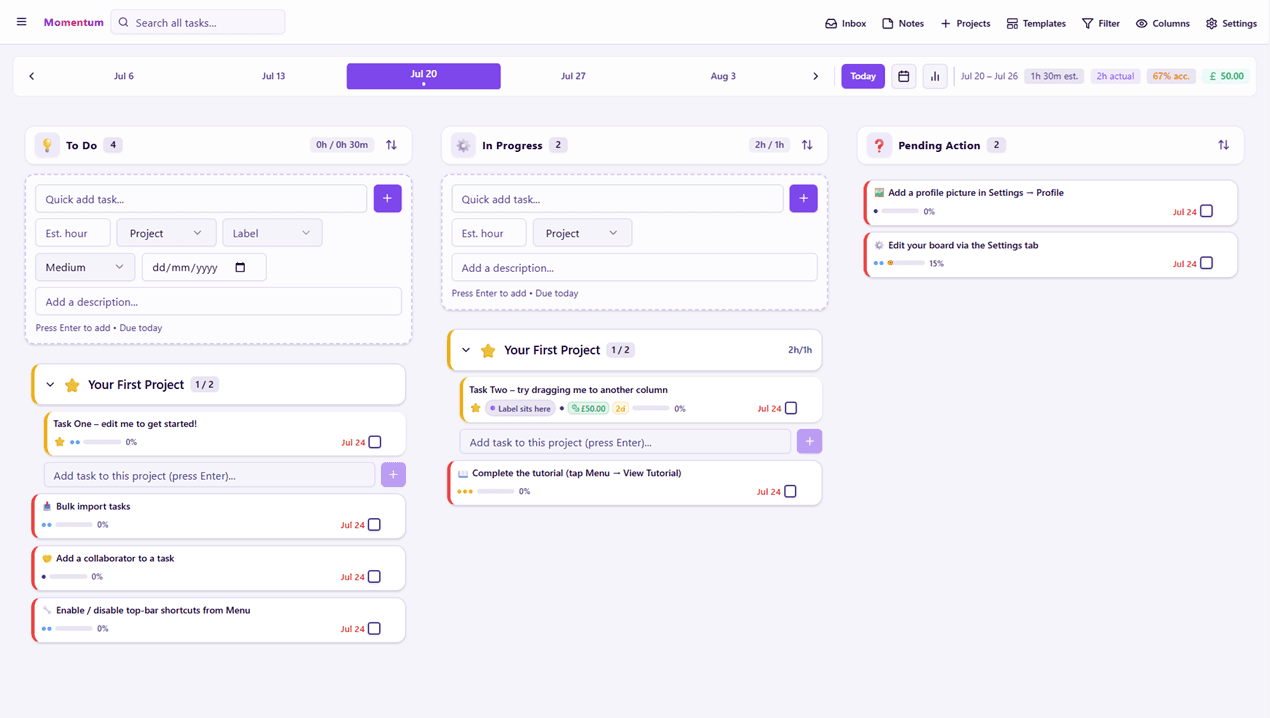
- 1Kanban boards with date/week selector, progress bars, and quick-add task entry in dark and light themes.
- 2Built-in stopwatch time tracking with session history, manual hour editing, and estimated vs actual comparison.
- 3Handwritten-note and printed-photo OCR to editable digital notes, plus project-tied chat, notes, and task handover.
Target customer profile
Drawn from the product itself, not from a survey.
Demographic
Solo entrepreneurs and freelancers
Pain points
Losing track of billable hours and juggling multiple client tasks
Primary needs
Time tracking and collaborative management of the deadlines and deliverables
Demographic
Small startup teams (2-10 people)
Pain points
Chaotic handoffs and unclear progress on shared projects
Primary needs
Visual Kanban boards that show workflow status at a glance
Demographic
Students and non-profit staff
Pain points
Expensive project tools and poor deadline management
Primary needs
Affordable, accessible task management with progress visibility
Demographic
Charites
Pain points
Finding a cheap tool for managing objectives and recording efforts towards projects and tasks
Primary needs
An all-in-one tool at an affordable price to ensure the charities proceeds are not taken away in digital tools
Scout Review
Written by AI from measured evidence, scored out of 100.
Momentum Tasking is a genuinely useful idea wrapped in an average execution. The Kanban is clean, the time-tracking and OCR features are real differentiators for freelancers and small teams, and the charity/student pricing angle is smart positioning against bloated incumbents. But the site opens on an empty black hero, the page takes nearly ten seconds to paint on mobile, and there's no documentation to explain the workflows that make it special. Security headers are solid at 9/12; accessibility is high-scoring but fails on contrast and touch targets. It's a product with a clear wedge and a slow front door.
Measure by measure
Usability
62Clear Kanban with quick-add, date selector, and progress bars supports fast entry; pricing shows one plan across four segments. No public docs or help center found, so onboarding depth is unverified.
Design
56Clean purple-accented Kanban with solid dark/light themes, but the homepage hero is mostly empty black space and nav lacks active states. On par with indie peers, behind polished SaaS.
Speed
46Lighthouse mobile 55/100 with a 9.8s LCP and 4.0s FCP; desktop 51/100. First paint is slow on both form factors, well behind category norms.
Security
74HTTPS enforced with HSTS, frame protection, nosniff, Referrer-Policy, SPF and DMARC — 9/12 checklist points. CSP and Permissions-Policy missing; no SOC 2 or audit claims found.
Accessibility
70Lighthouse accessibility 92/100, but contrast and touch-target audits fail. Dark and light themes stay readable; no WCAG statement or multi-language support found.
Growth
58Real problem, specific segments (freelancers, small teams, charities), and a genuine wedge in note-OCR plus project-tied chat and time tracking. Crowded category, no network effect.
Improvement areas
- Mobile LCP of 9.8s and desktop performance of 51/100 need serious front-end optimization.
- No public help center or onboarding docs for handover, bulk cleanup, and OCR workflows.
- Missing CSP and Permissions-Policy headers; contrast and touch-target accessibility failures remain.
Design & Usability
Momentum's interface is competent and consistent: purple accents, pill buttons, and a three-column Kanban that reads clearly in both dark and light themes. The date selector and progress bars give good at-a-glance status. The homepage, though, opens on a near-empty black hero that wastes the most valuable real estate on the site, and the nav has no active states. Usability is stronger than design — quick-add inputs, a demo CTA, and a transparent one-plan pricing page across individual, business, charity, and student tiers. The gap is documentation: no help center or onboarding guide surfaced in the fetched content, so the depth of the handover and bulk-cleanup workflows is unverified.
Speed & Security
Speed is the weak spot. Lighthouse mobile lands at 55/100 with a 9.8-second LCP and 4.0-second FCP; desktop is 51/100. For a task tool people open dozens of times a day, that first paint is a real friction cost. Security is more reassuring: HTTPS with HSTS, frame protection, nosniff, Referrer-Policy, plus SPF and DMARC — 9 of 12 checklist points. The gaps are CSP and Permissions-Policy, and there's no published SOC 2, ISO, or pen-test evidence, which is normal for a young product but leaves enterprise buyers guessing.
Accessibility & Growth
Accessibility scores 92/100 on Lighthouse, but the failing audits are the ones users feel: insufficient color contrast and undersized touch targets. Dark and light themes both hold up structurally, and there's no WCAG statement or multi-language support to point to. Growth is the more interesting story. Momentum names a real problem — scattered client work, lost billable hours, messy handoffs — and targets specific segments: freelancers, 2-10 person startups, students, and charities. The wedge is concrete: handwritten-note OCR, project-tied chat and notes, bulk stale-work handling, and stopwatch time tracking in one affordable plan. Against Trello, ClickUp, and Notion that's a defensible niche, but the category is crowded and there's no network effect to compound adoption.
Conclusion
If you're a freelancer tired of stitching Trello and a spreadsheet together, Momentum's combination of Kanban, stopwatch time tracking, and note OCR is worth a look — once the page loads. The pricing transparency and segment-specific plans are a genuine draw for charities and students. What it needs next is speed work on the front end, a real help center, and a CSP header. The foundation is there; the polish isn't yet.
Suggestions for improvement
- Fix the LCP: 9.8s mobile first paint is the single biggest conversion killer on the site.
- Replace the empty black hero with real product imagery or a short demo loop above the fold.
- Publish a help center or onboarding guide covering handover, bulk cleanup, and OCR workflows.
- Add CSP and Permissions-Policy headers, and fix the contrast and touch-target accessibility failures.
Alternatives comparison
Named competitors, point by point. Nobody paid to appear here or to be left out.
 Momentum Tasking Momentum Tasking |  Trello Trello |  ClickUp ClickUp | Notion | |
|---|---|---|---|---|
| Kanban board with task management | Yes — three-column Kanban with quick-add and progress bars | Yes — the classic Kanban with power-ups | Yes — multiple views including Kanban | Yes — via board views in pages |
| Built-in time tracking | Yes — stopwatch, session history, manual edits, estimated vs actual | Requires third-party power-ups | Yes — native time tracking | No native time tracking |
| Handwritten note / photo OCR | Yes — converts notes and photos to editable digital notes | No | No native OCR | No native OCR |
| Project-tied chat and notes | Yes — group chats, notes, tasks tied to projects | Comments only, no chat | Yes — chat and docs | Comments and pages, no chat |
| Pricing model | One plan with individual, business, charity, and student tiers | Free tier plus per-user paid plans | Free tier plus per-user paid plans | Free tier plus per-user paid plans |
Trello
The classic Kanban board tool with a free tier and huge integration ecosystem, though time tracking requires power-ups.
ClickUp
An all-in-one productivity suite with built-in time tracking and multiple views, but often feels bloated for simple Kanban workflows.
Notion
Build Custom Agents, search across all your apps, and automate busywork. The AI workspace where teams get more done, faster.
Comparing options? See Momentum Tasking alternatives, scored side by side
More Project Management apps
View all Project Management
Notion
92All-in-one AI workspace for docs, projects, and knowledge...

Vendor Space
88Vendor Space is an all-in-one vendor management platform ...

Plori
87Cloud AI agents with persistent disk, memory, and real CL...

Voice Memo Exporter
87Export all your Apple Voice Memos to one text file.

TempGuru
87Managed event staffing across the US and Canada with loca...

InviteVia
87InviteVia is a digital invitation platform for creating beautiful online invitations for weddings, birthdays, engagements, parties, and special events. Choose a template, customize your invitation, collect RSVPs, and share it instantly through WhatsApp, Instagram, SMS, or a simple link. No guest accounts or app downloads required.

Trac
87Local-first time tracker for freelancers with invoicing, ...

GrantCue
86Grant discovery and management software: search federal, state and foundation grants, then track deadlines, tasks and awards with your team.

AirLST
86Event management software for corporate events: invitations, registration, guest lists, check-in, seating and event apps in one platform.

FollowIncome
86Business workspace for solo founders and small teams.

ProviderOps
86NDIS provider management software for small Australian teams to roster workers, capture service records and prepare invoices.

Teamwork.com
85Project, resource, and financial management for client-fo...


A platform dedicated to providing unbiased reviews of newly launched applications, analyzing everything from their features to their full potential.
info@scoutforge.net© 2026 Scoutforge. All rights reserved.
