Cycling through all six. Tap any point to stop.
Measured on six things
Free private browser-based MP4 to MP3 converter with no u...
Growth
58Real, specific wedge: browser-local conversion with no upload, batch support and 320 kbps output. Targets privacy-conscious students, creators and journalists. Category is crowded but the no-upload angle is defensible.
Screenshots
1 / 1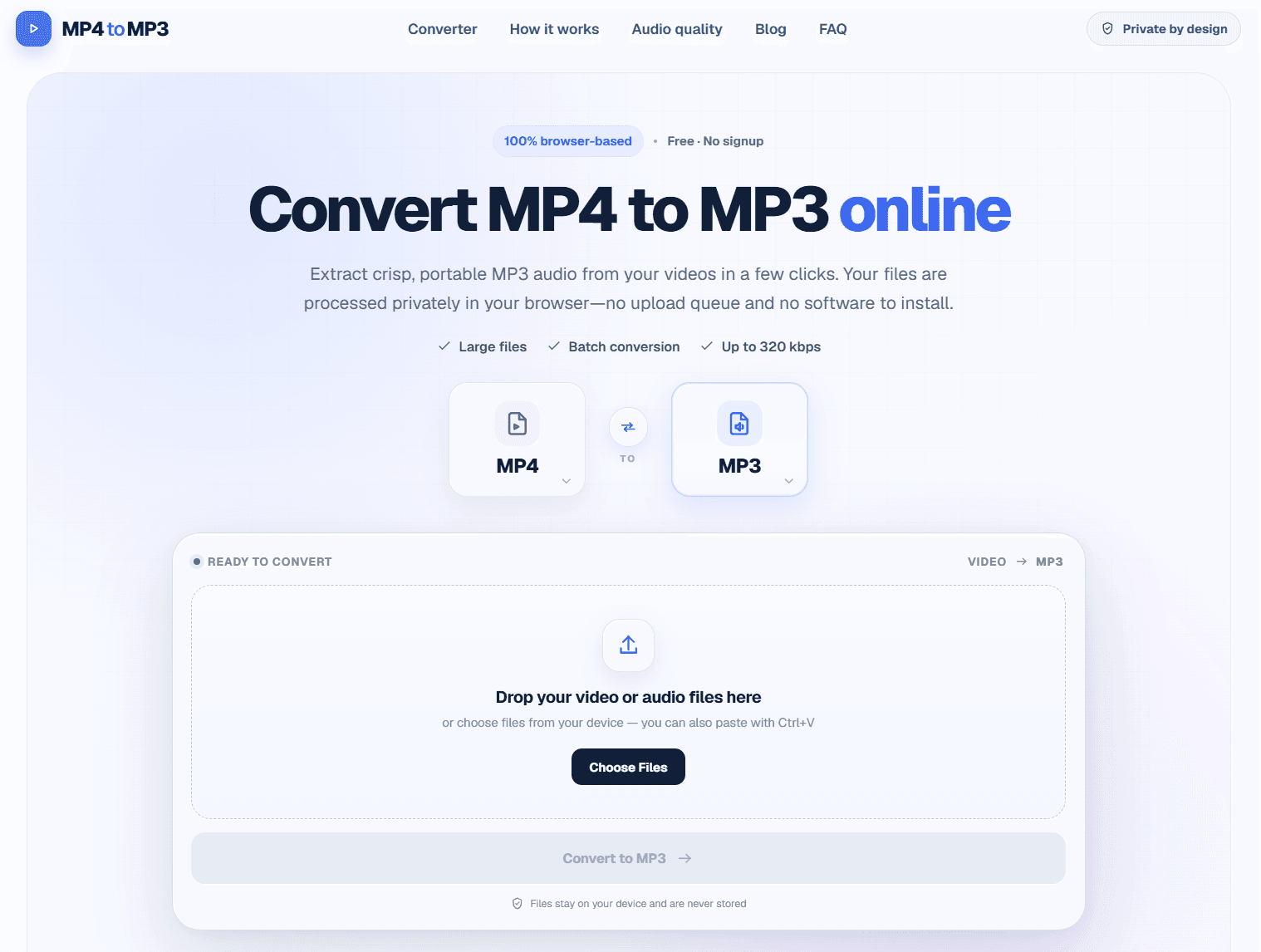
About this app
MP4toMP3.to is a free online tool that converts MP4 and other video formats to MP3 audio without uploading your files to a server. It runs entirely in your browser, ensuring privacy and security. It supports batch conversion, large files, and up to 320 kbps output quality. The interface is clean and easy to use, making it perfect for anyone needing quick audio extraction from videos. Whether you're a student, content creator, or professional, this tool delivers high-quality MP3s with no signup or watermark.
Key features
- 1100% browser-based MP4-to-MP3 conversion with no file upload — files stay on the device
- 2Batch conversion with drag-and-drop or Ctrl+V paste, plus inline trim controls and keyboard shortcuts
- 3Bitrate presets from 128 to 320 kbps with guidance for speech, general listening and music
Target customer profile
Drawn from the product itself, not from a survey.
Demographic
Students and educators
Pain points
Need to extract audio from lectures for offline study.
Primary needs
Free, fast, and private conversion without software installation.
Demographic
Content creators (podcasters, YouTubers)
Pain points
Require high-quality audio from video content for repurposing.
Primary needs
Batch conversion, high bitrate output, and no watermarks.
Demographic
Professionals (journalists, researchers)
Pain points
Need to convert interviews or meeting recordings to audio for transcription.
Primary needs
Privacy, large file support, and easy sharing.
Scout Review
Written by AI from measured evidence, scored out of 100.
MP4toMP3.to is a competent, well-executed browser-based video-to-audio converter. It does the one thing it promises — extract MP3 from MP4 locally, without uploads, signup or watermarks — and it does it with a clean interface, batch support, trim controls and bitrate options up to 320 kbps. Speed is strong (Lighthouse 93 mobile / 87 desktop), accessibility is solid (96/100), and the privacy architecture is a real advantage over server-upload competitors. The weaknesses are the usual ones for a young tool: no HSTS, CSP or DMARC, no published security documentation, no accessibility statement, and a design that is polished but generic. The idea is sound and the execution is above average for the category. It is not a category-defining product, but it is a genuinely useful one.
Measure by measure
Usability
74No signup, instant drag-and-drop or Ctrl+V paste, inline trim with keyboard shortcuts, batch queue, and a FAQ that actually answers file-size and bitrate questions. Onboarding is essentially zero.
Design
72Clean, modern converter UI with drag-and-drop, format pickers, trim controls and quality presets. Feature sections and FAQ are well-structured. Not distinctive, but polished and consistent.
Speed
82Lighthouse mobile 93/100, desktop 87/100; LCP 3.1s, CLS 0, TBT 101ms. Client-side conversion avoids upload round-trips, so perceived speed is strong once the page loads.
Security
62HTTPS enforced with frame protection, X-Content-Type-Options, Referrer-Policy, Permissions-Policy and SPF. Missing HSTS, CSP and DMARC (7/12 headers). Local processing is a real privacy win.
Accessibility
80Lighthouse accessibility 96/100 with keyboard shortcuts documented in the UI. Two failing audits: insufficient color contrast and text labels without matching accessible names. No WCAG statement published.
Growth
58Real, specific wedge: browser-local conversion with no upload, batch support and 320 kbps output. Targets privacy-conscious students, creators and journalists. Category is crowded but the no-upload angle is defensible.
Improvement areas
- Missing HSTS, Content-Security-Policy and DMARC headers despite a privacy-first positioning
- Two failing Lighthouse accessibility audits: color contrast and accessible names on labeled elements
- No published security page, WCAG conformance statement, or multi-language support
Design & Usability
MP4toMP3.to presents a clean, modern converter interface: drag-and-drop or Ctrl+V paste, format pickers, trim controls with keyboard shortcuts, bitrate presets from 128 to 320 kbps, and a batch queue. The homepage walks through a three-step how-to, explains bitrate tradeoffs, and closes with an FAQ that answers the questions users actually have (file size limits, batch conversion, whether files are uploaded). Onboarding is effectively zero — no signup, no email, no watermark. The design is not distinctive; it looks like a well-executed template rather than a branded product. But it is consistent, scannable, and free of the ad-choked clutter that plagues most free converter sites. Usability is the strongest part of the product: the tool is the homepage, and the value is delivered in seconds.
Speed & Security
Speed is a genuine strength. Lighthouse scores 93/100 on mobile and 87/100 on desktop, with CLS at 0 and FCP under a second. LCP of 3.1s on mobile is the weak spot, but for a tool where the real work happens client-side after load, perceived performance is excellent — no upload round-trip, no server queue, no waiting on someone else's bandwidth. Security is more mixed. HTTPS is enforced and the header set includes frame protection, X-Content-Type-Options, Referrer-Policy, Permissions-Policy and SPF. But HSTS, CSP and DMARC are all absent, giving a 7/12 header checklist. The privacy claim — files never leave the device — is architecturally true for a browser-based converter and is a real differentiator against server-upload competitors. There is no published security page, audit or bug bounty, which is normal for a tool at this stage but leaves the security story resting entirely on the architecture.
Accessibility & Growth
Accessibility scores 96/100 on Lighthouse, with two failing audits: insufficient color contrast and visible text labels without matching accessible names. Keyboard shortcuts are documented in the UI (Space to play, I to set start, O to set end), which suggests real keyboard support rather than a checkbox. No WCAG conformance statement is published, and there is no multi-language support visible. Growth is a judgement about the idea, not the traction. The wedge is specific and defensible: browser-local conversion means no upload, no server storage, no privacy exposure — a real concern for journalists, researchers and anyone handling sensitive recordings. Batch conversion and 320 kbps output cover the creator use case. The category is crowded (Online Audio Converter, VLC, and dozens of ad-farm converter sites), but the no-upload angle is a genuine differentiator that server-based competitors structurally cannot copy without rebuilding their architecture. The domain is only months old, so traction is minimal — but the idea itself has room.
Conclusion
If you need to pull audio out of a video and you would rather not hand your file to a stranger's server, this is one of the cleaner options available. It is free, it works, and it does not make you create an account to prove you are serious. The gaps — security headers, published docs, a11y statement — are the kind of things a young tool fills in as it grows. For now, it earns its place as a solid, privacy-respecting utility. Worth bookmarking if you do this kind of conversion regularly; worth a look if you just need it once.
Suggestions for improvement
- Add HSTS, a Content-Security-Policy and DMARC to close the remaining header gaps — cheap wins for a privacy-positioned tool.
- Publish a short security/privacy page explaining the local-processing architecture and what (if anything) touches a server.
- Fix the two failing accessibility audits: color contrast and accessible names on labeled elements.
- Add a WCAG conformance statement and consider multi-language support to widen the audience.
Alternatives comparison
Named competitors, point by point. Nobody paid to appear here or to be left out.
 MP4toMP3.to MP4toMP3.to |  Online Audio Converter Online Audio Converter |  VLC Media Player VLC Media Player | |
|---|---|---|---|
| Processing location | Entirely in-browser; files never uploaded | Server-side; files uploaded for conversion | Local desktop app; no upload, but requires install |
| Installation required | None — runs in any modern browser | None — web-based | Yes — desktop application install |
| Batch conversion | Yes — add multiple files to a queue | Yes — multiple file upload supported | Limited — one file at a time via GUI |
| Output quality control | 128 / 192 / 320 kbps presets with guidance | Adjustable bitrate and format options | Full codec and bitrate control via convert dialog |
| Signup required | No | No | No |
| Cost | Free | Free with ads / paid tiers | Free and open source |
Online Audio Converter
A popular web-based converter that supports multiple formats but requires uploading files to a server.
VLC Media Player
A free desktop application that can convert video to audio, but requires installation and is not browser-based.
Comparing options? See MP4toMP3.to alternatives, scored side by side
More Productivity apps
View all Productivity
Qamarero
92An all-in-one hospitality software for restaurants and ba...

The Stack Newsletter
92A weekly newsletter delivering curated tech jobs, intervi...

EmbedMyReviews
92White-label reputation management software for agencies s...

StoryPad
92Privacy-first open source journal app with a continuous t...

Puzzly – B2B Lead Generation & Sales Intelligence Platform
92Puzzly is an all-in-one B2B lead generation platform that...

Notion
92All-in-one AI workspace for docs, projects, and knowledge...

Vibe Coding Agent Skills
92A free, open-source platform offering 110 AI agent skills...

CC Switch
91Open-source desktop app for switching AI coding providers...

username.md
90One verified handle for your online identity, readable by...

PitchWhip
90AI cold call scripts & direct dials from LinkedIn

What the GIF
89Frame-perfect video-to-GIF maker that runs entirely in yo...

AuditCloser
89White-label website audits that close deals for digital a...


A platform dedicated to providing unbiased reviews of newly launched applications, analyzing everything from their features to their full potential.
info@scoutforge.net© 2026 Scoutforge. All rights reserved.
