Cycling through all six. Tap any point to stop.
Measured on six things
Free AI detector for ChatGPT, Claude, and Gemini content.
Security
41HTTPS is on, but the header probe found 2/12 checklist points: no HSTS, no CSP, no frame protection, no Referrer-Policy, and no SPF or DMARC records. No security page or compliance claim anywhere.
Screenshots
1 / 1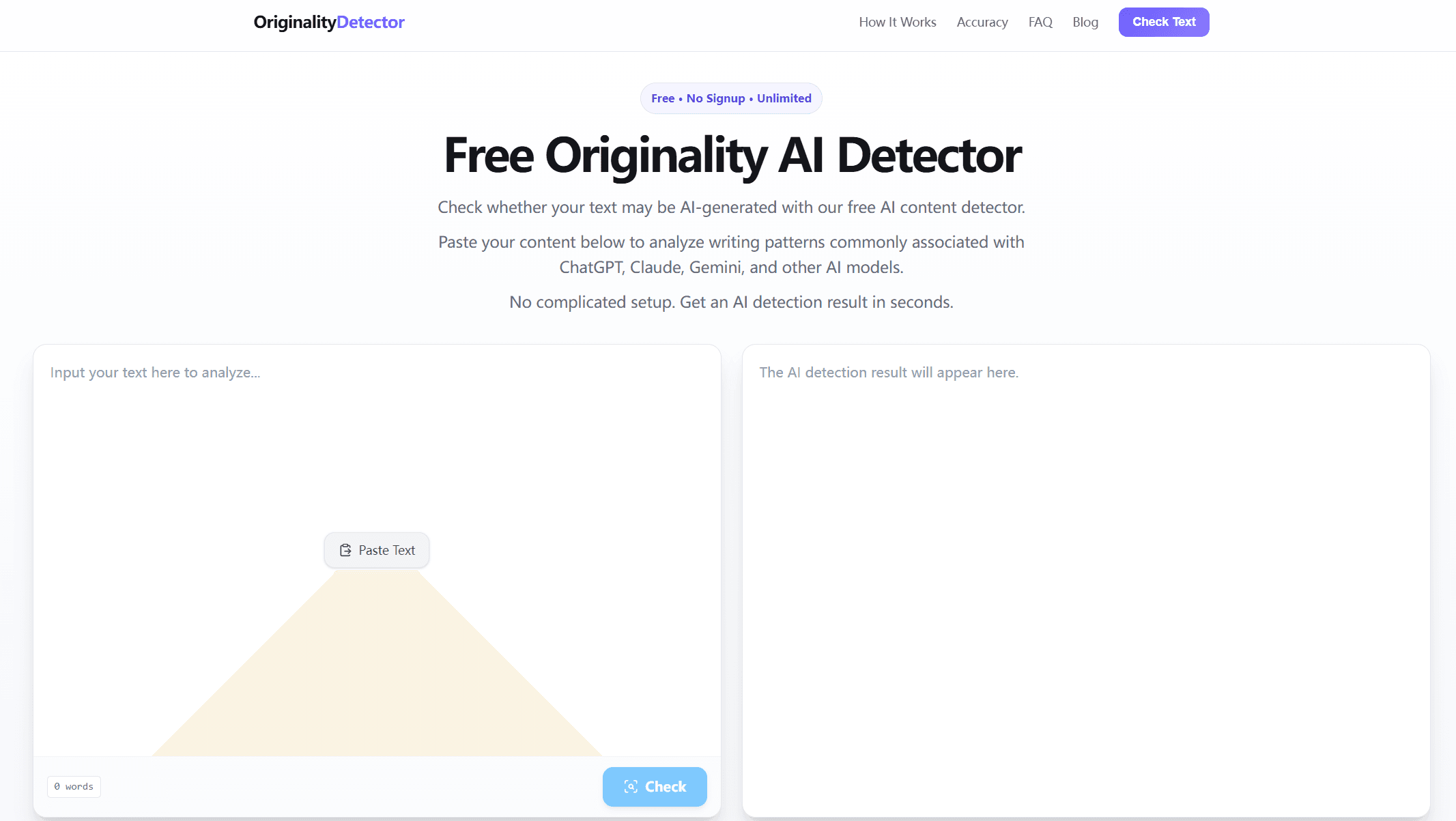
About this app
Originality Detector is a free, no-signup AI detection tool that analyzes text to estimate whether it was written by a human or generated by AI models like ChatGPT, Claude, and Gemini. With a simple paste-and-check interface, it offers instant results without any registration or usage limits. The tool is designed for students, teachers, writers, marketers, and anyone who needs a quick AI content check. It examines linguistic patterns, sentence structure, and predictability to provide an estimated AI probability score. While not 100% accurate, it serves as a useful first-line screening tool. The platform also educates users about AI detection limitations, including false positives and model variations. As a free alternative to paid services like Originality.ai, it provides accessible AI detection for casual and professional use.
Key features
- 1Free AI detection with no signup, no account, and no stated usage limits
- 2Paste-and-check interface returning an estimated AI probability score in seconds
- 3Detects text from ChatGPT, Claude, Gemini and other LLMs regardless of which tool was used
- 4FAQ and Accuracy sections that openly document false positives and model-dependent variance
Target customer profile
Drawn from the product itself, not from a survey.
Demographic
Students and academics
Pain points
Concerned about AI detection on assignments, need to verify originality before submission.
Primary needs
Quick, free AI check to ensure work is not falsely flagged as AI-generated.
Demographic
Content writers and bloggers
Pain points
Need to ensure articles are human-like and avoid AI detection penalties from search engines.
Primary needs
Reliable AI detection to refine and edit AI-assisted drafts before publishing.
Demographic
Teachers and educators
Pain points
Struggle to identify AI-written submissions, require an additional tool to assess writing authenticity.
Primary needs
Easy-to-use AI detector to supplement manual review and guide academic integrity policies.
Scout Review
Written by AI from measured evidence, scored out of 100.
Originality Detector is a free, no-signup AI text checker that does exactly one thing and does it without getting in your way. Paste text, click Check, get an estimated AI probability. No account, no usage cap, no upsell wall. The landing page is template-grade and the copy is SEO-bait, but the core flow is clean and the FAQ honestly documents the limits of AI detection — false positives, model variance, short-sample unreliability. Speed is good on mobile (81/100 Lighthouse, 1.5s LCP) and mediocre on desktop (64/100, 797ms TBT). Accessibility scores 96/100 with one contrast failure. Security is the weak spot: HTTPS only, 2/12 header checklist points, no SPF or DMARC, no compliance claims. Growth rests on a free-and-frictionless wedge that paid incumbents can copy. A competent free screening tool, not a category leader.
Measure by measure
Usability
68Paste, click Check, read result — no signup, no usage cap, no onboarding maze. The FAQ and Accuracy sections honestly document false positives, which is more than most detectors do.
Design
58Clean single-column paste-and-check layout that gets out of the way, but it's a template-grade landing page: no logo mark, no visual identity, and copy that reads like keyword-stuffed SEO rather than a brand.
Speed
71Lighthouse mobile 81/100 with LCP 1.5s and CLS 0 — snappy on phones. Desktop drops to 64/100 with 797ms total blocking time, so the heavier view stutters where the light one doesn't.
Security
41HTTPS is on, but the header probe found 2/12 checklist points: no HSTS, no CSP, no frame protection, no Referrer-Policy, and no SPF or DMARC records. No security page or compliance claim anywhere.
Accessibility
79Lighthouse a11y audit scored 96/100 — strong automated result. The one failure is a contrast ratio issue, and there's no accessibility statement or WCAG claim to back it up.
Growth
54A real, growing problem — AI-written text everywhere — with a specific free/no-signup wedge against paid incumbents. But the wedge is price, and price is the easiest thing for GPTZero or Copyleaks to copy.
Improvement areas
- Security headers: only 2/12 checklist points present — no HSTS, CSP, frame protection, Referrer-Policy, SPF or DMARC
- Desktop performance: 64/100 Lighthouse with 797ms total blocking time versus 81/100 on mobile
- No accessibility statement or WCAG conformance claim despite a strong 96/100 automated audit score
- No published accuracy benchmarks, methodology documentation, or model-version transparency
Design & Usability
The design is a paste box, a button, and a result panel — and honestly, that's the right call for a tool whose entire value is 'check this text fast'. No logo mark, no visual identity, and homepage copy that reads like it was written to rank for 'originality ai detector' rather than to sound like a product. But the usability is where it earns its keep: no signup, no usage cap, no onboarding flow to survive. You paste, you click, you get a number. The FAQ and Accuracy sections openly admit detection is an estimate and false positives happen — a level of honesty most competitors bury in a legal page. For a free screening tool, that combination of zero friction and zero pretense is genuinely well-matched to the job.
Speed & Security
Speed is a split verdict: Lighthouse mobile scores 81/100 with a 1.5s LCP and zero layout shift, which is genuinely snappy on a phone. Desktop drops to 64/100 with 797ms of total blocking time, so the heavier view stutters where the light one glides. Security is the weak flank. HTTPS is enforced, but the header probe found only 2 of 12 checklist points — no HSTS, no CSP, no frame protection, no Referrer-Policy, and no SPF or DMARC records on the domain. There's no security page, no SOC 2 or ISO claim, no bug bounty. For a tool where people paste unpublished essays and client drafts, that's a thin posture, and it's the dimension most worth fixing before anything else.
Accessibility & Growth
Accessibility is a genuine strength: Lighthouse scored 96/100, with a single failing audit for insufficient color contrast. No accessibility statement or WCAG conformance claim exists to back the number, but the automated result is strong for a tool this size. Growth is the harder question. The problem is real and growing — AI-written text is everywhere, and detection anxiety is a genuine market. The wedge is specific: free, no signup, no usage limit, explicitly positioned against Originality.ai, GPTZero and Copyleaks. But that wedge is price and friction, and both are trivially copyable by better-funded incumbents. The site itself concedes accuracy is an estimate that varies by model, length and editing — which is honest, but also means the product can't claim a technical edge. It can win casual users; it's hard to see it holding them.
Conclusion
If you need a quick, free sanity check on whether a paragraph smells AI-generated — before you submit an assignment, publish a draft, or send a client deliverable — this does that job with zero ceremony, and the honesty about detection limits is refreshing. If you need defensible, documented accuracy for academic integrity decisions or publisher-grade content review, this isn't the tool: there's no compliance story, no audit trail, and the security headers are thin. Use it as a first-line screen, not a verdict. And if you're the maker: the header configuration is a one-afternoon fix that would meaningfully improve the security posture, and a real accessibility statement would turn a strong automated score into a credible claim.
Suggestions for improvement
- Add HSTS, CSP, X-Content-Type-Options, Referrer-Policy and Permissions-Policy headers — the probe found only 2/12 checklist points present
- Publish SPF and DMARC DNS records; their absence makes the domain spoofable and undermines trust for a tool handling unpublished text
- Fix the single Lighthouse contrast failure and add a short accessibility statement to back the 96/100 automated score
- Cut desktop total blocking time (797ms) — the mobile build is fast, the desktop build isn't, and the gap is fixable
Alternatives comparison
Named competitors, point by point. Nobody paid to appear here or to be left out.
 Originality Detector Originality Detector |  Originality.ai Originality.ai |  GPTZero GPTZero |  Copyleaks Copyleaks | |
|---|---|---|---|---|
| Pricing model | Free, no signup, no stated usage limit | Paid subscription; pay-as-you-go credits available | Free tier plus paid plans with detailed analysis | Paid plans aimed at businesses and educators |
| Signup required | No — paste and check immediately | Yes — account required for scanning | Account required for most features | Yes — account and plan required |
| Primary audience | Students, teachers, writers, casual users | Content teams, publishers, SEO professionals | Educators and academic institutions | Businesses, educators, enterprise compliance |
| Plagiarism detection | No — AI detection only | Yes — plagiarism checker included | Limited; focused on AI detection | Yes — core plagiarism plus AI detection |
| Compliance and security posture | HTTPS only; 2/12 header checklist points; no SOC 2 or ISO claim | Publishes security and compliance information for business use | Education-focused privacy and data handling documentation | Enterprise-grade compliance and data protection claims |
Originality.ai
Paid AI detection tool with high accuracy, often used by content teams and publishers.
GPTZero
AI detector focused on education, offers free and paid plans with detailed analysis.
Copyleaks
AI-based plagiarism and AI detection platform for businesses and educators.
Comparing options? See Originality Detector alternatives, scored side by side
More Productivity apps
View all Productivity
Qamarero
92An all-in-one hospitality software for restaurants and ba...

The Stack Newsletter
92A weekly newsletter delivering curated tech jobs, intervi...

EmbedMyReviews
92White-label reputation management software for agencies s...

StoryPad
92Privacy-first open source journal app with a continuous t...

Puzzly – B2B Lead Generation & Sales Intelligence Platform
92Puzzly is an all-in-one B2B lead generation platform that...

Notion
92All-in-one AI workspace for docs, projects, and knowledge...

Vibe Coding Agent Skills
92A free, open-source platform offering 110 AI agent skills...

CC Switch
91Open-source desktop app for switching AI coding providers...

username.md
90One verified handle for your online identity, readable by...

PitchWhip
90AI cold call scripts & direct dials from LinkedIn

What the GIF
89Frame-perfect video-to-GIF maker that runs entirely in yo...

AuditCloser
89White-label website audits that close deals for digital a...


A platform dedicated to providing unbiased reviews of newly launched applications, analyzing everything from their features to their full potential.
info@scoutforge.net© 2026 Scoutforge. All rights reserved.
