Cycling through all six. Tap any point to stop.
Measured on six things
AI translator for iPhone: speech, text, camera, and offli...
Security
52HTTPS, HSTS, SPF and DMARC are in place, and on-device processing with no account is a genuine privacy story. But five security headers are missing and there's no published audit or bug bounty.
Screenshots
1 / 1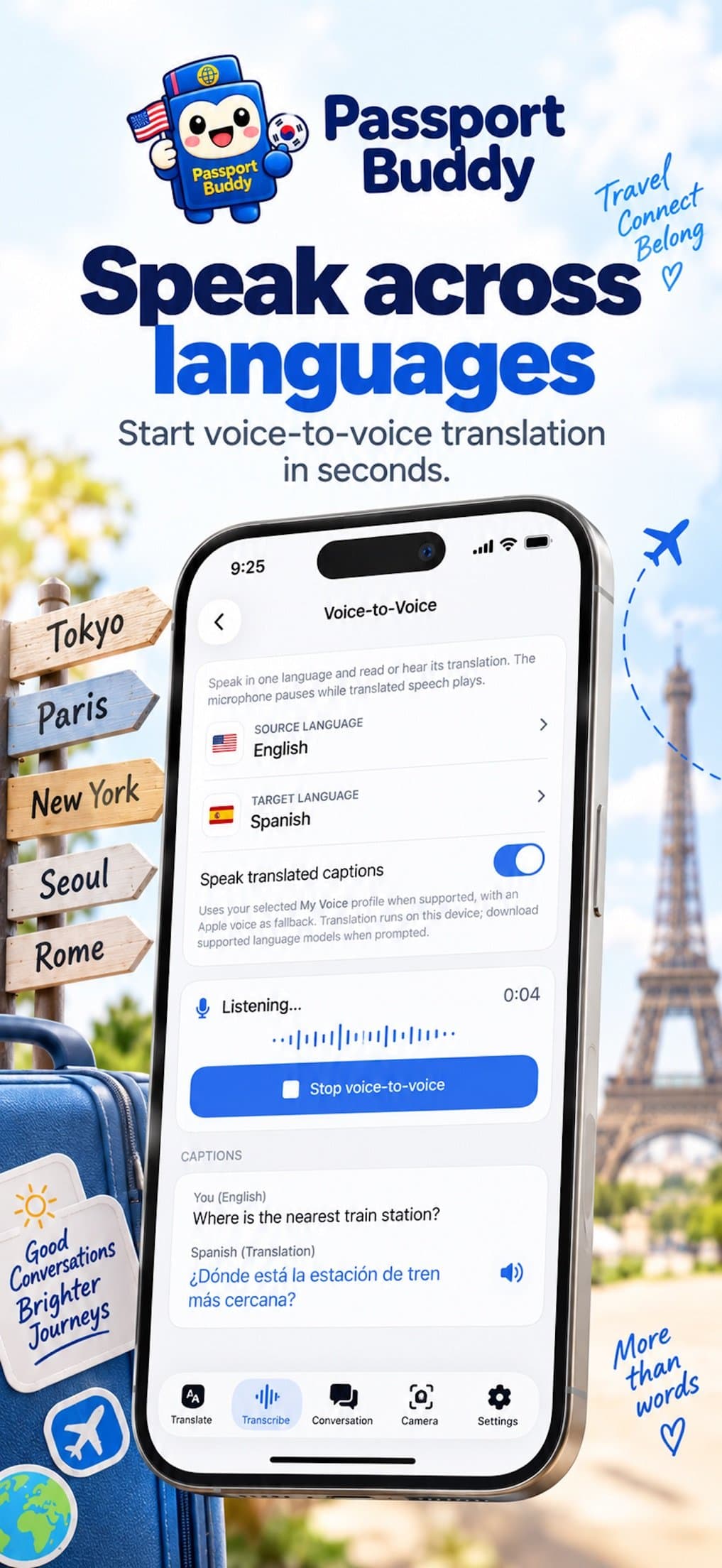
About this app
Passport Buddy is an iPhone translation app that handles speech, text, and camera-based text translation across 21 languages, with a standout feature: it can speak translations in your own voice using an on-device voice model built from just a few sentences you read aloud. Other features include face-to-face conversation mode, live transcription with export options (TXT, Markdown, SRT, VTT, JSON), a camera mode that overlays translations on menus and signs, and an object identification mode. Most processing runs on the iPhone, enabling offline use for Translate and Transcribe once languages are downloaded. There's no account to create, and the voice model recording never leaves the device. The app is free to download but requires a Passport Buddy Pro subscription (weekly, monthly, or yearly) or a one-time lifetime purchase to use. It's aimed at travelers, language learners, and professionals who need reliable translation in low-connectivity situations.
Key features
- 1On-device voice model: translations spoken in your own voice, built from a few sentences read aloud, never leaving the iPhone.
- 2Offline Translate and Transcribe after downloading languages, plus camera overlay translation and object identification.
- 3Face-to-face conversation mode and live transcription exportable as TXT, Markdown, SRT, VTT or JSON.
Target customer profile
Drawn from the product itself, not from a survey.
Demographic
Frequent international travelers
Pain points
Language barriers in restaurants, transit, and shops; unreliable or costly roaming data abroad
Primary needs
Fast offline translation of menus, signs, and conversations
Demographic
Language learners and students
Pain points
Difficulty practicing pronunciation and retaining vocabulary; limited access to native speakers
Primary needs
Voice-modeled speech output, flashcards, and live captions for study
Demographic
Business professionals and expats working abroad
Pain points
Miscommunication in meetings and negotiations; need for accurate real-time transcription
Primary needs
Face-to-face conversation mode, transcription export, and privacy-focused on-device processing
Scout Review
Written by AI from measured evidence, scored out of 100.
Passport Buddy is a competent iPhone translator with one genuinely distinctive feature: it speaks translations in a voice model built on-device from a few sentences you read aloud. Around that sit solid table stakes — camera overlay, face-to-face conversation, live transcription with five export formats, offline language packs, 21 translation languages and 47-language UI localization. The execution is uneven. The app UI is clean and navigable; the marketing site is a sparse hero with a 9.1s mobile LCP and no footer. Security headers are half-present and there's no audit. Accessibility fails on unnamed controls and contrast. And the paywall arrives before the user has seen anything work.
Measure by measure
Usability
63No signup, clear tab structure and documented flows for voice, camera, conversation and export. Undercut by a paywall before first use and a voice model gated to iPhone 15 Pro or later.
Design
58Judging the app UI and store material: clean tab bar, readable language rows and a consistent mascot. The marketing homepage is sparse and the store screenshots bury the UI under stock travel props.
Speed
57Desktop Lighthouse 89 but mobile 62 with a 9.1s LCP and 4.4s FCP — the marketing site is heavy on phones. In-app work is mostly on-device, which should keep translation snappy.
Security
52HTTPS, HSTS, SPF and DMARC are in place, and on-device processing with no account is a genuine privacy story. But five security headers are missing and there's no published audit or bug bounty.
Accessibility
58Lighthouse 82/100 with 47-language localization, but four real failures: unnamed buttons and links, low contrast text, and out-of-order headings. No WCAG statement published.
Growth
58A real problem with one sharp differentiator — translations in your own voice, on-device and offline. But it's up against free Google and Microsoft Translate, so the wedge has to carry a lot.
Improvement areas
- Mobile site performance: 9.1s LCP and 4.4s FCP on a single-hero page.
- Security posture: five missing HTTP headers and no published audit, pen-test or bug bounty.
- Accessibility: unnamed buttons and links, insufficient contrast, non-sequential headings.
- Paywall before first use and a voice model gated to iPhone 15 Pro or later.
Design & Usability
The app itself is the stronger half: a persistent bottom tab bar across Translate, Transcribe, Conversation, Camera and Settings, readable language selectors, a live waveform during voice capture, and a Notes screen that separates summary, tags and action items into scannable cards. The mascot gives it a recognizable identity. The website is the weak half — a hero, a bird, and then a white void with no footer, pricing or feature grid. Usability is helped by no account requirement and documented export formats, but hurt by a paywall before first use and a voice model that needs an iPhone 15 Pro.
Speed & Security
The marketing site is the bottleneck: mobile Lighthouse 62/100 with a 9.1s LCP and 4.4s FCP, against 89 on desktop. That's a heavy page for one headline. The app should feel much better, since translation, the voice model and offline captions run on-device. Security is a mixed bag: HTTPS, HSTS, SPF and DMARC are all present, and the no-account, on-device voice model is a real privacy advantage. But CSP, frame protection, X-Content-Type-Options, Referrer-Policy and Permissions-Policy are all absent, and there's no published audit, pen-test or bug bounty to point at.
Accessibility & Growth
Accessibility lands at 82/100 on Lighthouse with 47-language localization, but the failures are basic: buttons and links without accessible names, insufficient contrast, and non-sequential headings. No WCAG conformance statement is published. Growth is the interesting question. The problem is real — travelers in low-connectivity places need translation that works offline and sounds natural. Voice cloning in your own voice is a genuine differentiator, and the on-device architecture supports the privacy pitch. But Google Translate and Microsoft Translator are free, already do camera, conversation and offline, and have distribution this app cannot match. The wedge is real; the moat is thin.
Conclusion
Worth a look if you travel to places where roaming data is expensive or absent and you want translations that sound like a person rather than a robot — and you own an iPhone 15 Pro or later. If you just need menu translation in a city with signal, Google Translate is free and already on your phone. Passport Buddy's job is to be meaningfully better in the specific moment the signal drops. It has the architecture for that. What it needs now is a website that doesn't take nine seconds, security headers that match the privacy claims, and a way to try the voice feature before paying.
Suggestions for improvement
- Fix the mobile LCP: 9.1s for a single-hero page is a self-inflicted wound. Compress the mascot assets and defer non-critical scripts.
- Add the five missing security headers (CSP, frame protection, X-Content-Type-Options, Referrer-Policy, Permissions-Policy) and publish a security page.
- Fix the four Lighthouse a11y failures: label buttons and links, raise contrast, and correct heading order.
- Offer a limited free trial of Translate or the voice model so users can hear the differentiator before hitting the paywall.
Alternatives comparison
Named competitors, point by point. Nobody paid to appear here or to be left out.
 Passport Buddy Passport Buddy |  Google Translate Google Translate |  Microsoft Translator Microsoft Translator |  iTranslate iTranslate | |
|---|---|---|---|---|
| Price model | Free download; Pro required via weekly/monthly/yearly subscription or one-time lifetime purchase | Free | Free | Free tier with subscription for premium features |
| Offline translation | Yes, with Pro after downloading languages | Yes, downloadable offline language packs | Yes, offline language packs | Yes, offline mode available |
| Camera / OCR translation | Yes, overlays translation on menus and signs plus object identification | Yes, camera translation with AR overlay | Yes, camera translation | Yes, camera translation |
| Voice output in your own voice | Yes, on-device voice model built from a few sentences; requires iPhone 15 Pro or later | No; standard synthesized voices | No; standard synthesized voices | No; standard synthesized voices |
| Conversation / face-to-face mode | Yes, two-language face-to-face mode with spoken turns | Yes, conversation mode | Yes, conversation mode | Yes, conversation mode |
| Transcription export formats | TXT, Markdown, SRT, VTT, JSON | Limited; transcript copy, no SRT/VTT export | Transcript export available; format options limited | Limited transcription export |
| Account required | No account to create | Google account optional | Microsoft account optional | Account/subscription sign-in for premium |
| Languages supported | 21 translation languages; 47-language app interface | 100+ languages | 100+ languages | 100+ languages |
Google Translate
Free multilingual translation app with camera, voice, and offline support across many languages.
Microsoft Translator
Translation app with conversation mode, camera translation, and offline language packs.
iTranslate
iOS translation app offering voice, text, and camera translation with subscription features.
Comparing options? See Passport Buddy alternatives, scored side by side
More Travel & Exploration apps
View all Travel & Exploration
Roami eSIM
88A global travel eSIM app offering instant activation, no ...

TheBean.ai
84Adaptive AI personal trainer that evolves with your progr...

EchoWi
83Track and optimize your brand's visibility in AI answers.

Bracket2026
82Interactive 48-team World Cup 2026 bracket predictor with...

Vote-n-Venture
79AI-powered group travel planning app that simplifies decision-making with collaborative voting and bookable itineraries.

Remember
78An iOS app that enhances memory by capturing, tagging, and organizing items with smart contextual features.
SpeakSpots
78An AI-powered travel assistant that creates personalized itineraries via WhatsApp, perfect for quick and easy trip planning.

Suitpax
78AI-powered CRM for corporate travel, streamlining workflows with AI assistants for itinerary planning and expense tracking.

Urban Rider
76Urban Rider is a specialized navigation app for scooter and moped riders, offering highway-free routes optimized for 15-31 mph speeds.

Trefundo AI
76AI-powered tool that automates refunds for non-refundable hotel bookings, saving travelers money and hassle.

LocoMap
76A user-friendly, privacy-focused platform for creating and sharing personalized maps with collaborative features.

Carpooly
76Carpooly is a smart carpooling platform that simplifies ride-sharing for schools, work commutes, and daily transportation needs.


A platform dedicated to providing unbiased reviews of newly launched applications, analyzing everything from their features to their full potential.
info@scoutforge.net© 2026 Scoutforge. All rights reserved.
