Cycling through all six. Tap any point to stop.
Measured on six things
Ad-free recipe manager and meal planner. Import recipes from any website, photo or AI chat, read them five ways, and turn your week into one grocery list.
Growth
62Real problem — recipes scattered across screenshots, blogs and AI chats — with specific segments (AI users, shared households, bloggers) and a genuine wedge: five view modes plus $12/yr for five seats. Category is crowded; differentiation is real but copyable.
Screenshots
1 / 8

About this app
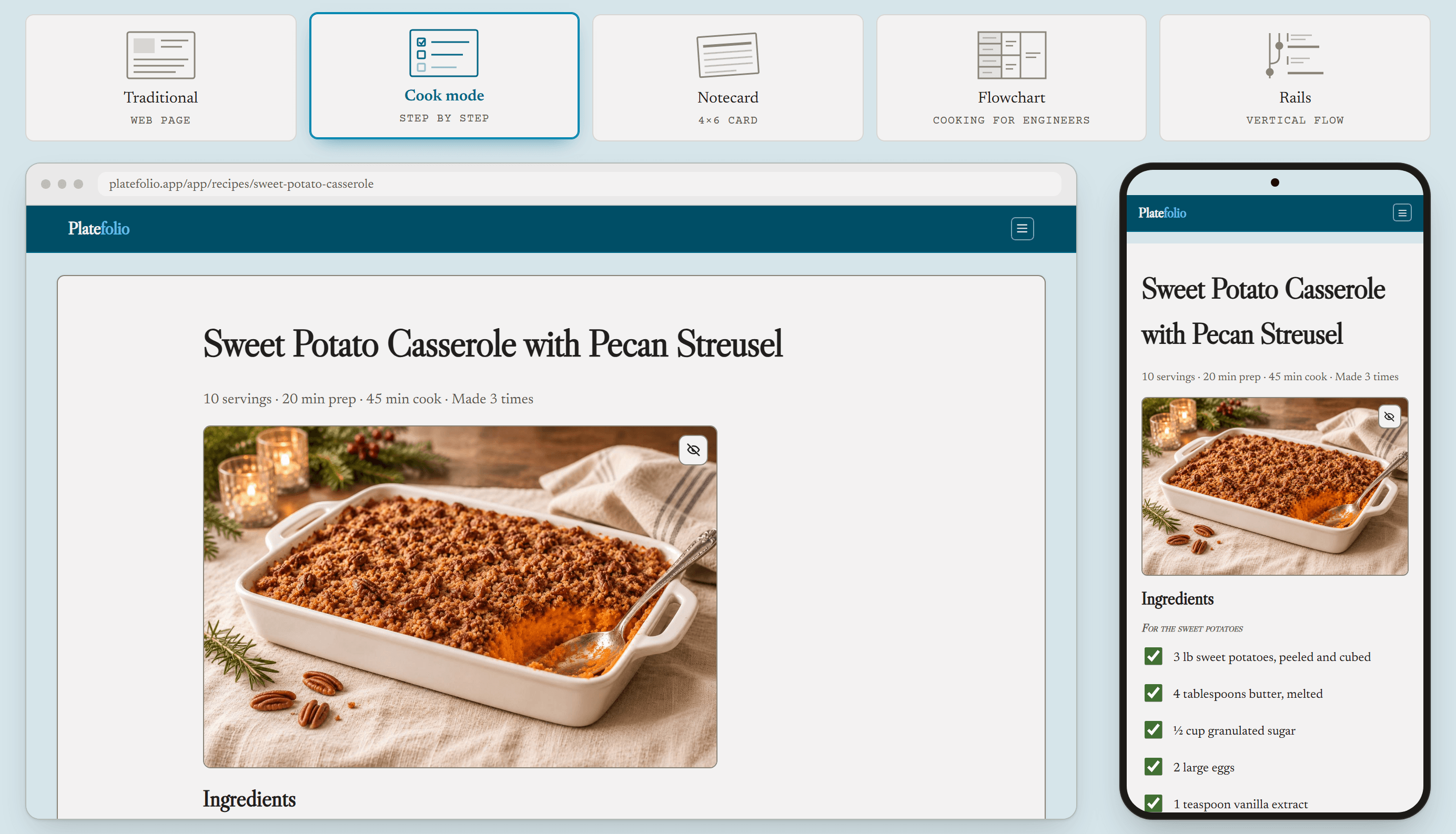
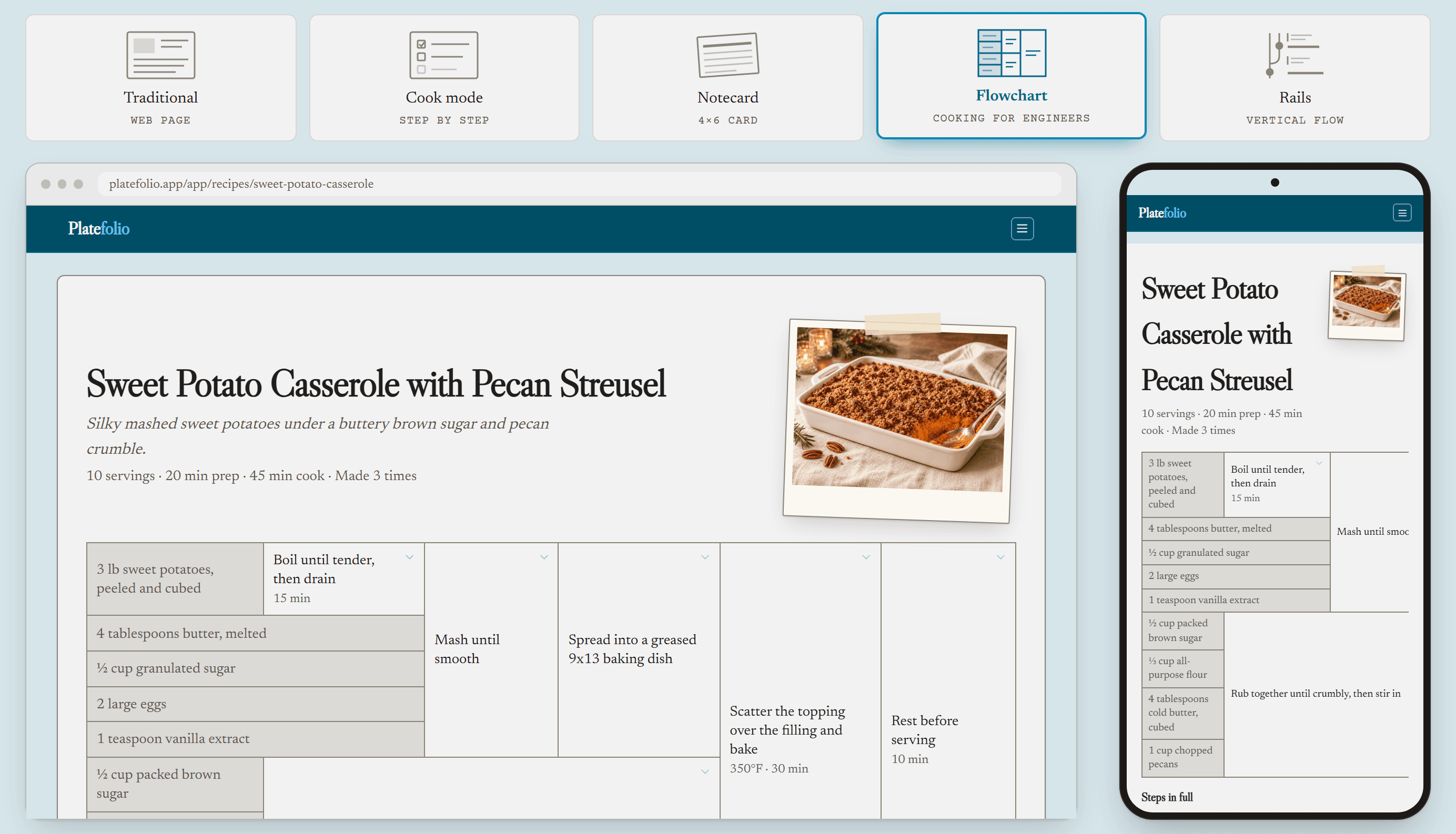
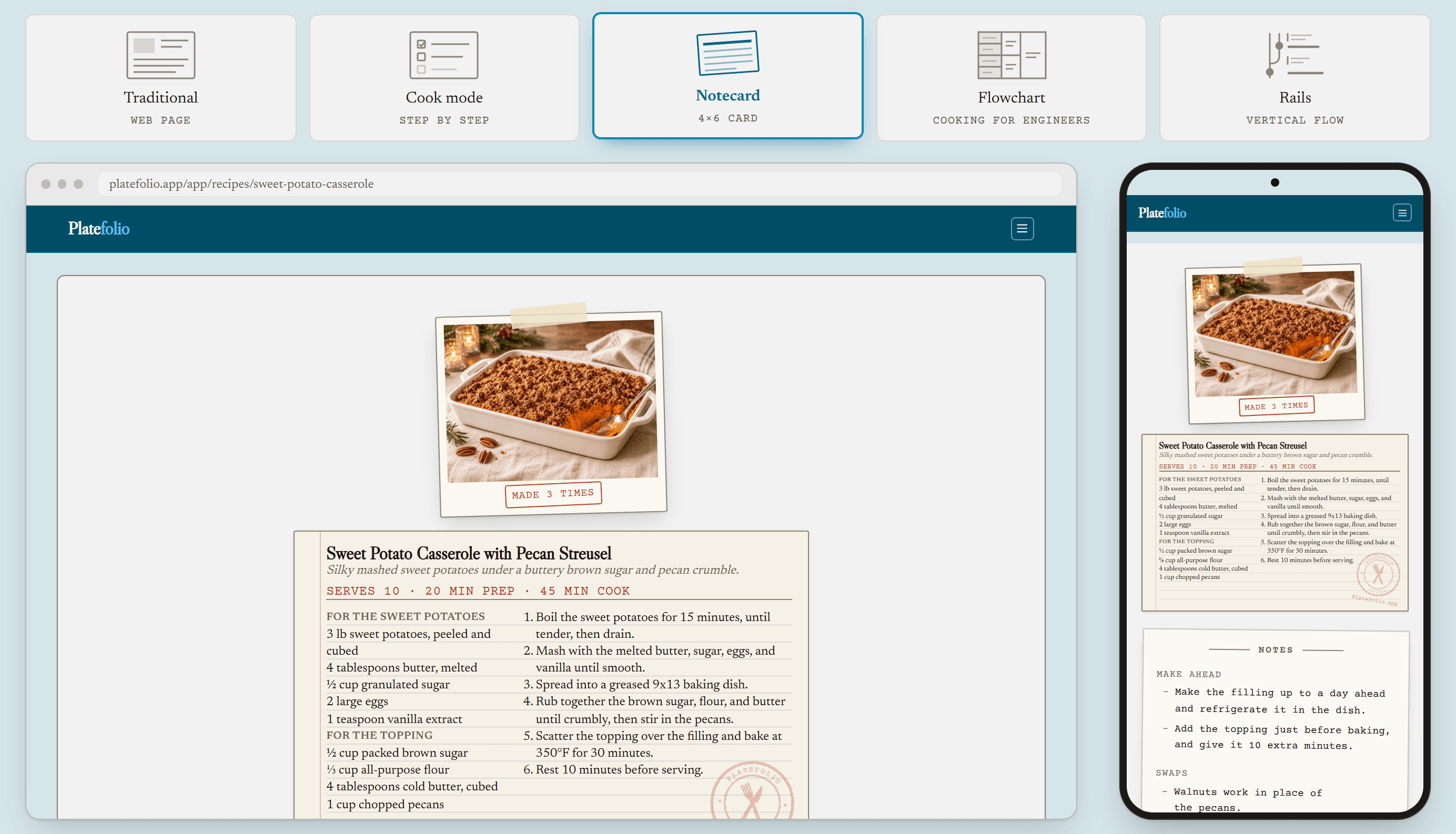
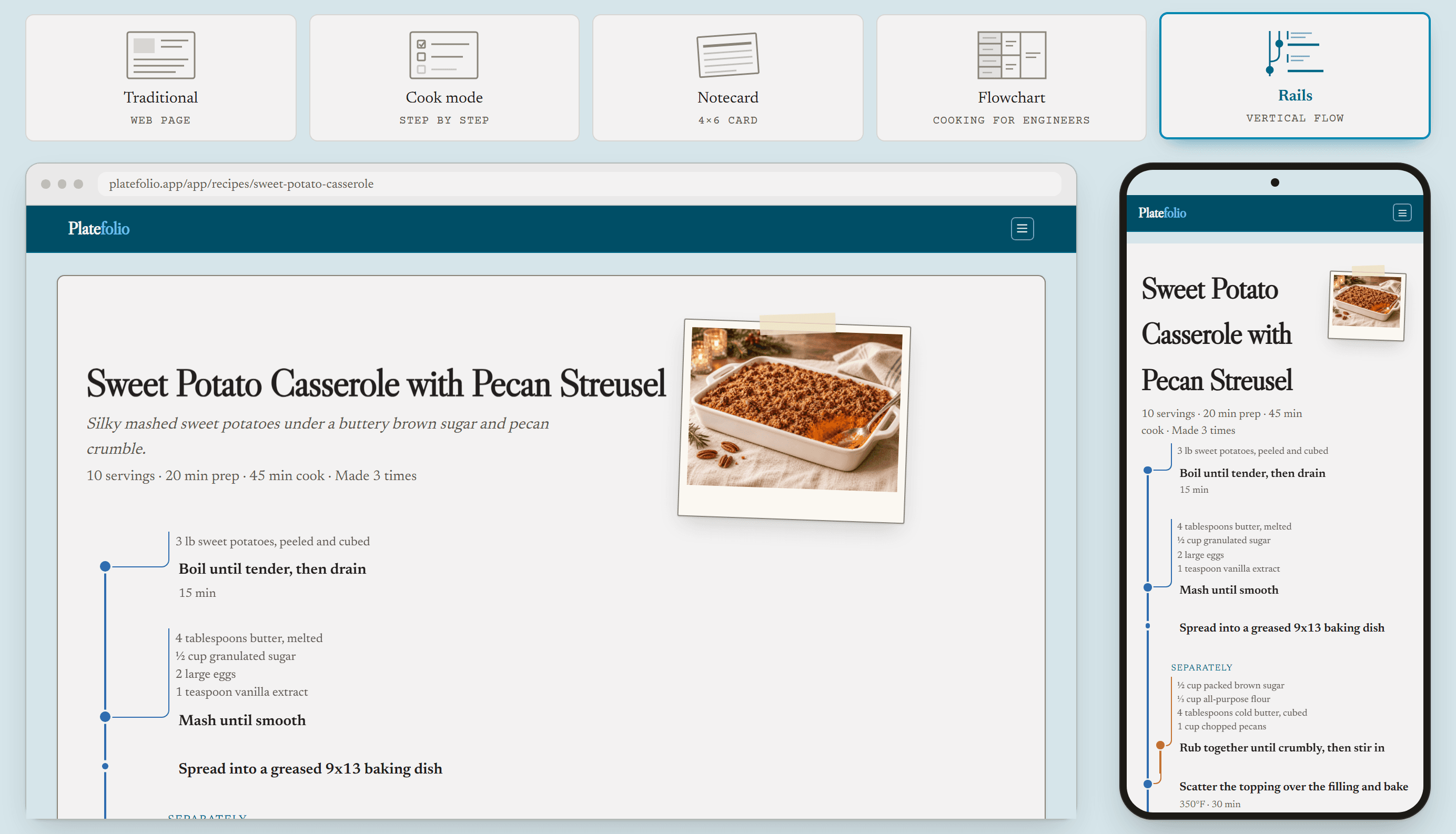
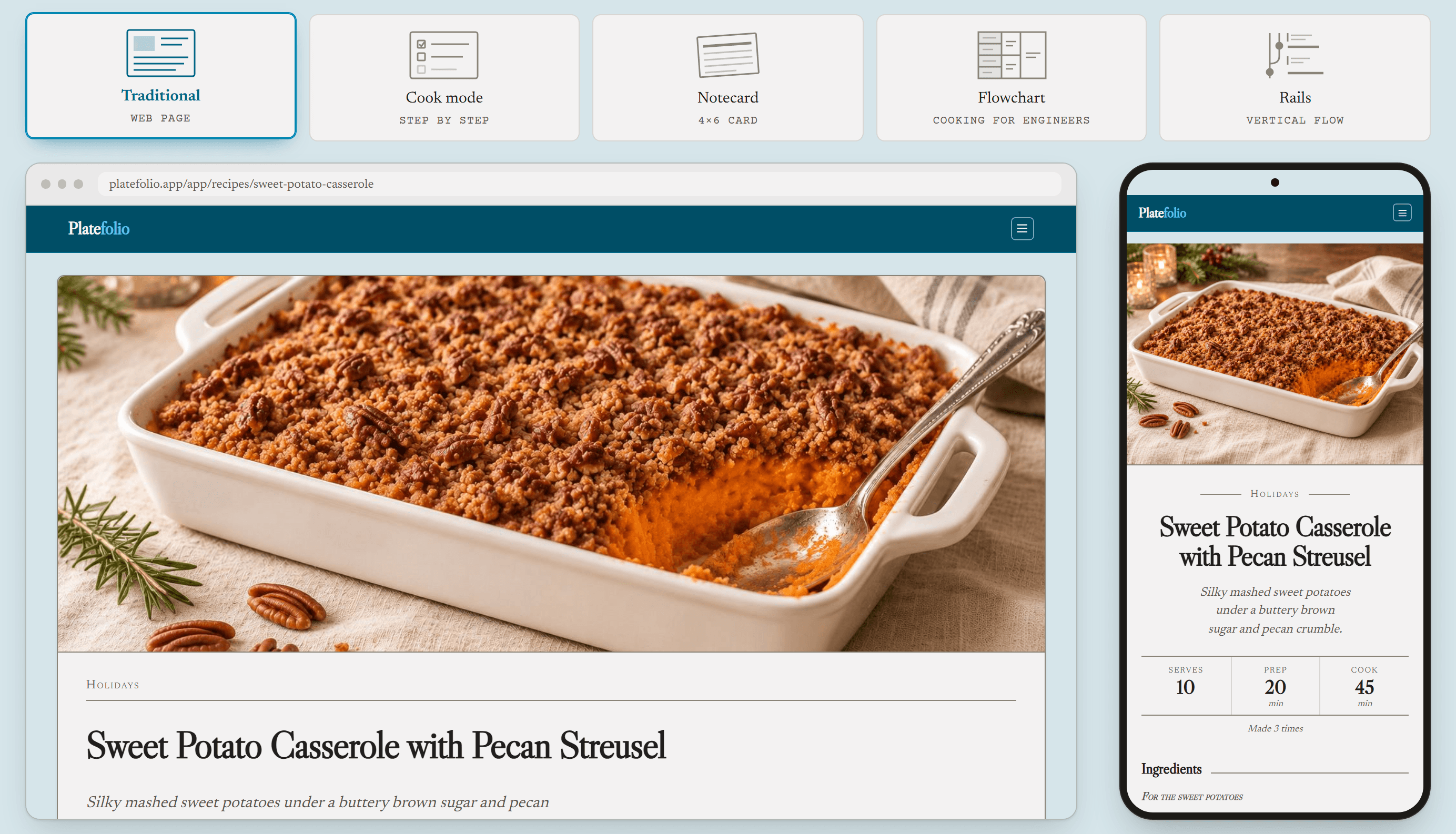
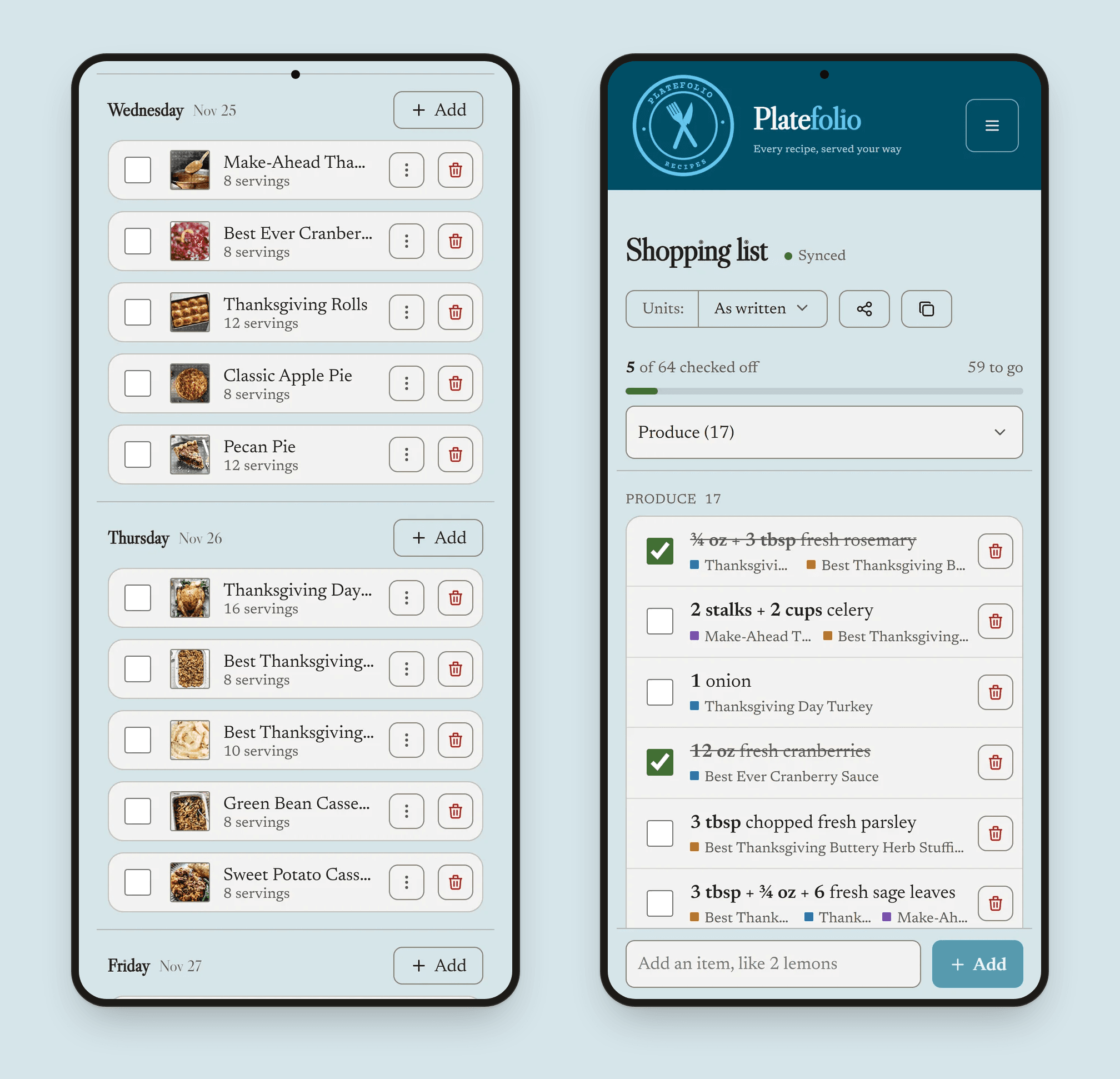
Platefolio is a web-based, ad-free recipe manager that gathers the recipes you've saved from food blogs, Pinterest pins, screenshots, index cards and AI chats like ChatGPT or Claude into one clean, searchable collection. Add recipes by pasting a link or text, snapping a photo, importing from an AI chat, or typing them in. Every import opens in an editable review before anything saves. Read the same recipe five ways: a clean web page, step-by-step Cook mode, a printable 4x6 notecard, a Cooking for Engineers style flowchart, or a phone-friendly vertical Rails layout, switching with one tap. Recipes scale to any number of servings and convert between US and metric measures, temperatures included. The weekly meal planner feeds a grocery list that combines duplicate ingredients across recipes, sorts them by aisle, and stays usable offline in the store once you've opened it.
Key features
- 1Five view modes per recipe: Traditional web, step-by-step Cook mode, printable 4x6 Notecard, Cooking-for-Engineers Flowchart, and phone-friendly Rails.
- 2Import from link, pasted text, photo, or AI chat (ChatGPT/Claude), with an editable review step before anything saves.
- 3Meal planner feeding a merged grocery list that combines duplicate ingredients, sorts by aisle, and works offline in the store.
Target customer profile
Drawn from the product itself, not from a survey.
Demographic
Home cooks and busy parents juggling weekly family meals
Pain points
Recipes scattered across screenshots, bookmarks and food blogs buried in ads and long stories
Primary needs
One clutter-free recipe hub plus fast meal planning and a combined grocery list
Demographic
Food bloggers, recipe creators and Pinterest/Instagram cooks
Pain points
No clean way to publish shareable, ad-free recipes or pin beautifully formatted cards
Primary needs
Public shareable links, printable notecard/flowchart images and easy pin export
Demographic
Tech-savvy home cooks and AI users who plan meals with ChatGPT or Claude
Pain points
Recipes generated in AI chats get lost and are tedious to reformat and reuse
Primary needs
Instant AI-chat import, scalable servings and metric conversion on every recipe
Demographic
Shared households and couples who divide cooking and shopping
Pain points
Duplicate grocery items, mismatched lists and no shared recipe box across devices
Primary needs
A synced household plan, one merged grocery list and collaborative cookbooks
Scout Review
Written by AI from measured evidence, scored out of 100.
Platefolio is a well-built, genuinely fast recipe manager with a clear editorial identity and an honest pricing model. The ad-free promise is demonstrated on the homepage rather than just claimed, the five view modes are a real differentiator, and the $12/yr household plan undercuts per-device competitors. The weak spots are execution details: a weak primary CTA placement, buried FAQ answers, small low-contrast body copy, an unlabeled cookie-decline button, and a security posture that stops at headers with no CSP or published compliance. Accessibility is good-but-not-great with three concrete Lighthouse failures. Growth potential is real but capped by a copyable feature set in a crowded category.
Measure by measure
Usability
66Pricing is refreshingly honest — free Line Cook plan with 25 lifetime imports, Head Chef at $12/yr for five household seats. Five view modes explained cleanly. But the CTA only lives in the hero and footer, and the FAQ buries pricing answers behind collapsed rows.
Design
71Coherent editorial serif type system, teal crest branding and a hero mockup that demonstrates the ad-free promise instead of just claiming it. Small muted body copy and an unlabeled cookie-decline button drag it down.
Speed
89Lighthouse mobile 99/100 with LCP 1.5s, CLS 0 and TBT 7ms; desktop a clean 100/100. Genuinely fast, no user complaints about lag found. Sits at the top of the measured band.
Security
74HTTPS enforced with HSTS, frame protection, X-Content-Type-Options, Referrer-Policy and Permissions-Policy all set; SPF and DMARC present. Missing CSP header and no published SOC 2, ISO or bug bounty program.
Accessibility
68Lighthouse accessibility 91/100, but three real failures: prohibited ARIA attributes, insufficient color contrast, and no main landmark. No accessibility statement or WCAG claim found. Responsive layout and keyboard-navigable nav are pluses.
Growth
62Real problem — recipes scattered across screenshots, blogs and AI chats — with specific segments (AI users, shared households, bloggers) and a genuine wedge: five view modes plus $12/yr for five seats. Category is crowded; differentiation is real but copyable.
Improvement areas
- Primary CTA only appears in hero and footer; mid-page readers have no obvious next step.
- Three Lighthouse accessibility failures: prohibited ARIA, low contrast, missing main landmark; no a11y statement.
- No CSP header and no published SOC 2/ISO/bug bounty despite the shared-household data pitch.
Design & Usability
Platefolio's design is the strongest part of the pitch: a serif editorial type system, a teal crest wordmark, and a hero mockup that shows a cluttered ad-laden recipe blog next to a clean Platefolio page — the ad-free promise demonstrated, not just stated. The five-view-mode card row in section 01 is tidy and explains a real differentiator. Usability is competent but uneven: pricing is honest (free Line Cook with 25 lifetime imports, Head Chef at $12/yr for five household seats), yet the primary CTA only appears in the hero and footer, and the FAQ buries the most likely objections behind collapsed rows. Small muted body copy and an unlabeled cookie-decline button are the visible rough edges.
Speed & Security
Speed is the standout: Lighthouse mobile 99/100 with LCP 1.5s, CLS 0 and TBT 7ms, and a perfect 100 on desktop. No user complaints about lag surfaced. Security is solid but not exceptional — HTTPS enforced with HSTS, frame protection, X-Content-Type-Options, Referrer-Policy and Permissions-Policy all present, plus SPF and DMARC on DNS. The gaps: no Content-Security-Policy header, and no published SOC 2, ISO certification, security page or bug bounty. For a consumer recipe app that's a reasonable posture, but the 'shared household' collaboration pitch raises the stakes on data handling that isn't documented.
Accessibility & Growth
Accessibility lands at 91/100 on Lighthouse but with three real failures: prohibited ARIA attributes, insufficient color contrast, and no main landmark. No accessibility statement or WCAG conformance claim is published, and multi-language support isn't evident. Growth is the more interesting question: the problem is real (recipes scattered across screenshots, ad-laden blogs and AI chats), the segments are specific (AI-chat users, shared households, food bloggers), and the wedge — five view modes plus $12/yr for five household seats — is genuinely differentiated against Paprika, Mealime and Pestle. The limit is that the wedge is copyable: AI import is a feature any competitor can ship, and the category is crowded. Domain registered August 2026, so traction is early and context only.
Conclusion
If you're drowning in screenshots and bookmarked food blogs, Platefolio is a credible, fast, ad-free home for your recipes — and the household pricing is genuinely fair. Go in expecting a young product: no published security certifications, an accessibility audit with real failures, and a landing page that could use a stronger mid-page CTA. For the price of a coffee a year, the core workflow — import, scale, cook, plan, shop — is solid. It won't replace Paprika for power users who need deep offline sync, but for AI-chat cooks and shared households it's a compelling option.
Suggestions for improvement
- Add a persistent or mid-page CTA so readers who scroll past the hero have an obvious next step.
- Fix the three Lighthouse accessibility failures: remove prohibited ARIA attributes, raise body-copy contrast, add a main landmark.
- Label the cookie banner's decline button and fix the cropped 'Featured on' footer logos.
- Publish a security page and consider a CSP header to back up the shared-household data-handling pitch.
Alternatives comparison
Named competitors, point by point. Nobody paid to appear here or to be left out.
 Platefolio |  Paprika Recipe Manager |  Mealime |  Pestle | |
|---|---|---|---|---|
| Price model | Free Line Cook plan; Head Chef $12/yr for up to 5 household seats | One-time paid purchase per platform (phone/desktop) | Freemium with Pro subscription | iOS subscription |
| Import your own recipes | Link, text, photo, AI chat; editable review before save | Web clipping from browser | Limited — focused on curated menus, not your own collection | Scans from websites and photos |
| Multiple recipe display formats | Five modes: web, cook, notecard, flowchart, rails | Standard recipe view plus cook mode | Standard step-by-step view | Hands-free cooking mode |
| Meal planner + merged grocery list | Weekly planner; merged list sorted by aisle, offline in store | Meal planner and grocery list with offline sync | Auto-generated grocery list from curated menus | Meal planning features |
| Household / shared collection | Up to 5 people share one collection on Head Chef | Sync across your own devices; not a shared household account | Individual account focused | Individual iOS account |
Paprika Recipe Manager
A long-standing paid recipe manager with web clipping, meal planning, grocery lists and offline syncing across phone and desktop apps.
Mealime
A meal planning app focused on curated weekly menus and auto-generated grocery lists rather than storing your own collected recipes.
Pestle
An iOS recipe app that scans recipes from websites and photos, with hands-free cooking mode and meal planning features.
Comparing options? See Platefolio alternatives, scored side by side
More Dining & Food apps
View all Dining & Food
Hireci
89Save every recipe. Plan every meal.

Melipo
83Family recipe keeper with meal journal and smart suggestions

Budy
83Cannabis dispensary POS and management software. Per-gram scale pricing, strain tracking, AI product scanner, compliance logs, full offline mode.

WhatsYourShare
82Free AI-powered group expense tracker and bill splitter w...

CellarMate: Easy Wine Tracking
80An AI-powered iPhone app that simplifies wine collection management with smart scanning and personalized recommendations.

Recipe Notes
80Save recipes from TikTok, Instagram and any website

WakeSharp
80Loud alarm clock with missions to wake heavy sleepers.

NewlyOpened
80A platform for discovering the latest restaurant openings in Toronto, designed for food enthusiasts and urban explorers.

Make Me a Cocktail
79An innovative app that helps users discover and create cocktails using ingredients they already have on hand.

MixBooze
79A comprehensive online platform for cocktail and mocktail recipes with global multi-language content, perfect for home bartenders and enthusiasts.

TheBeanGeek
79A discovery platform for coffee enthusiasts to explore specialty beans with personalized search and detailed tasting notes.

Meme Library
78Never lose a meme again with text search and backup.


A platform dedicated to providing unbiased reviews of newly launched applications, analyzing everything from their features to their full potential.
info@scoutforge.net© 2026 Scoutforge. All rights reserved.
