

A platform dedicated to providing unbiased reviews of newly launched applications, analyzing everything from their features to their full potential.
info@scoutforge.net© 2026 Scoutforge. All rights reserved.
A platform dedicated to providing unbiased reviews of newly launched applications, analyzing everything from their features to their full potential.
info@scoutforge.net© 2026 Scoutforge. All rights reserved.
A platform dedicated to providing unbiased reviews of newly launched applications, analyzing everything from their features to their full potential.
info@scoutforge.net© 2026 Scoutforge. All rights reserved.
Cycling through all six. Tap any point to stop.
Measured on six things
In-browser image/video converter and optimizer suitable for sensitive files. The codecs come to you — nothing leaves.
HTTPS enforced, but missing HSTS, CSP, frame protection, and other headers. No SOC 2 or audits. Privacy claim is core, but security headers are weak.
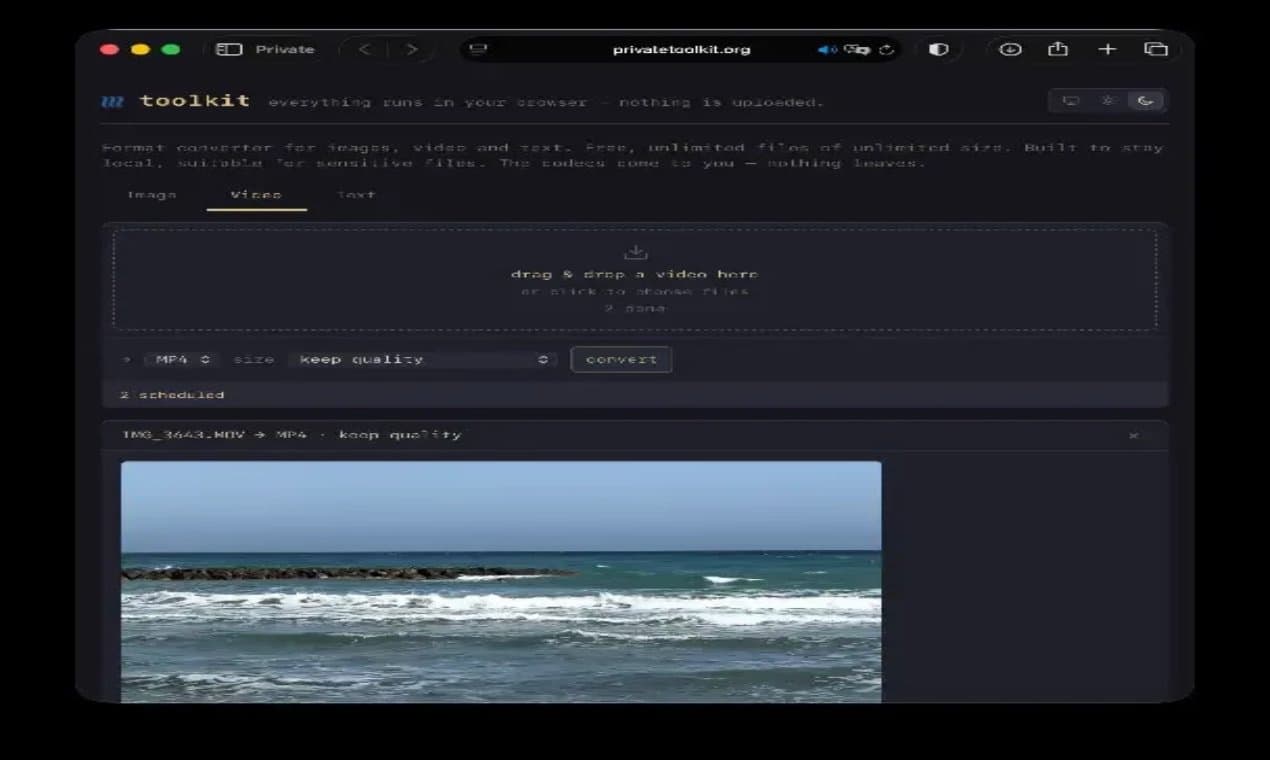
Private Toolkit is a collection of image and video converters designed with privacy as a core principle. All tools run directly in your browser with zero data uploads — your information never leaves your device. Ideal for developers who need reliable utilities without compromising on data privacy or security. Perfect for quick tasks, offline work, and scenarios where data sensitivity is paramount.
Drawn from the product itself, not from a survey.
Demographic
Privacy-conscious individuals, aged 25-45, who handle sensitive documents (e.g., medical records, financial data) and are wary of cloud services
Pain points
Anxiety about data breaches on cloud-based converters; need to ensure files are not stored or accessed by third parties.
Primary needs
Complete data privacy, local processing, no sign-up, and ease of use for common file conversions.
Demographic
Freelancers and small business owners (e.g., designers, video editors) who work remotely and need to convert large files without compromising client confidentiality
Pain points
Difficulty transferring large files securely; time wasted on slow uploads to external servers; risk of leaking proprietary work.
Primary needs
Fast, unlimited file size conversion, support for various formats, and a reliable, no-cost solution to maintain client trust.
Demographic
IT professionals and cybersecurity enthusiasts, aged 30-55, who are tech-savvy and prefer open-source, self-hosted alternatives
Pain points
Distrust of online tools that claim security but secretly track user data; need for a tool that aligns with strict security standards.
Primary needs
Transparent code, local-processing capabilities, advanced features like WebAssembly, and assurance of no data leakage.
Written by AI from measured evidence, scored out of 100.
Private Toolkit is a fast, privacy-focused converter that runs entirely in the browser. It excels in speed and offers a decent range of tools, but the design feels dated and security headers are lacking. Accessibility is decent but not perfect. For privacy-conscious users, it's a solid choice, but it faces stiff competition from established tools. With some polish and stronger security posture, it could carve a niche.
Clear dropzone and tab bar, but options lack grouping and labels. No hover states. Decent for quick tasks, but first-time users may stumble.
Functional but dated: flat beige background, thin borders, dense text. Dark mode shows better layout. Average visual polish.
Excellent performance: 99/100 Lighthouse, LCP 1.1s, CLS 0, TBT 0ms. Fast and snappy, no lag complaints found.
HTTPS enforced, but missing HSTS, CSP, frame protection, and other headers. No SOC 2 or audits. Privacy claim is core, but security headers are weak.
Lighthouse 91/100, but fails contrast and select labels. No a11y statement. Keyboard navigable, but multi-language missing.
Real privacy problem, but crowded market. Differentiated by local processing and no limits, but HandBrake already does local. Needs sharper wedge.
Private Toolkit offers a functional but visually dated interface. The beige background and thin borders feel outdated, though the dark mode shows better design sense. Usability is decent: the dropzone is prominent, but options lack grouping and labels, which may confuse first-time users. The tab bar is simple, but missing hover states reduces feedback. Overall, it's a tool that works, but the presentation and UX could use polish to match modern standards.
Performance is stellar: Lighthouse 99/100, LCP 1.1s, and zero layout shift. The site is lightweight and snappy. However, security is a mixed bag. HTTPS is enforced, but the absence of HSTS, CSP, and other headers is concerning for a privacy-focused tool. The claim of a Content Security Policy is contradicted by the probe. While local processing reduces data exposure, the lack of security headers and audits undermines trust.
Accessibility is above average with a 91/100 Lighthouse score, but fails on contrast and select labels. No a11y statement or multi-language support. Growth potential is moderate: the privacy angle is compelling, but the market is crowded with alternatives like HandBrake offering local processing. The product needs a clearer differentiator, such as a unique workflow or integration, to stand out. Current traction is minimal, but the idea has room if executed well.
Conclusion
If you prioritize speed and privacy, Private Toolkit is worth a try. But if you need advanced features or enterprise-grade security, look elsewhere. It's a promising start, but it needs to mature to compete with the big names.
Named competitors, point by point. Nobody paid to appear here or to be left out.
 Private Toolkit Private Toolkit |  CloudConvert CloudConvert |  HandBrake HandBrake |  TinyPNG TinyPNG | |
|---|---|---|---|---|
| Privacy: local processing vs cloud upload | All processing in browser, no uploads. | Cloud-based, files uploaded to servers. | Local processing, but requires installation. | Uploads images to servers for compression. |
| File size limits | No limits. | Free tier has limits, paid plans for larger. | No limits, depends on hardware. | Limits on free tier, paid for more. |
| Ease of use | Simple drag-and-drop, no sign-up. | Easy but requires account for some features. | Steeper learning curve, advanced controls. | Very simple, but only PNG/JPEG. |
CloudConvert
A popular online converter with a wide range of formats and cloud-based processing, but less privacy-focused.
HandBrake
An open-source video transcoder that runs locally on your machine, offering advanced controls but with a steeper learning curve.
TinyPNG
Specializes in image compression, but only for PNG and JPEG, and it uploads images to its servers.
Comparing options? See Private Toolkit alternatives, scored side by side

pdfpix is a set of 31 free PDF tools that run in your browser. Your files are never uploaded, and every result is verified.

AI invoice follow-up that drafts reminders and tracks next steps.

Project, resource, and financial management for client-fo...

Professional quoting with reusable pricing rules, polished proposals and online customer approvals.

An AI receptionist for home services. It answers the calls you miss, books the job, and sends you the details.

AI-powered insurance verification for healthcare, cutting...

AI-native accounting platform that automates financial cl...

Create realistic chats, posts & videos in your browser

MatSync is martial arts club software from Poland, European Union: memberships, Stripe billing, class bookings, attendance and belt progression, with a free plan for up to 30 students and native iOS/Android member apps.

Double-click CSV/XLS/XLSX files to instantly open in Goog...

All-in-One Free Accounting Software for Small Businesses

Privacy-first on-device Mac calendar sync tool.
A platform dedicated to providing unbiased reviews of newly launched applications, analyzing everything from their features to their full potential.
info@scoutforge.net© 2026 Scoutforge. All rights reserved.
