Cycling through all six. Tap any point to stop.
Measured on six things
RedLinz turns marked-up screenshots into structured, AI-ready prompts — so Cursor, Claude, ChatGPT & Perplexity know exactly what to change.
Growth
28Launched ~3 weeks ago (domain June 29, 2026). Zero reviews, GitHub activity, or community signals; only appears on generic product listing sites.
Screenshots
1 / 1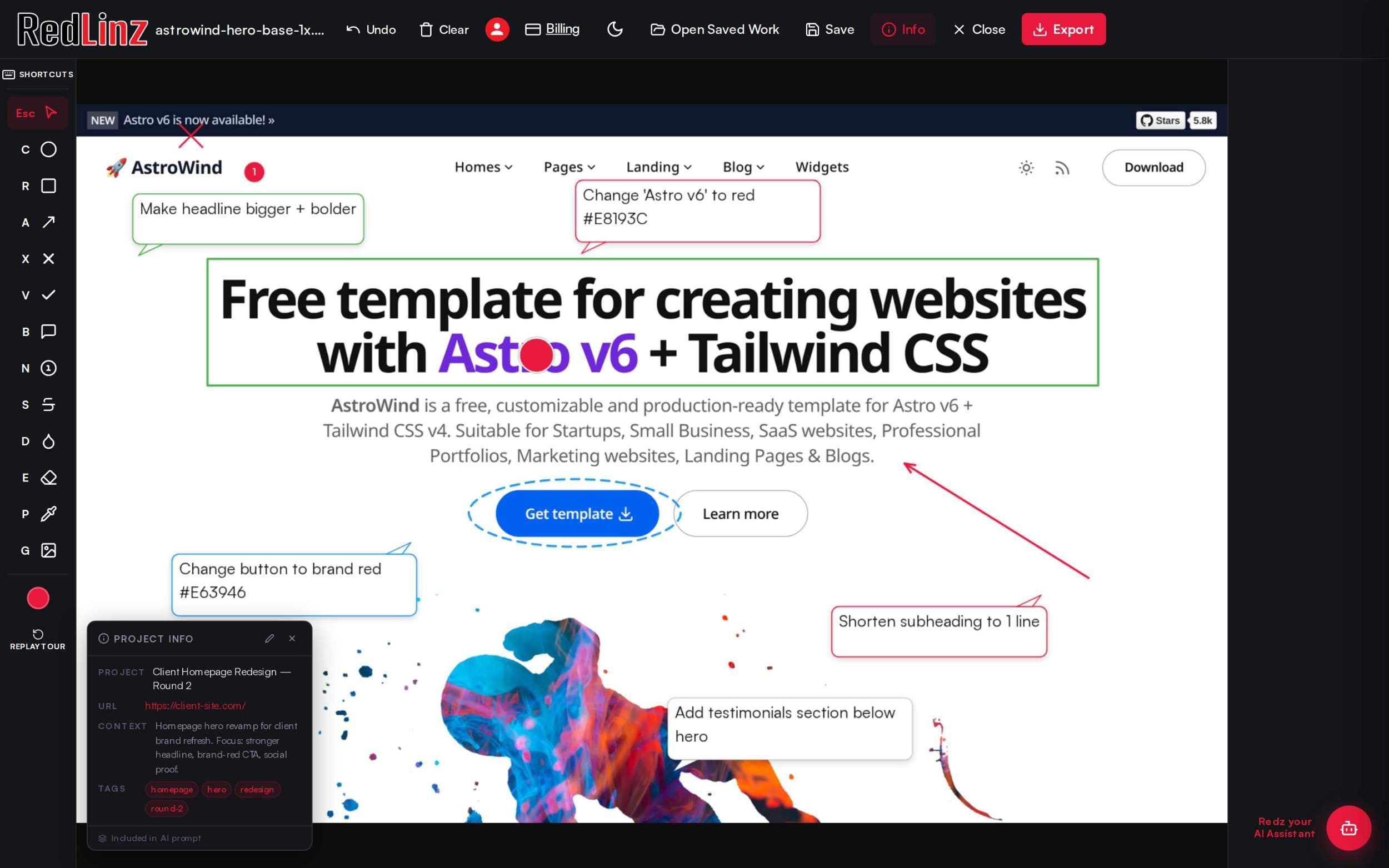
About this app
RedLinz is a browser-based visual markup tool built for human-to-AI handoffs. Instead of describing a UI tweak in words or handing an AI a raw screenshot and hoping it guesses right, you mark up the image directly. Circle, arrow, or annotate with 12 standardized markup symbols — circle, arrow, rectangle, X stamp, checkmark, callout, number stamp, and more — each carrying meaning the AI can parse. RedLinz then exports a structured prompt with exact coordinates and labels instead of a flat image, so the agent stops guessing which element you meant. Works with Cursor, Claude Code, ChatGPT, Perplexity, and Grok — or any AI tool that reads text and images. All annotation happens client-side; images never leave your browser. Free forever for 5 markups/month, no card required. Upgrade to Pro ($8/mo or $82/yr) for unlimited, watermark-free exports.
Key features
- 112 semantic markup symbols that export structured prompts with coordinates for AI tools
- 2Fully client-side annotation — images never leave the browser
- 3Free forever tier (5 markups/month) with no card required; Pro at $8/mo
Target customer profile
Drawn from the product itself, not from a survey.
Demographic
Software developers using AI coding assistants
Pain points
Spending time describing UI bugs or changes to Cursor/Claude; miscommunication leads to repeated fixes.
Primary needs
Fast, precise visual feedback that translates to actionable AI prompts for code changes.
Demographic
UI/UX designers collaborating with AI tools
Pain points
Hard to communicate visual revisions to AI image generators (Midjourney, DALL·E); text descriptions are ambiguous.
Primary needs
A visual markup-to-prompt pipeline for iterating designs efficiently.
Demographic
Marketing professionals reviewing creatives
Pain points
Tedious back-and-forth with designers or AI tools over ad copy, banners, and landing pages.
Primary needs
Markup screenshots with annotations and get AI to revise copy or layout without long emails.
Scout Review
Written by AI from measured evidence, scored out of 100.
RedLinz is a focused, no-install solution for precise AI handoffs via visual markup. It excels at solving a specific pain point for AI-assisted developers and designers with semantic annotations and clean exports. The product is early but the core experience is already polished and useful.
Measure by measure
Usability
68Straightforward 4-step flow, instant browser workspace, generous free tier with no card. Semantic symbols and export are well explained; learning curve is minimal.
Design
55Standard SaaS landing page with clear demo screenshots. Annotation colors pop but layout feels template-driven with some low-contrast text and overlapping elements in previews.
Speed
68Mobile Lighthouse 76/100 with 4.4s LCP; desktop 97/100. No user lag reports; new site loads acceptably for a lightweight client-side tool.
Security
48HTTPS + HSTS in place and fully client-side processing. Missing multiple security headers and any compliance certifications or audits.
Accessibility
70Strong automated score of 93/100 but two clear failures on contrast and heading order. No dedicated a11y docs or statements found.
Growth
28Launched ~3 weeks ago (domain June 29, 2026). Zero reviews, GitHub activity, or community signals; only appears on generic product listing sites.
Improvement areas
- Add public changelog, docs, and community channels for better discoverability
- Implement missing security headers and publish basic compliance info
- Improve demo visuals to reduce overlap and increase contrast in sidebar text
Design & Usability
RedLinz delivers a clean, functional browser tool that turns visual markup into structured AI prompts using 12 semantic symbols. The homepage clearly communicates the value with a simple 4-step process and generous free tier. Design is competent but relies on a very standard SaaS template with some visual clutter in the demo. Usability shines through instant access and client-side processing, making it immediately usable for developers and designers already working with Cursor or Claude.
Speed & Security
Performance is solid on desktop and acceptable on mobile per Lighthouse data, with no reported lag. Security is basic but appropriate for a client-side tool: HTTPS and HSTS are present, and images never leave the browser. However, several standard security headers are missing and there are no published audits or compliance claims, which is typical for an early-stage indie product but leaves room for improvement.
Accessibility & Growth
Accessibility scores well in automated checks despite minor contrast and heading issues. Growth is the weakest area — the product is only weeks old with no reviews, community, or traction signals yet. This is expected for a brand-new launch but means it currently lacks the social proof and feedback loops that more established alternatives have.
Conclusion
For teams tired of typing 'the red box on the left' into ChatGPT, RedLinz offers a practical shortcut. Watch for community growth and expanded integrations as it matures.
Suggestions for improvement
- Add a public changelog and simple docs site to improve discoverability and onboarding.
- Publish basic security headers and a privacy policy page for trust.
- Create a short demo video or interactive playground to showcase the 12 symbols in action.
Alternatives comparison
Named competitors, point by point. Nobody paid to appear here or to be left out.
 RedLinz RedLinz |  Markup.io Markup.io |  BugHerd BugHerd |  Screenpresso Screenpresso | |
|---|---|---|---|---|
| AI prompt export with semantic markup | Yes — 12 symbols export structured prompts + coordinates | No — general visual feedback only | No — issue tracking focus | No — basic annotation exports |
| Client-side only processing | Yes — images never leave browser | No — uploads to cloud | No — web-based with server storage | Partial — desktop app with local options |
| Free tier availability | 5 markups/month forever, no card | Limited free plan | 14-day trial | Free version with limits |
Markup.io
General visual feedback tool for teams, but no AI prompt generation.
BugHerd
Visual bug tracking for websites, but focused on issue management, not AI prompts.
Screenpresso
Screenshot and annotation tool with export options, lacks AI integration.
Comparing options? See RedLinz alternatives, scored side by side
Sources
What the review was written against. A verdict with no sources is an opinion.
More Project Management apps
View all Project Management
Notion
92All-in-one AI workspace for docs, projects, and knowledge...

Vendor Space
88Vendor Space is an all-in-one vendor management platform ...

Plori
87Cloud AI agents with persistent disk, memory, and real CL...

Voice Memo Exporter
87Export all your Apple Voice Memos to one text file.

TempGuru
87Managed event staffing across the US and Canada with loca...

InviteVia
87InviteVia is a digital invitation platform for creating beautiful online invitations for weddings, birthdays, engagements, parties, and special events. Choose a template, customize your invitation, collect RSVPs, and share it instantly through WhatsApp, Instagram, SMS, or a simple link. No guest accounts or app downloads required.

Trac
87Local-first time tracker for freelancers with invoicing, ...

GrantCue
86Grant discovery and management software: search federal, state and foundation grants, then track deadlines, tasks and awards with your team.

AirLST
86Event management software for corporate events: invitations, registration, guest lists, check-in, seating and event apps in one platform.

FollowIncome
86Business workspace for solo founders and small teams.

ProviderOps
86NDIS provider management software for small Australian teams to roster workers, capture service records and prepare invoices.

Teamwork.com
85Project, resource, and financial management for client-fo...


A platform dedicated to providing unbiased reviews of newly launched applications, analyzing everything from their features to their full potential.
info@scoutforge.net© 2026 Scoutforge. All rights reserved.
