Cycling through all six. Tap any point to stop.
Measured on six things
Preview interior redesign ideas from a room photo with Spaceora.
Security
52HTTPS enforced with HSTS and SPF published, but the header probe found no CSP, no frame protection, no Referrer-Policy, no Permissions-Policy, no secure cookies and no DMARC — 5/13 checklist points. No SOC 2, ISO or bug-bounty signal on site.
Screenshots
1 / 1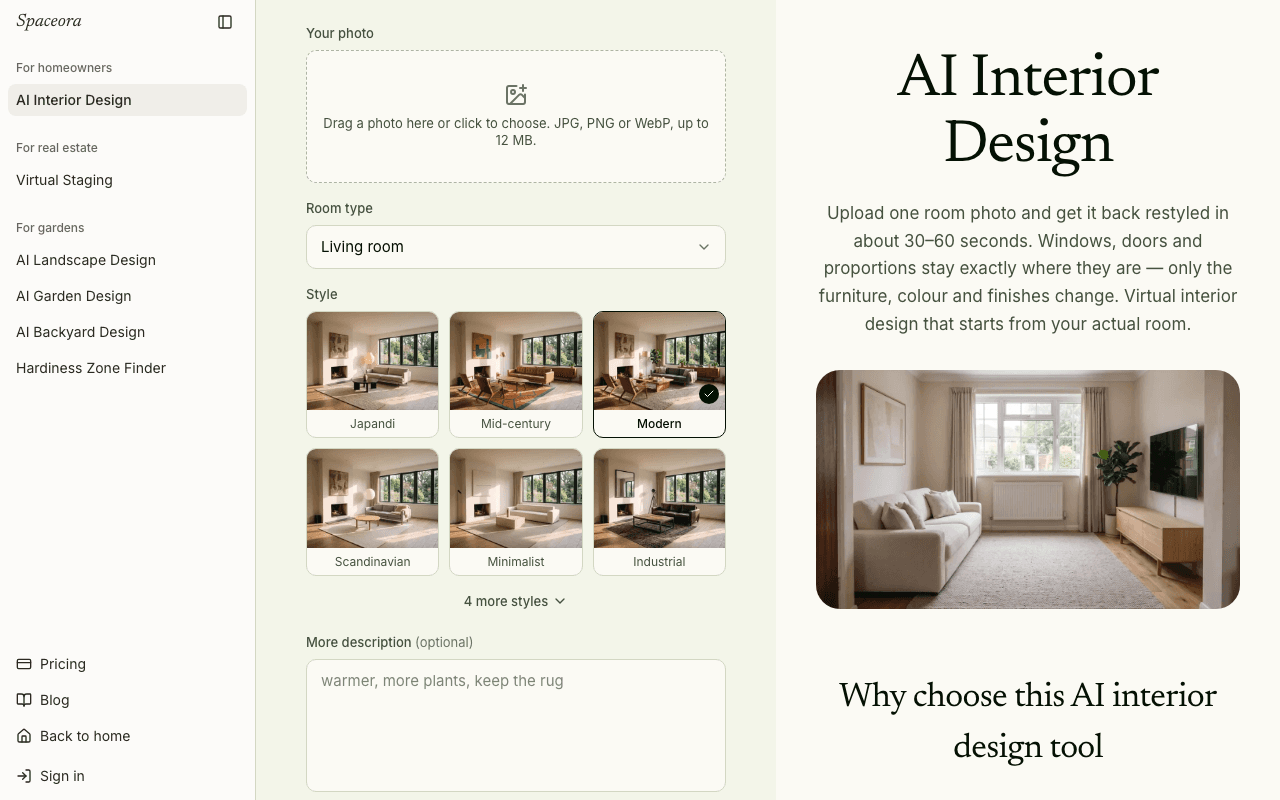
About this app
Spaceora helps homeowners and design enthusiasts explore interior design ideas using a photo of an existing room. Upload a room photo and generate visual concepts for different styles, furnishings, and colors. The results are design inspiration, not measured plans or construction advice. Spaceora also offers virtual staging and garden design tools.
Key features
- 1Upload a room photo and generate redesigns across 14 styles (Japandi, Mid-century, Modern, Scandinavian and more)
- 2Before/after comparison slider to check the AI result against your original photo
- 3Bundled garden and landscape tools with USDA hardiness-zone lookup by ZIP code
- 4Virtual staging for empty listing photos and a Replace Furniture tool for single-piece edits
Target customer profile
Drawn from the product itself, not from a survey.
Demographic
Homeowners planning a renovation or redecorating
Pain points
Uncertain about design choices, fear of costly mistakes
Primary needs
Visualize different styles in their own room before committing
Demographic
Real estate agents and property stagers
Pain points
Empty properties look less appealing; staging is expensive
Primary needs
Quickly furnish and style rooms virtually for listings
Demographic
Interior design enthusiasts and DIY decorators
Pain points
Lack of confidence in mixing styles and furniture
Primary needs
Experiment with diverse styles and get inspiration
Scout Review
Written by AI from measured evidence, scored out of 100.
Spaceora is a competent, clearly positioned AI interior design tool with a better-than-average tool UI and an unusually honest FAQ. The before/after slider sells the product in one gesture, the style grid is scannable, and the pricing ladder from a 3-generation free tier to $79.90/mo is legible. The rough edges are real but fixable: dead space below the tool, an ungrouped sidebar, a 5.6s mobile LCP, and a security header set that's missing most of the modern checklist. The garden and hardiness-zone bundle is the most interesting thing here — it gives the product a reason to exist beyond being another room-redesign wrapper.
Measure by measure
Usability
68Room type and style sit above the fold, the FAQ pre-answers cost and photo-quality questions, and the 3-step flow is explicit. Friction: a '10 credits' badge on the Generate button before you've uploaded anything, and sign-in required to see a result.
Design
71Clean, coherent tool UI: crisp style thumbnails with active states, a working before/after slider, and a consistent green accent across nav and CTA. Undermined by dead vertical space below the tool and a sidebar that mixes garden tools with core features.
Speed
66Desktop Lighthouse 94/100 is genuinely fast. Mobile drops to 79 with a 5.6s LCP — the page renders late on phones even though CLS is a clean 0 and TBT is only 33ms. Fine on a laptop, sluggish first paint on mobile.
Security
52HTTPS enforced with HSTS and SPF published, but the header probe found no CSP, no frame protection, no Referrer-Policy, no Permissions-Policy, no secure cookies and no DMARC — 5/13 checklist points. No SOC 2, ISO or bug-bounty signal on site.
Accessibility
79Lighthouse accessibility 97/100 with a single failing audit: insufficient background/foreground contrast. No WCAG statement or a11y page found, so keyboard and screen-reader support beyond automated checks is unverified.
Growth
58Real problem (renovation anxiety, staging cost) with two named segments and a genuine wedge: bundled garden/landscape tools with hardiness-zone lookup. Credit pricing is clear. But interior AI redesign is crowded and the wedge is copyable.
Improvement areas
- Mobile LCP of 5.6s — well past the 2.5s 'good' threshold despite a clean CLS
- Security headers at 5/13: no CSP, frame protection, Referrer-Policy, Permissions-Policy or DMARC
- Single failing contrast audit and no WCAG or accessibility statement on site
- Unfinished layout: dead space below the tool and an ungrouped sidebar mixing tools with marketing links
Design & Usability
The tool UI is the strongest part of Spaceora. Style thumbnails are crisp and clearly labeled with visible active states, the before/after slider does the explaining for you, and a single green accent runs from nav to CTA without clashing. The flow is legible: upload, pick room type and style, generate, compare. The FAQ is unusually honest — it tells you the AI may change room proportions and that results aren't for measurements. What holds it back is polish at the edges: a large empty band below the tool that reads as unfinished, a cookie banner floating over nothing, and a sidebar that puts a Hardiness Zone Finder next to AI Interior Design with no visual grouping. The '10 credits' badge on Generate also front-loads cost anxiety before the user has uploaded a single photo.
Speed & Security
Speed is split cleanly by device. Desktop Lighthouse lands at 94/100 — genuinely snappy. Mobile drops to 79 with an LCP of 5.6 seconds, well past the 2.5s 'good' threshold, though CLS is a perfect 0 and TBT is only 33ms, so the page is stable and light, just slow to paint its main content on phones. Security is the weaker half: HTTPS is enforced with HSTS and SPF is published, but the header probe found no CSP, no frame protection, no X-Content-Type-Options, no Referrer-Policy, no Permissions-Policy, no secure cookies and no DMARC — 5 of 13 checklist points. There's no SOC 2, ISO or bug-bounty signal on the site. To its credit, the FAQ is transparent that photos are sent to a third-party image-generation provider and that saved designs can be deleted from account history.
Accessibility & Growth
Accessibility scores 97/100 on Lighthouse with exactly one failing audit: insufficient background/foreground contrast. That's a single CSS value away from a clean sheet, but there's no WCAG conformance statement or accessibility page, so keyboard and screen-reader behavior beyond automated checks is unverified. On growth: the problem Spaceora names is real — homeowners afraid of expensive mistakes, agents who can't afford staging — and it names two specific segments rather than 'everyone.' The wedge is the bundle: interior design plus virtual staging plus garden and landscape tools with a USDA hardiness-zone lookup, which is a genuinely useful hook for the homeowner crowd and not something RoomGPT or Reimagine Home lead with. The limit is that the core interior-redesign feature is commoditized and the garden bundle is copyable. The domain was registered in August 2026, so this is very early — traction is context, not a verdict.
Conclusion
If you're a homeowner who wants to see a Japandi version of your living room before you spend money on furniture, Spaceora does that job and does it with a clean interface. If you're a stager running listings weekly, the Pro tier at $39.90/mo for 80 designs is a reasonable line item. What it needs next is polish on the edges — close the empty space, group the sidebar, fix the contrast, tighten the mobile LCP, and add the security headers that are currently missing. None of those are hard. All of them would move this from 'solid' to 'recommend without caveats.'
Suggestions for improvement
- Fill or remove the large empty vertical space below the tool UI — it reads as an unfinished page
- Group the sidebar: core design tools in one block, garden tools in another, marketing links separate
- Fix the single failing contrast audit — it's one CSS value away from a 100 accessibility score
- Add CSP, frame protection, Referrer-Policy and DMARC to close the 5/13 security header gap
Alternatives comparison
Named competitors, point by point. Nobody paid to appear here or to be left out.
 Spaceora AI Interior Design Spaceora AI Interior Design |  RoomGPT RoomGPT |  Reimagine Home Reimagine Home | |
|---|---|---|---|
| Free tier | 30 credits = 3 watermarked generations at 1248×832 | Limited free generations with watermark | Free trial generations available |
| Style variety | 14 styles incl. Japandi, Mid-century, Coastal, Bohemian | Multiple preset design styles | Wide range of interior and exterior styles |
| Virtual staging | Yes — dedicated Virtual Staging tool for empty listings | Focused on room redesign, not staging | Yes — core virtual staging for agents |
| Garden / landscape tools | Yes — landscape, garden, backyard design plus hardiness-zone lookup | No | Exterior design, but no garden/zone tools |
| Pricing | Free / $19.90 / $39.90 / $79.90 per month | Subscription tiers with free entry | Credit-based subscription tiers |
RoomGPT
AI tool that redesigns rooms from photos with various styles.
Reimagine Home
AI-powered interior design and virtual staging for homeowners and agents.
Comparing options? See Spaceora AI Interior Design alternatives, scored side by side
More Home & Living apps
View all Home & Living
Factory Direct Mattress Overland Park
92A locally-owned mattress store in Overland Park, KS offer...

RoomCreator
92An AI-powered interior and exterior design tool that tran...

Efficienco
88Free construction and home improvement calculators for ma...

InviteVia
87InviteVia is a digital invitation platform for creating beautiful online invitations for weddings, birthdays, engagements, parties, and special events. Choose a template, customize your invitation, collect RSVPs, and share it instantly through WhatsApp, Instagram, SMS, or a simple link. No guest accounts or app downloads required.

Remotype
86Turn iPhone & Android into a wireless keyboard, trackpad ...

Melipo
83Family recipe keeper with meal journal and smart suggestions

Drugwars Online
82Classic 1984 drug trading game reborn in browser

Art&See
82Art&See offers museum-quality, hand-painted oil painting ...

Rael Miracle Patch Pimple Patches
82Top-rated hydrocolloid and microneedle pimple patches for...

Oh Yah! - Daily Routines for Kids
80A family task management app that helps parents assign chores and track routines for children with strong privacy features.

Chore Quest
80A gamified app that turns household chores into fun quests for families.

August
80An all-in-one rental management app for small landlords, streamlining rent collection, compliance, maintenance, and documents.


A platform dedicated to providing unbiased reviews of newly launched applications, analyzing everything from their features to their full potential.
info@scoutforge.net© 2026 Scoutforge. All rights reserved.
