Cycling through all six. Tap any point to stop.
Measured on six things
Export ChatGPT conversations to PDF, Word, Markdown, TXT, PNG and JSON.
Security
42HTTPS enforced and Stripe handles payments, but the header probe found only 3/12 checklist items: no HSTS, CSP, frame protection, Referrer-Policy, or DMARC. No SOC 2/ISO claims or security page published.
Screenshots
1 / 1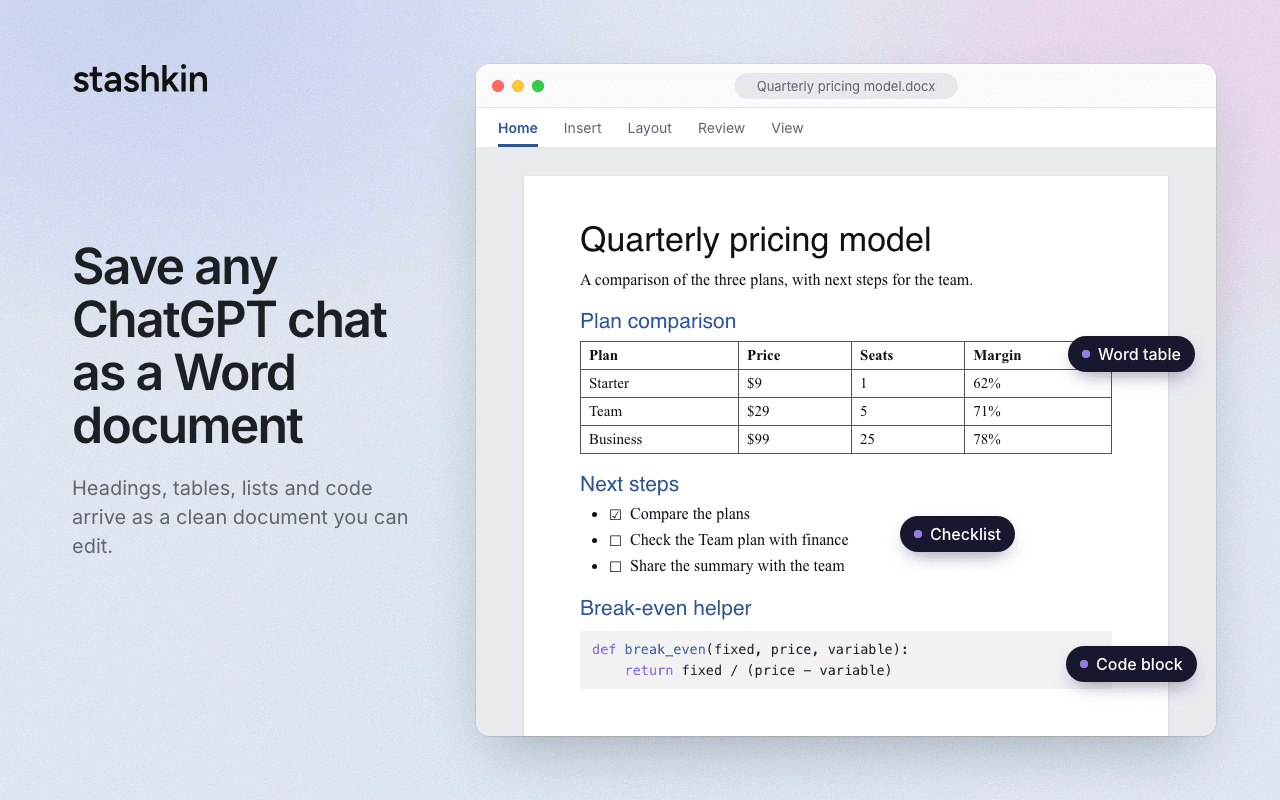
About this app
Stashkin is a Chrome extension for exporting ChatGPT conversations to PDF, Word (DOCX), Markdown, TXT, PNG and JSON. Export a full conversation, selected messages or a single reply while preserving headings, tables, code, images and math formulas. Word exports include editable equations. Stashkin offers a free plan with daily Word and PDF limits, and a Pro plan for unlimited exports.
Key features
- 1Export ChatGPT conversations to PDF, Word (DOCX), Markdown, TXT, PNG and JSON with formatting, tables, charts and images intact.
- 2Word exports convert LaTeX into native, editable Microsoft Word equations.
- 3Export the whole chat, ChatGPT replies only, selected messages, or a single reply.
- 4Free plan: 8 Word and 3 PDF exports per day, unlimited Markdown/TXT/PNG/JSON, no account required.
Target customer profile
Drawn from the product itself, not from a survey.
Demographic
Students and academics
Pain points
Losing formatting when pasting ChatGPT answers into assignments or notes
Primary needs
Save conversations to Word or PDF with formatting and editable equations.
Demographic
Researchers and analysts
Pain points
Copied conversation tables and formulas require manual formatting.
Primary needs
High-fidelity export of data-heavy conversations for reports
Demographic
Professionals and content creators
Pain points
Manual reformatting of ChatGPT outputs wastes time
Primary needs
Quick, clean export to Markdown or Word for publishing
Scout Review
Written by AI from measured evidence, scored out of 100.
Stashkin is a focused Chrome extension that solves one annoying, well-defined problem: getting ChatGPT conversations out of the browser with formatting, tables, charts and formulas intact. The landing page earns its claims with side-by-side demos rather than adjectives, the free tier is genuinely usable without an account, and the site is fast enough to make the pitch feel effortless. The gaps are the usual early-stage ones — thin documentation, a bare security posture with most standard headers missing, no accessibility statement, and a business that lives or dies on OpenAI not building the same feature. For students and researchers who export ChatGPT answers daily, it's a reasonable $3.88/month bet.
Measure by measure
Usability
74No sign-up needed to start, one-click install, three-step onboarding, and a pricing page that actually documents cancel/refund flows. Free tier is generous enough to evaluate. Docs are thin beyond the FAQ.
Design
78Polished, modern landing page with a live ChatGPT-style demo and side-by-side 'messy paste vs clean export' visuals for tables, formulas and charts. Concrete and credible, though the site is the only design surface since it's a Chrome extension.
Speed
88Lighthouse mobile 99/100 (LCP 1.9s, CLS 0, TBT 0ms) and desktop 100/100. The site is genuinely snappy with no layout shift. No user complaints about lag in collected evidence.
Security
42HTTPS enforced and Stripe handles payments, but the header probe found only 3/12 checklist items: no HSTS, CSP, frame protection, Referrer-Policy, or DMARC. No SOC 2/ISO claims or security page published.
Accessibility
76Lighthouse accessibility audit scored a perfect 100/100, indicating solid semantic markup and contrast. No published WCAG statement and English-only, which caps it below the top of the band.
Growth
62Real, specific problem (formatting loss on ChatGPT copy-paste) with a clear wedge over ChatGPT's built-in export: editable Word equations, intact tables and charts. Early-stage domain, but the idea has room.
Improvement areas
- Security posture: only 3/12 expected HTTP headers present; no HSTS, CSP, DMARC, or security page.
- Documentation is limited to an FAQ accordion; no troubleshooting docs or changelog.
- No accessibility statement or multi-language support despite a perfect automated audit.
- Single-platform dependency on ChatGPT's UI and data model, with no stated contingency if OpenAI ships native export.
Design & Usability
Stashkin's site does the hard thing well: it shows the problem instead of describing it. The before/after demos for tables, formulas and charts are the kind of concrete proof most landing pages skip, and the design holds together as a coherent, modern page. Usability is similarly thoughtful — no account required to start, one-click install, a three-step onboarding, and a pricing page that actually explains how to cancel and get a refund. The weak spot is depth: beyond the FAQ accordion there's no real documentation, so anyone hitting an edge case is left emailing support and waiting.
Speed & Security
Speed is the standout measured result: Lighthouse mobile 99/100 with a 1.9s LCP and zero layout shift, desktop a clean 100/100. The site loads fast and stays stable, which matters for a tool whose whole pitch is fidelity. Security is the opposite story. HTTPS is enforced and Stripe handles payments so card data never touches Stashkin's servers, but the header probe found only 3 of 12 expected protections — no HSTS, no CSP, no frame protection, no DMARC. For a browser extension that reads your ChatGPT conversations, that's a thin public security posture, and there's no security page or compliance claim to offset it.
Accessibility & Growth
Accessibility scores a perfect 100/100 on the Lighthouse axe audit, which suggests clean semantics and contrast, but the site publishes no WCAG statement and ships English-only — good automated results without a stated commitment. Growth is the more interesting question. The problem Stashkin names is real and specific: ChatGPT's copy button mangles tables, formulas and formatting when pasted into Word or Docs. The wedge over the only listed alternative — ChatGPT's own export, which dumps text or JSON with no fidelity — is concrete and demonstrable, especially editable Word equations. The limit is structural: OpenAI could ship a better export button at any time, and the domain is only months old.
Conclusion
If you regularly paste ChatGPT output into Word, Docs or a report and then spend ten minutes fixing tables and equations, Stashkin is worth the install — the free plan costs nothing and the demo shows exactly what you get. Go Pro only if you're hitting the 8 Word / 3 PDF daily cap or need the footer gone for client work. Watch the security side: a browser extension that reads your conversations deserves more than three security headers, so keep an eye on whether they publish a security page or tighten the response headers. And keep a Markdown export habit as a fallback in case OpenAI ships its own polished export.
Suggestions for improvement
- Publish a real security page: add HSTS, CSP, Referrer-Policy and DMARC, and document what data the extension reads and where it goes.
- Expand beyond the FAQ into actual docs — troubleshooting, format-specific quirks, and what happens when ChatGPT changes its UI.
- Add an accessibility statement and a second language; a 100/100 audit is a start, not a commitment.
- Show a short video of a real export end-to-end, including the Word equation editing, to convert skeptics faster.
Alternatives comparison
Named competitors, point by point. Nobody paid to appear here or to be left out.
 Stashkin Stashkin |  ChatGPT Export ChatGPT Export | |
|---|---|---|
| Format fidelity (tables, headings, lists preserved) | Yes — headings, lists, tables, charts and images preserved in PDF/Word/Markdown | No — plain text/JSON dump, formatting lost |
| Editable math equations in Word | Yes — LaTeX converted to native editable Word equations | No — raw LaTeX strings only |
| Export formats offered | PDF, DOCX, Markdown, TXT, PNG, JSON | Text and JSON only |
| Selective export (single reply or picked messages) | Yes — whole chat, replies only, picked messages, or one reply | No — full history export only |
| Pricing | Free tier (8 Word / 3 PDF per day); Pro $3.88/mo yearly or $5.88 monthly | Free with ChatGPT account |
| Account required to use | No — free tier works without sign-up | Yes — requires ChatGPT login |
Comparing options? See Stashkin alternatives, scored side by side
More Productivity apps
View all Productivity
The Stack Newsletter
92A weekly newsletter delivering curated tech jobs, intervi...

Qamarero
92An all-in-one hospitality software for restaurants and ba...

EmbedMyReviews
92White-label reputation management software for agencies s...

StoryPad
92Privacy-first open source journal app with a continuous t...

Notion
92All-in-one AI workspace for docs, projects, and knowledge...

Puzzly – B2B Lead Generation & Sales Intelligence Platform
92Puzzly is an all-in-one B2B lead generation platform that...

Vibe Coding Agent Skills
92A free, open-source platform offering 110 AI agent skills...

Gerty
91Private, local AI assistant for Mac that runs offline

CC Switch
91Open-source desktop app for switching AI coding providers...

username.md
90One verified handle for your online identity, readable by...

PitchWhip
90AI cold call scripts & direct dials from LinkedIn

What the GIF
89Frame-perfect video-to-GIF maker that runs entirely in yo...


A platform dedicated to providing unbiased reviews of newly launched applications, analyzing everything from their features to their full potential.
info@scoutforge.net© 2026 Scoutforge. All rights reserved.
