Cycling through all six. Tap any point to stop.
Measured on six things
Convert, migrate, and back up MBOX email files to PST, PD...
Design
58Functional long-form vendor landing page with screenshots, video and a rating badge. The desktop converter UI looks dated next to modern migration tools, and the page repeats nav and 'Video' links.
Screenshots
1 / 1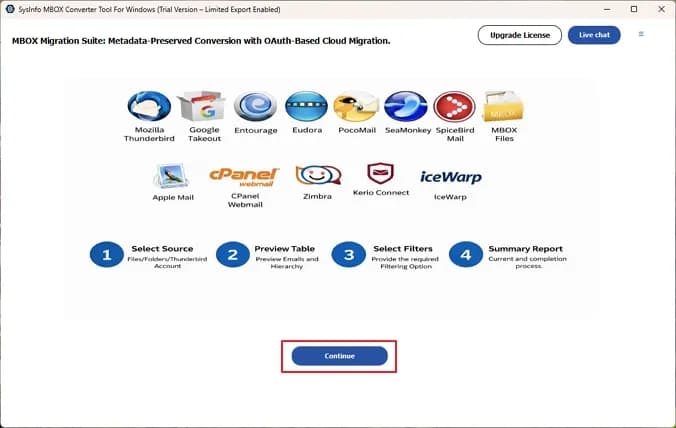
About this app
I've spent enough time wrestling with MBOX files to appreciate a tool that just works, and SysInfo MBOX Converter is one of those rare utilities that delivers without a steep learning curve. At its core, it's a dedicated migration and conversion suite for MBOX/MBX mailboxes—those container files used by Thunderbird, Apple Mail, Eudora, Entourage, Claws Mail, and a long list of other clients. The real appeal here is flexibility: you can dump MBOX data into universal formats like PST, EML, MSG, CSV, HTML, and even PDF, or push it straight into live web and cloud clients such as Gmail, Office 365, Hotmail, IMAP, GoDaddy, and Google Workspace. I like that it handles batch processing of multiple files of any size, preserves folder hierarchy and data integrity, and still gives you granular control through a date-range filter, duplicate removal, and attachment exclusion options. What stands out from a practical standpoint is the preview pane—you can scan and verify emails before committin...
Key features
- 1Batch convert MBOX/MBX to PST, EML, MSG, CSV, HTML and PDF with folder hierarchy preserved.
- 2Direct import to Gmail, Office 365, Hotmail, IMAP, GoDaddy and Google Workspace.
- 3Preview before export, date-range filter, duplicate removal and attachment exclusion.
Target customer profile
Drawn from the product itself, not from a survey.
Demographic
IT administrators and email migration specialists in SMBs
Pain points
Bulk MBOX migrations to cloud clients are slow, error-prone, and often corrupt folder structure
Primary needs
Reliable batch conversion with hierarchy preserved and direct cloud import support
Demographic
Thunderbird, Apple Mail, and Eudora users switching to Outlook or Gmail
Pain points
Native clients don't export to PST or cloud formats cleanly; manual methods lose attachments
Primary needs
One-click conversion to PST/EML/MSG and direct push to Gmail or Office 365
Demographic
Legal, compliance, and forensic teams archiving email evidence
Pain points
Inaccessible or corrupted MBOX files; need for selective, date-filtered exports in PDF/HTML
Primary needs
Preview before export, date-range filtering, duplicate removal, and PDF/CSV output
Demographic
Freelancers and small business owners consolidating multiple email accounts
Pain points
Scattered mailboxes across clients make backup and consolidation a headache
Primary needs
Affordable, simple tool that merges and backs up MBOX data without technical expertise
Scout Review
Written by AI from measured evidence, scored out of 100.
SysInfo MBOX Converter is a competent, long-standing (domain since 2010) email migration utility with a genuinely useful feature set: batch conversion, preview, date filtering, dedup, attachment exclusion, and direct push to Gmail/Office 365/IMAP. The marketing site is fast (Lighthouse 100/100) and security headers are mostly in place. The weak spots are a dated desktop UI, a 50-email free cap that makes real testing impossible without buying, six accessibility audit failures, and no published compliance certifications despite targeting legal and forensic teams. Against Aid4Mail, eSoftTools and free Thunderbird, it's a reasonable middle option — not the cheapest, not the most powerful, but functional.
Measure by measure
Usability
62Preview-before-export, date filter, dedup and attachment exclusion are genuinely useful controls, and a guide/video exist. The 50-email free cap means you must buy to actually test a real mailbox.
Design
58Functional long-form vendor landing page with screenshots, video and a rating badge. The desktop converter UI looks dated next to modern migration tools, and the page repeats nav and 'Video' links.
Speed
86Lighthouse mobile and desktop both score 100/100, with LCP 1.1s, CLS 0 and TBT 39ms. The marketing site is genuinely fast; no lag complaints surfaced in collected evidence.
Security
74HTTPS enforced with HSTS, CSP, Referrer-Policy and Permissions-Policy, plus SPF and DMARC — 10/12 header checks. Frame protection and X-Content-Type-Options are missing, and no SOC 2/ISO claim was found.
Accessibility
58Lighthouse accessibility 86/100, but six failing audits: images without alt text, links without discernible names, no main landmark, and ARIA role misuse. No a11y statement found.
Growth
58Real, specific pain (MBOX to PST/cloud migration) with concrete differentiators — direct Gmail/Office 365 push, PDF/CSV, date filter. But Aid4Mail, eSoftTools and free Thunderbird all crowd the same wedge.
Improvement areas
- Free tier caps at 50 emails per MBOX file — too small to validate a real migration.
- No published SOC 2, ISO or pen-test evidence despite targeting legal and forensic teams.
- Six Lighthouse accessibility failures: missing alt text, unnamed links, no main landmark, ARIA misuse.
Design & Usability
SysInfo MBOX Converter is a Windows/Mac desktop utility wrapped in a classic vendor landing page: dense feature blocks, screenshots, a video, and a 4.9/1276 rating badge. The app UI shown in screenshots is a tree-pane converter — functional, not modern. Usability is where it earns its keep: preview-before-export, date-range filtering, duplicate removal, attachment exclusion and custom folder naming are exactly the controls a migration specialist wants. The catch is the free tier, which caps at 50 emails per MBOX file — enough to confirm the tool works, not enough to validate a real mailbox. A guide, screenshots and video exist, and there's a 30-day moneyback claim, but you're buying before you can properly test.
Speed & Security
Speed is the standout measured result: Lighthouse 100/100 on both mobile and desktop, LCP 1.1s, CLS 0, TBT 39ms. The marketing site is genuinely snappy and there's no evidence of lag complaints. Security is solid-but-not-audited: HTTPS enforced with HSTS, CSP, Referrer-Policy and Permissions-Policy, plus SPF and DMARC — 10 of 12 header checks. Missing are frame protection and X-Content-Type-Options, both cheap fixes. No SOC 2, ISO 27001 or pen-test claim appears in the collected site text, which matters for the legal/compliance/forensic segment the product explicitly targets.
Accessibility & Growth
Accessibility lands at 86/100 on Lighthouse but with six failing audits that matter: images without alt attributes, links without discernible names, no main landmark, and ARIA role misuse. For a tool marketed to IT admins and compliance teams, that's a gap worth closing. Growth is a judgement on the idea: the problem — MBOX to PST/cloud migration with hierarchy preserved — is real and specific, and the differentiators (direct Gmail/Office 365/IMAP push, PDF/CSV output, date filter, dedup) are concrete. But the category is crowded: Aid4Mail offers scripting and dedup for power users, eSoftTools undercuts on price, and Thunderbird does simple MBOX-to-EML for free. The wedge exists; the moat is thin.
Conclusion
If you're an IT admin or migration specialist who needs batch MBOX-to-PST or direct cloud import with hierarchy preserved, SysInfo is worth a look — the feature list matches the job. Just budget for the paid license up front, because the free tier won't tell you whether it handles your real mailboxes. If you only need simple MBOX-to-EML, Thunderbird is free. If you need scripting and deep dedup, Aid4Mail is the stronger power-user pick. SysInfo sits in the middle: competent, fast to load, and priced to compete — but not clearly ahead of its peers on any single axis.
Suggestions for improvement
- Raise the free-tier cap or offer a time-limited full trial so buyers can validate against a real mailbox before paying.
- Add X-Frame-Options and X-Content-Type-Options headers — two cheap fixes to close the 10/12 security checklist.
- Fix the six Lighthouse accessibility failures: alt text, link names, main landmark, and ARIA role cleanup.
- Publish a security/compliance page (SOC 2, ISO, or pen-test summary) to back the legal and forensic use cases.
Alternatives comparison
Named competitors, point by point. Nobody paid to appear here or to be left out.
 SysInfo MBOX Converter SysInfo MBOX Converter |  Aid4Mail Aid4Mail |  MBOX to PST Converter (eSoftTools) MBOX to PST Converter (eSoftTools) |  Thunderbird (built-in import/export) Thunderbird (built-in import/export) | |
|---|---|---|---|---|
| Direct import to cloud/webmail (Gmail, Office 365, IMAP) | Yes — Gmail, Office 365, Hotmail, IMAP, GoDaddy, Google Workspace | Yes — supports many webmail/IMAP targets | Limited — focused on PST export | No — native client only, no cloud push |
| Output formats | PST, EML, MSG, CSV, HTML, PDF, MBOX | Dozens of formats including PST, EML, MSG, PDF | Primarily PST, with EML/MSG options | EML export only |
| Batch processing & filtering | Batch, date filter, dedup, attachment exclusion | Batch with scripting and advanced dedup | Batch with selective export | Manual, one file at a time |
| Free tier / trial | Free download, 50 emails per MBOX file | Paid with trial | Free trial with limited conversion | Free and open source |
| Platform | Windows and Mac desktop | Windows desktop | Windows desktop | Windows, Mac, Linux |
Aid4Mail
A veteran email conversion tool that supports MBOX and dozens of other formats with batch processing and filtering, popular among power users for its scripting and dedup features.
MBOX to PST Converter (eSoftTools)
A budget-friendly MBOX converter focused on Outlook PST migration with preview and selective export options, often used as a lighter-weight alternative.
Thunderbird (built-in import/export)
The free, native client can import MBOX files and export to EML, making it a no-cost option for simple conversions—though it lacks direct PST or cloud migration.
Comparing options? See SysInfo MBOX Converter alternatives, scored side by side
More Productivity apps
View all Productivity
The Stack Newsletter
92A weekly newsletter delivering curated tech jobs, intervi...

Qamarero
92An all-in-one hospitality software for restaurants and ba...

EmbedMyReviews
92White-label reputation management software for agencies s...

StoryPad
92Privacy-first open source journal app with a continuous t...

Notion
92All-in-one AI workspace for docs, projects, and knowledge...

Puzzly – B2B Lead Generation & Sales Intelligence Platform
92Puzzly is an all-in-one B2B lead generation platform that...

Vibe Coding Agent Skills
92A free, open-source platform offering 110 AI agent skills...

Gerty
91Private, local AI assistant for Mac that runs offline

CC Switch
91Open-source desktop app for switching AI coding providers...

username.md
90One verified handle for your online identity, readable by...

PitchWhip
90AI cold call scripts & direct dials from LinkedIn

What the GIF
89Frame-perfect video-to-GIF maker that runs entirely in yo...


A platform dedicated to providing unbiased reviews of newly launched applications, analyzing everything from their features to their full potential.
info@scoutforge.net© 2026 Scoutforge. All rights reserved.
