Cycling through all six. Tap any point to stop.
Measured on six things
Migrate Teams, channels, and chats between Microsoft 365 ...
Design
58Conventional vendor-template marketing page: dense copy, tabbed features/specification, star-rating widget and repeated CTAs. Functional and on-brand for the category, but visually dated next to Sharegate and AvePoint. Desktop app UI itself was not visible in the collected evidence.
Screenshots
1 / 1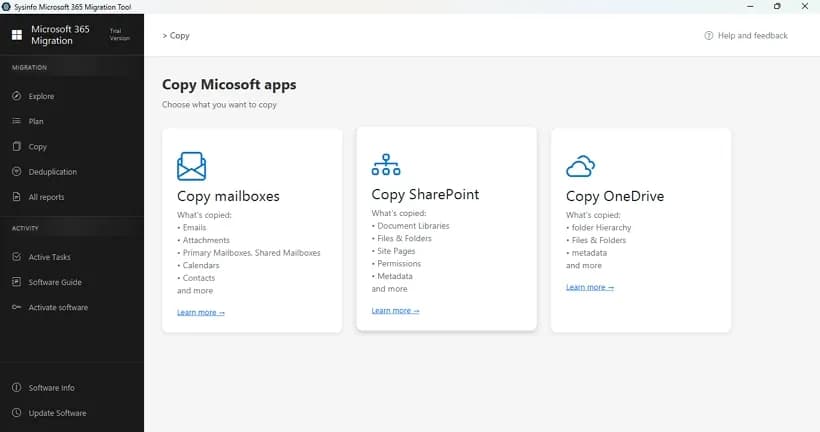
About this app
The SysInfo Microsoft Teams Migration Tool is a specialized utility built for migrating Microsoft Teams data between Microsoft 365 tenants. It offers two dedicated workflows: Teams & Channels Migration (moving teams, channels, tabs, permissions, and group chats) and Private Chats Migration (transferring 1:1, group, and meeting chats). Key features include Modern Authentication and Admin Access for secure connections, automatic and manual source-to-destination user/team mapping, selective data transfer, incremental delta migration to avoid duplicates, and detailed migration reports. An HTML archive of source data supports post-migration verification. Available for Windows and Mac, it targets administrators, enterprise IT teams, MSPs, and businesses undergoing tenant consolidation or restructuring. Licensing starts around $15 per user/site with a 10-user minimum, positioning it as an affordable alternative to tools like BitTitan. A limited demo (50 messages, 20 MB file cap) is availab...
Key features
- 1Two dedicated workflows: Teams & Channels Migration (teams, channels, tabs, permissions, group chats) and Private Chats Migration (1:1, group, meeting chats).
- 2Automatic and manual source-to-destination user and team mapping, plus selective data transfer and incremental delta migration to avoid duplicates.
- 3HTML archive of source data for post-migration verification, alongside detailed migration reports; Windows and Mac desktop clients.
Target customer profile
Drawn from the product itself, not from a survey.
Demographic
Microsoft 365 & Teams Administrators
Pain points
Error-prone manual migrations; risk of losing chats and permissions
Primary needs
Secure authentication, mapping, selective transfer, reports
Demographic
Enterprise IT Teams (M&A, restructuring)
Pain points
Large-scale tenant consolidation; downtime and data loss risks
Primary needs
Bulk migration, incremental runs, structured workflows
Demographic
IT Consultants & Managed Service Providers
Pain points
Need repeatable, brandable solutions across client tenants
Primary needs
White-label services, customization, affordable licensing
Scout Review
Written by AI from measured evidence, scored out of 100.
SysInfo Microsoft Teams Migration Tool is a focused, competently packaged utility for a genuinely awkward problem: moving Teams channels, chats, permissions and attachments between Microsoft 365 tenants when native tooling will not. The two-workflow split, source-to-destination mapping, selective transfer, delta runs and HTML archive for verification are the right feature set for the job, and the ~$15/user price with a 10-user minimum undercuts BitTitan, Sharegate and AvePoint by a wide margin. The site backing it is fast (95 mobile / 100 desktop Lighthouse) and reasonably hardened (10/12 security headers), though it is visually dated and leans on a 4.9-star widget with no visible review source. The real gaps are trust and trial: no published SOC 2 or pen-test despite requesting tenant admin credentials, and a demo capped at 50 messages and 20 MB that cannot prove a large migration works. Buy it for cost-sensitive tenant consolidation; demand a pilot before you point it at production.
Measure by measure
Usability
63Splitting migration into Teams & Channels vs Private Chats workflows matches how admins scope projects, and mapping plus selective transfer are spelled out. Held back by a download-only trial (50 messages, 20 MB cap) and no live demo or deep docs on the page.
Design
58Conventional vendor-template marketing page: dense copy, tabbed features/specification, star-rating widget and repeated CTAs. Functional and on-brand for the category, but visually dated next to Sharegate and AvePoint. Desktop app UI itself was not visible in the collected evidence.
Speed
88Lighthouse mobile 95/100 (LCP 1.3s, CLS 0, TBT 190ms) and desktop 100/100. The marketing site is genuinely fast and stable — no layout shift, no bloat. Desktop migration throughput itself is not benchmarked publicly.
Security
74Strong header hygiene: HTTPS enforced, HSTS, CSP, Referrer-Policy, Permissions-Policy, SPF and DMARC — 10/12 probe points. Missing frame protection and X-Content-Type-Options. Modern Authentication and Admin Access are claimed, but no SOC 2, ISO, or pen-test report was found.
Accessibility
78Lighthouse accessibility 98/100, with three real failures: no main landmark, role=presentation conflicts, and visible labels without matching accessible names. No WCAG statement published. Desktop-only delivery limits platform reach, though the site itself is responsive and readable.
Growth
62Real, recurring pain — Teams chat history does not move natively between tenants — with a clear price wedge (~$15/user, 10-user minimum) against BitTitan, Sharegate and AvePoint. MSP and M&A segments are named specifically. Ceiling is the migration-event market: bursty, project-based demand.
Improvement areas
- No published SOC 2, ISO 27001, or penetration-test report despite requiring Modern Authentication and tenant admin access.
- Demo limited to 50 messages and 20 MB, which is too small to validate a real tenant-to-tenant migration before purchase.
- Marketing page shows no application screenshots or video walkthrough, and accessibility misses include a missing main landmark and mismatched labels.
Design & Usability
The site is a textbook migration-vendor page: tabbed Features/Specification, a star-rating widget, trust badges, and CTAs repeated four times before you reach the fold. It is not ugly, it is just unremarkable — Sharegate and AvePoint both present cleaner, more modern surfaces, and neither hides the product behind a download. Where SysInfo does earn credit is structure: splitting the tool into Teams & Channels Migration and Private Chats Migration mirrors how an admin actually scopes a project, and the mapping plus selective-transfer story is stated plainly. The friction is the trial. A 50-message, 20 MB cap tells you almost nothing about whether a 40,000-message channel survives the trip, and there is no live demo or sandbox to bridge the gap. You are asked to trust a guide link and a money-back window.
Speed & Security
Speed is the standout. Lighthouse puts mobile at 95/100 with a 1.3s LCP, zero cumulative layout shift, and 190ms total blocking time; desktop scores a clean 100/100. Whatever else is true, the marketing site is not wasting your time. Security is competent but incomplete: HTTPS enforced, HSTS, CSP, Referrer-Policy, Permissions-Policy, SPF and DMARC all present for 10 of 12 probe points, with frame protection and X-Content-Type-Options the two omissions — both trivial fixes. The bigger question is the one the headers cannot answer. This tool asks for Modern Authentication and tenant admin access, which is exactly the credential surface an enterprise buyer will audit, and no SOC 2, ISO 27001, or penetration-test report surfaced in the collected evidence. For a $15/user utility that may be acceptable; for an MSP running it across client tenants, it is the first question on the call.
Accessibility & Growth
Accessibility lands at 98/100 on Lighthouse, and the three failures are the kind that take an afternoon: no main landmark, role=presentation conflicts, and visible text labels without matching accessible names. No WCAG conformance statement is published, and the product is Windows/Mac desktop only — no web or mobile client — so reach is bounded by the OS. Growth is the more interesting read. The problem is real and Microsoft does not solve it: native tooling will not carry Teams chat history across tenants, so M&A, divestiture and consolidation all create forced demand. SysInfo's wedge is price — roughly $15 per user with a 10-user minimum against BitTitan, Sharegate and AvePoint — plus named segments (MSPs, enterprise IT, tenant consolidation). That is a legitimate differentiator, not a slogan. The honest limit is the shape of the market: migration is a project, not a subscription, so demand is bursty and the buyer disappears once the tenant is consolidated.
Conclusion
If you are consolidating tenants after an acquisition and the budget line for MigrationWiz made someone wince, this is a defensible shortlist entry — the feature list matches the job and the price is hard to argue with. Run it against a throwaway tenant first: migrate one real team with a few thousand messages, verify the HTML archive against the source, and check that permissions and reactions actually survived. If that pilot holds, scale it. If the vendor cannot produce a security questionnaire response or a compliance document for your procurement team, that is your answer regardless of how good the price looks.
Suggestions for improvement
- Publish a security page with SOC 2 or a recent penetration-test summary — you are requesting tenant admin credentials and offering no compliance evidence.
- Raise the demo cap or offer a time-limited full trial; 50 messages and 20 MB cannot demonstrate that a large channel migration actually works.
- Add real product screenshots and a short screen-recorded walkthrough of both workflows — the page sells a desktop UI it never shows.
- Add X-Frame-Options/frame-ancestors and X-Content-Type-Options, and publish a WCAG conformance statement with a <main> landmark fix.
Alternatives comparison
Named competitors, point by point. Nobody paid to appear here or to be left out.
 SysInfo Microsoft Teams Migration Tool SysInfo Microsoft Teams Migration Tool |  BitTitan MigrationWiz BitTitan MigrationWiz |  Sharegate Sharegate |  AvePoint AvePoint | |
|---|---|---|---|---|
| Teams & channels migration (teams, channels, tabs, permissions) | Yes — dedicated workflow with mapping and selective transfer | Yes — mature Teams coverage within a broader migration platform | Yes — Teams migration plus ongoing governance | Yes — enterprise migration with governance and compliance layers |
| Private 1:1 / group / meeting chat migration | Yes — separate Private Chats workflow | Yes — chat migration supported | Yes — Teams chat migration supported | Yes — chat migration within broader platform |
| Incremental / delta migration to avoid duplicates | Yes — incremental delta runs claimed | Yes — incremental passes are a core feature | Yes — incremental migration supported | Yes — incremental and scheduled runs |
| Entry price positioning | ~$15 per user/site, 10-user minimum | Per-user licensing, materially higher at scale | Subscription-based, enterprise pricing | Enterprise quote-based pricing |
| Published compliance certifications (SOC 2 / ISO) | None found in collected evidence | Yes — established compliance program | Yes — enterprise security and compliance documentation | Yes — extensive certification portfolio |
| Free trial / demo before purchase | Limited demo — 50 messages, 20 MB cap | Trial available | Free trial available | Trial / pilot available via sales |
BitTitan MigrationWiz
Mature tenant-to-tenant migration platform with strong Teams coverage; SysInfo offers a lower-cost alternative.
Sharegate
Enterprise-grade Microsoft 365 migration and governance suite with robust admin controls.
AvePoint
Enterprise Microsoft 365 migration and data management platform with governance features.
Comparing options? See SysInfo Microsoft Teams Migration Tool alternatives, scored side by side
More Productivity apps
View all Productivity
The Stack Newsletter
92A weekly newsletter delivering curated tech jobs, intervi...

Qamarero
92An all-in-one hospitality software for restaurants and ba...

EmbedMyReviews
92White-label reputation management software for agencies s...

StoryPad
92Privacy-first open source journal app with a continuous t...

Notion
92All-in-one AI workspace for docs, projects, and knowledge...

Puzzly – B2B Lead Generation & Sales Intelligence Platform
92Puzzly is an all-in-one B2B lead generation platform that...

Vibe Coding Agent Skills
92A free, open-source platform offering 110 AI agent skills...

Gerty
91Private, local AI assistant for Mac that runs offline

CC Switch
91Open-source desktop app for switching AI coding providers...

username.md
90One verified handle for your online identity, readable by...

PitchWhip
90AI cold call scripts & direct dials from LinkedIn

What the GIF
89Frame-perfect video-to-GIF maker that runs entirely in yo...


A platform dedicated to providing unbiased reviews of newly launched applications, analyzing everything from their features to their full potential.
info@scoutforge.net© 2026 Scoutforge. All rights reserved.
