Cycling through all six. Tap any point to stop.
Measured on six things
Convert Mac OLM files to Outlook PST and other formats wi...
Growth
52Real, narrow problem (OLM→PST migration plus corrupt-file repair) with concrete differentiators: no Outlook install, no size limit, date filtering, scan snapshots. But the category is shrinking and crowded.
Screenshots
1 / 1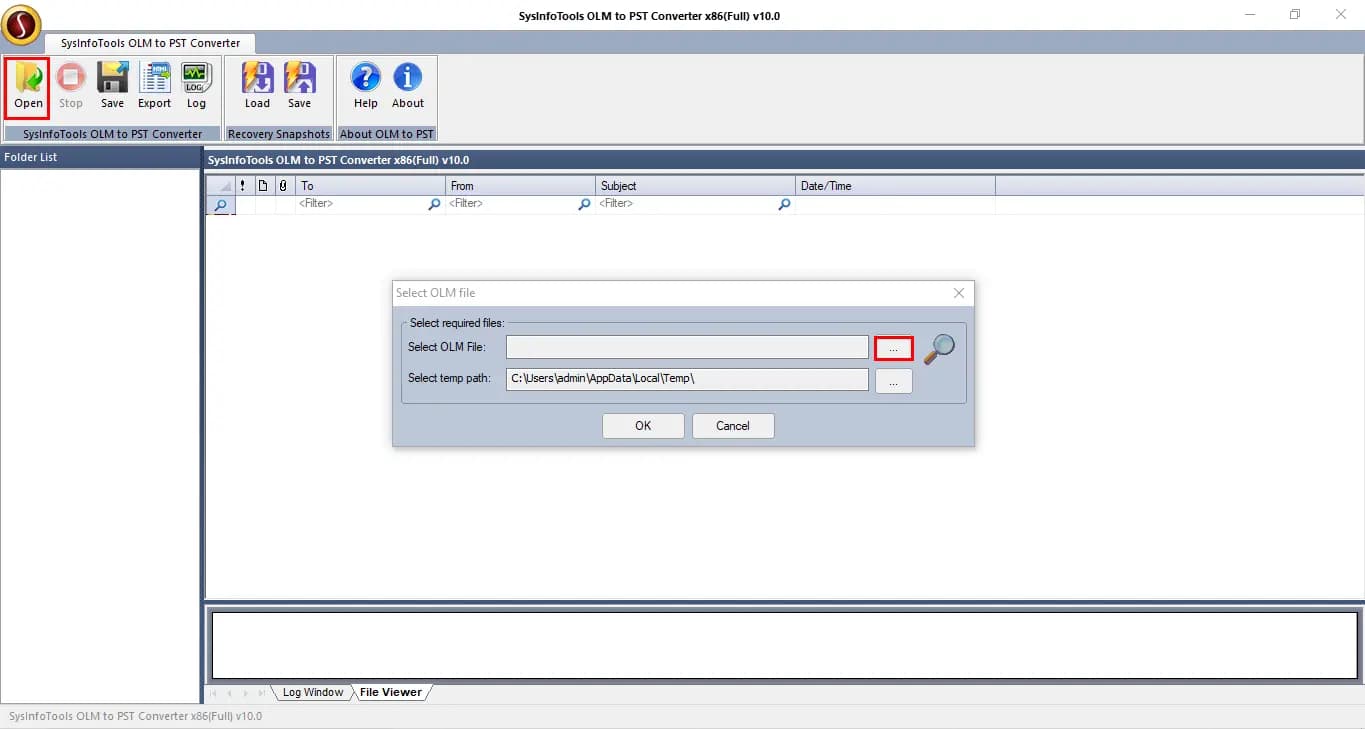
About this app
SysInfo OLM to PST Converter is a specialized desktop tool for Windows that converts Outlook for Mac OLM files into Windows Outlook PST format, along with MBOX, EML, and MSG. It supports all Mac Outlook items including emails, contacts, calendars, tasks, notes, and journals, and can also repair corrupt OLM files. The software offers a preview of mailbox items before conversion, date-range filtering for selective exports, and options to attach the resulting PST to an Outlook profile. It requires no Outlook installation, handles large files without size limits, and maintains folder hierarchy and metadata. A free trial allows previewing up to 5,000 emails per folder, while the full version unlocks unlimited conversion.
Key features
- 1Converts OLM to PST, MBOX, EML and MSG, preserving folder hierarchy and metadata across emails, contacts, calendars, tasks, notes and journals.
- 2Repairs corrupt OLM files and recovers mailbox data, with a Load & Save option to snapshot scans and skip re-scanning large files.
- 3Date-range filtering for selective export, preview before conversion, and the option to attach the generated PST directly to an Outlook profile — no Outlook install required.
Target customer profile
Drawn from the product itself, not from a survey.
Demographic
IT administrators managing mixed Mac and Windows environments
Pain points
Difficulty migrating Mac Outlook data to Windows Outlook without data loss
Primary needs
A reliable tool to convert OLM to PST while preserving all mailbox items and folder structure
Demographic
Business professionals switching from Mac to Windows
Pain points
Loss of important emails, contacts, and calendars when changing platforms
Primary needs
Seamless migration of entire Mac Outlook mailbox to Windows Outlook
Demographic
Users with corrupt OLM files
Pain points
Inability to access or recover critical email data from damaged OLM files
Primary needs
A tool that can repair corrupt OLM files and export recoverable data to PST
Scout Review
Written by AI from measured evidence, scored out of 100.
SysInfo OLM to PST Converter is a competent, narrowly-scoped Windows utility with a fast site, a real free trial and a feature list that matches the job: convert OLM to PST/MBOX/EML/MSG, repair corrupt OLM files, filter by date, preserve folder hierarchy, and attach the result to an Outlook profile without Outlook installed. The marketing site is dated and dense, security is well-configured but unaudited, and accessibility has three fixable failures. It does one thing and does it, but it's competing in a category that's quietly shrinking.
Measure by measure
Usability
62Solid for the category: Software Guide, Screenshots and Video tabs, a 5,000-email-per-folder free trial, date-range filtering, Load & Save scan snapshots, and no Outlook install needed. No live demo or chat visible.
Design
58Dense, dated long-form landing page with a 4.8/1696 rating badge and repeated CTAs. Screenshots and video exist as separate tabs, but the site reads like 2014 SEO copy rather than a modern product page.
Speed
88Lighthouse mobile 99/100 (LCP 1.1s, CLS 0, TBT 118ms) and desktop 100/100. The marketing site is genuinely fast; no lag complaints found in the collected evidence.
Security
74HTTPS enforced with HSTS, CSP, Referrer-Policy and Permissions-Policy; SPF and DMARC set; 10/12 header checklist. Missing frame protection and X-Content-Type-Options; no SOC 2/ISO claim found.
Accessibility
80Lighthouse accessibility 98/100, but three real failures: no main landmark, role=none/presentation conflicts, and visible text labels without matching accessible names. No WCAG statement; English-only.
Growth
52Real, narrow problem (OLM→PST migration plus corrupt-file repair) with concrete differentiators: no Outlook install, no size limit, date filtering, scan snapshots. But the category is shrinking and crowded.
Improvement areas
- No published security audit (SOC 2/ISO) or data-handling page, despite ingesting entire email archives.
- Three Lighthouse accessibility failures (no main landmark, role conflicts, label mismatches) and no WCAG statement.
- Dated, text-heavy landing page that hides screenshots and video behind separate tabs; no live demo.
Design & Usability
The landing page is a long-form SEO document: a 4.8/1696 rating badge, four separate CTA buttons, and feature blocks stacked until the fold gives up. Screenshots, video and a software guide live on separate tabs, which is fine for a desktop utility but makes the site feel older than the 2010 domain suggests. Usability is the stronger half: the free trial previews up to 5,000 emails per folder, date-range filtering lets you export selectively, Load & Save avoids rescanning large OLM files, and the tool attaches the finished PST straight to an Outlook profile without requiring Outlook installed. What's missing is anything interactive — no live demo, no chat widget in the fetched content — so evaluating it means downloading and trusting the guide.
Speed & Security
Speed is the standout: Lighthouse mobile 99/100 with LCP 1.1s, CLS 0 and TBT 118ms, and a perfect 100 on desktop. For a page this text-heavy that's a genuinely well-built front end, and no lag complaints surfaced in the collected evidence. Security is solid-but-not-audited: HTTPS enforced with HSTS, a real CSP, Referrer-Policy and Permissions-Policy, plus SPF and DMARC, landing 10 of 12 on the header checklist. The two gaps are frame protection and X-Content-Type-Options. There's no SOC 2, ISO 27001 or penetration-test claim anywhere in the fetched content, which for a tool that ingests entire email archives is the thing an IT admin will ask about first.
Accessibility & Growth
Accessibility scores 98/100 on Lighthouse but fails three concrete audits: no main landmark, role=none/presentation conflicts, and visible text labels without matching accessible names. There's no WCAG conformance statement and the site is English-only. Growth is the honest question mark. The problem is real — OLM files don't open in Windows Outlook, and corrupt OLM repair is a genuine pain — and the differentiators are specific: no Outlook install, no file-size cap, date-range filtering, scan snapshots, PST-to-profile attachment. But the addressable market is a shrinking slice of IT admins handling Mac-to-Windows migrations, and Stellar and Aid4Mail already occupy the same shelf with broader format coverage. A 16-year-old domain is context, not momentum.
Conclusion
If you're an IT admin staring at an OLM file that Windows Outlook refuses to touch, this will probably do the job — the trial lets you preview 5,000 emails per folder before you pay, which is a fair way to test the claim. Go in knowing what you're buying: a single-purpose desktop converter from a long-standing vendor, not a platform. Compare the price against Stellar and Aid4Mail before you commit, and ask support directly about data handling, because there's no published audit to read.
Suggestions for improvement
- Publish a security/data-handling page — for a tool that ingests whole mailboxes, 'no SOC 2' is the first question an IT admin asks.
- Fix the three Lighthouse a11y failures: add a <main> landmark, resolve role=none conflicts, and match visible labels to accessible names.
- Add frame protection (X-Frame-Options or CSP frame-ancestors) and X-Content-Type-Options: nosniff to close the two header gaps.
- Put screenshots and a short demo video on the landing page instead of behind tabs — the current page is 900 words before the product appears.
Alternatives comparison
Named competitors, point by point. Nobody paid to appear here or to be left out.
 SysInfo OLM to PST Converter SysInfo OLM to PST Converter |  Stellar OLM to PST Converter Stellar OLM to PST Converter |  Aid4Mail Aid4Mail | |
|---|---|---|---|
| Core conversion: OLM to PST | Yes | Yes | Yes |
| Additional output formats (MBOX, EML, MSG) | PST, MBOX, EML, MSG | PST plus multiple email formats | Very broad format support |
| Corrupt OLM repair | Yes, scans and recovers | Yes, repair-focused | Not a repair tool |
| Free trial / preview before purchase | Preview up to 5,000 emails per folder | Free trial available | Trial available |
| Requires Outlook installed | No | No | No |
| Date-range / selective filtering | Yes | Yes | Yes, advanced filtering |
Stellar OLM to PST Converter
A reputable tool for converting OLM files to PST, supporting batch conversion and various email formats.
Aid4Mail
A versatile email conversion tool that supports OLM to PST and many other formats, with advanced filtering options.
Comparing options? See SysInfo OLM to PST Converter alternatives, scored side by side
More Productivity apps
View all Productivity
The Stack Newsletter
92A weekly newsletter delivering curated tech jobs, intervi...

Qamarero
92An all-in-one hospitality software for restaurants and ba...

EmbedMyReviews
92White-label reputation management software for agencies s...

StoryPad
92Privacy-first open source journal app with a continuous t...

Notion
92All-in-one AI workspace for docs, projects, and knowledge...

Puzzly – B2B Lead Generation & Sales Intelligence Platform
92Puzzly is an all-in-one B2B lead generation platform that...

Vibe Coding Agent Skills
92A free, open-source platform offering 110 AI agent skills...

Gerty
91Private, local AI assistant for Mac that runs offline

CC Switch
91Open-source desktop app for switching AI coding providers...

username.md
90One verified handle for your online identity, readable by...

PitchWhip
90AI cold call scripts & direct dials from LinkedIn

What the GIF
89Frame-perfect video-to-GIF maker that runs entirely in yo...


A platform dedicated to providing unbiased reviews of newly launched applications, analyzing everything from their features to their full potential.
info@scoutforge.net© 2026 Scoutforge. All rights reserved.
